
USR Feedback help
USR Feedback asks your customers how they feel, after a support ticket, a sale, a project or every quarter. It shows your NPS, CSAT and effort score, opens a follow-up when a customer is unhappy, and credits each score to the person who served them.
See the screens
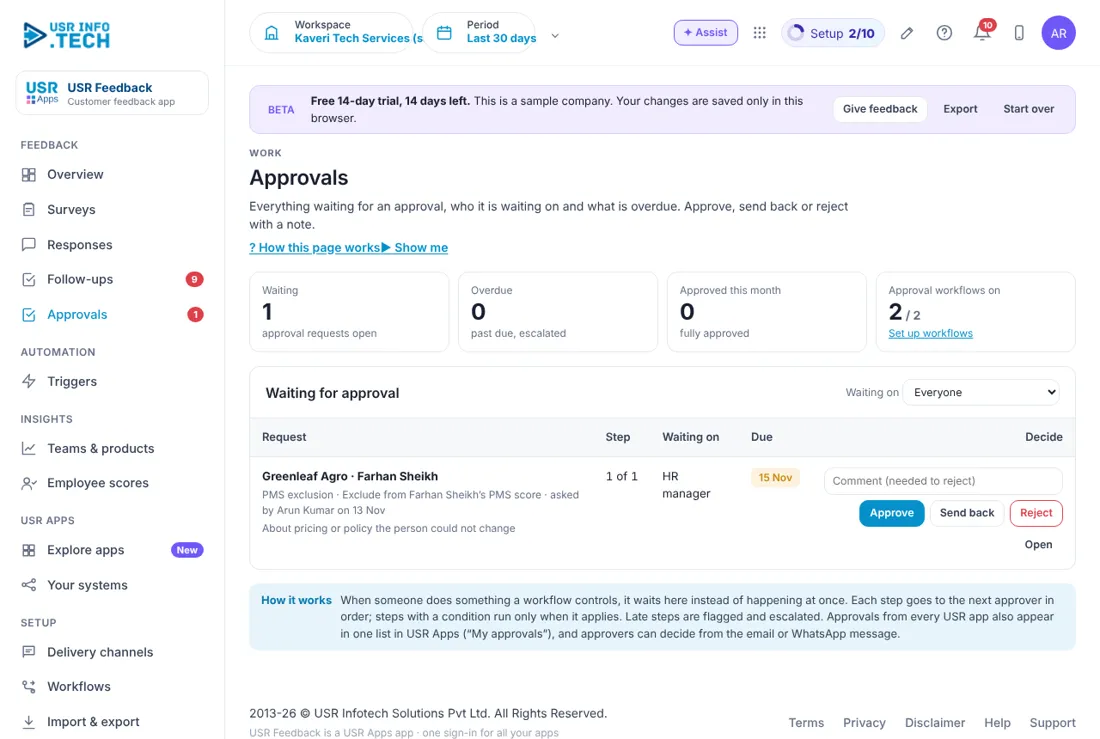
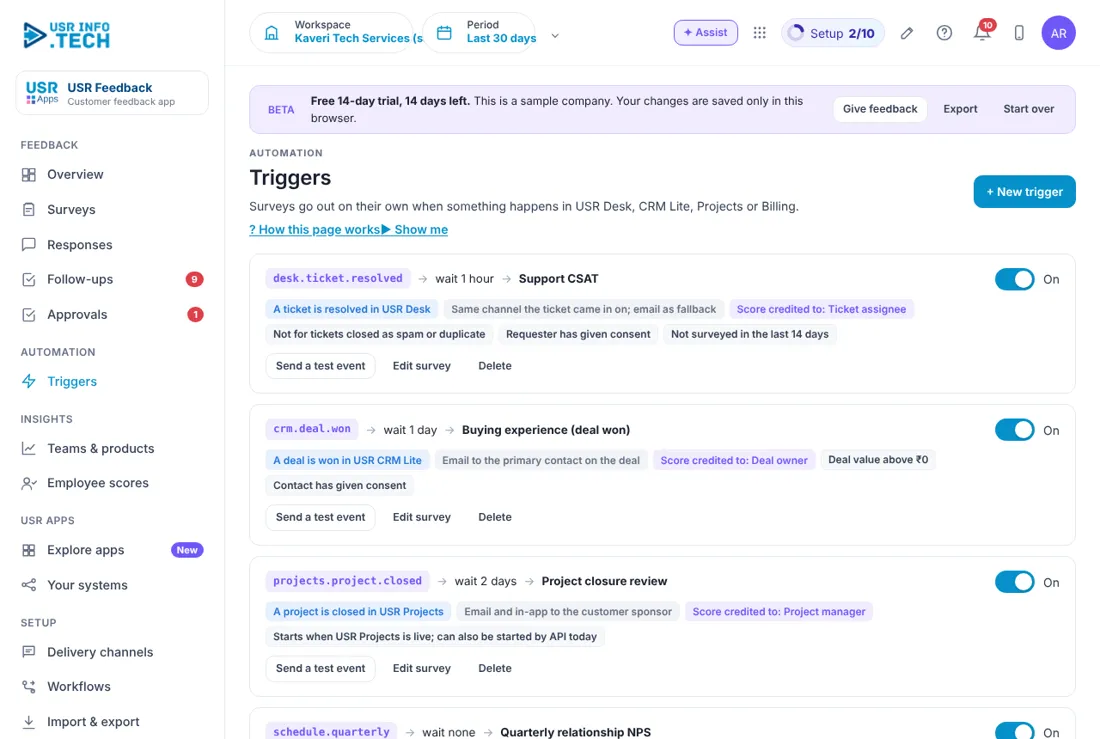
Sample company data. Screens can change as the app improves; the steps stay the same.
Welcome to USR Feedback
USR Feedback asks your customers how they feel, after a support ticket, a sale, a project or every quarter. It shows your NPS, CSAT and effort score, opens a follow-up when a customer is unhappy, and credits each score to the person who served them.
- Surveys for CSAT, NPS and effort (CES), in English, Hindi, Tamil and more
- Sent by email, WhatsApp, link or inside the app
- Automatic triggers from USR Desk, CRM Lite, Projects and a quarterly schedule
- Follow-ups that open on low scores and escalate if not closed in 2 working days
- Scores per team, product, customer and employee, shared with USR PMS
Key ideas in simple words
- NPS. Net Promoter Score. 'How likely are you to recommend us?' from 0 to 10. Promoters 9-10, passives 7-8, detractors 0-6.
- CSAT. Customer satisfaction, a 1 to 5 rating after one experience.
- CES. Customer effort score. How easy it was to get something done.
- Trigger. An event in another USR app that sends a survey, such as a ticket resolved.
- Follow-up. A task opened for NPS 0-6 or CSAT 1-2 so someone calls the customer.
- Credited to. The person whose work the score is about.
- Response rate. Answers received out of surveys sent.
- PMS exclusion. A manager removes an unfair response from a person's score, with a reason.
Ask at the right moment
A survey sent an hour after a ticket is resolved gets honest answers. A survey sent a month later does not. Triggers send the survey at the right time and never ask the same person twice in 14 days.
A low score is a chance
An unhappy customer who is called back the same day often stays. A follow-up opens on its own for a low score and moves to the team lead. If nobody closes it in 2 working days it is escalated.
Scores should be fair
Scores are credited to the person who served the customer and shared with USR PMS only when the person has enough responses, for example 5. A manager can exclude an unfair response, and the reason is kept in the audit log.
What each role sees
| Role | What you do and see |
|---|---|
| Support and customer success | Responses and Follow-ups for their own customers. |
| Team lead | Follow-ups, Teams & products and their team's scores. |
| HR manager | Approvals for PMS exclusions and Employee scores. |
| Customer | The short survey on email, WhatsApp, a link or inside the app. |
Manager guide
- Open Follow-ups. Click Mark contacted after you call, then Resolve.
- Open Approvals. Read the reason and click Approve, Send back or Reject.
Quick start in 5 steps (about 25 minutes)
- Open USR Feedback and read the Overview: NPS, CSAT, effort score, responses and open follow-ups.
- Open Surveys. Start from a template such as Support CSAT, or click + New survey.
- Open Delivery channels. Check the From name and the reply address.
- Open Triggers and switch on the survey you want sent automatically.
- Open Plan & billing and click Choose a plan.
Features step by step
5.1 Overview
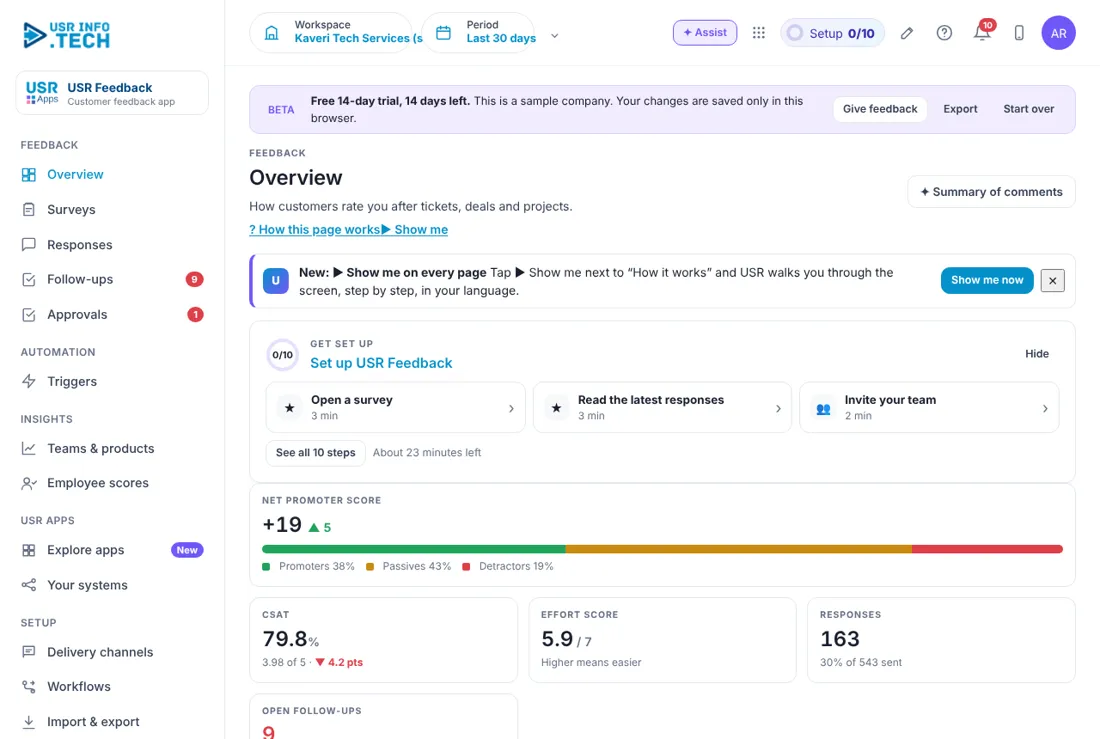
How customers feel now and which comments and themes need attention. Steps: open Overview, use the Period selector to change the dates.
| Field or button | What it is for |
|---|---|
| Net promoter score | NPS with promoters, passives and detractors. |
| CSAT | Satisfaction as a percentage, with the average out of 5. |
| Effort score | Out of 7. Higher means easier. |
| Responses | Number received and the share of surveys sent. |
| Open follow-ups | How many, and how many are past due. |
| NPS rolling 4 weeks | A line chart, with a CSAT switch. |
| NPS score spread | Bars for each score from 0 to 10. |
| Get set up | A box with 10 steps for new users. |
Tip: read the themes in comments to see what customers talk about most.
5.2 Surveys
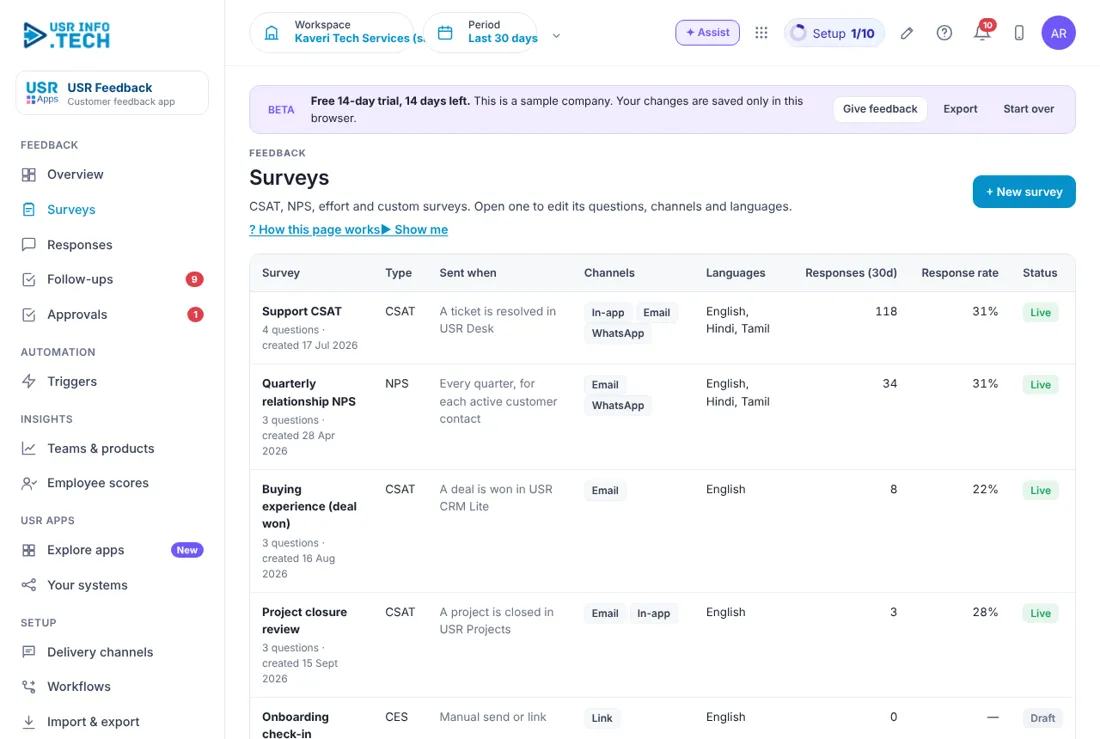
Every survey, what sends it, the channels and how many people answer. Steps: open Surveys, click + New survey or pick a template, choose channels and languages, set it live.
| Field or button | What it is for |
|---|---|
| Survey | Name and number of questions. |
| Type | CSAT, NPS or CES. |
| Sent when | The event that sends it. |
| Channels | In-app, Email, WhatsApp or Link. |
| Languages | For example English, Hindi and Tamil. |
| Responses (30d) and Response rate | Answers in 30 days and the share of surveys sent. |
| Status | Live or Draft. |
| Start from a template | Support CSAT, Relationship NPS, Customer effort, Field service visit, Training feedback. |
Watch out: a Draft survey sends nothing until it is set live.
5.3 Responses
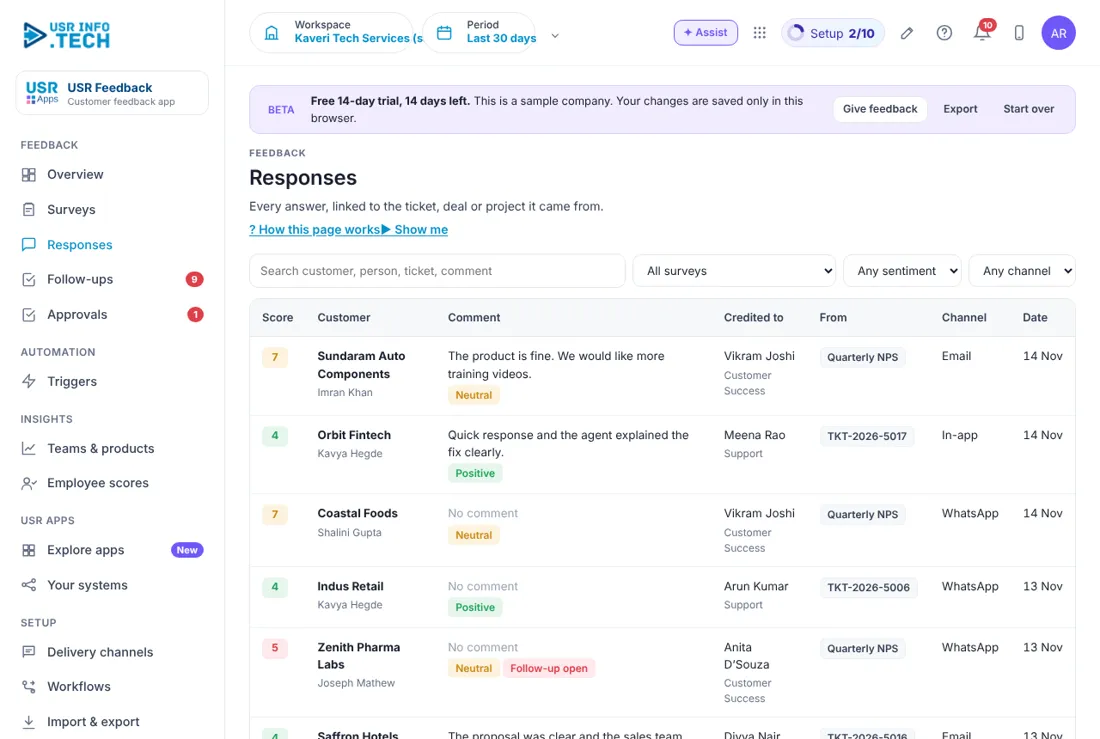
Every answer with the score, comment and the person it is credited to. Steps: open Responses, filter by Any sentiment to see Negative answers, open a response to read it.
| Field or button | What it is for |
|---|---|
| Search and filters | By customer, person, ticket or comment, and by survey, sentiment or channel. |
| Score | The number given. |
| Customer | Company and contact. |
| Comment | What the customer wrote, with Positive, Neutral or Negative. |
| Follow-up open | Shown on low scores. |
| Credited to | The person and team. |
| From and Channel | The ticket or survey, and how it was answered. |
Tip: read negative comments first thing every day.
5.4 Follow-ups
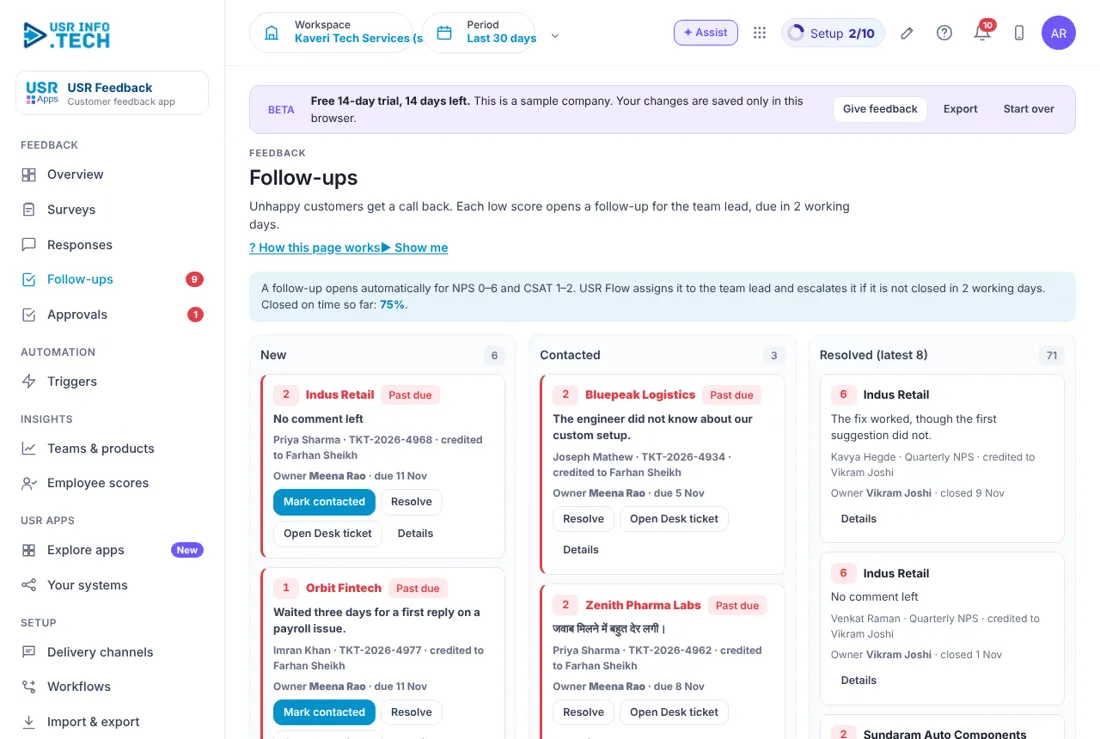
A board of unhappy customers to call back: New, Contacted and Resolved. Steps: open Follow-ups, call the customer, click Mark contacted, then Resolve.
| Field or button | What it is for |
|---|---|
| Rule | A follow-up opens for NPS 0-6 and CSAT 1-2. It escalates if not closed in 2 working days. |
| Closed on time | The share closed on time. |
| Card | Customer, score, comment, contact, ticket and owner with due date. |
| Past due | Shown in red. |
| Mark contacted, Resolve | Move the card. |
| Open Desk ticket | Opens the ticket. |
Tip: resolve on the same day. Late follow-ups go red.
5.5 Approvals
Requests that wait for a decision, such as removing an unfair response from a person's score. Steps: open Approvals, read the reason, click Approve, Send back or Reject.
| Field or button | What it is for |
|---|---|
| Waiting, Overdue, Approved this month | Counts at the top. |
| Approval workflows on | How many workflows are on. |
| Request, Step, Waiting on, Due | What, which step, who and by when. |
| Comment | Needed if you reject. |
| Approve, Send back, Reject, Open | Your decisions. |
Tip: approvers can also decide from the email or WhatsApp message.
5.6 Triggers
Send a survey when something happens in another USR app. Steps: open Triggers, switch a trigger On, click Send a test event to check it.
| Field or button | What it is for |
|---|---|
| Event | For example a ticket resolved in USR Desk, a deal won in USR CRM Lite, a project closed or every quarter. |
| Wait | How long after the event. |
| Survey | Which survey goes out. |
| Rules | Consent, not surveyed in the last 14 days, not for spam tickets. |
| Score credited to | Ticket assignee, deal owner, project manager or account owner. |
| On or Off | The switch. |
| Send a test event | Tries the flow. |
| Event log | What came in and what happened. |
Watch out: surveys go only to contacts who gave consent.
5.7 Teams & products
Compares scores across teams, products, customers and channels with the previous 30 days. Steps: open Teams & products, choose a tab.
| Field or button | What it is for |
|---|---|
| Team, Product, Customer, Channel | The tabs. |
| Responses | How many answers. |
| NPS and CSAT | Scores with the change. |
| CSAT avg | The average out of 5. |
| Open follow-ups | How many are still open. |
Tip: a red arrow shows a fall. Ask the team what changed.
5.8 Employee scores
Credits each answer to the person who served the customer and can share it with USR PMS. Steps: open Employee scores, choose the minimum responses, switch sharing on.
| Field or button | What it is for |
|---|---|
| Person | Name, team and whether team lead. |
| Responses, CSAT avg, CSAT, NPS | Their scores. |
| Follow-ups on time | Share closed on time. |
| Sent to USR PMS | Shared, or Under 5 responses. |
| Share these scores with USR PMS | The switch. |
| Share a score only when a person has at least | 3, 5, 10 or 20 responses. |
Watch out: anonymous surveys never credit a person.
5.9 Delivery channels
How surveys reach customers. Steps: open Delivery channels, set the From name and reply address, copy a survey link where you need it.
| Field or button | What it is for |
|---|---|
| Send from, From name and Replies go to. | |
| Only contacts who opted in, and quiet hours such as 9 pm to 8 am. | |
| Survey link | One link per survey for invoices, a QR code or your website. |
| In-app widget | A small script for your own web app or portal. |
| USR Desk | Support CSAT goes out when a ticket is resolved and the score is written to the ticket. |
Watch out: messages are held during quiet hours and sent next morning.
5.10 Plan & billing
Shows your plan, trial and invoices. One bill covers every USR app through USR Billing. Steps: open Plan & billing, click Choose a plan to see prices in ₹ and US$.
| Field or button | What it is for |
|---|---|
| Plan and Trial ends | For example Growth, trial ending on a date. |
| After the trial | Add a card, UPI or ask for a postpaid invoice. If you do nothing, your data stays and the app becomes read-only. |
| Currency | INR in India, USD elsewhere. |
| Growth includes | All survey types, 4 channels, 9 languages, triggers, follow-ups and PMS scores. |
| Add-ons | Extra WhatsApp messages, a custom domain for survey links and white-label. |
If a payment fails, you get a reminder on the due date and 3 and 7 days later. After 21 days the account becomes read-only, never deleted, until it is paid.
Leader guide
Open Overview and read NPS, CSAT and open follow-ups. Open Teams & products to see which team rose or fell.
Cheat sheet
| What to do | Where |
|---|---|
| Read new answers | Responses |
| Call an unhappy customer | Follow-ups > Mark contacted |
| Read the mood | Overview |
| Send a survey automatically | Triggers |
| Decide a PMS exclusion | Approvals |
| Compare teams | Teams & products |
| Share scores with PMS | Employee scores |
Tips
- Call back the same day. Say thank you for a good score.
- Keep surveys short. Use scores to coach, not to blame.
If something is not working
| Problem | What to do |
|---|---|
| No survey was sent | Check the trigger is On, the contact gave consent and was not surveyed in the last 14 days. |
| A WhatsApp survey is late | It may be held for quiet hours. Check Delivery channels. |
| A score is not in PMS | The person may have fewer responses than the minimum. See Employee scores. |
| A follow-up did not open | It opens only for NPS 0-6 and CSAT 1-2. |
Questions people ask
Which languages work? The plan includes 9 languages, for example English, Hindi and Tamil.
Can customers answer on WhatsApp? Yes, if they opted in. The first answer can be a button tap.
Does it work with USR Desk? Yes. Support CSAT goes out when a ticket is resolved.
What happens after the trial? Your data stays and the app becomes read-only until you choose a plan.
Glossary
CES: customer effort score. CSAT: customer satisfaction. Detractor: score 0 to 6. Follow-up: a call-back task for an unhappy customer. NPS: Net Promoter Score. Promoter: score 9 or 10. Trigger: an event that sends a survey.
USR Feedback shares one record with these apps
No retyping between apps: data entered once flows to the next app, on the same login.
USR Feedback is part of USR One. Service Suite from ₹349 ($9) per agent a month, or every app in USR One Complete. Free for up to 10 people.
See USR One
