
Switch payroll without risk.
Bring your Excel sheet, or the export from your current payroll product. Run USR side by side with it, compare every line, and switch only when the numbers match. Go live at the start of a financial year, so tax starts clean for everyone.
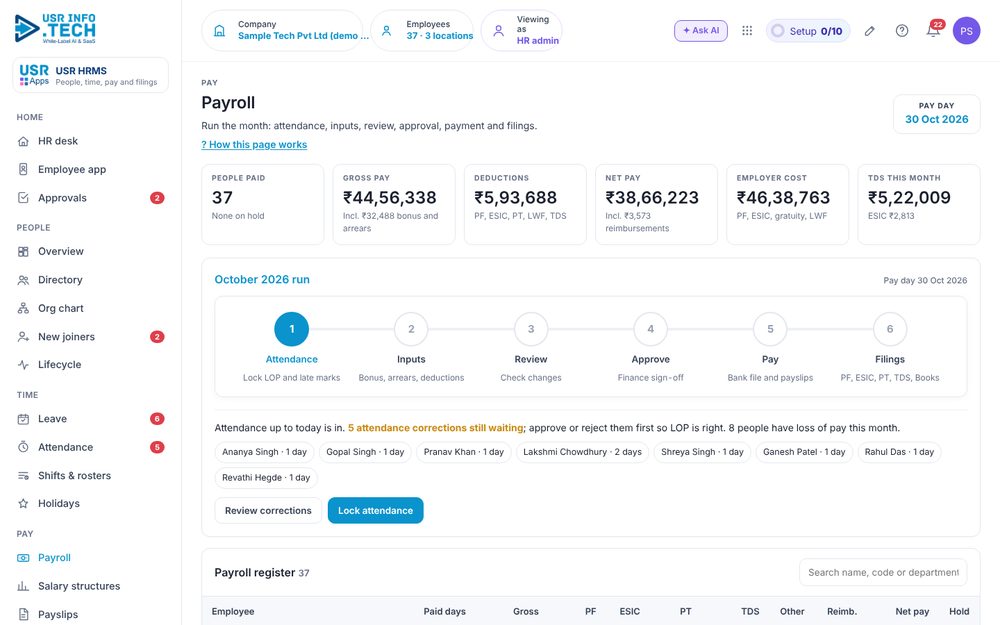
Watch: run payroll in six steps
A 95-second walk-through with sample data: attendance, inputs, review, approval, payment and filings. Voice in English or Hindi, subtitles in seven languages.
Four steps, and you decide when to go live
Nothing changes in your current payroll until you are sure. Press a step, or just watch. Your own payroll expert or CA can check each step.
or the export from your current payroll product
Your current payroll
USR Payroll
Go live
After go-live
Using Excel today, or another payroll product? Both work the same way: import, run side by side, compare, then switch. Keeping your books in other accounting software? Export the monthly salary journal for it.
Three facts to plan your switch around
Public facts, with the source next to each one. They are general guidance, not legal advice: confirm what applies to you with your CA or payroll expert.
The four labour codes took effect on 21 November 2025. Under the Code on Wages, "wages" has a new definition with a 50% test: if excluded pay components exceed half of total pay, the excess is added back. Employers are advised to classify every pay component and review PF and gratuity separately.
Source: KS&K, 50% wage rule under the labour codesA review of seven field audits of real business spreadsheets found errors in 24% of the 367 audited, and in 91% of the 54 audited with more careful methods. It is about spreadsheets in general, not payroll alone, but it is why a line-by-line compare matters.
Source: R. Panko, Spreadsheet Errors: What We Know (arXiv)Payroll specialists recommend running the old and the new payroll together before go-live. One cycle is enough to start, two or three give more reliable data, and you should pick a typical month. Differences are sorted into data-entry errors, explainable differences such as rounding, rule errors and unexplained errors, and testing continues until none are left unexplained.
Source: IRIS, guide to payroll parallel testingWhat HR, finance and your CA each get
Pay people with confidence
- Your payslip and the USR payslip side by side, with every difference explained
- Leave, attendance and employee records feed payroll, so nothing is typed twice
- Payslips for every employee on phone or computer
- Full and final for leavers in one statement
Close the month without re-keying
- One salary journal for the month posts to USR Books, or export it for other accounting software
- TDS on salary and statutory contributions worked out each month
- The same record of people in payroll, expenses and books
Win the move, then run it every month
- Show the client a line-by-line match before they switch
- Earn from migration, the side-by-side run and monthly payroll, plus a share of the subscription
- Your clients keep their data and can export it any time
Try the payroll screen yourself
A guided tour of the real USR HRMS payroll screen, with sample data. Press a dot to jump to any step, or press Pause to take your time.
What USR Payroll covers
Built for Indian payroll, with USR Assist flagging what looks different from last month, always with your approval.
PF
Employee and employer contributions worked out for every person each month.
ESI
Contributions for covered employees, worked out each month.
Professional tax (PT)
State-wise professional tax shown on every payslip.
TDS on salary
Tax on salary worked out each month from each person's declarations.
Payslips
Clear payslips for every employee, on a phone or a computer.
Full and final
Settle a leaver's dues, notice pay and leave encashment in one statement.
Salary journal to USR Books
One journal for the month posts to USR Books, or export it for other accounting software.
Import and side-by-side compare
Excel sheet or your current product's export in, a line-by-line compare out.
USR Payroll helps you run payroll. It is not a compliance certificate and does not replace your CA or payroll expert: check the side-by-side results before you switch and before you file.
Payroll that flows into your books
The monthly salary journal posts to USR Books, with the edit log that cannot be switched off. Use other accounting software? Export the same journal for it.
Small company? Start free, on your own
Companies with up to 10 people use every app free. Sign up on your own, import your people from Excel on your own, and look around with no call needed.
Do you run payroll for many companies?
CA firms, payroll bureaus and HR consultants earn from the migration, the side-by-side run and running payroll every month for their clients, plus a share of the subscription. Partners wanted.
Your switch checklist
Whatever payroll you use today, these steps make the move safe. We work through them with you.
- Pick a typical month for the first side-by-side run, not one with many bonuses, raises or joiners.
- Gather your last three payslip registers and the current Excel sheet or export file.
- List every pay component and classify it under the new wage definition, then review PF and gratuity.
- Check statutory details for each employee: PF and ESI numbers, state for professional tax, tax regime declarations.
- Carry across the year so far if you switch mid-year: tax deducted to date and leave balances. Starting at the first day of a financial year avoids most of this.
- Run two or three cycles side by side and explain every difference before you switch.
- Get your CA or payroll expert to sign off the match, and keep the old payroll available until the first live month is closed.
- Keep a copy of everything: you can export all your data in Excel or CSV whenever you choose.
Questions about USR Payroll
Can I buy USR Payroll today?
USR Payroll is offered through early access. Request it, or talk to us, and we set up your import and your side-by-side run with you. We do not sell it as a self-serve purchase yet.
How much does USR Payroll cost?
USR Payroll is an add-on to the People Suite, which starts from ₹39 ($1) per employee a month. Talk to us for the payroll add-on price.
What can I import?
Your Excel sheet, or the export file from your current payroll product. USR reads the values only; macros in your sheet are never run. You can export all your data in Excel or CSV whenever you choose.
What does running side by side mean?
USR works out your payroll next to your current payroll, for a few months, so you can be sure. You see your payslip and the USR payslip line by line, with every difference explained, and you switch only when the numbers match.
When should I go live?
At the start of a financial year, so each person's tax for the year sits in one system and TDS and Form 16 start clean. You can run side by side in the months before.
Which accounting software does the salary journal go to?
The monthly salary journal posts to USR Books. You can also export it for other accounting software.
Is USR Payroll certified for compliance?
No. USR Payroll is software that helps you run payroll. It is not a compliance certificate and does not replace your CA or payroll expert, so check the side-by-side results before you switch and before you file. USR INFOTECH is certified to ISO 27001 and ISO 42001 and is DPDP Ready.
What if the two payrolls do not match?
That is what the side-by-side run is for. Each difference is sorted: a data-entry error in the source file, an explainable difference such as rounding, a rule set up differently, or something unexplained. You keep running side by side until every difference is explained, and you switch only then.
We are mid-year. Can we still switch?
You can run side by side at any time. For going live, the first day of a financial year is the cleanest, because each person's tax for the year sits in one system. If you must switch mid-year, the year-so-far tax and leave balances have to be carried across and checked.
Who is responsible for filings?
You and your CA remain responsible for statutory filings. USR works out the numbers and shows you how, and you check them before you file.
Can a partner do the switch and run payroll for me?
Yes. Services partners such as CA firms and payroll bureaus can do the migration, the side-by-side run and your monthly payroll. See the partner page.
- Four labour codes in force from 21 November 2025; wage definition and 50% test: KS&K.
- Spreadsheet error rates in field audits: R. Panko, Spreadsheet Errors: What We Know (arXiv).
- Payroll parallel testing, cycles and how differences are sorted: IRIS.
These are third-party publications, shown as general guidance and not as legal or tax advice. Confirm what applies to your company with your CA or payroll expert.
See your own payroll side by side
Tell us how you run payroll today and we will set up the import and the side-by-side run with you.