
USR Desk help
USR Desk is where your team answers customers. Every question, from the widget, email, the customer portal, inside an app or WhatsApp, becomes a ticket with an owner, a priority and a clock. The clock is the SLA, the time you promised to reply and to solve. USR Desk also gives you a knowledge base, a customer help centre, approvals and a Performance page. USR Assist can suggest an owner for each ticket and spot questions that have no help article yet.
See the screens
Sample company data. Screens can change as the app improves; the steps stay the same.
Welcome
USR Desk is where your team answers customers. Every question, from the widget, email, the customer portal, inside an app or WhatsApp, becomes a ticket with an owner, a priority and a clock. The clock is the SLA, the time you promised to reply and to solve. USR Desk also gives you a knowledge base, a customer help centre, approvals and a Performance page. USR Assist can suggest an owner for each ticket and spot questions that have no help article yet.
- One list of tickets from every channel, with priority and SLA clock
- SLAs by priority, a warning at 75% of the time, and automatic escalation
- Knowledge base with public and internal articles, in many languages
- Customer portal where customers search help and raise a ticket
- Performance page: first reply, solved on time, customer rating and deflection
- Search gaps: the questions customers search for that have no answer
A year in USR Desk
| When | What happens | Who |
|---|---|---|
| At the start | Create your desk. Set the SLA for each priority. Add your agents. Write the first help articles. | Admin |
| Every morning | Open Tickets. Take the tickets nobody owns. Look at At risk and Breached. | Agents |
| Every day | Reply, solve and close tickets. Mark Waiting on customer so the clock pauses. | Agents |
| Every week | Read Performance. Write articles for the Search gaps. | Support lead |
| Every month | Review breached tickets and customer rating. Update old articles. | Support lead |
| Every year | Review SLAs, desks, agents and who can see internal articles. | Admin |
Key ideas
- Ticket. One customer question or problem, with a number such as DSK-001226.
- Desk. A support team with its own tickets, SLAs and agents.
- Channel. Where the ticket came from: Widget, Email, Portal, In-app or WhatsApp.
- Priority. Critical, High, Normal or Low.
- SLA. The time you promise to reply and to solve, by priority.
- At risk. A ticket that has used 75% of its SLA time.
- Breached. A ticket that missed its SLA.
- Waiting on customer. A status that pauses the SLA clock.
- Knowledge base. Your help articles, public or internal.
- Deflection. Customers who found their answer in an article and did not need a ticket.
The SLA clock keeps your promise. Each priority has two times: a first reply time and a solve time. They count in business hours. When 75% of the time is used the ticket turns At risk. When the time is over it is Breached and the escalation rule runs. When you wait for the customer, the clock pauses.
Every ticket has an owner. A ticket with no owner is the main reason customers wait. The Unassigned number on Tickets shows them. USR Assist can propose an owner for each one.
The best ticket is the one that is not needed. A good article lets a customer help themselves. Deflection shows how often that happens. Search gaps shows what customers searched for and did not find, so you know which article to write next.
Support and the rest of your business. Each ticket shows the app it is about, such as USR Billing or USR PMS. Customer ratings come from USR Feedback. SLA met flows into USR Insights, where an alert can warn you when it falls.
Features step by step
5.1 Tickets
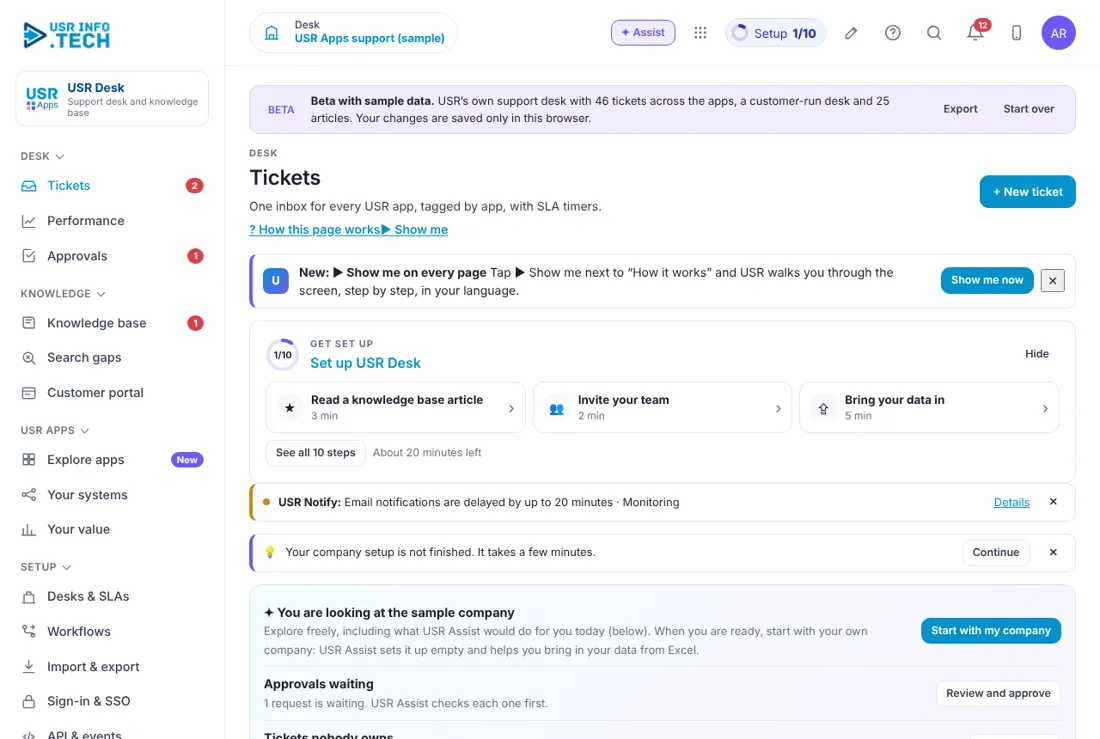
Tickets is your main page. It shows what needs you now. Get set up: A checklist of 10 steps with the time each takes. USR Assist box: Approvals waiting, tickets nobody owns, SLA at risk and missing help articles. Open: Tickets that are not closed. Unassigned: Tickets with no owner. At risk: Tickets that used 75% of their SLA time. Breached: Tickets that missed their SLA. Waiting on customer: Tickets where the clock is paused. + New ticket: Create a ticket for a customer who phoned or visited. Watch out: USR Assist only proposes. You decide.
5.2 Ticket list
The ticket list shows every ticket with its clock. Search box: Find by number, subject or customer. Desk, status, app, priority, SLA state: Five filters. Ticket: Number, subject, app tag, channel and date. Customer: The company and the contact. Priority: Critical, High, Normal or Low. Status: New, Open, Waiting on customer, Solved. SLA: The time left, or how long it is overdue, in red. Assignee: The agent who owns it. Watch out: Unassigned tickets show grey text in the Assignee column.
5.3 Performance
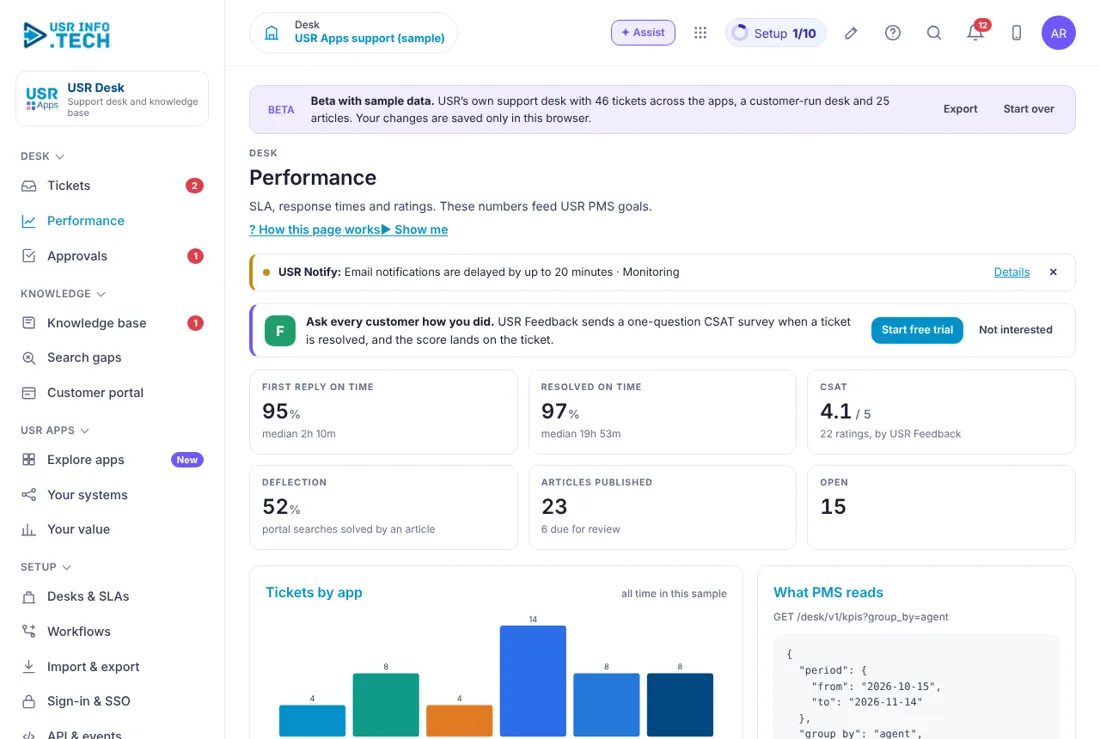
Performance shows how well your team is doing. First reply on time: Share of tickets answered within the SLA. Resolved on time: Share of tickets solved within the SLA. Customer rating (CSAT): The rating customers give, out of 5, through USR Feedback. Deflection: Share of help searches that ended without a ticket. Articles published: How many help articles are live. Tickets by app: A chart of which apps cause tickets. By agent: A table for each agent. Watch out: Use the figures to help people, not to blame them.
5.4 Approvals
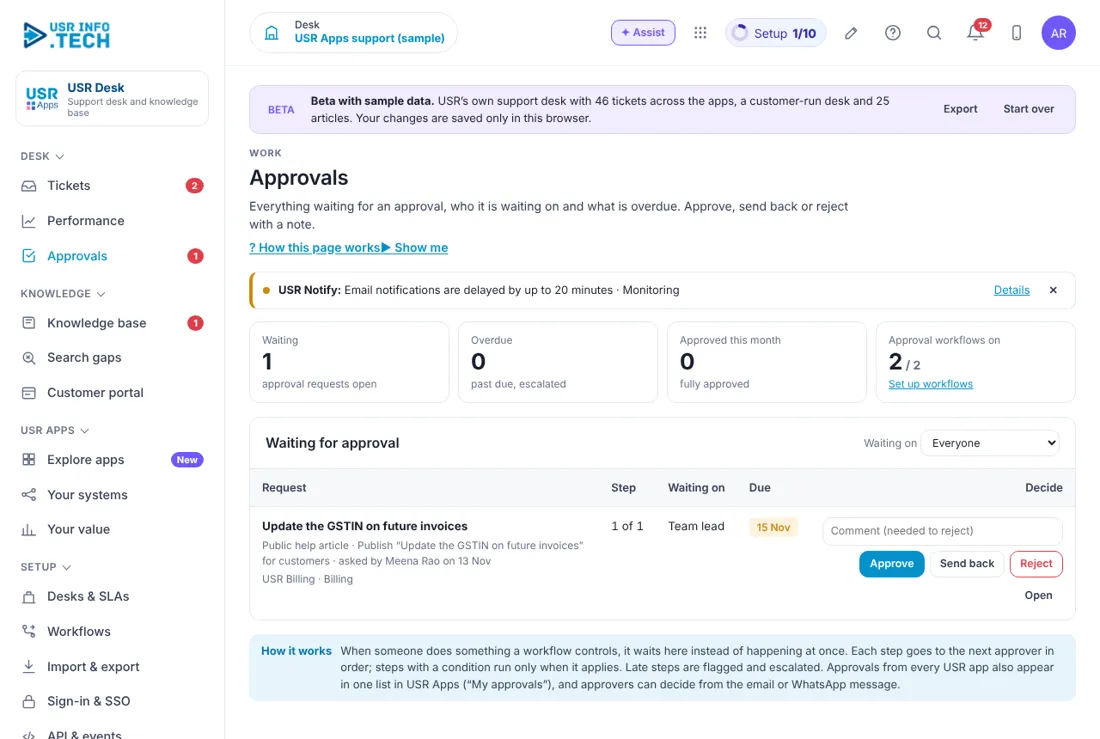
Approvals holds requests waiting for a decision, such as a change to a customer record. Waiting, Overdue, Approved this month: Counts of requests. Approval workflows on: How many workflows are switched on. Waiting for approval: The list, with Approve, Send back and Reject. Comment: Needed when you reject. Watch out: Late approvals are flagged and escalated.
5.5 Knowledge base
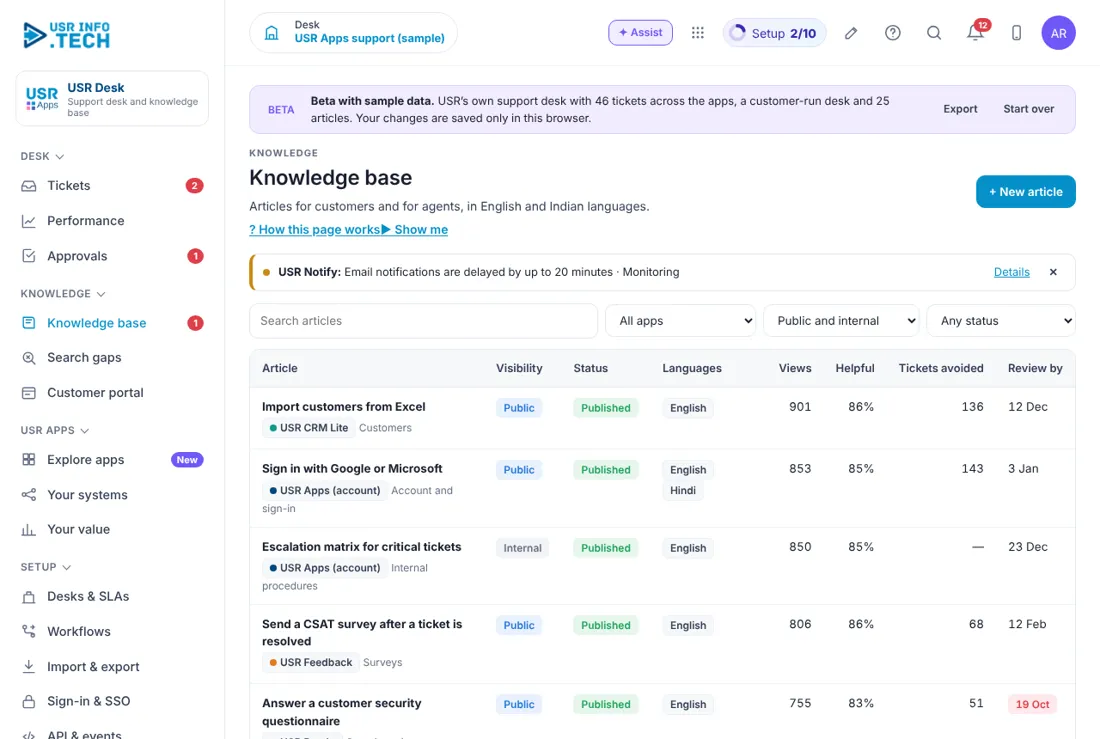
The knowledge base holds your help articles. Article: The title. Visibility: Public for customers, or Internal for your team. Status: Draft, In review or Published. Languages: The languages available. Views: How often it was read. Helpful: How many readers said it helped. Tickets avoided: Tickets that did not happen because of this article. Review by: The date to check it again. + New article: Write a new article. Watch out: Do not put customer data or passwords in an article.
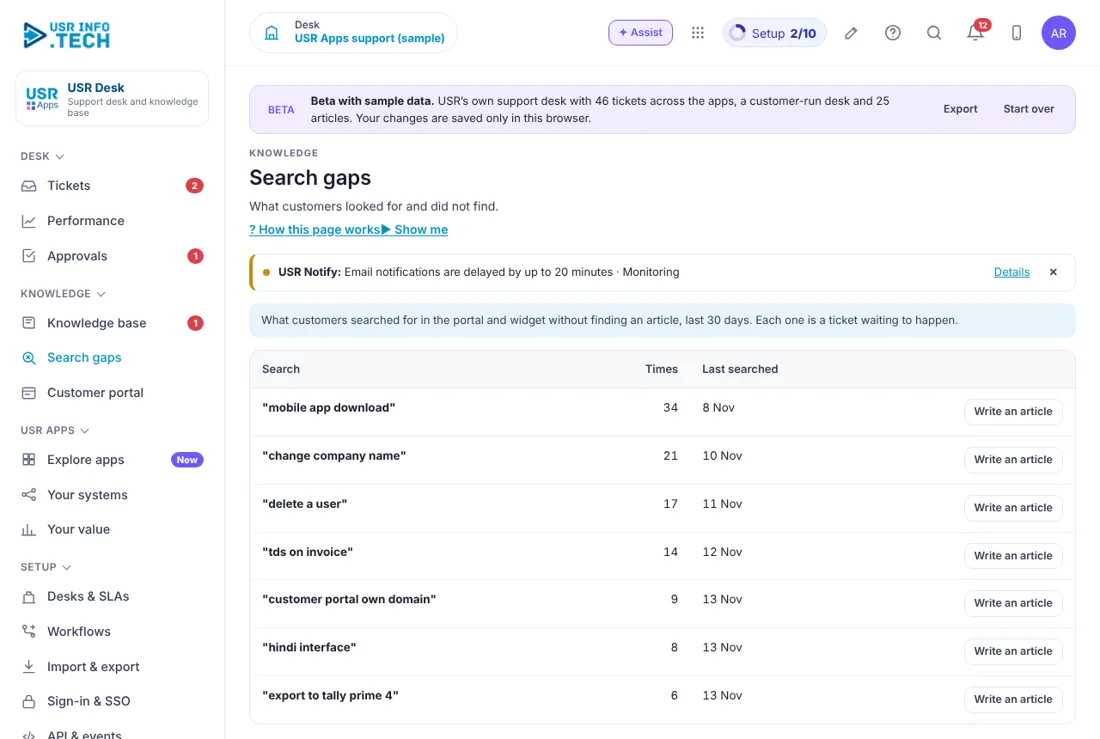
5.6 Search gaps
Search gaps lists what customers searched for and did not find. Question: The words customers typed. Searches: How many times. Write an article: Start an article for it. Watch out: The words are searches, not names of customers.
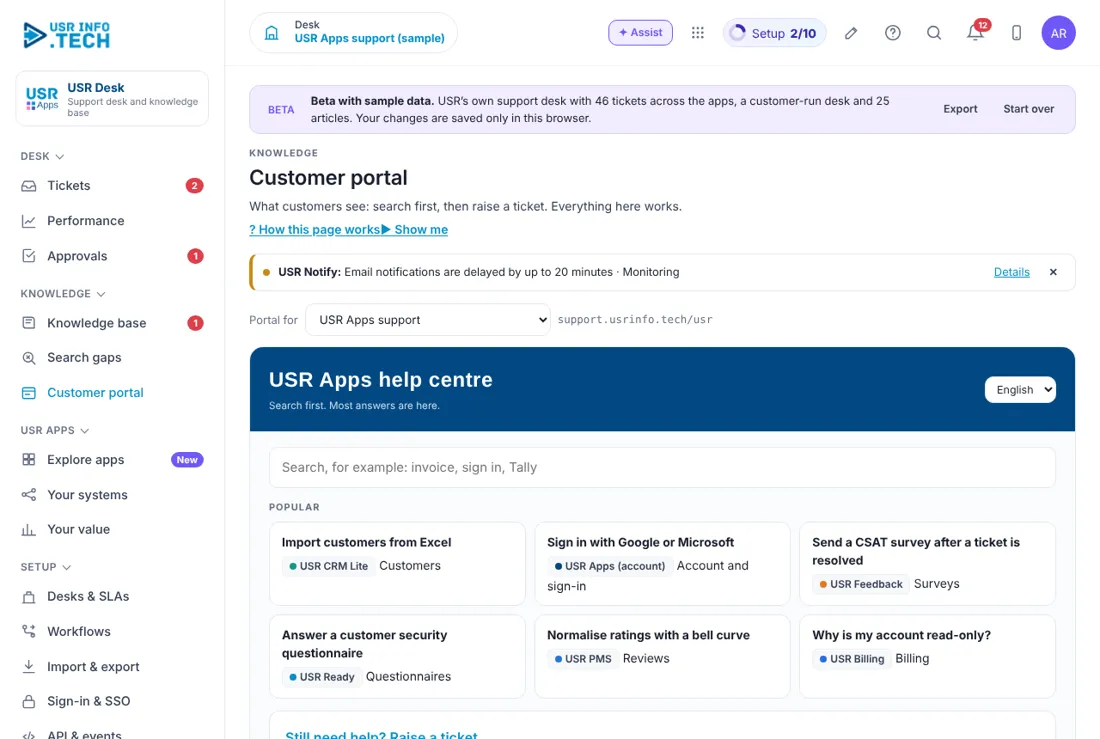
5.7 Customer portal
The customer portal is your help centre. Customers search, read and raise a ticket. Search box: Customers search the help articles. Popular articles: The most read articles. Raise a ticket: A form for the customer. Consent tick: The customer agrees to the privacy notice (DPDP). Reply promise: For example: reply within 8 business hours. Watch out: Keep the consent tick on.
5.8 Your value
Your value shows what USR Desk and your other USR apps gave you. Hours saved: Time your team saved. Deadlines met: Share of deadlines kept. People using: How many of your people use USR apps. Apps in use: How many apps you use. What each app did: A short line for each app. Compare with similar companies: Turn on to see how you compare. See my price: Shows your suite plan and the monthly price in rupees. Watch out: USR Desk is billed as part of your suite plan, not on its own.
5.9 Desks & SLAs
Desks & SLAs is where an admin sets up each support team and its promises. Desk: A support team, such as the apps support desk or customer care. Priority rows: Critical, High, Normal and Low. First reply and solve time: For example Critical 2 hours and 8 hours, in business hours. Warning at 75%: When a ticket turns At risk. Escalation: A Flow rule that alerts someone when the SLA is breached. Watch out: Do not promise more than you can do.
If something is not working
| Problem | What to do |
|---|---|
| A ticket has no owner | Use Assign for me on Tickets, or ask your lead to assign it. |
| The SLA clock is still running | Check the status. Set Waiting on customer to pause it. |
| A customer cannot find an article | Check that it is Public and Published. |
| The customer rating is empty | Ratings come from USR Feedback. Check that surveys are on. |
| I cannot see a desk | Ask an admin to add you to that desk. |
Questions people ask
How does a ticket start? From the widget, email, the portal, inside an app or WhatsApp. Your team can also click + New ticket.
What does At risk mean? The ticket used 75% of its SLA time.
Does the clock stop on weekends? SLA times count in business hours.
Who can read Internal articles? Only your team.
What is deflection? Customers who found an answer and did not raise a ticket.
Does USR Desk have its own price? It is part of your suite plan. Open Your value and click See my price.
Glossary
Ticket: One customer question. Desk: A support team. SLA: The time you promise to reply and solve. At risk: 75% of SLA time used. Breached: SLA missed. Deflection: A question answered without a ticket. CSAT: Customer satisfaction rating. Channel: Where a ticket came from.
USR Desk shares one record with these apps
No retyping between apps: data entered once flows to the next app, on the same login.
USR Desk is part of USR One. Service Suite from ₹349 ($9) per agent a month, or every app in USR One Complete. Free for up to 10 people.
See USR One
