
USR Projects help
USR Projects runs client projects from the first task to the final invoice. You plan projects with milestones, give tasks to people, record time on weekly timesheets, approve the time, and see at once which project is late, over budget or ready to invoice. Won deals come from USR CRM Lite, approved time and finished milestones turn into invoices, and delivery numbers go to USR PMS.
See the screens
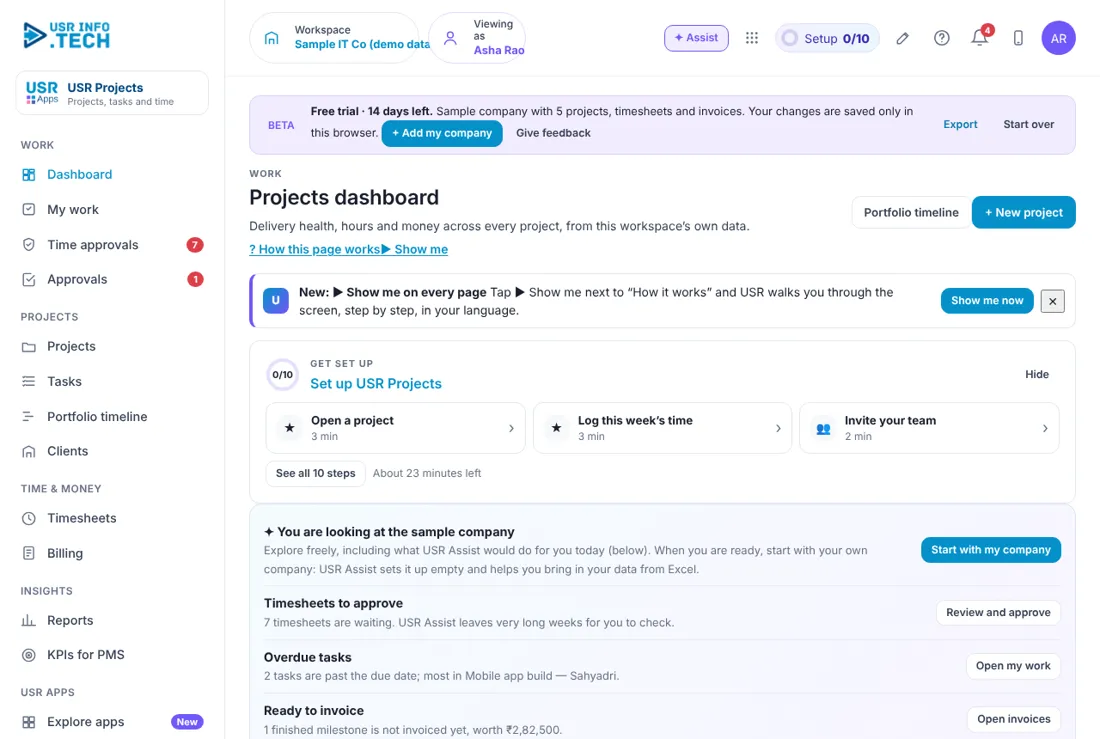
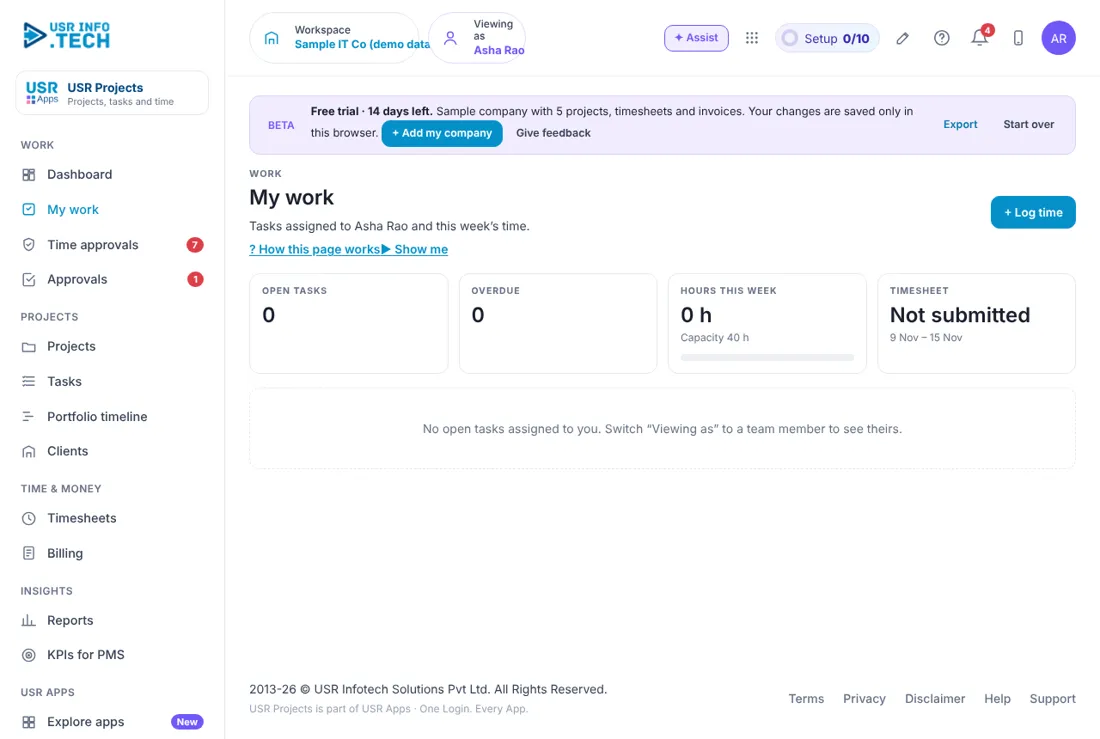
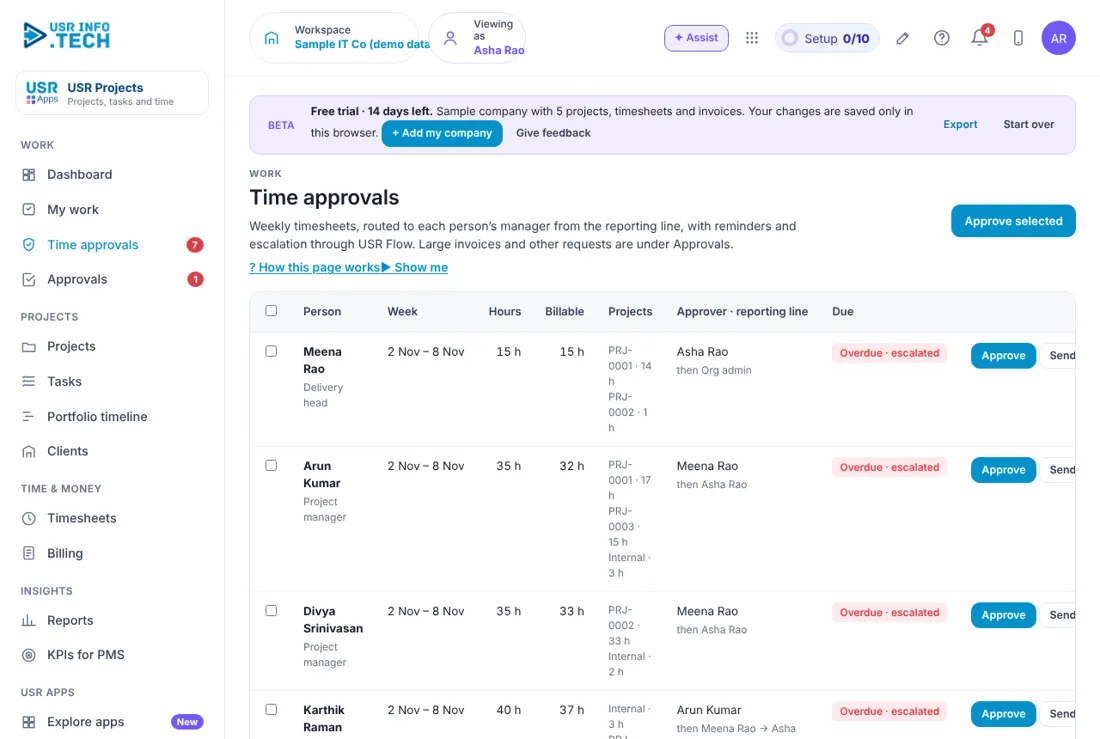
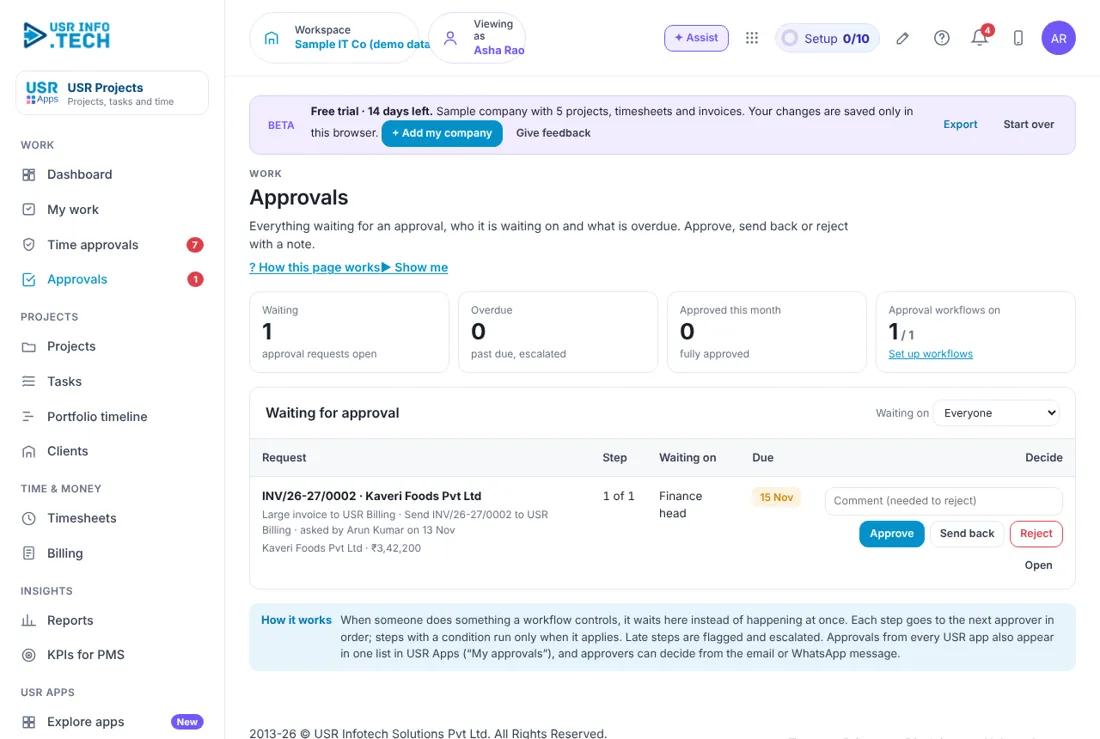
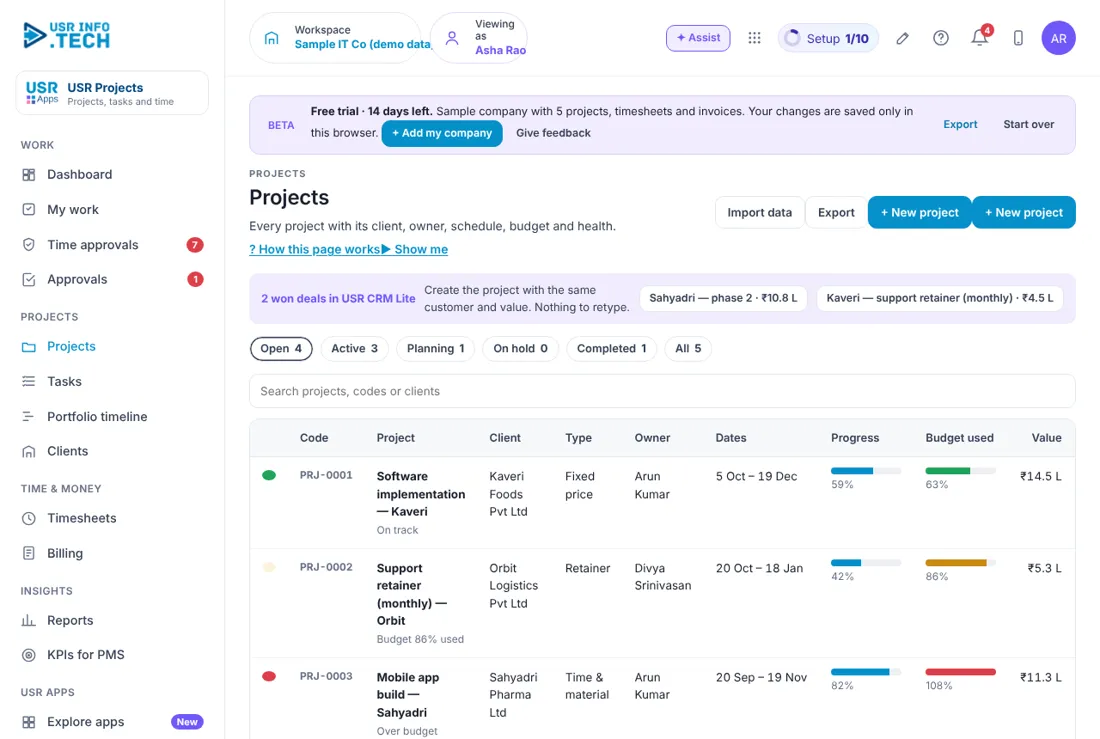
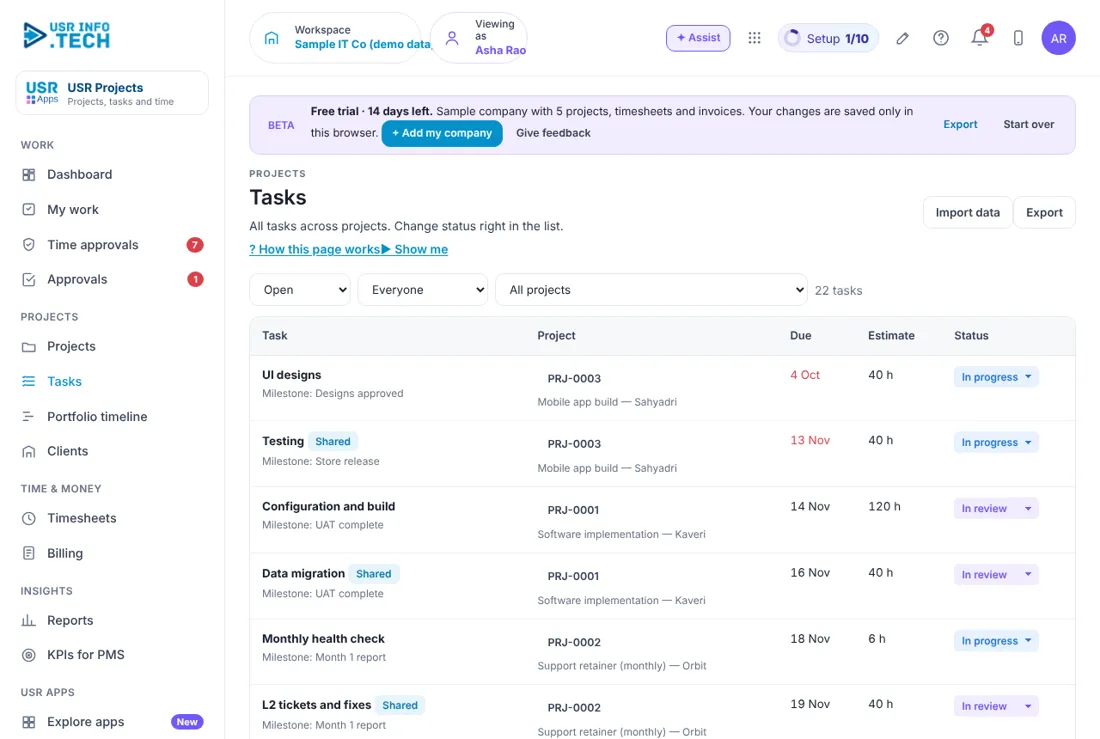
Sample company data. Screens can change as the app improves; the steps stay the same.
Welcome
USR Projects runs client projects from the first task to the final invoice. You plan projects with milestones, give tasks to people, record time on weekly timesheets, approve the time, and see at once which project is late, over budget or ready to invoice. Won deals come from USR CRM Lite, approved time and finished milestones turn into invoices, and delivery numbers go to USR PMS.
- Projects with owner, dates, budget, value and progress, and a red, amber or green health mark
- Tasks and milestones, and a portfolio timeline of every project
- Weekly timesheets with approval by the manager and the reporting line
- Billing: invoices from approved hours and finished milestones, with GST and a TallyPrime voucher
- Reports on utilisation, billable share and project margin, and KPIs that go to USR PMS
A year in USR Projects
| When | What happens | Who |
|---|---|---|
| At the start | Add the clients and the people. Set the roles, the weekly capacity and the approval lines. | Delivery head |
| Every day | Open My work. Do the tasks due. Log the time. | Everyone |
| Every week | Submit the timesheet. Managers approve the time. Check the Dashboard for projects at risk. | Everyone, managers |
| Every month | Draft the invoices from Billing. Read Reports for utilisation and margin. | Delivery head, finance |
| Every quarter | Read Project profitability and the KPIs for PMS. Review the project templates. | Delivery head |
| Every year | Review the rates, the capacity and the plan you are on. | Management |
Key ideas
- Project. A piece of client work with a code, an owner, dates, a budget and a value.
- Project type. Fixed price, Time and material, or Retainer.
- Task. A piece of work with a due date and an estimate in hours.
- Milestone. A date that marks a stage, which can be invoiced when it is done.
- Timesheet. The hours a person logs for a week, submitted for approval.
- Billable hours. Hours that you charge the client for.
- Utilisation. Hours logged as a share of the hours a person could work.
- Budget used. Hours or money spent compared with the plan.
Three kinds of project. A fixed price project has one agreed value, and you watch how much of the budget is used against how much is done. A time and material project is billed from approved hours. A retainer is a monthly fee for support, where the risk is that the hours used go over the fee. USR Projects shows all three in one list with their own health marks.
Time first, then money. People log hours on a weekly timesheet and submit it. Their manager and then the next person in the reporting line approve it. Only approved hours can be invoiced, so Ready to invoice always shows money that is safe to bill. Days over 10 hours show in red.
Watch the health marks. Each project has a mark. Green is on track. Amber is close to the budget. Red is over budget or late. In the sample company the Mobile app project is red because 107% of the budget is used while 82% of the work is done. Open the red ones first.
Delivery numbers feed performance. KPIs for PMS turns delivery facts into numbers for USR PMS: tasks on time, utilisation, billable share and timesheets on time. Managers then judge delivery from facts, not from memory.
Features step by step
5.1 Dashboard
Dashboard shows what needs you and how your projects are doing. Timesheets to approve: How many are waiting. Overdue tasks: Tasks past their date, and in which project. Ready to invoice: Finished milestones not yet invoiced. Missing timesheets: People who have not logged time last week. Active projects: How many, and how many are in planning. At risk: Projects to open first. Hours this week: Team hours for the week. Billable share and Utilisation: For the last 4 weeks. Project health: Each project with progress, budget used and end date. Milestones in the next 30 days: With days left or days late.
5.2 My work
My work shows your own tasks and your time for the week. + Log time: Add hours. Open tasks: Tasks given to you. Overdue: Your tasks past their date. Hours this week: Hours logged against your capacity of 40 hours. Timesheet: Not submitted, or Submitted.
5.3 Time approvals
Time approvals lists the weekly timesheets that wait for you. Person: Who submitted, and their role. Week and Hours: The week and the hours. Billable: Hours you can charge. Projects: Hours for each project. Approver · reporting line: Who approves first and who is next. Due: The date by when to approve. Approve, Send back, Delegate: Your decision. Approve selected: Approve all the ticked weeks. Watch out: Only approved hours can be invoiced.
5.4 Approvals
Approvals holds the requests waiting for a decision, such as a large invoice. Waiting, Overdue, Approved this month: Counts of requests. Approval workflows on: How many workflows are switched on. Waiting on: Filter by who must decide. Request, Step, Waiting on, Due: What, which step, who and by when. Comment, Approve, Send back, Reject, Open: Your decision. A comment is needed to reject.
5.5 Projects
Projects lists every project with its health, progress and money. Import data and Export: Bring projects from Excel, or download the list. + New project: Start a project. Won deals from USR CRM Lite: Create a project with the same customer and value. Nothing to retype. Open, Active, Planning, On hold, Completed, All: Filter the list. Search: By project, code or client. Code, Project, Client, Type: PRJ-0001 and so on, with Fixed price, Time and material or Retainer. Owner and Dates: Who leads it, and from when to when. Progress and Budget used: Two bars. Red means over budget. Value: The money value of the project. Watch out: A red bar on Budget used means the project is over budget. Talk to the client or change the plan.
5.6 Tasks
Tasks lists the work to do across all projects. Open and status filter: Choose which tasks to see. Everyone: Filter by person. All projects: Filter by project. Task: The name, the milestone it belongs to, and a Shared tag when other people work on it. Project: The project code and name. Due and Estimate: The date, and the hours planned. Status: In progress, In review and so on. Click to change. Import data and Export: Bring tasks from Excel, or download them.
5.7 Portfolio timeline
Portfolio timeline draws every project as a bar on a calendar. Rows: One for each project. Bar: The dates of the project. Blue is planned, green is done and red is late. Diamond: A milestone. Red line: Today. + New project: Start a project.
5.8 Clients
Clients lists the companies you do projects for. Client: The company name. Industry and Location: Its sector and place. Projects: How many. Open value: The value of open projects. Hours (all time): Hours logged for the client. Record: Shared with CRM Lite means one customer record for both apps. Import data, Export and + Add client: Bring clients from Excel, download, or add one.
5.9 Timesheets
Timesheets is where you log hours for the week. Person selector: Choose whose timesheet to see. Week arrows and This week: Move between weeks. Copy last week's rows: Repeat last week's projects and tasks. Submit week for approval: Send the week to your manager. Project and task rows: One row for each task, with Billable ticked or not. Mon to Sun: The hours for each day. A day over 10 hours shows in red. Internal work and + Add row: Add a row for the work you did. Capacity: 40 hours a week in the sample company.
5.10 Billing
Billing turns approved hours and finished milestones into invoices. TallyPrime connector: Posts each invoice to TallyPrime as a sales voucher, and the payments come back. Ready to invoice: The value of approved hours and done milestones. Waiting for approval: Billable hours not yet approved. Drafts and Sent this month: Invoices not sent, and sent. Ready to invoice table: The project, the client, the basis and the amount before GST, with Draft invoice. Invoices: The number, client, project, total, tax and status. View and Tally XML: See the invoice, or download it for TallyPrime. Watch out: A large invoice waits for the Finance head's approval before it goes to USR Billing.
5.11 Reports
Reports shows how busy your team is and which projects make money. Hours per week: A bar chart for 8 weeks: billable and non-billable. Utilisation by person: Hours logged, billable share and utilisation. Over 100% shows in red. Project profitability: Value, earned value, cost, margin and budget used for each project. Period and Export: Choose the weeks, or download.
5.12 KPIs for PMS
KPIs for PMS gives delivery numbers that go to USR PMS. Employee table: Tasks completed, on time, utilisation, billable hours, billable share and timesheets on time. Suggested KPI mapping: Which Projects number matches which goal in PMS, with a typical target. API response: The same numbers as a developer sees them. Export: Download the numbers.
5.13 Settings
Settings holds your company details and the rules of the app. Company: Company name, industry (sets project templates), state for GST and GSTIN. People & roles: Who can do what. Preferences: How the app behaves. Events & API: Links to other systems. Audit log: A record of who changed what.
5.14 Plan & billing
Plan & billing shows your plan and the plans you can choose. One bill covers every USR app through USR Billing. Free: ₹0 (US$0). Up to 3 users. Business: ₹2,083 (US$24) a month per company. Up to 15 users. All modules. Growth: ₹4,999 (US$58) a month per company. Up to 50 users. Single sign-on, approvals and analytics. Group: ₹12,499 (US$149) a month per group. Up to 5 companies and 150 users, with a group view. Enterprise: Talk to us. Unlimited users and companies, private hosting. Yearly or Monthly: Prices shown are for the yearly option, where you pay for 10 months. INR and USD: Switch the currency at the top. INR excludes 18% GST. Watch out: There is a 14-day Growth trial with no card needed. After it, up to 3 users move to Free and larger teams become view-only until a plan is chosen. Export always works.
If something is not working
| Problem | What to do |
|---|---|
| A person is missing from Time approvals | They may not have submitted. Check Missing timesheets on the Dashboard. |
| Nothing is ready to invoice | Only approved hours and finished milestones count. Approve the time first. |
| A project shows red | Open it. Budget used is higher than progress. Change the plan or talk to the client. |
| A won deal is not shown | Check USR CRM Lite. The deal must be marked won. |
| I cannot see a page | Your role may not allow it. Ask your administrator. |
Questions people ask
Who approves my timesheet? Your manager first, then the next person in the reporting line.
Can I invoice from the app? Yes. Billing drafts invoices from approved hours and finished milestones, and sends them to USR Billing.
Does it work with TallyPrime? Yes. The TallyPrime connector posts each invoice as a sales voucher and brings payments back.
Where do clients come from? From USR CRM Lite, so one customer record is used by both apps.
Is there a trial? Yes. A 14-day Growth trial starts when you add your own company.
Glossary
Milestone: A date that marks a stage of a project. Timesheet: The hours a person logs for a week. Utilisation: Hours logged as a share of the hours a person could work. Billable: Work you charge the client for. Retainer: A monthly fee for ongoing support. Fixed price: One agreed value for a project. KPI: A key number that tells how well something is going.
USR Projects shares one record with these apps
No retyping between apps: data entered once flows to the next app, on the same login.
USR Projects is part of USR One. Operations Suite from ₹399 ($10) per seat a month, or every app in USR One Complete. Free for up to 10 people.
See USR One
