
USR Ideas & Roadmap help
USR Ideas & Roadmap collects what your customers ask for, lets them vote, and turns the best ideas into a roadmap you can show them. Ideas arrive from a customer portal, from the Tell us what you need button in every USR app, from questions USR Assist could not answer, and from your own team. Each idea shows who asked, what it is worth to you each month, and how much effort it needs, so you build what matters most. When an idea ships, every voter is told.
See the screens
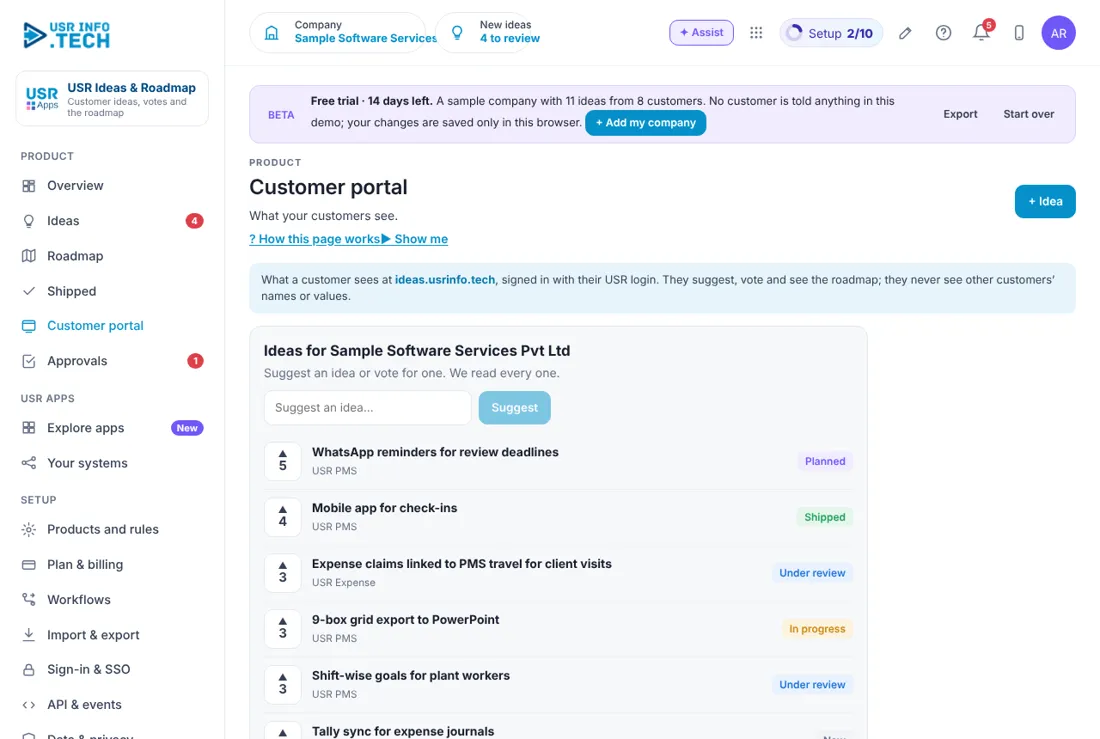
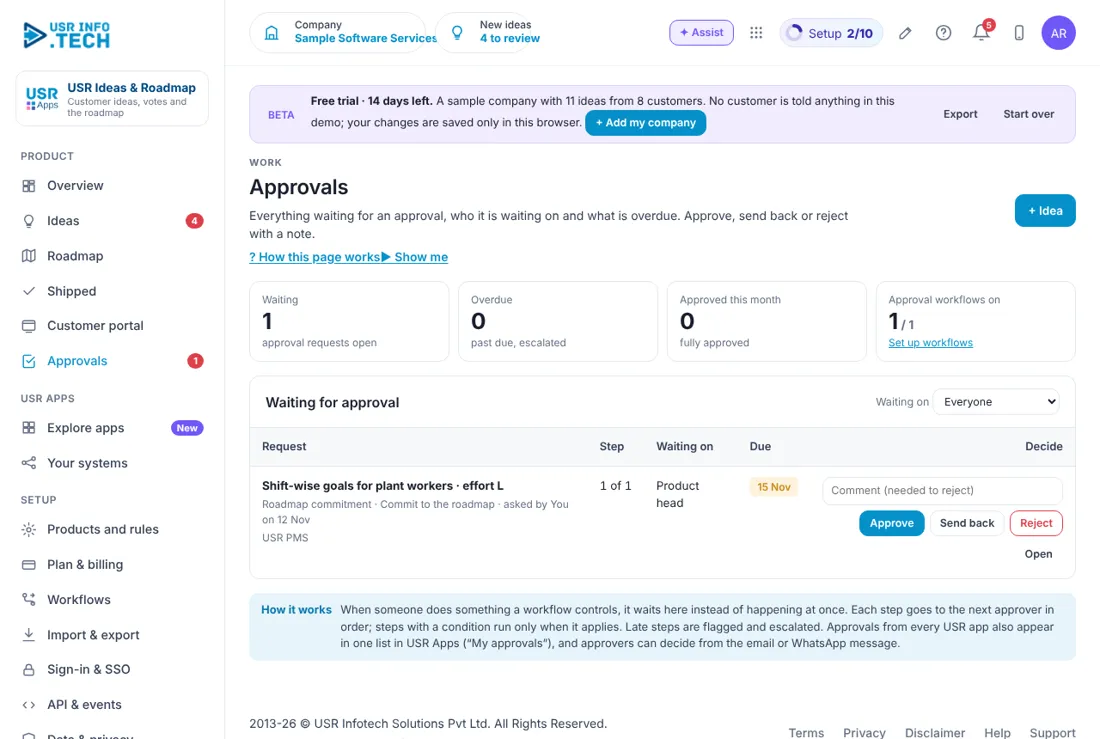
Sample company data. Screens can change as the app improves; the steps stay the same.
Welcome
USR Ideas & Roadmap collects what your customers ask for, lets them vote, and turns the best ideas into a roadmap you can show them. Ideas arrive from a customer portal, from the Tell us what you need button in every USR app, from questions USR Assist could not answer, and from your own team. Each idea shows who asked, what it is worth to you each month, and how much effort it needs, so you build what matters most. When an idea ships, every voter is told.
- Customer portal where customers suggest, vote and see the roadmap
- Priority score from customers asking, monthly value, would-pay and urgent votes, divided by effort
- Roadmap with Now, Next and Later, shown without customer names or values
- Shipped page that tells every voter, and gives your sales team a list to follow up
- Approval before an idea is committed to the roadmap
- Ideas from Tell us what you need in every USR app and from USR Assist
A year in USR Ideas & Roadmap
| When | What happens | Who |
|---|---|---|
| At the start | List your products. Choose to show the roadmap to customers. Invite your team. | Admin |
| Every week | Open the Overview. Review the new ideas. Decide within a week. | Product owner |
| Every month | Look at Highest priority. Move ideas to Planned and place them on the roadmap. | Product owner |
| Every release | Mark ideas as Shipped. Voters are told. Sales follows up the list. | Product and sales |
| Every quarter | Read demand by status. Share the roadmap with customers. | Leaders |
| Every year | Review products and rules. Remove ideas that are no longer wanted. | Admin |
Key ideas
- Idea. A request from a customer or your team, such as WhatsApp reminders for review deadlines.
- Vote. A customer or person who also wants the idea.
- Demand. The monthly value of the customers who voted.
- Would pay. Votes from customers who said they would pay for it.
- Effort. How big the work is: S, M or L.
- Priority. A score: customers asking, their monthly value, would-pay and urgent votes, divided by effort.
- Status. New, Under review, Planned, In progress, Shipped or Not now.
- Roadmap. Now, Next and Later columns for committed ideas.
- Customer portal. The page customers see to suggest, vote and read the roadmap.
- Sales list. Customers who asked for a shipped idea, ready for a follow-up.
Listen to every customer, build for the many. One loud customer should not decide your product. USR Ideas & Roadmap counts votes and adds up the monthly value of the customers behind them. The priority score divides that by effort, so a small idea with strong demand rises to the top.
Decide within a week. The Overview shows New to review and asks you to decide within a week. A quick answer tells customers they are heard, even when the answer is Not now.
A roadmap customers can trust. The roadmap has three columns: Now, Next and Later. Customers see it in the portal without customer names or values. Committing an idea to the roadmap can need approval, so promises are made by the right person.
Close the loop. When an idea ships, mark it Shipped. Every voter is told. The Shipped page gives your sales team a list of the customers who asked, so a free trial of the new feature is one click away.
Features step by step
5.1 Overview
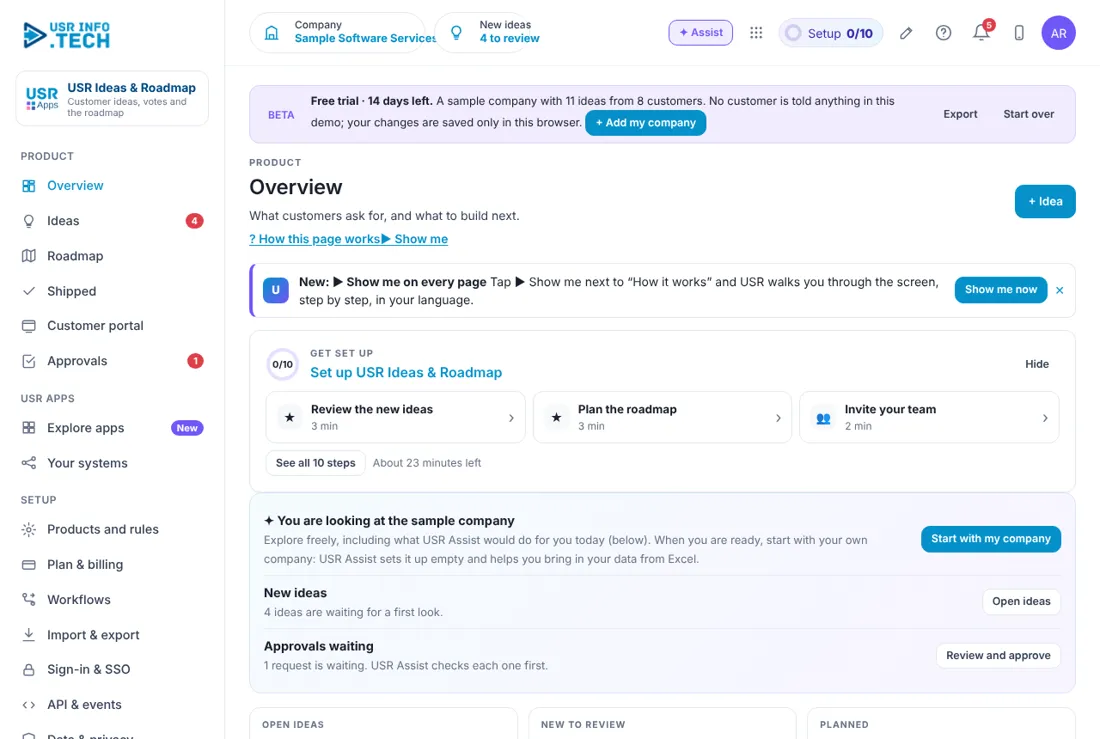
Overview shows the demand behind your ideas and what needs a decision. Get set up: A checklist of 10 steps with the time each takes. Open ideas: How many ideas are open and how many votes. New to review: Ideas waiting for a first look. Decide within a week. Planned: Ideas on the roadmap. Shipped in 30 days: Ideas shipped, and how many voters were told. Demand behind open ideas: The monthly value of voting customers. Would pay: Votes from customers who said they would pay. Highest priority: The top ideas with a score and an Open button. Ideas by status: A bar for each status. Ask about ideas: Type a question, such as what should we build next. Watch out: AI answers from your ideas. You decide what to build.
5.2 Ideas
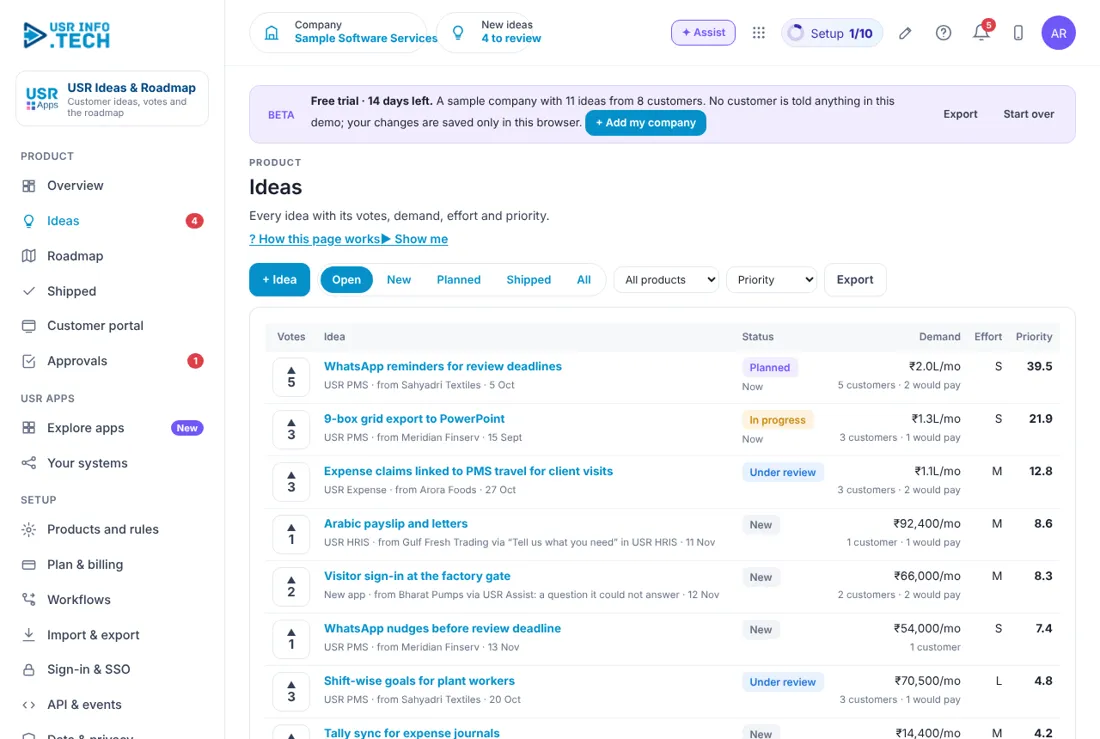
Ideas lists every idea with its votes, demand, effort and priority. + Idea: Add an idea. Open, New, Planned, Shipped, All: Filter the list. All products: Filter by product. Priority: Sort the list. Export: Download the list. Votes: Click the arrow to add a vote. Idea: The title, the product, who asked and how it arrived. Status: New, Under review, Planned, In progress, Shipped. Demand: Monthly value, number of customers and would-pay votes. Effort: S, M or L. Priority: The score. A higher score is a stronger idea. Watch out: Ideas can come in through Tell us what you need in other USR apps.
5.3 Roadmap
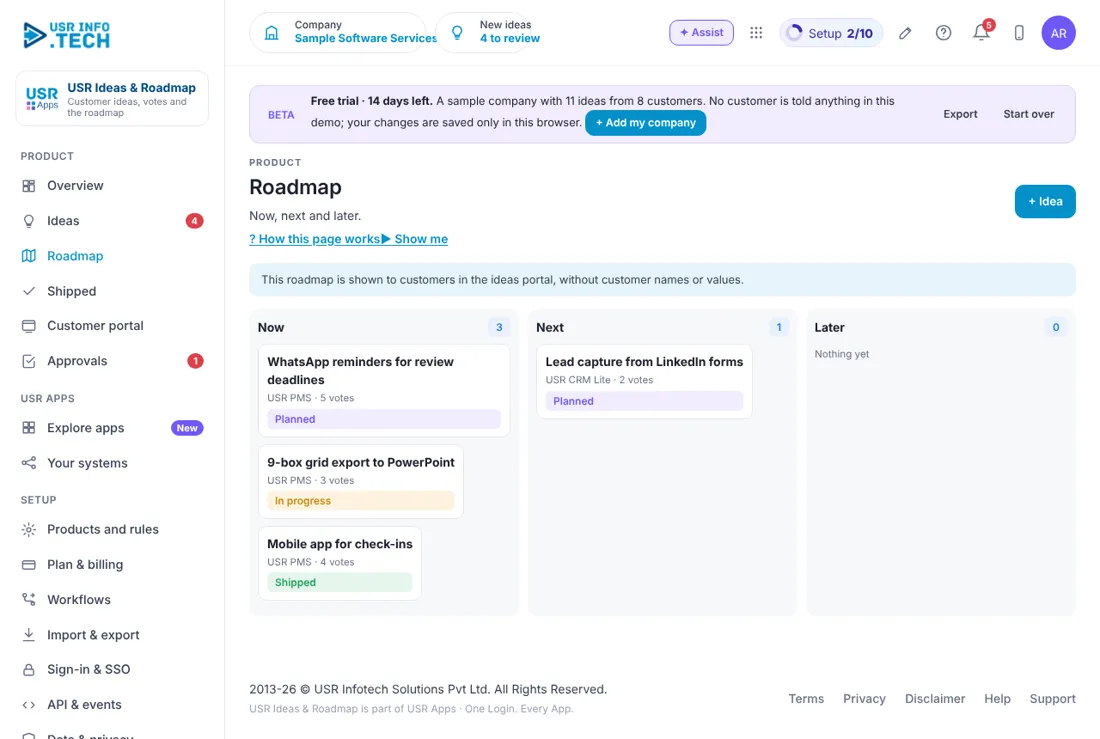
Roadmap shows what you will build now, next and later. Now, Next, Later: Three columns with a count. Idea card: The title, the product, the votes and the status. + Idea: Add an idea. Customer note: This roadmap is shown to customers without names or values. Watch out: Do not promise dates you cannot keep.
5.4 Shipped
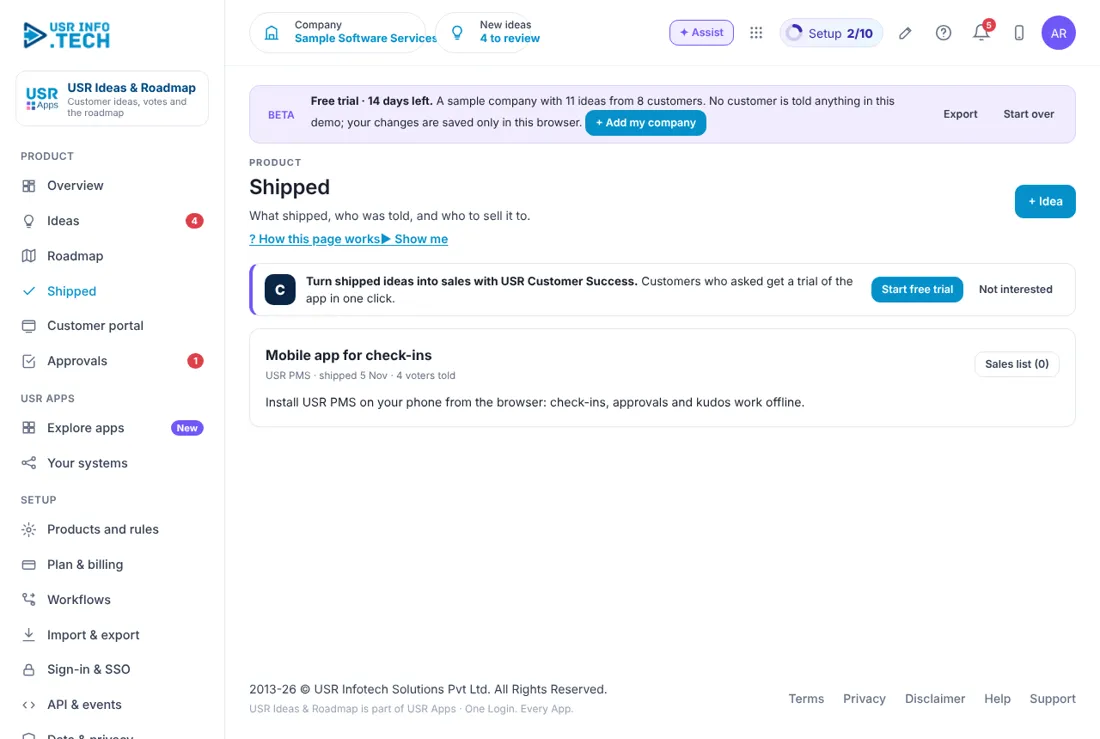
Shipped lists the ideas you have delivered and the customers who asked. Idea: The title, the product, the date and how many voters were told. Release note: A short line on what changed. Sales list: The customers who asked, ready for follow-up. Start free trial: From USR Customer Success. Customers who asked get a trial in one click. Not interested: Hide the suggestion. Watch out: Voters are told when you mark an idea Shipped.
5.5 Customer portal
Customer portal shows what your customers see. Portal address: ideas.usrinfo.tech, signed in with a USR login. Suggest an idea: A box where a customer types an idea. Vote: The arrow beside each idea. Status: Planned, Shipped, Under review, In progress or New. Privacy: Customers never see other customers' names or values. Watch out: Only ideas you choose to show appear here.
5.6 Approvals
Approvals holds requests waiting for a decision, such as committing an idea to the roadmap. Waiting, Overdue, Approved this month: Counts of requests. Approval workflows on: How many workflows are switched on. Waiting on: Filter by approver. Request: What is asked, the step and who asked. Approve, Send back, Reject: Decide. A comment is needed to reject. Open: See the idea. Watch out: Late approvals are flagged and escalated.
5.7 Products and rules
Products and rules is where you name your products and set the rules. Products: The products customers can suggest ideas for. + Product: Add a product. Show the roadmap to customers: Switch the portal roadmap on or off. Tell every voter when an idea ships: Switch the shipped message on or off. Watch out: Ideas also arrive from Tell us what you need and from USR Assist.
5.8 Plan & billing
Plan & billing shows your plan and the plans you can choose. One bill covers every USR app through USR Billing. Free: ₹0 (US$0). Up to 50 ideas: portal, voting and roadmap. Standard: ₹1,200 (US$15) a month. Demand from CRM and Billing, merge, private roadmap. Professional: ₹2,400 (US$29) a month. AI grouping, sales lists, many products, release notes. Enterprise: Talk to us. Your own domain, single sign-on for customers, private hosting. Mid-market: 501 to 5,000 users. Volume pricing per user, in INR or USD. Prices: INR excludes 18% GST. Watch out: There is a 14-day Professional trial with no card needed.
If something is not working
| Problem | What to do |
|---|---|
| An idea has a low priority score | Check the effort and the number of customers. Priority is value and votes divided by effort. |
| Customers cannot see the roadmap | Open Products and rules and switch on Show the roadmap to customers. |
| Voters were not told | Open Products and rules and switch on Tell every voter when an idea ships. |
| An idea is stuck | It may be waiting for approval. Open Approvals. |
| I cannot find an idea | Choose All in the filter and check the product filter. |
Questions people ask
Where do ideas come from? From the customer portal, from Tell us what you need in every USR app, from questions USR Assist could not answer, and from your team.
Do customers see each other's names? No. They never see other customers' names or values.
Can AI group similar ideas? Yes, in the Professional plan. You decide what to merge.
Who approves a roadmap commitment? The approver set in your workflow, shown in Approvals.
Is there a trial? Yes. A 14-day Professional trial starts when you add your own company.
Glossary
Idea: A request from a customer or your team. Vote: A person who also wants the idea. Demand: The monthly value of the customers who voted. Effort: How big the work is: S, M or L. Priority: A score that ranks ideas. Roadmap: Now, Next and Later columns. Shipped: An idea you have delivered. Portal: The page customers use to suggest and vote.
USR Ideas & Roadmap shares one record with these apps
No retyping between apps: data entered once flows to the next app, on the same login.
USR Ideas & Roadmap is part of USR One. Service Suite from ₹349 ($9) per agent a month, or every app in USR One Complete. Free for up to 10 people.
See USR One
