
USR Field Service & AMC help
USR Field Service & AMC runs a team of service technicians. You log a service job, see who is nearby and free, send the right technician, and track the promised response time (SLA). It keeps your AMC contracts with their planned visits and renewals, and the list of every machine you have installed with its warranty. The team sees their jobs on a phone, and the customer signs off at the end.
See the screens
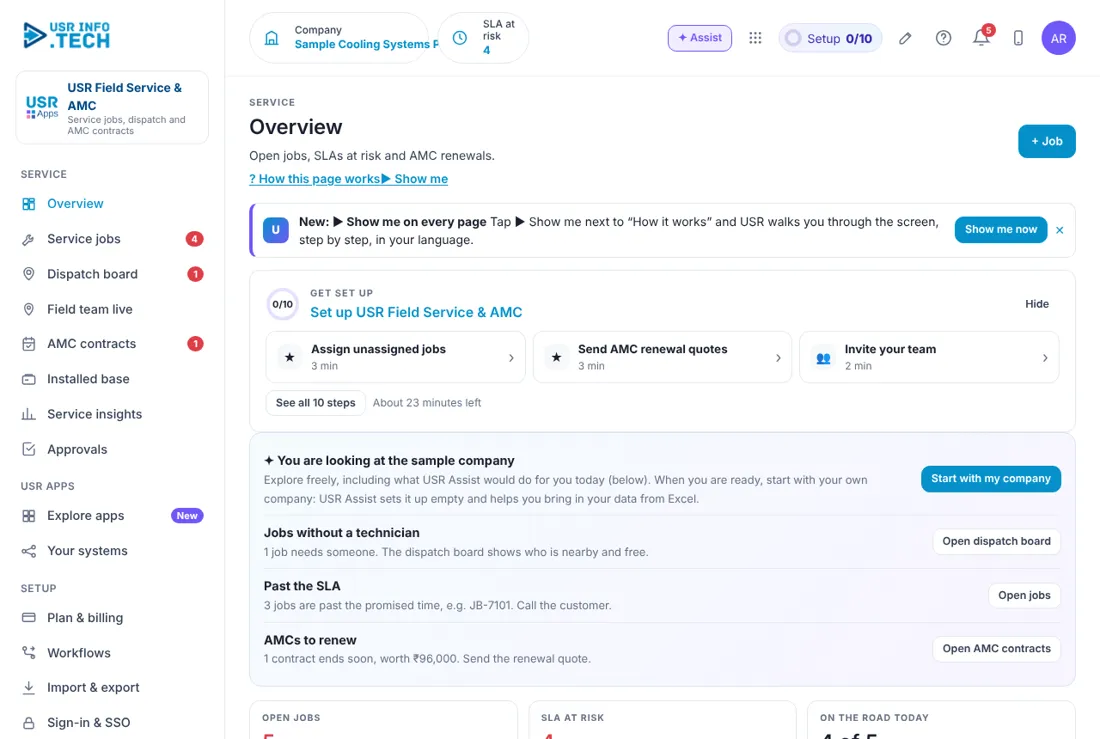
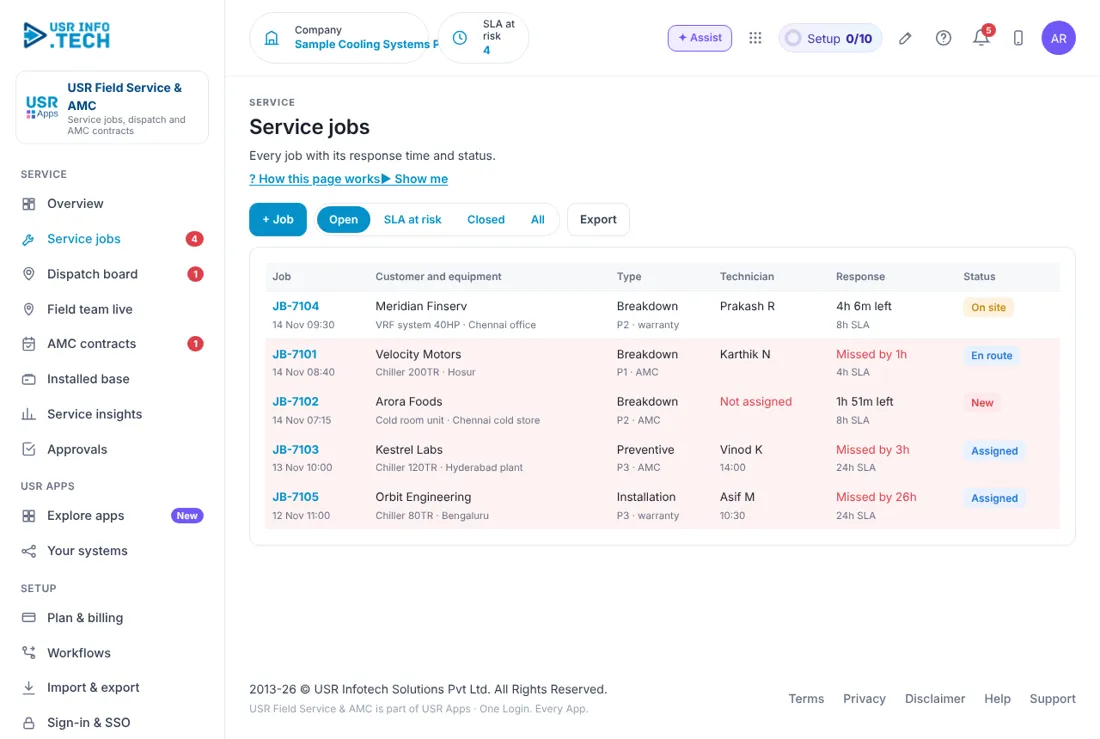
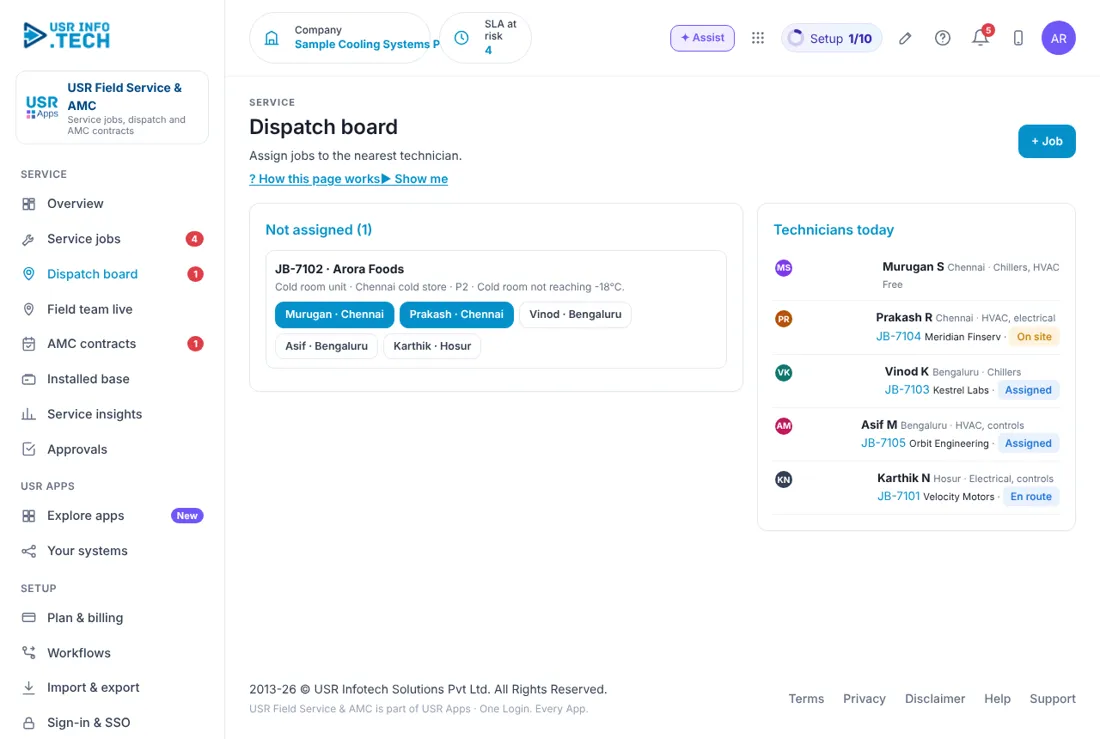
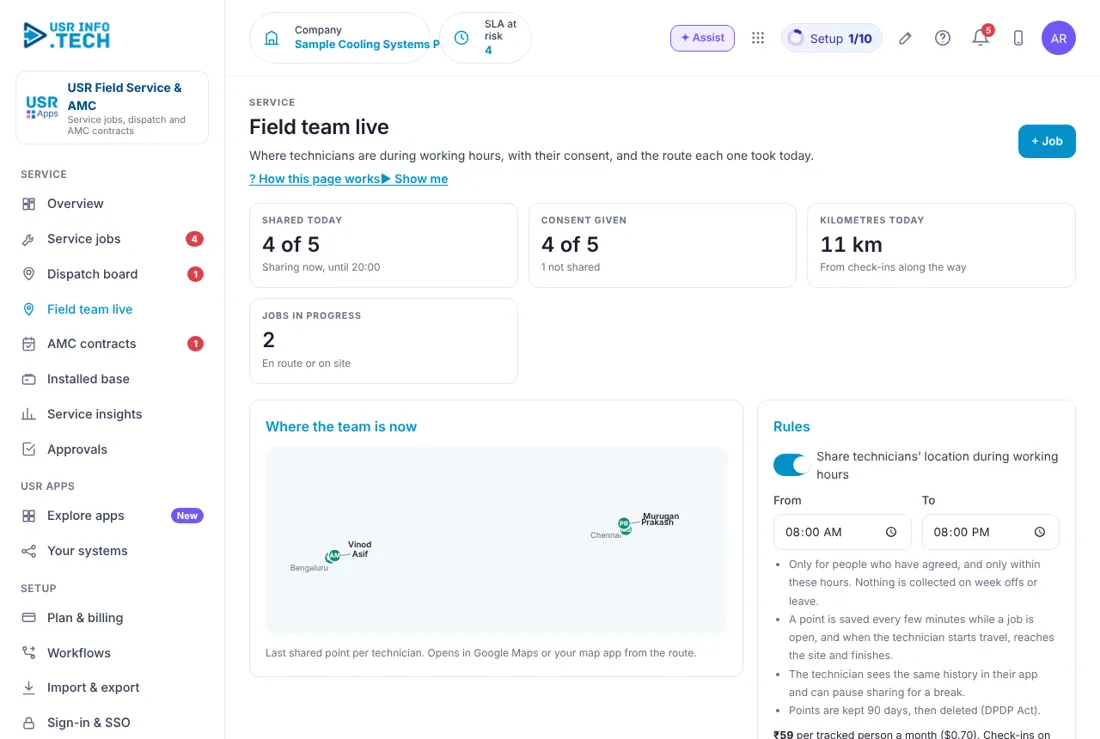
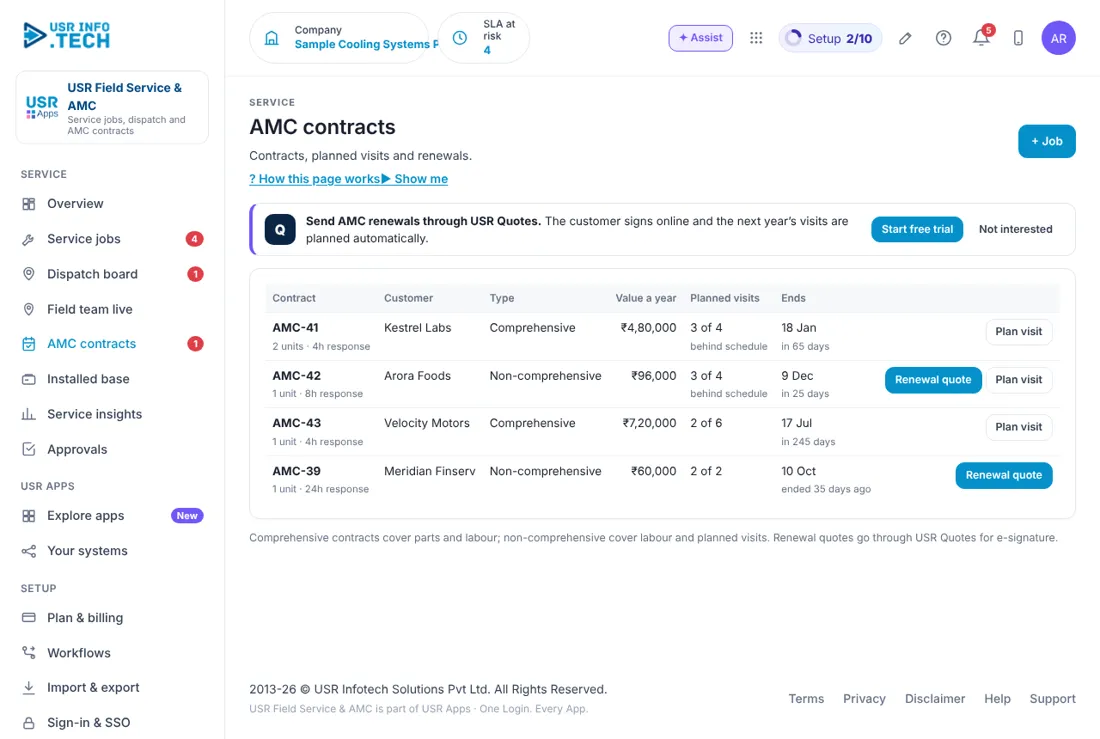
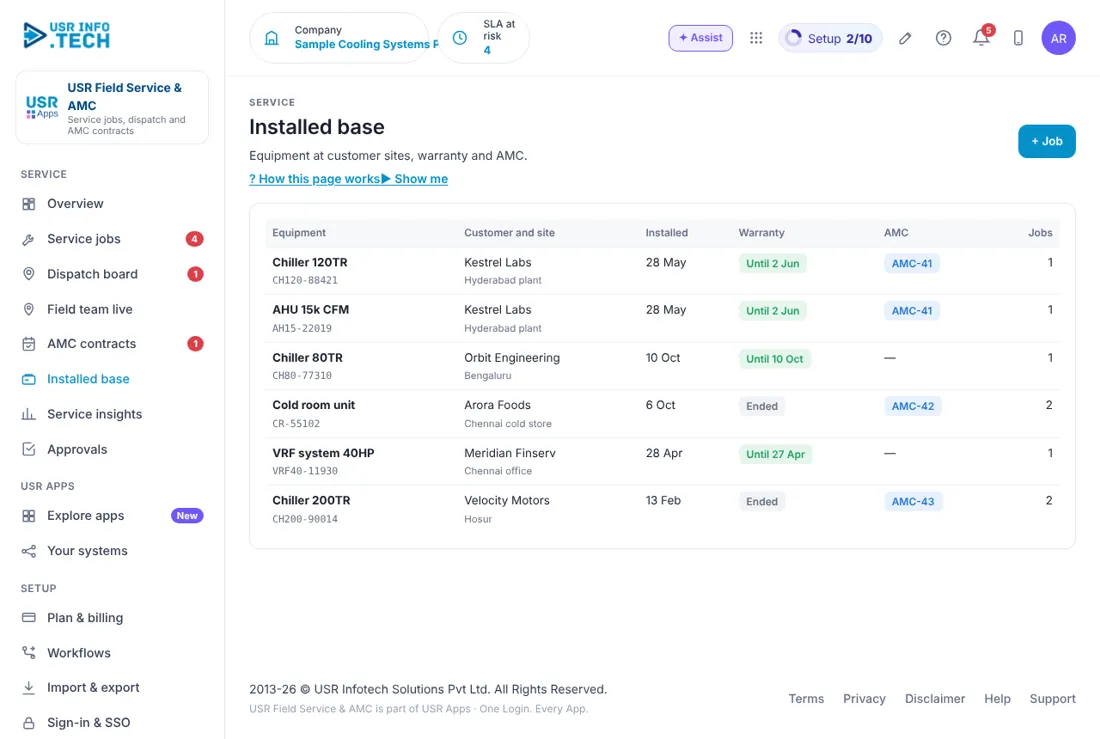
Sample company data. Screens can change as the app improves; the steps stay the same.
Welcome
USR Field Service & AMC runs a team of service technicians. You log a service job, see who is nearby and free, send the right technician, and track the promised response time (SLA). It keeps your AMC contracts with their planned visits and renewals, and the list of every machine you have installed with its warranty. The team sees their jobs on a phone, and the customer signs off at the end.
- Service jobs with priority, SLA and a clear Missed by marker
- A dispatch board that shows who is free, nearby and has the right skill
- Field team live: location shared only with consent and only in working hours
- AMC contracts with planned visits, value and renewal quotes
- Installed base with warranty and AMC for every unit, plus service insights
A year in USR Field Service & AMC
| When | What happens | Who |
|---|---|---|
| At the start | Add technicians with their skills. Add every installed unit and its AMC. Set the SLA for each priority. | Service head |
| Every day | Open the Overview. Assign new jobs. Call customers whose SLA is missed. | Dispatcher |
| Every week | Check planned AMC visits that are behind. Look at who is free next week. | Service head |
| Every month | Read Service insights: first-time fix, customer rating and AMC revenue. | Service head |
| Every quarter | Send renewal quotes for contracts that end soon. Check units out of warranty with no AMC. | Sales and service |
| Every year | Review the SLA and the AMC prices. Plan the technicians for the next year. | Management |
Key ideas
- Service job. A visit or repair for a customer, with a priority, a type and an SLA.
- SLA. The response time you promised, such as 4 hours for P1.
- Priority P1, P2, P3. How urgent a job is. P1 is the most urgent.
- AMC. Annual maintenance contract: a yearly agreement for planned visits and support.
- Comprehensive AMC. Covers parts and labour.
- Non-comprehensive AMC. Covers labour and planned visits, not parts.
- Installed base. The list of machines you have installed at customers, with warranty and AMC.
- First-time fix. A job closed without a second visit.
The SLA clock. Every job has a promised response time. A P1 breakdown under an AMC may promise 4 hours, a P3 job 24 hours. The Service jobs page shows how late a job is, such as Missed by 6h, and marks the row in red. The Overview shows how many are at risk in the next 2 hours.
Send the right person. The Dispatch board lists jobs that have no technician, and the technicians for today with their place and skills. Pick the person who is free, nearby and has the right skill. This saves travel and improves first-time fix.
Location only with consent. Field team live shares a technician's location only for people who have agreed, and only inside the working hours you set, such as 8 am to 8 pm. Nothing is collected on week offs or leave. A point is saved every few minutes while a job is open. The technician sees the same history and can pause sharing. Points are kept for 90 days and then deleted, as the DPDP Act expects.
AMC and warranty. Each installed unit shows its warranty and any AMC. A comprehensive AMC covers parts and labour. A non-comprehensive AMC covers labour and planned visits. When a contract ends soon, send a renewal quote. When a unit is out of warranty and has no AMC, it is a sales chance.
Features step by step
5.1 Overview
Overview shows what needs you today and the main numbers of your service team. Jobs without a technician: Jobs that need someone, with Open dispatch board. Past the SLA: Jobs past the promised time, with Open jobs. AMCs to renew: Contracts that end soon, with their value, and Open AMC contracts. Open jobs: How many are open and how many are not assigned. SLA at risk: Jobs whose response is due within 2 hours. On the road today: Technicians busy out of the total. AMC renewals due: The number and their yearly value. Planned visits behind: Contracts behind their schedule. First-time fix: The share of closed jobs with no second visit. Needs you now: The items to act on first, with Open or Renew. Jobs by type: A bar for Breakdown, Preventive and Installation. Ask about service: Type a question, such as which AMC customers to renew.
5.2 Service jobs
Service jobs lists every job, how late it is and who has it. + Job: Log a new job. Open, SLA at risk, Closed, All: Filter the list. Export: Download the list. Job: The number and the date and time it was logged. Customer and equipment: Who, what machine and where. Type: Breakdown, Preventive or Installation, with the priority and whether it is under warranty or AMC. Technician: Who has the job, or Not assigned. Response: Missed by, or the time left, and the SLA. Status: New, Assigned, En route, On site and so on. Watch out: A red row means the SLA is missed. Call the customer first.
5.3 Dispatch board
Dispatch board helps you send the right technician to a job. Not assigned: Jobs that have no technician, with the problem. Technician buttons: The technicians, with their place. The best matches are highlighted. Technicians today: Each technician, their place and skills, and what they are doing now.
5.4 Field team live
Field team live shows where technicians are, if they have agreed to share. Shared today: How many technicians share their location. Consent given: How many have agreed. Kilometres today: From check-ins along the way. Jobs in progress: En route or on site. Where the team is now: The last shared point for each technician. Share technicians' location during working hours: A switch, with From and To times. Table: For each technician: Now, Last point, Today, Consent, Route, Share from this phone and Withdraw. Watch out: Share location only with technicians who have agreed. They can pause or withdraw at any time. Tracking is a paid add-on, so check Plan & billing.
5.5 AMC contracts
AMC contracts lists your yearly maintenance contracts and their planned visits. Contract: The number, the units and the response time. Customer: Who it is for. Type: Comprehensive (parts and labour) or Non-comprehensive (labour and planned visits). Value a year: The contract value. Planned visits: Done out of planned, and whether it is behind schedule. Ends: The end date and the days left. Renewal quote: Send a renewal quote through USR Quotes for e-signature. Plan visit: Plan the next visit.
5.6 Installed base
Installed base is the list of every machine you have installed, with its warranty and AMC. Equipment: The model and its serial number. Customer and site: Who and where. Installed: The install date. Warranty: Until when, or Ended. AMC: The contract that covers it, or a dash. Jobs: How many jobs it has had.
5.7 Service insights
Service insights shows how well your service team is doing. Jobs closed: In the last 30 days. First-time fix: The share of jobs with no second visit. Customer rating: The average rating after each job. AMC revenue: The yearly value of active contracts. Jobs by technician: A bar for each technician. Units out of warranty with no AMC: Units you could sell an AMC for.
5.8 Approvals
Approvals holds the requests waiting for a decision. Waiting, Overdue, Approved this month: Counts of requests. Approval workflows on: How many workflows are switched on. Waiting on: Filter by who must decide. Approve, Send back, Reject: Your decision. A comment is needed to reject.
5.9 Plan & billing
Plan & billing shows your plan and the plans you can choose. One bill covers every USR app through USR Billing. Free: ₹0 (US$0). 2 technicians, 50 jobs a month. Standard: ₹299 (US$3.6) per technician a month. Dispatch, job sheet on the phone, sign-off, SLAs. Professional: ₹499 (US$6) per technician a month. AMC and renewals, installed base, Inventory parts, Feedback. Enterprise: Talk to us. Many branches, route planning, IoT alerts, private hosting. Mid-market: 501 to 5,000 users. Volume pricing per user, in INR or USD. Tracking add-on: Live location is ₹59 per tracked person a month. Check-ins on job sheets stay free. Prices: INR excludes 18% GST. Watch out: There is a 14-day Professional trial with no card needed.
If something is not working
| Problem | What to do |
|---|---|
| A job shows Not assigned | Open the Dispatch board and click a highlighted technician. |
| A technician does not show on the map | They may not have agreed to share location, or it is outside working hours. Check Field team live. |
| An AMC has no renewal button | The Renewal quote button shows when the contract ends soon or has ended. |
| A unit does not show its AMC | Open Installed base and check the unit is linked to the contract. |
| I cannot see a page | Your role may not allow it. Ask your administrator. |
Questions people ask
Is the technician's location always tracked? No. It is shared only with people who have agreed, only in working hours, and never on week offs or leave. Technicians can pause or withdraw.
How long is location kept? 90 days, and then it is deleted, as the DPDP Act expects.
What is the difference between comprehensive and non-comprehensive AMC? Comprehensive covers parts and labour. Non-comprehensive covers labour and planned visits.
Can customers sign the renewal online? Yes. Renewal quotes go through USR Quotes, and the customer signs online.
Is there a trial? Yes. A 14-day Professional trial starts when you add your own company.
Glossary
AMC: Annual maintenance contract. SLA: The response time you promised. P1, P2, P3: Priority levels. P1 is the most urgent. First-time fix: A job closed with no second visit. Installed base: The machines you have installed at customers. Dispatch: Sending a technician to a job. DPDP: India's Digital Personal Data Protection Act.
USR Field Service & AMC shares one record with these apps
No retyping between apps: data entered once flows to the next app, on the same login.
USR Field Service & AMC is part of USR One. Service Suite from ₹349 ($9) per agent a month, or every app in USR One Complete. Free for up to 10 people.
See USR One
