
USR Customer Success help
USR Customer Success tells you which customers need a call today. It gives every customer a health score from 0 to 100 using usage, NPS, support tickets, last contact and payments, flags customers at risk and customers ready to buy more, forecasts renewals, and gives your team a playbook to follow for each case.
See the screens
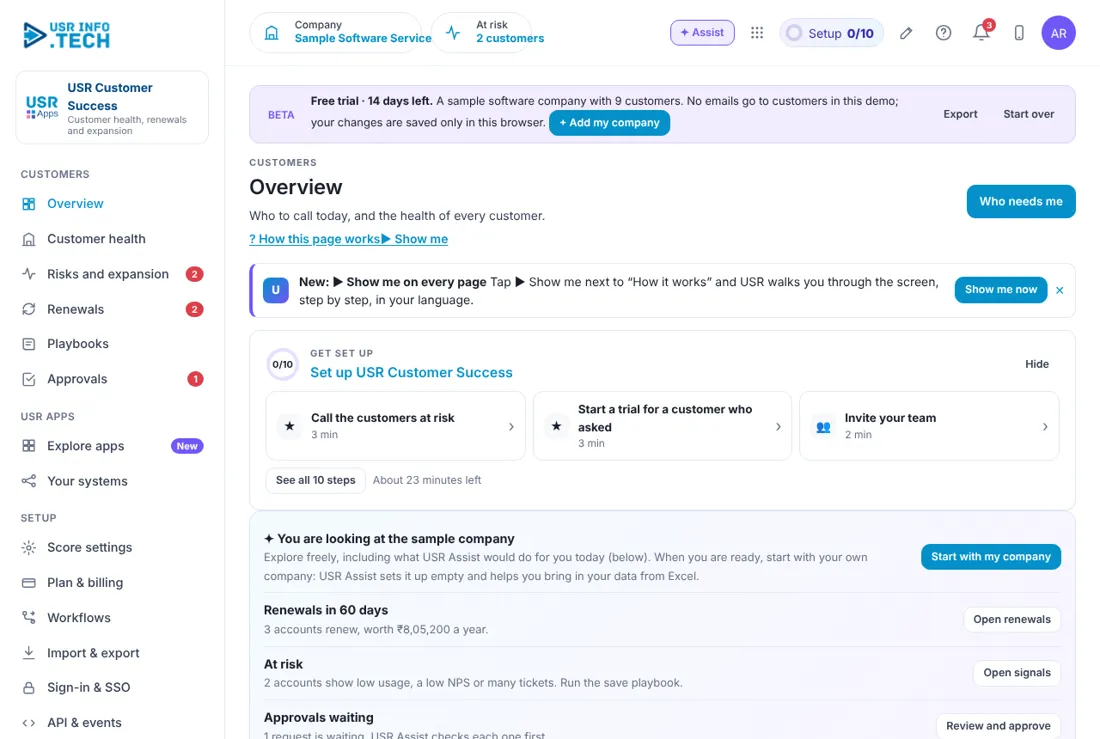
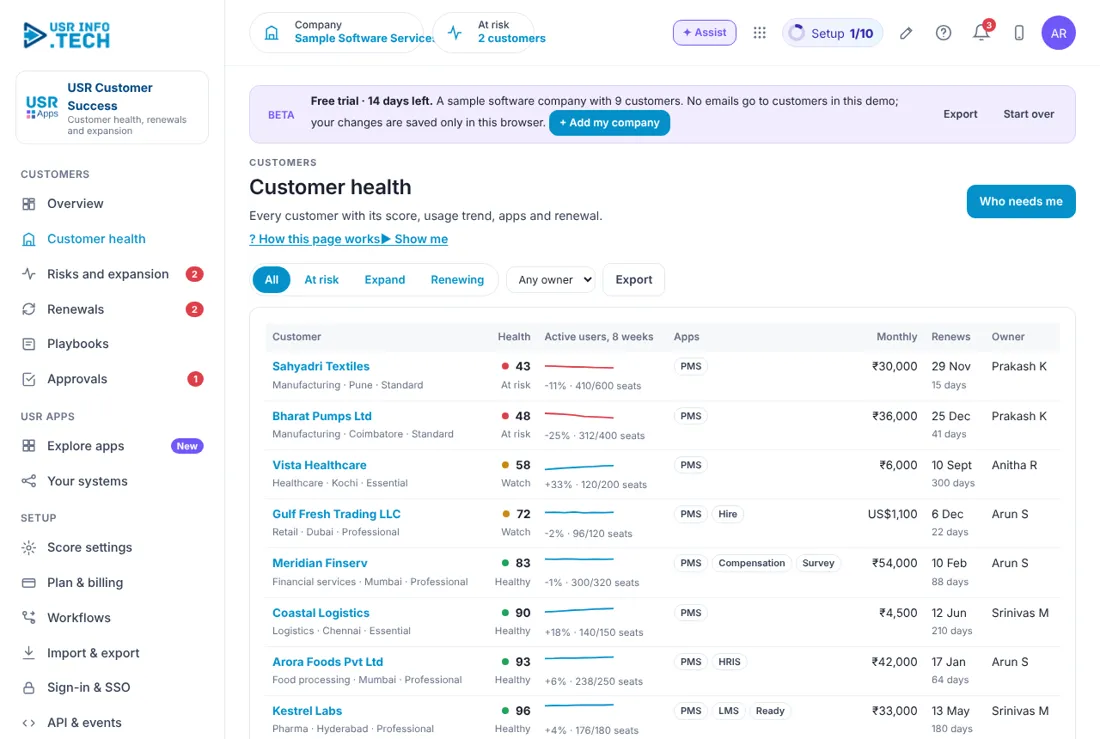
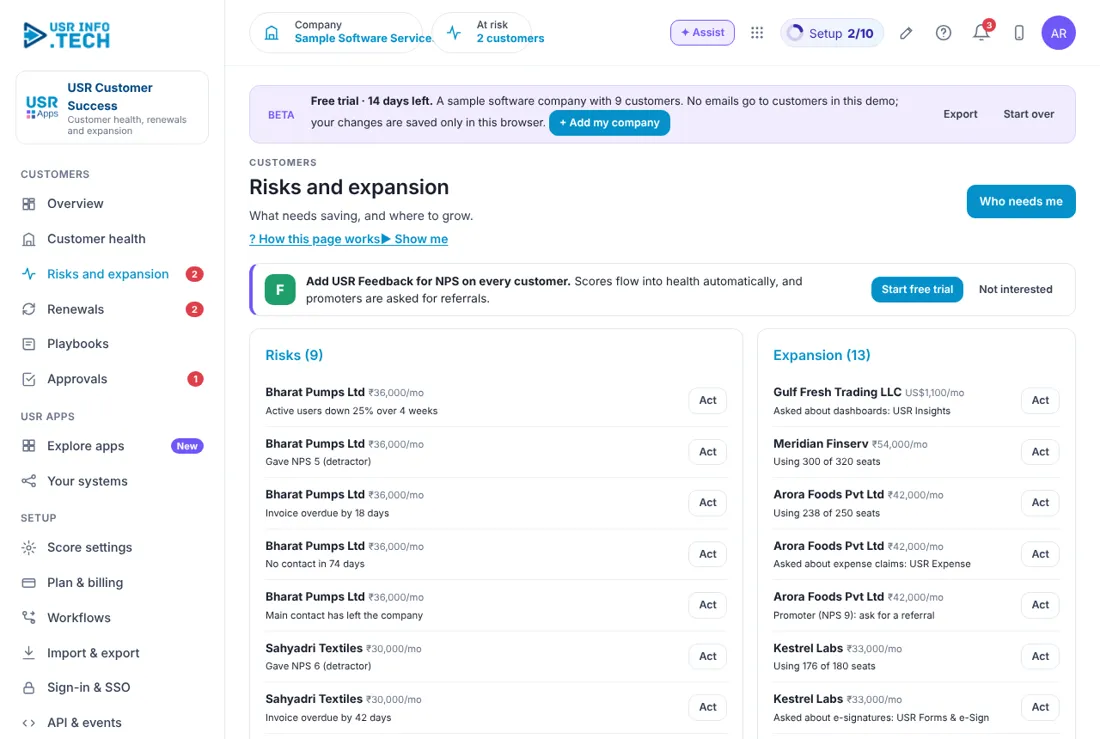
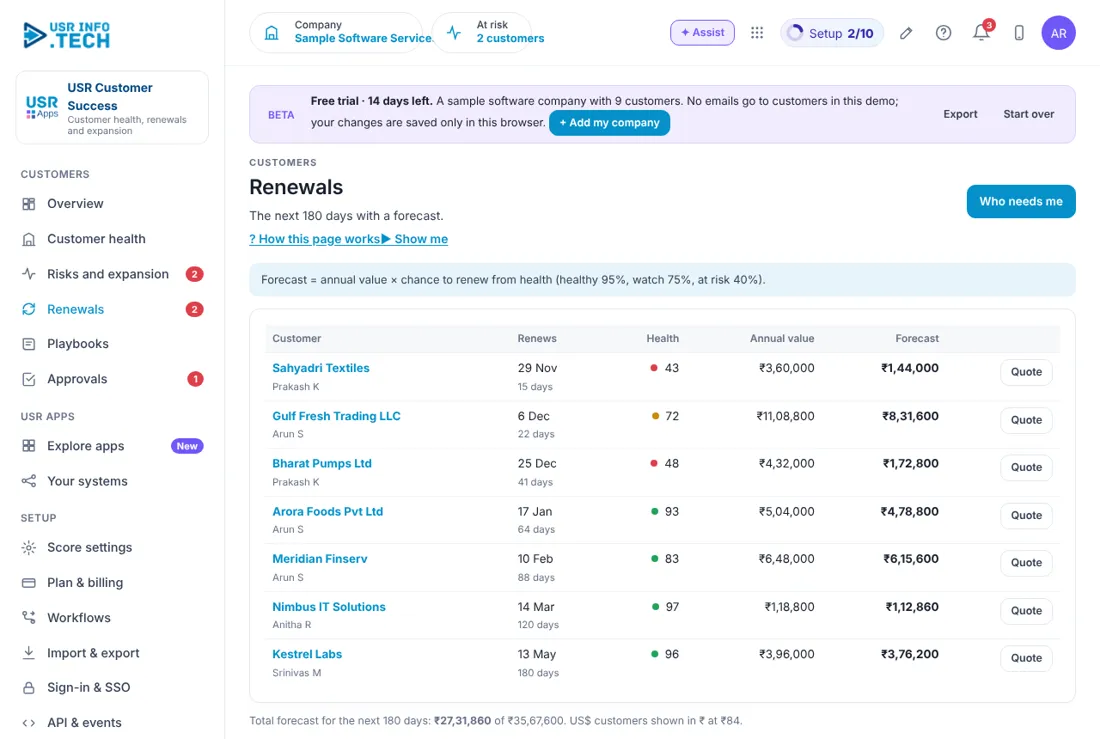
Sample company data. Screens can change as the app improves; the steps stay the same.
Welcome to USR Customer Success
USR Customer Success tells you which customers need a call today. It gives every customer a health score from 0 to 100 using usage, NPS, support tickets, last contact and payments, flags customers at risk and customers ready to buy more, forecasts renewals, and gives your team a playbook to follow for each case.
- Health score for every customer, with a trend of active users
- Risks and expansion signals, ranked by the money at stake
- Renewals with a forecast based on health
- Playbooks for risk save, expansion, renewal and onboarding
- Score settings, so you choose how much each part counts
Key ideas in simple words
- Health score. A number from 0 to 100 for each customer. Below 50 is at risk.
- Healthy, Watch, At risk. The three bands of health, shown in green, amber and red.
- Usage. How many people use the apps, compared with the seats bought.
- NPS. A score from 0 to 10 of how likely the customer is to recommend you.
- Risk. A sign that a customer may leave, such as falling usage or an overdue invoice.
- Expansion. A sign that a customer may buy more, such as using nearly all seats.
- Renewal forecast. The annual value times the chance to renew.
- Playbook. A short list of steps to follow for a case.
Do not wait for the customer to complain
Customers usually go quiet before they leave. Falling users, a low NPS, many tickets or late payments appear weeks before a cancellation. The health score brings these signals together so you can call first.
Money decides who you call first
Call today is ranked by money at stake: risk first, then renewals, then expansion. A small account at risk waits behind a large one.
Forecast with honesty
The renewal forecast is the annual value times the chance to renew: healthy 95%, watch 75%, at risk 40%. It shows what you can expect, not what you hope.
What each role sees
| Role | What you do and see |
|---|---|
| Account owner | Their own customers, Call today, Playbooks. |
| Customer success head | Everything, plus Score settings. |
| Leader | Overview, Customer health and Renewals. |
Manager guide
- Open Overview and read Call today. Make sure each red customer has an owner and a call.
- Open Playbooks and look at Running for each one.
Quick start in 5 steps (about 25 minutes)
- Open USR Customer Success and read Overview: customers, average health, at risk, ready to expand, renewing in 90 days and trials running.
- Open Score settings. Set how much usage, NPS, tickets, last contact and payments count.
- Open Customer health and filter At risk.
- Open Risks and expansion and click Act on a row.
- Open Plan & billing and choose a plan.
Features step by step
5.1 Overview
The day's calls and the health of all customers. Steps: open Overview, click Open next to a customer, make the call.
| Field or button | What it is for |
|---|---|
| Renewals in 60 days, At risk, Approvals waiting | Prompts with a button each. |
| Customers | How many, and the monthly value. |
| Average health | Out of 100. |
| At risk | Number and the monthly value at stake. |
| Ready to expand | Customers with a signal. |
| Renewing in 90 days | Number and yearly value. |
| Trials running | Apps on trial. |
| Call today | Customers ranked by money at stake, each with Open. |
| Health of all customers | Healthy, Watch and At risk. |
| Ask about your customers | Type a question and get an answer. |
| Who needs me | Shows what needs you now. |
Tip: make Call today your first job each morning.
5.2 Customer health
Every customer with their score and trend. Steps: open Customer health, click a filter, click a customer to see the detail.
| Field or button | What it is for |
|---|---|
| Filters | All, At risk, Expand, Renewing, and Any owner. |
| Customer | Name, industry, city and plan. |
| Health | The score and Healthy, Watch or At risk. |
| Active users, 8 weeks | A small chart, the change and seats used. |
| Apps | Which USR apps they use. |
| Monthly | What they pay a month. |
| Renews | The renewal date and days left. |
| Owner | The account owner. |
| Export | Downloads the list. |
Watch out: a low score is a reason to call, not a final verdict.
5.3 Risks and expansion
Every signal in two columns. Steps: open Risks and expansion, click Act next to a signal.
| Field or button | What it is for |
|---|---|
| Risks | Falling users, low NPS, overdue invoices, no contact, or the main contact has left. |
| Expansion | Using nearly all seats, asked about another app, or a promoter you can ask for a referral. |
| Act | Starts the matching playbook. |
| Add USR Feedback | A prompt to add NPS for every customer. |
Tip: ask a promoter for a referral. USR Referrals tracks it.
5.4 Renewals
Upcoming renewals with a forecast. Steps: open Renewals, click Quote for a customer who is ready to renew.
| Field or button | What it is for |
|---|---|
| Customer and owner | Who and who looks after them. |
| Renews | The date and days left. |
| Health | The score. |
| Annual value | The value of the year. |
| Forecast | Annual value times the chance to renew. |
| Quote | Makes a renewal quote in USR Quotes. |
| Total forecast | For the next 180 days. Dollar customers are shown in rupees at ₹84. |
Watch out: start the Renewal playbook 90 days before the date.
5.5 Playbooks
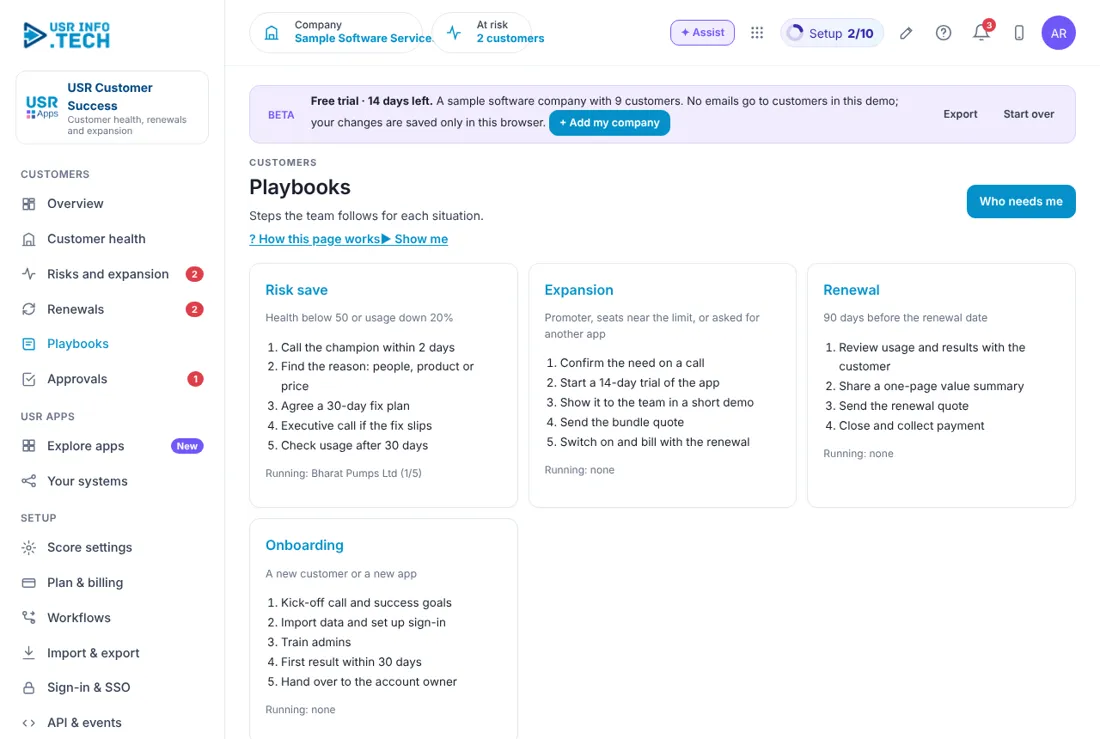
Short lists of steps for common cases. Steps: open Playbooks, read the steps, start one from Risks and expansion.
| Playbook | Steps |
|---|---|
| Risk save | Health below 50 or usage down 20%: call the champion within 2 days, find the reason, agree a 30-day fix plan, executive call if it slips, check usage after 30 days. |
| Expansion | Promoter, seats near the limit or asked for another app: confirm the need, start a 14-day trial, short demo, bundle quote, switch on and bill with the renewal. |
| Renewal | 90 days before renewal: review usage, share a one-page value summary, send the quote, close and collect payment. |
| Onboarding | A new customer or app: kick-off call, import data and sign-in, train admins, first result within 30 days, hand over. |
| Running | Which customers are on each playbook and the step. |
5.6 Score settings
How much each part counts in the health score. Weights are scaled to 100. Steps: open Score settings, change the weights, save.
| Field or button | What it is for |
|---|---|
| Usage (%) | For example 40. |
| NPS (%) | For example 20. |
| Support tickets (%) | For example 15. |
| Last contact (%) | For example 10. |
| Payments (%) | For example 15. |
| Where the data comes from | Usage from every USR app, NPS from USR Feedback, tickets from USR Desk, payments from USR Billing, contacts from here or USR CRM Lite. |
5.7 Plan & billing
One bill covers every USR app through USR Billing.
| Plan | What it gives |
|---|---|
| Free | ₹0 (US$0). Up to 25 customer accounts: health scores and signals. |
| Standard | ₹1,500 (US$18) per user a month: playbooks, renewals forecast, trials. |
| Professional | ₹2,500 (US$30) per user a month: AI answers, custom score weights, CRM and Billing data. |
| Enterprise | Talk to us: many teams, private hosting, custom data sources. |
| Mid-market | 501 to 5,000 users. Volume pricing per user, in INR or USD. |
INR excludes 18% GST. USD is for customers outside India. If a payment fails, you get a reminder on the due date and 3 and 7 days later. After 21 days the account becomes read-only, never deleted, until it is paid.
Leader guide
Open Overview and read Average health and At risk. Open Renewals and read the total forecast.
Cheat sheet
| What to do | Where |
|---|---|
| Who to call | Overview > Call today |
| Save a customer | Risks and expansion > Act |
| Quote a renewal | Renewals > Quote |
| Change the score weights | Score settings |
| See the playbooks | Playbooks |
| Change plan | Plan & billing |
Tips
- Call the red customers first. Ask promoters for a referral. Log every call so last contact stays right.
- Keep the weights simple. Start the renewal playbook 90 days ahead.
If something is not working
| Problem | What to do |
|---|---|
| A customer has no health score | The data may be missing. Check that usage, NPS and tickets are connected. |
| NPS is blank | Add USR Feedback to send NPS surveys. |
| The forecast looks low | It counts at risk customers at 40%. Fix the risks to raise it. |
| A dollar customer shows in rupees | The forecast shows all values in rupees at ₹84 to a dollar. |
Questions people ask
How is the health score worked out? From usage, NPS, support tickets, last contact and payments, with the weights you set in Score settings.
Can I change the weights? Yes, in Score settings. Professional includes custom score weights.
Is there a free plan? Yes. Free covers up to 25 customer accounts, with health scores and signals.
Where does the data come from? From USR apps, USR Feedback, USR Desk, USR Billing and USR CRM Lite.
Glossary
At risk: health below 50. Champion: the main supporter at the customer. Expansion: a chance to sell more. Health score: a number from 0 to 100. NPS: likelihood to recommend, from 0 to 10. Playbook: steps for a case. Renewal: the customer continues for another term.
USR Customer Success shares one record with these apps
No retyping between apps: data entered once flows to the next app, on the same login.
USR Customer Success is part of USR One. Sales & Marketing Suite from ₹499 ($12) per seat a month, or every app in USR One Complete. Free for up to 10 people.
See USR One
