
USR CRM Lite help
USR CRM Lite helps a small sales team keep every enquiry, customer and deal in one place. Enquiries from WhatsApp, email, your website and portals become leads. Good leads become deals that move across a board of stages. Each deal has a next step, so nothing is forgotten. You can make a quote, get a discount approved, send a document to sign, raise an invoice and follow up the payment, all in the same app. It also respects consent: marketing messages go only to people who said yes (DPDP).
See the screens
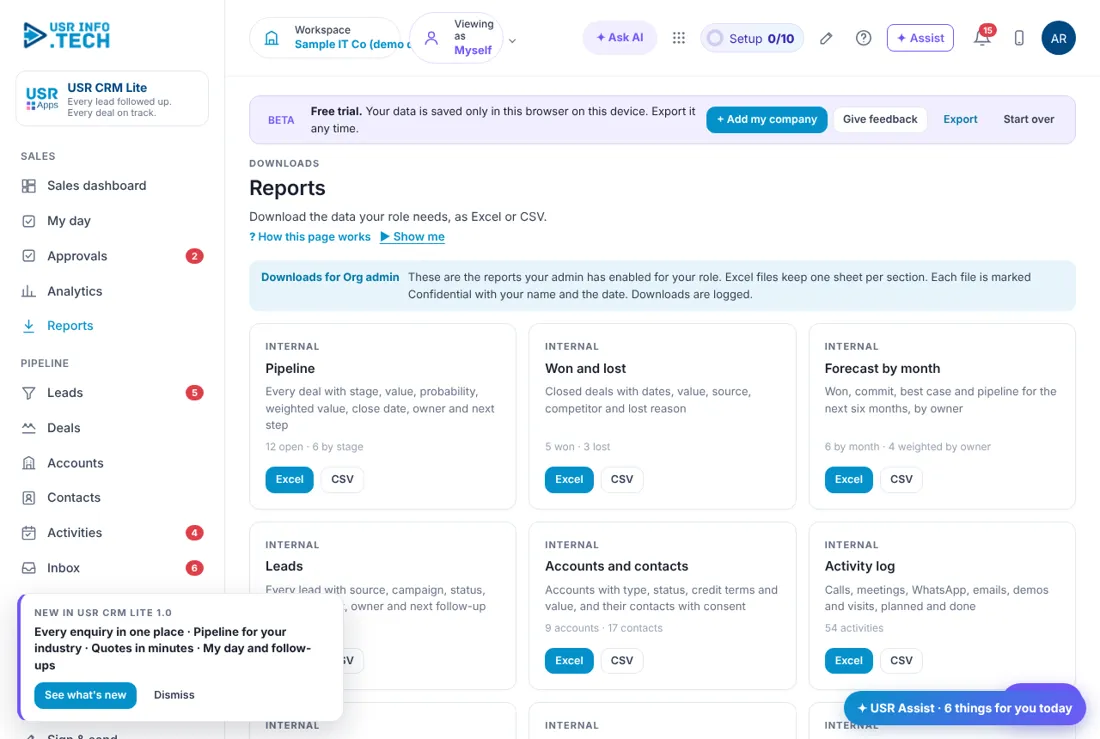
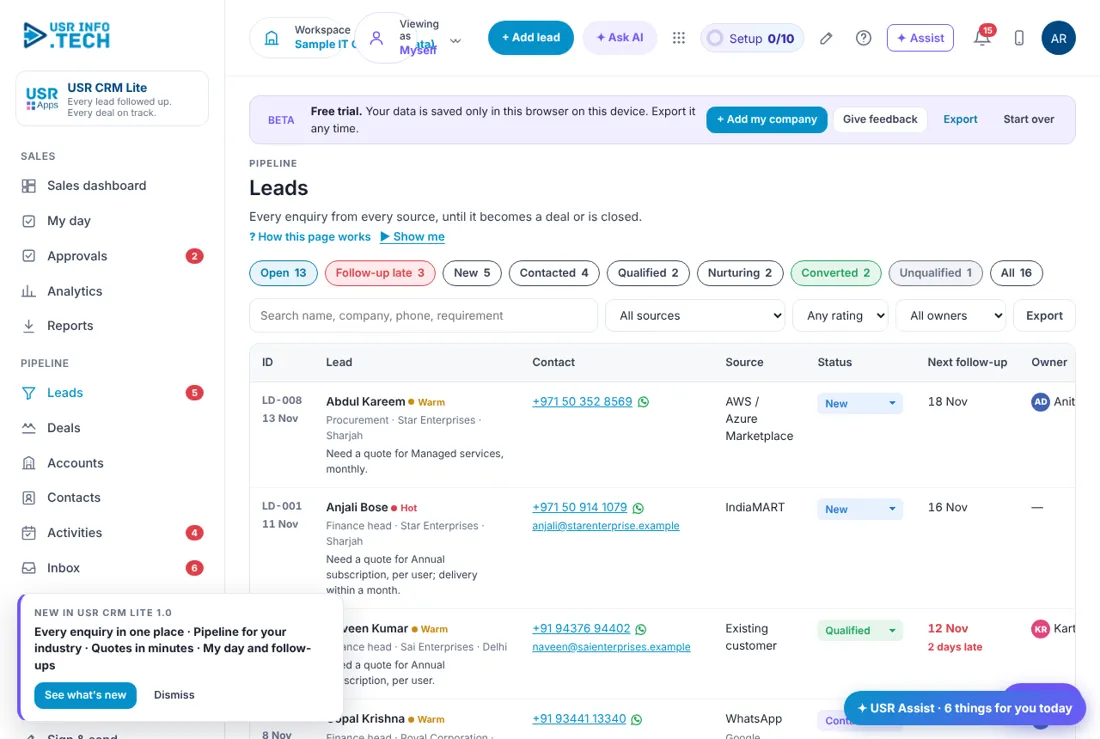
Sample company data. Screens can change as the app improves; the steps stay the same.
Welcome
USR CRM Lite helps a small sales team keep every enquiry, customer and deal in one place. Enquiries from WhatsApp, email, your website and portals become leads. Good leads become deals that move across a board of stages. Each deal has a next step, so nothing is forgotten. You can make a quote, get a discount approved, send a document to sign, raise an invoice and follow up the payment, all in the same app. It also respects consent: marketing messages go only to people who said yes (DPDP).
- Inbox that turns WhatsApp, email, website and portal enquiries into leads
- Pipeline board with stages and a forecast
- Quotes with discount approval, e-sign and invoices with payment reminders
- My day: a daily list of calls and follow-ups, so nothing is missed
- Campaigns that message only people who agreed to hear from you
- Targets and KPIs for each person, linked to USR PMS
A year in USR CRM Lite
| When | What happens | Who |
|---|---|---|
| At the start | Set your pipeline stages. Add products and prices. Invite your team. Bring your data in from Excel. | Admin |
| Every morning | Open My day. Call the leads that are due. Clear overdue follow-ups. | Sales team |
| Every day | Log calls and visits. Move deals to the next stage. Send quotes. | Sales team |
| Every week | Look at Deals going quiet. Check the forecast. Chase unpaid invoices. | Sales manager |
| Every month | Read Analytics. Set next month's targets. | Sales head |
| Every year | Review stages, lost reasons and price list. | Admin |
Key ideas
- Lead. A person or company who may buy, before you know if they are serious.
- Contact. A person you deal with at a company.
- Account. A company that is your customer or prospect.
- Deal. A sale you are working on, with a value and a stage.
- Stage. A step in your sales process, such as Demo done or Negotiation.
- Pipeline. All your open deals, shown by stage.
- Forecast. The value you expect to win, using the chance for each stage.
- Win rate. Deals won as a share of deals won or lost.
- Quote. A priced offer you send to the customer.
- Consent. The customer's yes to receive your marketing messages.
A lead is not yet a deal. A lead is an enquiry. You call, you ask a few questions, and you decide if it is worth your time. Only then do you convert it. Converting a lead creates the account, the contact and the deal for you, so you do not type the same thing twice.
Every deal needs a next step. Deals fail when nobody knows what happens next. USR CRM Lite shows a No next step label on a deal that has none, and Deals going quiet lists deals with no activity for 14 days. You can ask AI to draft a follow-up, and you read it and send it yourself.
Discounts need a second pair of eyes. A quote with a big discount, or a customer on credit, waits for approval from the sales manager or the credit controller. The reason is simple: it protects your margin and your cash.
Consent comes first. Under India's DPDP Act, marketing messages need consent. Lead and contact forms record it. Only people with Yes are included in campaign lists, and an unsubscribe sets it to No.
Features step by step
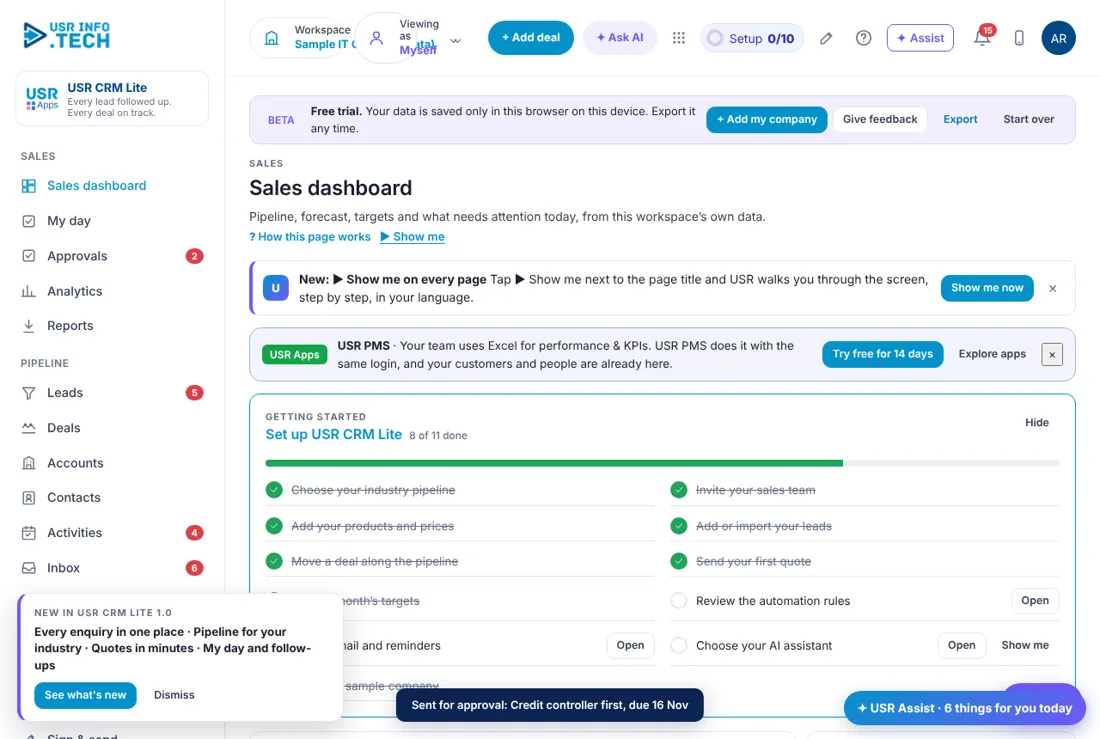
5.1 Sales dashboard
The Sales dashboard shows how your sales are going right now. Getting started: A short checklist to set up the app. Open pipeline: Value of open deals, and the weighted value. Won this month: Value won, against the target. Forecast this month: Won plus the weighted deals that may close. Win rate (90 days): Share of decided deals that you won. Overdue follow-ups: Activities past their date. Pipeline by stage: Bars for each stage. Click a bar to open those deals. Needs attention: Overdue follow-ups, hot leads, next steps, quotes and payments. + Add deal: Create a deal. Watch out: The numbers are for your selected pipeline and this month.
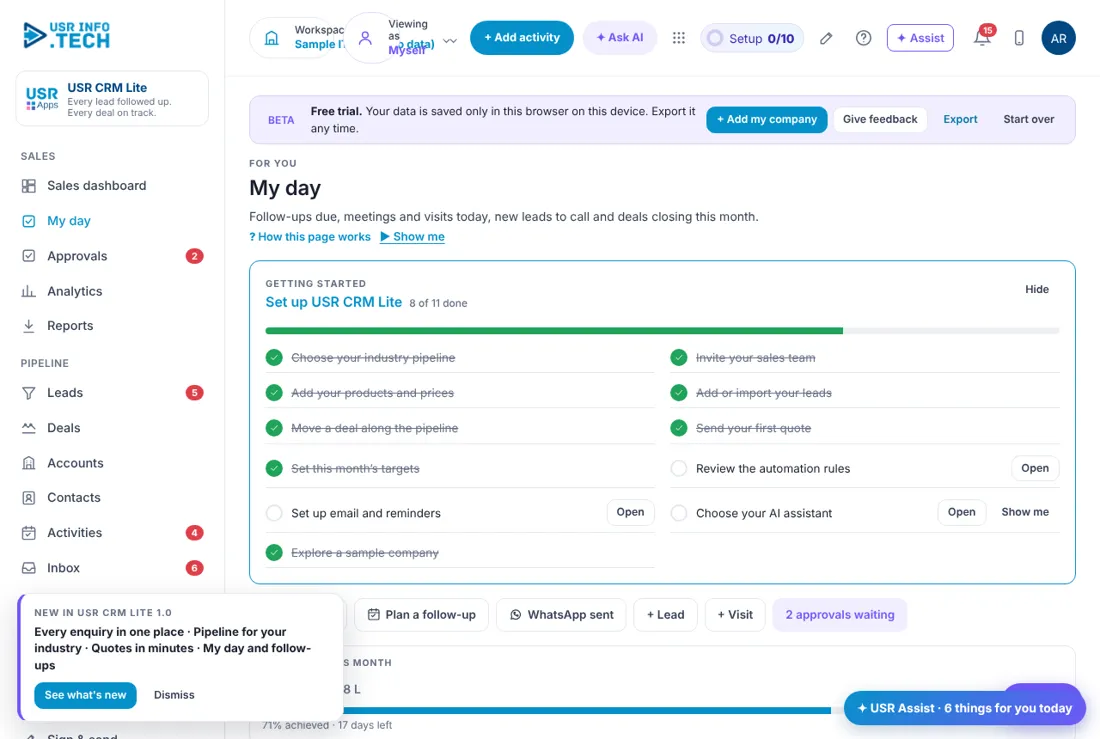
5.2 My day
My day is your personal to-do list for sales. Log a call, Plan a follow-up, WhatsApp sent, + Lead, + Visit: Quick buttons. My target this month: How much you have won against your target. Overdue, Today, New leads, Activities this month: Four numbers. Today's agenda: Overdue and today's activities. Click Done when finished. Leads to call: New leads due for a call. My deals closing this month: Deals you expect to close. Watch out: Overdue items show in red.
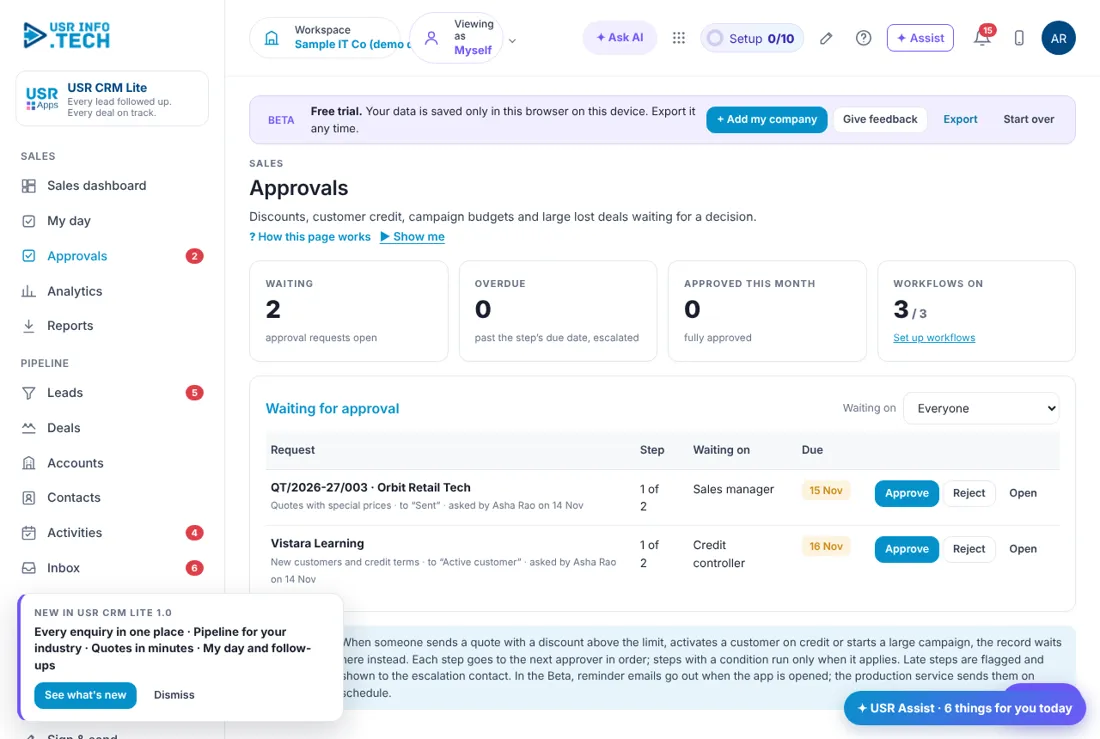
5.3 Approvals
Approvals holds quotes and customers that need a manager's yes. Waiting, Overdue, Approved this month: Counts. Workflows on: How many approval flows are switched on. Request: What needs approval, who asked and when. Step, Waiting on: Which approver is next, such as Sales manager or Credit controller. Approve, Reject, Open: Your choices. Watch out: Late approvals are escalated.
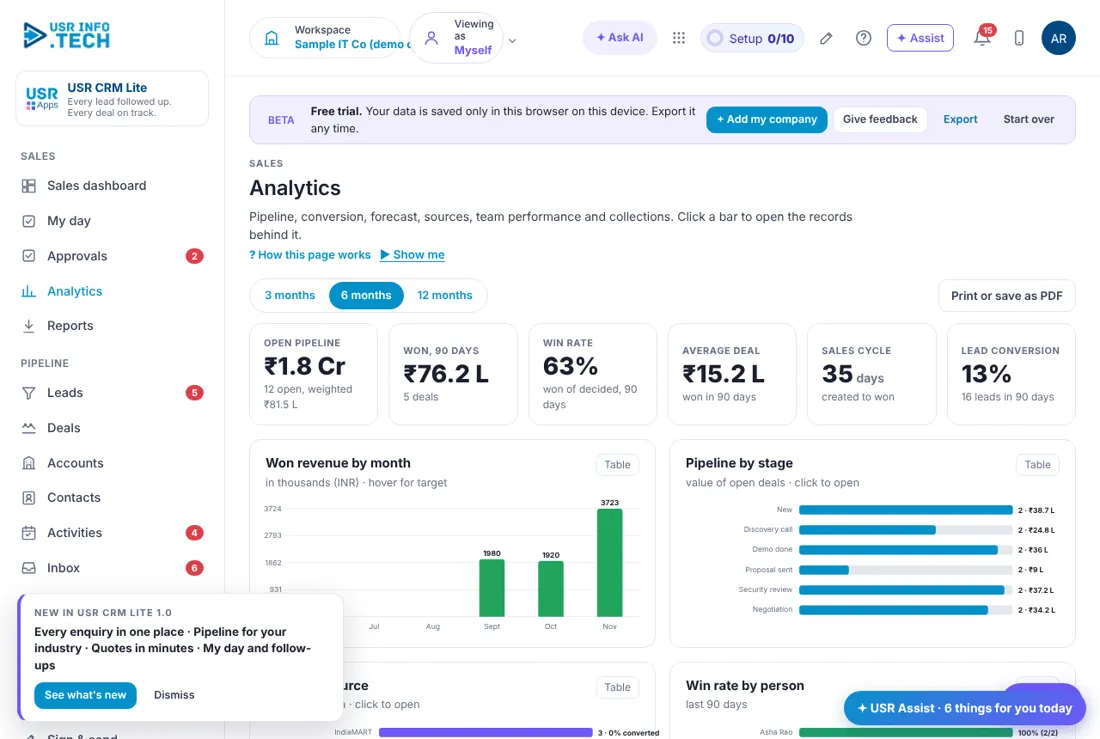
5.4 Analytics
Analytics shows how your sales performed over 3, 6 or 12 months. 3, 6 or 12 months: Choose the period. Open pipeline, Won, Win rate, Average deal, Sales cycle, Lead conversion: Six key numbers. Won revenue by month: A bar chart. Pipeline by stage: Value in each stage. Leads by source: Where leads come from, and how many converted. Win rate by person: How each person is doing. Print or save as PDF: Take it out. Watch out: Small teams have small numbers, so look at the trend.
5.5 Leads
Leads are enquiries you have not yet turned into deals. Filters: Open, Follow-up late, New, Contacted, Qualified, Nurturing, Converted, Unqualified, All. Search box: Name, company, phone or requirement. Lead: Name, rating (Hot, Warm, Cold), role, company and what they need. Contact: Phone with a WhatsApp link, and email. Source: Where the lead came from. Status: Change it from the drop-down. Next follow-up: The date, with days late in red. Owner: Who is handling it. Convert: Make it an account, contact and deal. Watch out: Only message people whose consent is Yes.
5.6 Deals
Deals is your pipeline board. Deals going quiet: Deals with no activity for 14 days or more, with a Draft follow-up button. Board, List, Forecast: Three views. Stage columns: New, Discovery call, Demo done, Proposal sent, Security review, Negotiation, with the chance of winning. Deal card: Name, account, value, expected close date, owner and days in stage. No next step: A warning on a deal with nothing planned. Watch out: AI only drafts. You send.
5.7 Accounts
Accounts are the companies you sell to. Filters: All, Prospect, Credit review, Active customer, On hold, Inactive. Account: Name, tier, type, industry, city and territory. Status: Change it from the drop-down. Owner: Who looks after it. Open pipeline, Won (12 months), Outstanding: Money figures. Last contact: When you last spoke. Watch out: Search by GSTIN to avoid duplicates.
5.8 Contacts
Contacts are the people at your accounts. Birthdays this week: A reminder for a short greeting. Contact: Name, role and decision role. Account: The company. Phone / email: With a WhatsApp link. Consent: Opted in, Opted out or Not asked. Owner: Who looks after the contact. Watch out: Do not message people who opted out.
5.9 Activities
Activities are your calls, meetings, visits, WhatsApp messages and follow-ups. Agenda, Done, All: Three views. All types, All owners: Filters. Overdue, Tomorrow, Next 7 days: Groups of activities. Done: Mark an activity finished. + Add activity: Plan a new one. Watch out: Overdue items show in red.
5.10 Inbox
Inbox collects messages from your channels so you can turn them into leads. New, Converted to lead, Linked, Ignored, All: Filters. Message card: Sender, channel, time and the message. Convert to lead: Make a lead from it. Reply on WhatsApp or email: Answer from the app. Ignore: Remove spam. Where messages come from: WhatsApp Business, Email capture, Website form, IndiaMART, JustDial and Missed-call number. Rules for new messages: Assign leads round-robin and plan the first call. Watch out: Some channels start working when your own company is live.
5.11 Products & prices
Products & prices is your price list. Product or service: Name, code and category. Unit: User per year, project, month, person-day, year. Price (INR) and Price (USD): Both shown. A floor price is the lowest allowed. GST: The rate, such as 18%. HSN / SAC: The tax code. Sold (12 months): How many you sold. Watch out: Check GST and HSN codes with your CA.
5.12 Quotes
Quotes are priced offers for your customers. Sent, awaiting reply: Value waiting. Accepted: Value accepted but not yet invoiced. Waiting for approval: Discounts above your limit. Filters: All, Draft, Approval, Sent, Accepted, Rejected, Expired. Quote: Number, account, deal, dates, discount, total and status. below floor: Warns when a price is under the floor. Watch out: A discount above the limit needs approval.
5.13 Invoices & collections
Invoices & collections helps you get paid. Outstanding: Money owed to you. Overdue: Money past its due date. Collected this month: What came in. Days to collect: The average days to be paid. Ageing of outstanding: A bar by days past due. Invoice: Number, customer, dates, total, balance, status and reminders sent. Send due reminders now: Remind customers. + New invoice: Create an invoice. Watch out: Finance sees the same numbers in USR Books.
5.14 Sign & send
Sign & send lets people sign documents on any device. Document types: Mutual NDA, Employee confidentiality and NDA, Vendor registration form, Data processing terms, Policy acknowledgement and Your own PDF. Waiting for me, Out for signature, Expiring in 7 days, Completed this month: Four numbers. + Send a document: Start. Watch out: Check legal terms for your country.
5.15 Field visits
Field visits plans and records visits by your field team. Beat plan, All visits: Two views. Date and owner: Choose a day and a person. Planned, Completed, Orders booked, Collected: Four numbers. + Plan visit: Add a visit. Watch out: Ask staff before using location features.
5.16 Campaigns
Campaigns tracks marketing spend and what it brought. Spent, Leads from campaigns, Won from campaigns, Can be messaged: Four numbers. Campaign: Name, channel, dates, status, spent against budget, leads, converted, won and return. Write an email: Send to opted-in people. WhatsApp list (CSV): Download opted-in numbers. Consent comes first: Only Yes is included. Watch out: Never message people without consent.
5.17 Targets & KPIs
Targets & KPIs shows each person's goals and results. Progress, Set targets, KPI feed to USR PMS: Three tabs. Month: Choose the month. Revenue won, Deals won, New pipeline created, Activities done: Team totals. Person rows: Revenue, deals, pipeline, activities, visits and collections for each person. + Set target: Add a target. Watch out: These figures feed USR PMS goals.
5.18 Support desk
Support desk records your own customers' tickets. Service desk, Our requests to USR support: Two tabs. Open, Past SLA, Waiting on customer, Resolved this month, Satisfaction: Five numbers. Ticket: Number, subject, requester, priority, status and SLA. + New ticket: Log a ticket. Watch out: Full support is in USR Desk.
5.19 Apps & data flow
Apps & data flow shows how your tools connect and what could be easier. USR apps in use, Outside tools, Manual data flows, Logins your team manages: Four numbers. How your data flows: A picture: green lines for live USR apps, blue for connected tools, dotted for manual work. Do more with one login: Choices to move to a USR app or to connect your tool instead. Watch out: Nothing changes until you choose.
5.20 Bring your data in
Bring your data in lets you import from Excel or another tool. Order: 1 Accounts, 2 Contacts, 3 Products and prices, 4 Leads, 5 Deals. Where is your data today?: Any Excel or Google Sheet, or a named tool. Download template: A sample file. Upload your file: Check the matched columns and the preview, then import. Duplicates: Same phone, email or company name are skipped. Watch out: For more than 10,000 records, write to support@usrinfo.tech.
5.21 Users & access
Users & access shows who can use the app and what they can see. Internal and External: Staff, and outside people such as channel partners and customers. User: Name and email. Role: Sales head, Sales manager, Sales executive and so on. Company, Workspaces, Status: Where the person works. View as: See the app as that person sees it. + Invite user: Add someone. Watch out: External people see only what is shared with their company.
5.22 Pipelines & fields
Pipelines & fields changes your stages and lists. Deal stages: Name and chance of winning for each stage. Won and Lost are always last. + Stage: Add a stage. What your team calls a deal: For example Deal or Opportunity. Main currency: INR or another. Lists: Lead sources, lost reasons, territories and default quote terms. Save, Discard changes, Reset: Keep, undo or go back to the standard. Watch out: Too many stages slow your team.
5.23 Plan & billing
Plan & billing is for your own company. In the sample company it only explains how to start. Sample company: Billing does not apply. Add your own company to start a 14-day free trial. USR One: USR CRM Lite is included in USR One, with every other USR app, at ₹149 (US$1.8) per employee a month, with a yearly saving of 2 months. INR excludes 18% GST. Watch out: One bill covers every USR app through USR Billing.
If something is not working
| Problem | What to do |
|---|---|
| A lead has no owner | Open the lead and choose an owner, or set a round-robin rule in Inbox. |
| I cannot convert a lead | Check that the lead has a name and a phone number. |
| A quote is stuck | Open Approvals. A discount above the limit waits for the manager. |
| Import skipped some rows | Rows with the same phone, email or company name are skipped as duplicates. |
| I cannot send a campaign message | Check the consent. Only contacts with Yes can be messaged. |
Questions people ask
Can I import from Excel or another CRM? Yes. Use Bring your data in. Import accounts first, then contacts and products, then leads and deals.
Does AI send messages? No. AI drafts and you read, change and send.
Can my channel partner use it? Yes. Invite them as an External user with a role. They see only what is shared.
Is marketing consent recorded? Yes. Only Yes is included in campaign lists, and an unsubscribe sets it to No.
What does it cost? It is included in USR One at ₹149 (US$1.8) per employee a month. INR excludes 18% GST.
Glossary
Lead: An enquiry before it is a deal. Deal: A sale you are working on. Stage: A step in your sales process. Pipeline: Your open deals by stage. Forecast: What you expect to win. Win rate: Deals won out of deals decided. Consent: A yes to receive marketing. GSTIN: The GST number of a business.
USR CRM Lite shares one record with these apps
No retyping between apps: data entered once flows to the next app, on the same login.
USR CRM Lite is part of USR One. Sales & Marketing Suite from ₹499 ($12) per seat a month, or every app in USR One Complete. Free for up to 10 people.
See USR One
