
USR Webinars & Events help
USR Webinars & Events runs your webinars and in-person events from invitation to follow-up. People register on your page, get reminders by email and WhatsApp, and after the event you see who came, who stayed long or asked a question, and send the right follow-up to each one.
See the screens
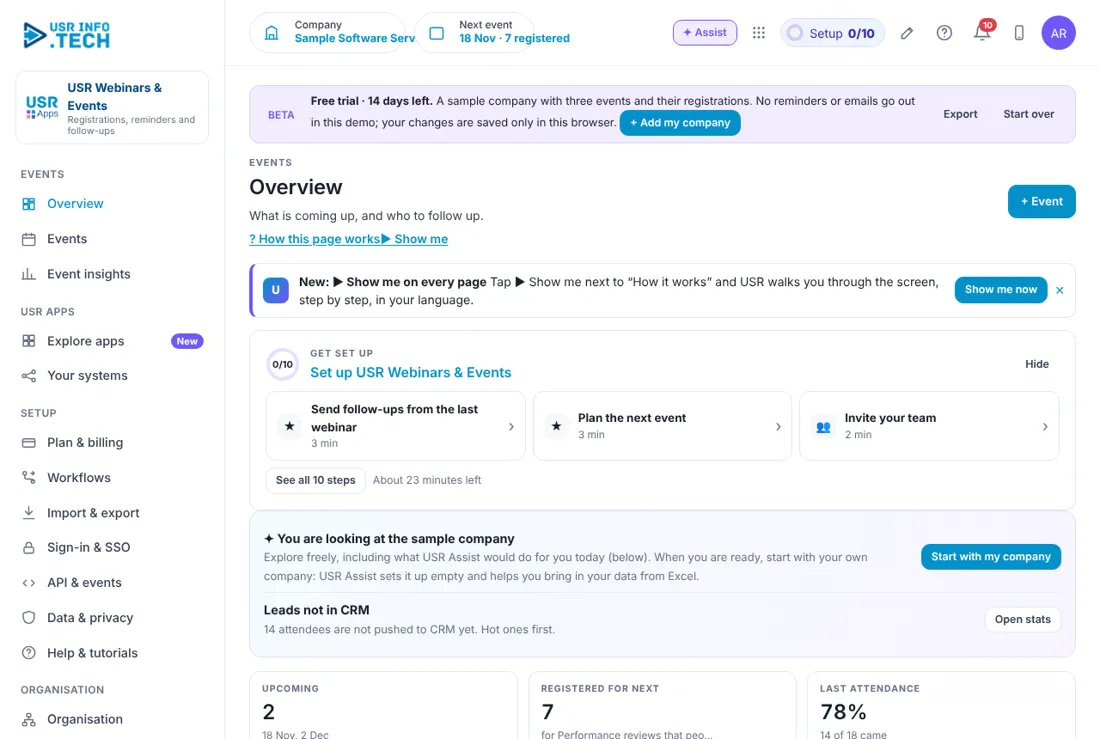
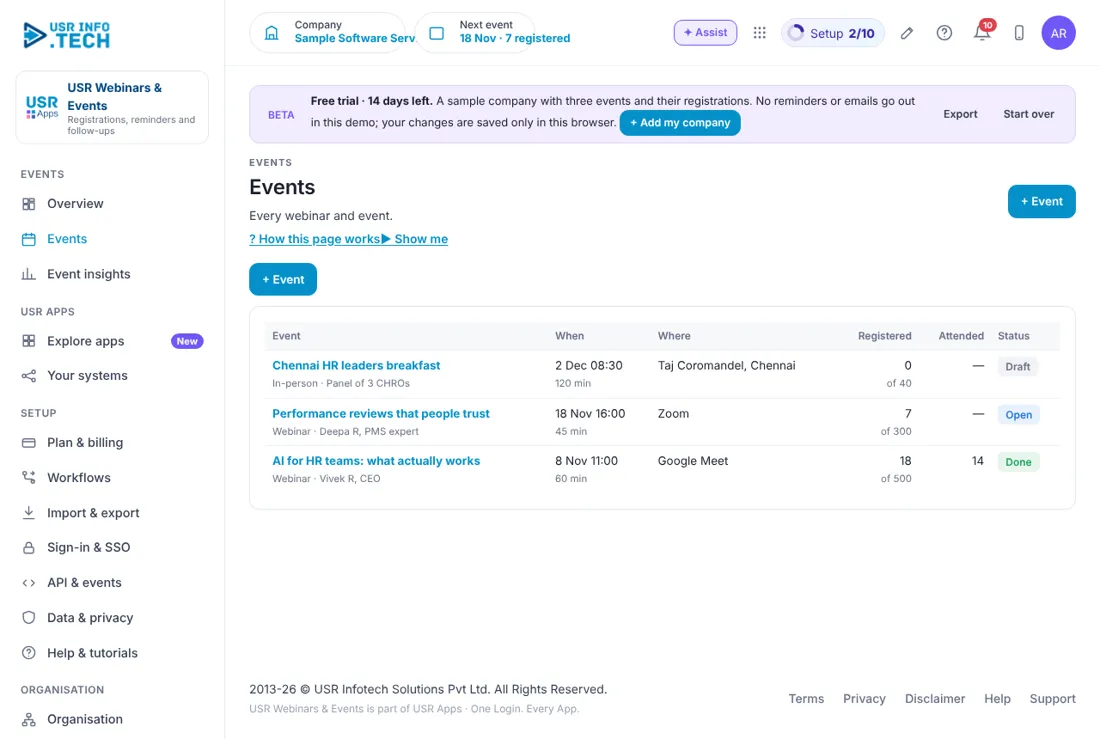
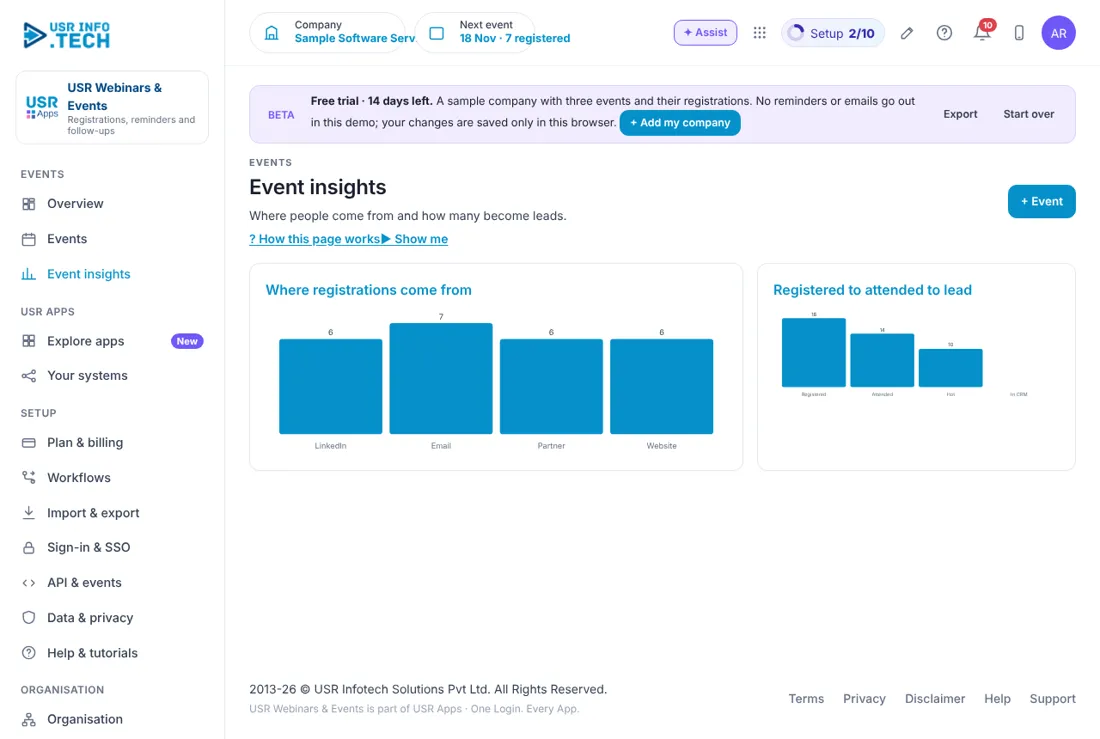
Sample company data. Screens can change as the app improves; the steps stay the same.
Welcome to USR Webinars & Events
USR Webinars & Events runs your webinars and in-person events from invitation to follow-up. People register on your page, get reminders by email and WhatsApp, and after the event you see who came, who stayed long or asked a question, and send the right follow-up to each one.
OUR USP: One sign-in, one record, one bill. USR Webinars & Events is part of USR One, so your people, customers and numbers are never typed twice. AI helps in every app through USR Assist, and AI never takes a decision for you. ISO 27001, ISO 42001 and DPDP Ready.
- A registration page for each event, with a link to share
- Reminders: straight away, one day before and one hour before, also on WhatsApp
- Attendance import and ratings after the event
- Hot leads: people who stayed long or asked a question, sent to USR CRM Lite
- Follow-up plan for hot, attended and no-show people, and for existing customers
USR ONE: USR Webinars & Events sends hot leads to USR CRM Lite, sends reminders through USR Notify and tells USR Sales Assistant when someone shows interest. Existing customers are sent to their account owner, not to sales.
A year in USR Webinars & Events
Events need a steady plan. This is how a year looks in USR Webinars & Events.
| When | What happens | Who |
|---|---|---|
| At the start of the year | Plan the events for the year, with topics, dates and hosts. | Marketing head |
| Before each event | Create the event, share the link and check registrations. | Marketing |
| On the day | Check the reminders went out. Host the event. | Host |
| After each event | Import attendance and send follow-ups the same week. | Marketing, sales |
| Every month | Read Event insights: where registrations come from and how many become leads. | Marketing head |
| When someone asks a question | Pass the hot lead to sales within 2 days. | Sales |
Key ideas in simple words
CONCEPT: Event. A webinar or an in-person event with a date, place and seats.
CONCEPT: Registration. A person signing up on your event page.
CONCEPT: Reminder. A message before the event: straight away, a day before, an hour before.
CONCEPT: Attendance. Who came and for how many minutes.
CONCEPT: Hot lead. A person who stayed 75% or more of the time, or asked a question.
CONCEPT: No-show. A person who registered but did not come.
CONCEPT: Follow-up plan. What each group receives after the event.
CONCEPT: Source. Where a registration came from, such as LinkedIn, Email, Partner or Website.
Reminders fill the room
Many people who register forget to come. Reminders straight away, a day before and an hour before, also on WhatsApp, bring more of them to the event. Attendance of around three in four is a good result.
Follow up while they remember
The best time to follow up is within two days. A hot lead is added to USR CRM Lite for the salesperson, with a recording and a demo link. People who attended get the recording, slides and a 14-day trial link. No-shows get a kind note and the recording.
Customers are not leads
If a registered person is already your customer, they are sent to their account owner and not to sales. This stops a customer receiving a sales call they do not need.
What each role sees
| Role | What you do and see |
|---|---|
| Marketing | Events, Event insights and follow-ups. |
| Sales | Hot leads sent to USR CRM Lite. |
| Account owner | Their own customers who registered. |
| Attendee | The registration page and the reminders. |
HR and admin guide: features step by step
5.1 Overview
What it is: Overview shows your next events and the leads from the last one.
#### How to do it
- Open Overview.
- Click To CRM next to a hot lead.
#### Fields and buttons
| Field or button | What it is for |
|---|---|
| Leads not in CRM | Prompt with an Open stats button. |
| Upcoming | Events coming up and their dates. |
| Registered for next | People registered for the next event. |
| Last attendance | Percentage who came, and how many. |
| Hot leads from last | People who stayed long or asked a question. |
| Not yet followed up | People who have not received a follow-up. |
| Rating | Average out of 5 for the last event. |
| Coming up | The next events, each with Open. |
| Hot leads from the last event | Each person with minutes watched and any question, with a To CRM button. |
| Ask about events | Type a question and get an answer. |
TIP: Pass hot leads to sales within 2 days.
5.2 Events
What it is: Events lists every event with its date, place, registrations and status.
#### How to do it
- Open Events.
- Click + Event.
- Fill in the details and save.
- Click the event name to open it.
#### Fields and buttons
| Field or button | What it is for |
|---|---|
| Event | Name, type, and host or panel. |
| When | Date, time and length. |
| Where | Zoom, Google Meet or the venue. |
| Registered | Registrations out of seats. |
| Attended | How many came. |
| Status | Draft, Open or Done. |
| + Event | Adds an event. |
WATCH OUT: A Draft event is not shown to the public until you set it Open.
5.3 An open event
What it is: An open event shows registrations, reminders and the registration page.
#### How to do it
- Open the event.
- Click Share link and post it.
- Check Registrations each day.
#### Fields and buttons
| Field or button | What it is for |
|---|---|
| Registered, From LinkedIn, Existing customers | Counts at the top. |
| Registrations | Each person with role, source and date. |
| Reminders | Confirmation, one day before and one hour before, with how many were sent. Also on WhatsApp. |
| Registration page | The public page with Name, Work email, Company and Role. |
| Share link | Copies the link to share. |
| + Registration | Adds a person yourself. |
TIP: Share the link on LinkedIn a week before, and again the day before.
5.4 A finished event
What it is: A finished event shows who came, who is hot, and the follow-up plan.
#### How to do it
- Open the event.
- Click Import attendance.
- Click Send follow-ups.
#### Fields and buttons
| Field or button | What it is for |
|---|---|
| Registered, Attended, Hot, Rating | Counts and the average rating. |
| Attendees and follow-up | All, Hot, Attended and No-show. |
| Person | Name, role, company, and whether a customer. Questions they asked are shown. |
| Source and Minutes | Where they came from and how long they stayed. |
| Follow-up | Hot, Attended or No-show. |
| Follow-up plan | Hot: lead in USR CRM Lite, call within 2 days, plus recording and demo link. Attended: recording, slides and a 14-day trial link. No-show: a kind note with the recording. Customers: sent to their account owner. |
| Import attendance | Brings in who came from your webinar tool. |
| Send follow-ups | Sends each group its follow-up. |
WATCH OUT: Send follow-ups within two days, while people remember the event.
5.5 Event insights
What it is: Event insights shows where registrations come from and how many become leads.
#### How to do it
- Open Event insights.
- Compare the bars.
#### Fields and buttons
| Field or button | What it is for |
|---|---|
| Where registrations come from | LinkedIn, Email, Partner and Website. |
| Registered to attended to lead | Registered, Attended, Hot and In CRM. |
TIP: Put more effort into the source that brings the most registrations.
5.6 Plan & billing
What it is: Plan & billing shows your plan, invoices and the plans you can choose. One bill covers every USR app through USR Billing.
#### How to do it
- Open Plan & billing.
- Choose a plan.
#### Fields and buttons
| Field or button | What it is for |
|---|---|
| Free | ₹0 (US$0). 1 event a month, up to 100 registrations. |
| Standard | ₹1,500 (US$18) a month: unlimited events, reminders by email, attendance import. |
| Professional | ₹3,000 (US$36) a month: WhatsApp reminders, hot leads to CRM, follow-up sequences, AI. |
| Enterprise | Talk to us: many brands, your own domain, private hosting. |
| Mid-market | 501 to 5,000 users. Volume pricing per user, in INR or USD. |
| Prices | INR excludes 18% GST. USD is for customers outside India. |
WATCH OUT: If a payment fails, you get a reminder on the due date and 3 and 7 days later. After 21 days the account becomes read-only, never deleted, until it is paid.
If something is not working
| Problem | What to do |
|---|---|
| Nobody has registered | Check the event is Open, not Draft, and the link was shared. |
| Reminders did not go out | Check the plan. WhatsApp reminders need Professional. |
| Attendance is empty | Click Import attendance after the event. |
| A customer was sent to sales | Customers go to their account owner. Check the person is marked as a customer. |
Questions people ask
#### Events
Can I run in-person events?
Yes. An event can be a webinar or in-person, with a venue and seats.
Who gets a follow-up?
Hot, attended and no-show people each get their own message. Customers go to their account owner.
#### Using the app
Is there a free plan?
Yes. Free allows 1 event a month, up to 100 registrations.
Does it send WhatsApp reminders?
Yes, in the Professional plan.
Glossary: words you will see
| Word | Meaning |
|---|---|
| Event | A webinar or in-person event. |
| Follow-up plan | What each group receives after the event. |
| Hot lead | Stayed 75% or more, or asked a question. |
| No-show | Registered but did not come. |
| Registration | Signing up for an event. |
| Source | Where a registration came from. |
USR Webinars & Events shares one record with these apps
No retyping between apps: data entered once flows to the next app, on the same login.
USR Webinars & Events is part of USR One. Sales & Marketing Suite from ₹499 ($12) per seat a month, or every app in USR One Complete. Free for up to 10 people.
See USR One
