
USR Sales Assistant help
USR Sales Assistant tells each salesperson who to talk to today and why. It reads signals such as a prospect opening your demo five times, writes a call brief and a follow-up message for you to check, and keeps a list of prospects that have gone quiet. Every draft is for a person to review before it is sent.
See the screens
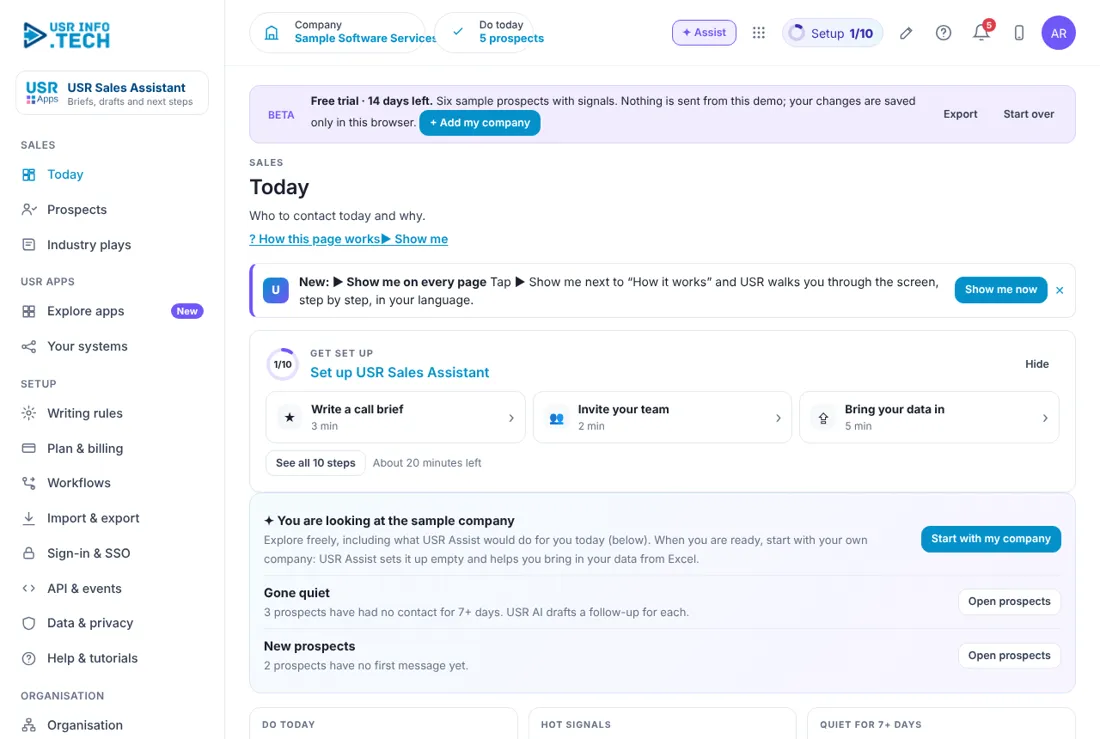
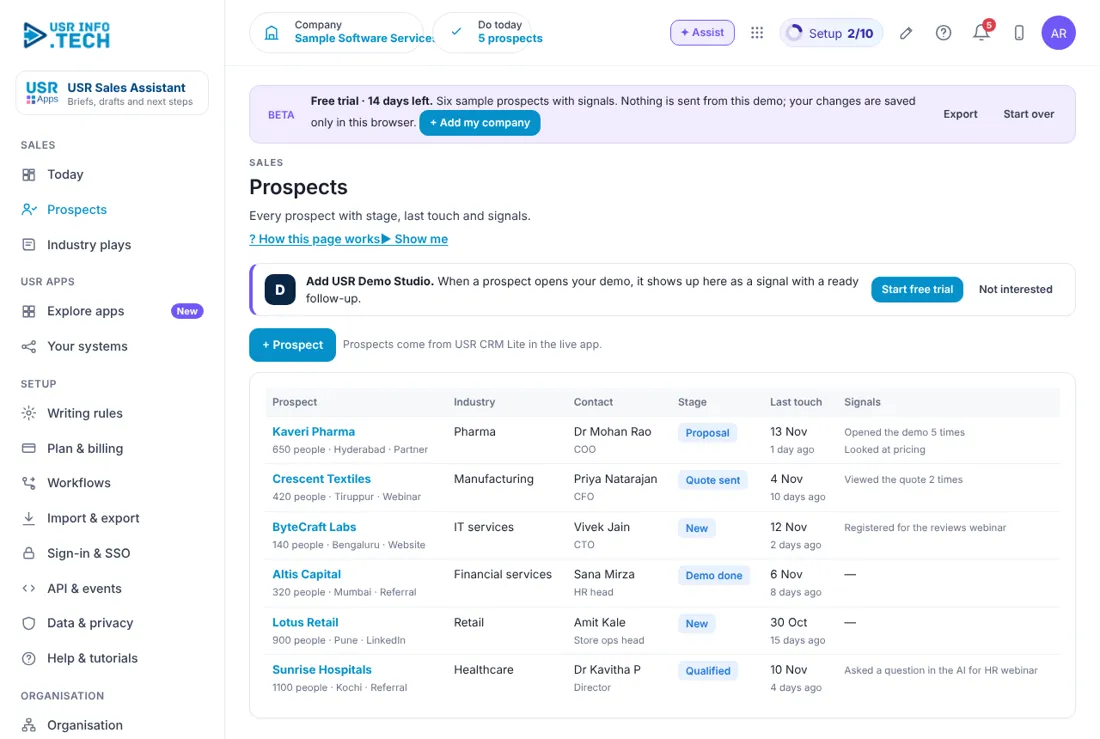
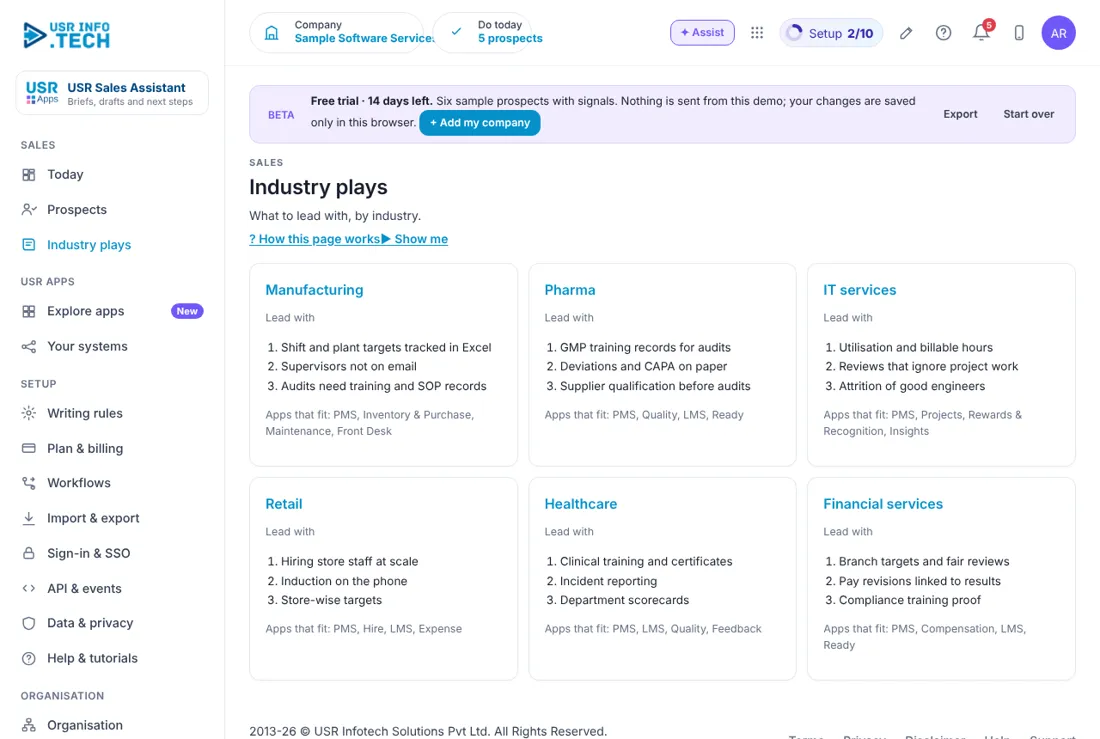
Sample company data. Screens can change as the app improves; the steps stay the same.
Welcome to USR Sales Assistant
USR Sales Assistant tells each salesperson who to talk to today and why. It reads signals such as a prospect opening your demo five times, writes a call brief and a follow-up message for you to check, and keeps a list of prospects that have gone quiet. Every draft is for a person to review before it is sent.
- A Do today list of hot signals and prospects that have gone quiet
- Call briefs and follow-up drafts written by AI, in your tone
- Prospect list with stage, last touch and signals
- Industry plays: what to lead with, and which apps fit
- Writing rules that keep drafts safe: no competitor names, no guarantees, no unverified numbers
Key ideas in simple words
- Prospect. A person at a company who might buy.
- Signal. Something a prospect did, such as opening the demo or registering for a webinar.
- Hot signal. A signal from the last 2 days.
- Gone quiet. A prospect with no contact for the quiet days you set, for example 7.
- Call brief. A short note on the prospect to read before a call.
- Draft. A message the AI writes for you. You always check it.
- Industry play. What to lead with for an industry, and which apps fit.
- Writing rules. Rules that go with every request to the AI.
The best time to follow up is when they show interest
A prospect who opens your demo five times or reads the pricing is interested now. The Do today list puts those prospects first, with a ready draft.
AI drafts, people decide
USR Sales Assistant never sends a message by itself. Every draft is for a person to check before sending. The Writing rules stop it from naming competitors, promising results or quoting numbers it cannot verify.
Sell to the industry's problem
Industry plays list the three problems to lead with for each industry, such as GMP training records for pharma, and which USR apps fit.
What each role sees
| Role | What you do and see |
|---|---|
| Salesperson | Today, Prospects and Industry plays. |
| Sales head | Everything, plus Writing rules and Plan & billing. |
| Admin | Set-up pages and billing. |
Manager guide
- Open Today and read Quiet for 7+ days. Ask each salesperson to follow up.
- Open Writing rules. Choose the tone and the number of quiet days.
Quick start in 5 steps (about 20 minutes)
- Open USR Sales Assistant and read Today: do today, hot signals, quiet for 7+ days, drafts, briefs ready and meetings summarised.
- Open Writing rules. Choose the tone, the quiet days and your signature.
- Open Prospects. Click + Prospect, or let them come from USR CRM Lite.
- Open Today and click Draft or Open next to a prospect.
- Open Plan & billing and choose a plan.
Features step by step
5.1 Today
The salesperson's daily list. Steps: open Today, click Draft next to a prospect, read and edit the draft, then send it from your mail.
| Field or button | What it is for |
|---|---|
| Gone quiet and New prospects | Prompts with an Open prospects button. |
| Do today | Signals and quiet prospects together. |
| Hot signals | Signals in the last 2 days. |
| Quiet for 7+ days | Prospects with no contact. |
| Drafts this week | Messages written for you. |
| Briefs ready | Call briefs written, out of all prospects. |
| Meetings summarised | Meeting notes with next steps. |
| Do today list | Each prospect with the reason, a Draft button and an Open button. |
| Prospects by stage | A bar for each stage. |
| Ask about your pipeline | Type a question and get an answer. |
Tip: start every morning here.
5.2 Prospects
Everyone you are selling to, with stage and signals. Prospects come from USR CRM Lite in the live app. Steps: open Prospects, click a prospect to see the brief and the drafts.
| Field or button | What it is for |
|---|---|
| Prospect | Company, number of people, city and source. |
| Industry | The industry. |
| Contact | Name and role. |
| Stage | New, Qualified, Demo done, Proposal, Quote sent. |
| Last touch | Date and days ago. |
| Signals | What they did, such as opened the demo. |
| + Prospect | Adds a prospect. |
Watch out: keep the stage up to date in USR CRM Lite so the list stays right.
5.3 Industry plays
What to lead with for each industry and which apps fit. Steps: open Industry plays, read the card for your prospect's industry before a call.
| Field or button | What it is for |
|---|---|
| Industry card | Manufacturing, Pharma, IT services, Retail, Healthcare, Financial services. |
| Lead with | Three problems to open with. |
| Apps that fit | Which USR apps to suggest. |
5.4 Writing rules
Shape every draft the AI writes. Steps: open Writing rules, choose a tone and set the quiet days, write your signature and save.
| Field or button | What it is for |
|---|---|
| Tone | Warm and respectful, or Direct and brief. |
| Quiet after (days) | When a prospect counts as quiet, for example 7. |
| Signature | The name and company at the end of messages. |
| Never write | No competitor names, no guaranteed results, no unverified numbers. |
Watch out: every draft is for a person to check before sending.
5.5 Plan & billing
One bill covers every USR app through USR Billing.
| Plan | What it gives |
|---|---|
| Free | ₹0 (US$0). 20 briefs and drafts a month. |
| Standard | ₹499 (US$6) per salesperson a month: unlimited briefs and drafts, do-today queue. |
| Professional | ₹999 (US$12) per salesperson a month: meeting notes to CRM, voice notes, signals from Demo Studio and Webinars. |
| Enterprise | Talk to us: your own playbooks, approved wording, private hosting. |
| Mid-market | 501 to 5,000 users. Volume pricing per user, in INR or USD. |
INR excludes 18% GST. USD is for customers outside India. If a payment fails, you get a reminder on the due date and 3 and 7 days later. After 21 days the account becomes read-only, never deleted, until it is paid.
Leader guide
Open Today and look at Quiet for 7+ days and Prospects by stage.
Cheat sheet
| What to do | Where |
|---|---|
| See who to call | Today > Do today |
| Write a draft | Today > Draft |
| Know the industry | Industry plays |
| Set the tone | Writing rules |
| Change plan | Plan & billing |
Tips
- Check every draft before you send it. Send the follow-up the same day as the signal.
- Keep the Writing rules short and clear. Read the quiet list every week.
If something is not working
| Problem | What to do |
|---|---|
| No prospects show | Prospects come from USR CRM Lite. Add them there, or click + Prospect. |
| A draft names a competitor | This should not happen. Check Writing rules, edit the draft and tell support. |
| A draft has a wrong number | Edit it. Every draft is for a person to check before sending. |
| Signals from the demo do not show | Add USR Demo Studio and the Professional plan. |
Questions people ask
Does the AI send messages by itself? No. Every draft is for a person to check and send.
Will it promise results? No. Writing rules stop guaranteed results, competitor names and unverified numbers.
Is there a free plan? Yes. Free gives 20 briefs and drafts a month.
Where do prospects come from? From USR CRM Lite, or add them yourself.
Glossary
Call brief: a note to read before a call. Draft: a message written by AI for you to check. Hot signal: a signal from the last 2 days. Industry play: what to lead with for an industry. Prospect: a possible buyer. Signal: something a prospect did.
USR Sales Assistant shares one record with these apps
No retyping between apps: data entered once flows to the next app, on the same login.
USR Sales Assistant is part of USR One. Sales & Marketing Suite from ₹499 ($12) per seat a month, or every app in USR One Complete. Free for up to 10 people.
See USR One
