
USR Quotes help
USR Quotes lets your sales team make a quote from your price book, get a discount approved, send it for e-signature, and then follow the customer until they are live. It shows which quotes are stuck, so no deal is forgotten.
See the screens
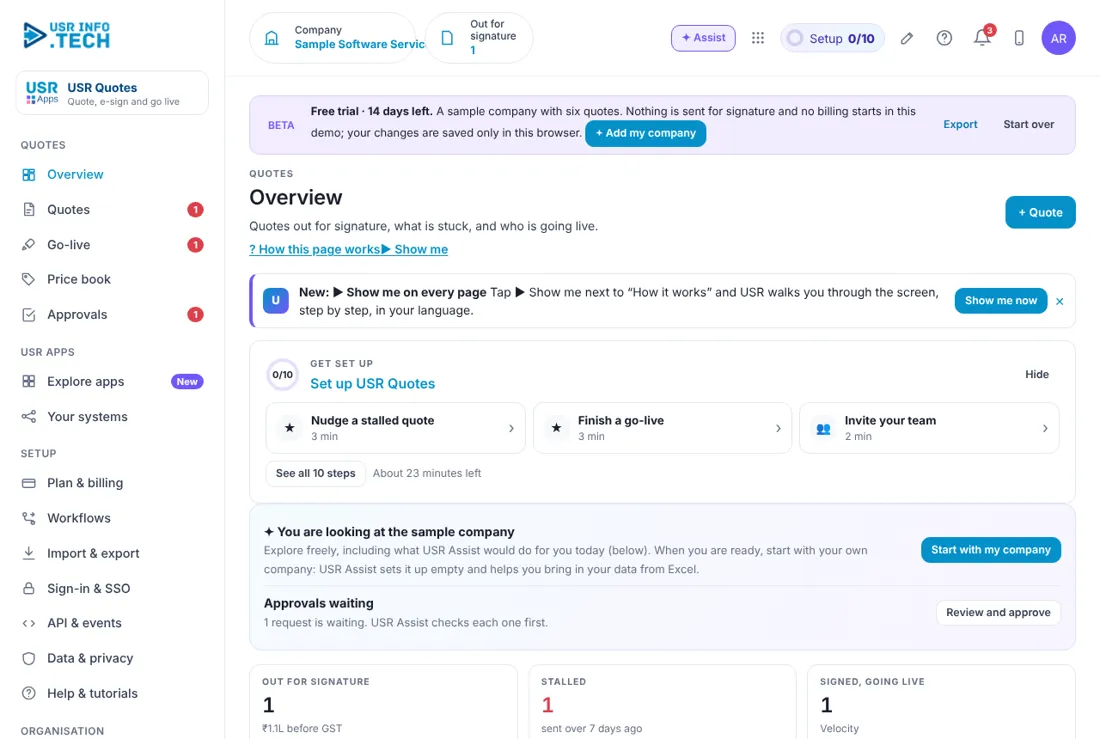
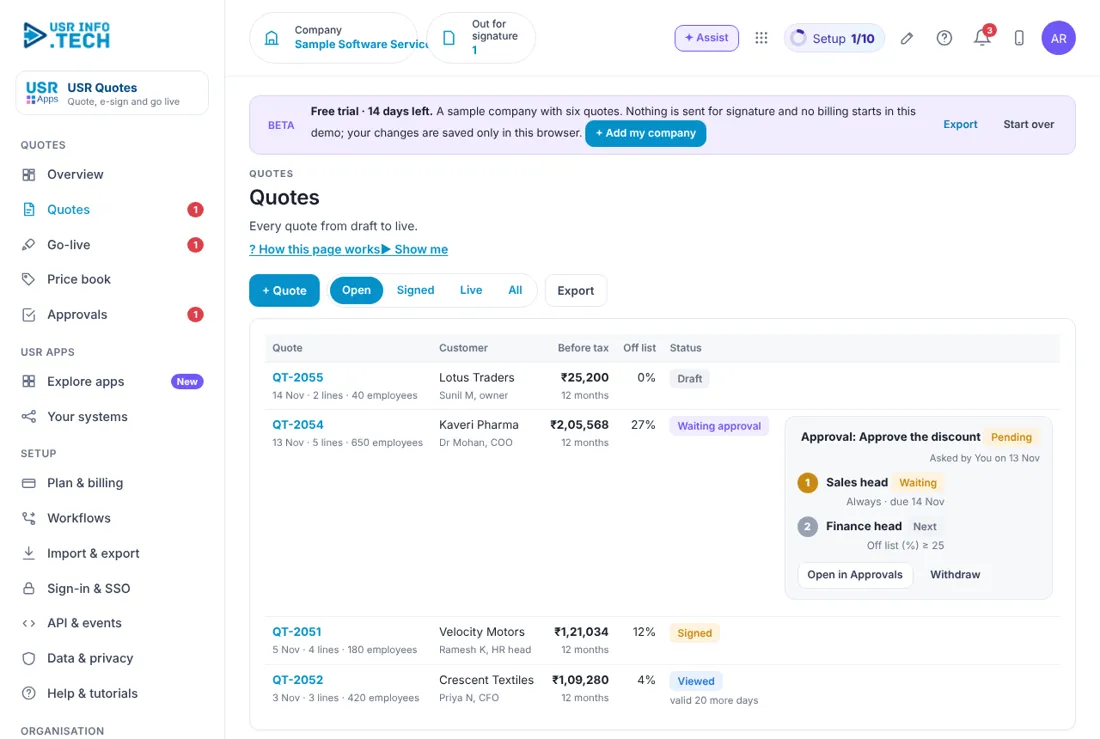
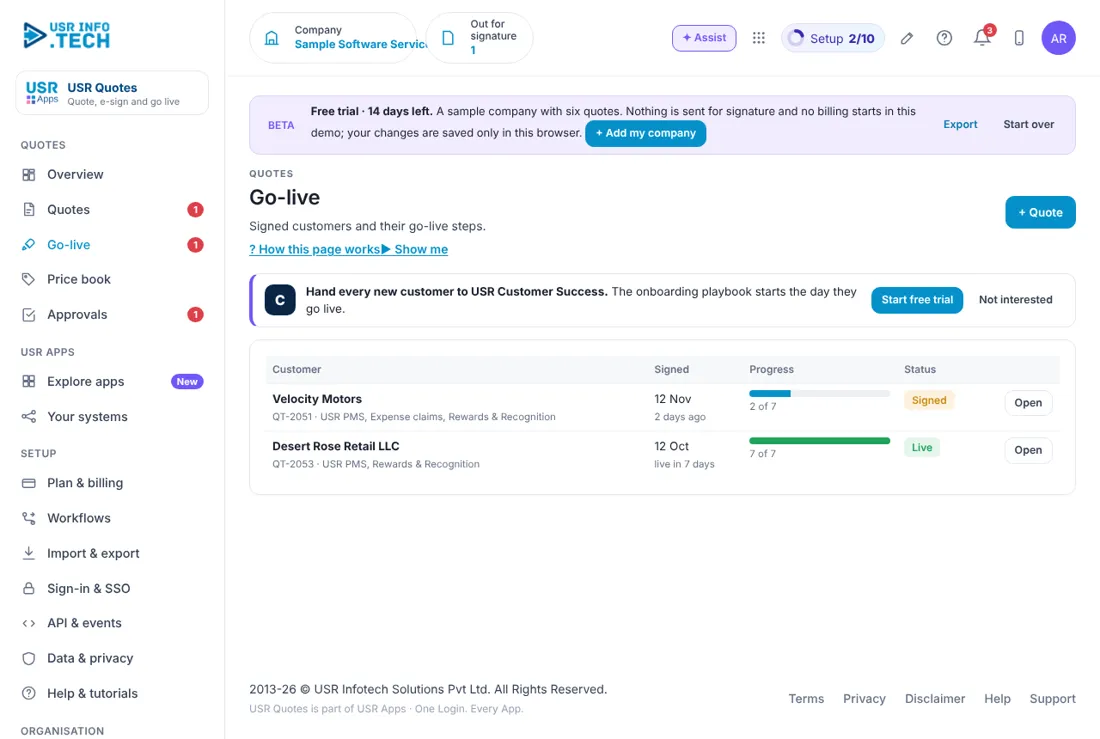
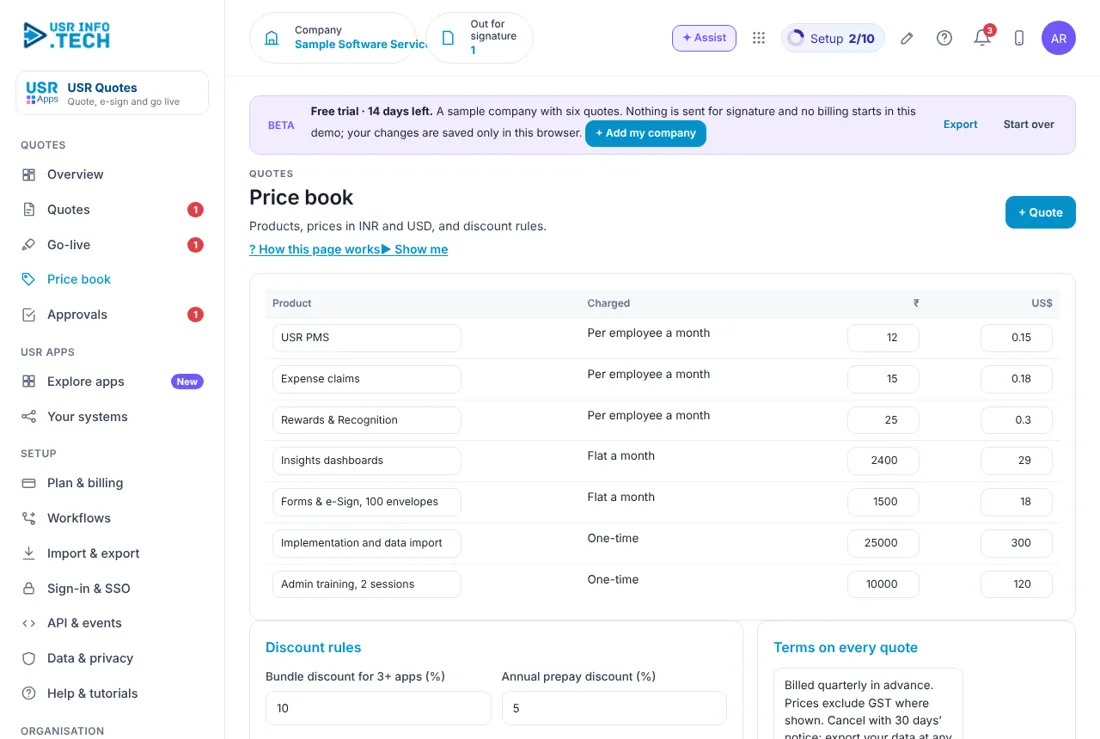
Sample company data. Screens can change as the app improves; the steps stay the same.
Welcome to USR Quotes
USR Quotes lets your sales team make a quote from your price book, get a discount approved, send it for e-signature, and then follow the customer until they are live. It shows which quotes are stuck, so no deal is forgotten.
- Quotes made from a price book in INR and USD
- Discount rules, with approval above a limit you set
- E-signature, with a nudge for quotes nobody has opened
- Go-live checklist that follows a signed quote to the first bill
- Hand-over to USR Customer Success and USR Billing
Key ideas in simple words
- Quote. A priced offer to a customer, with lines, discount and terms.
- Price book. The list of your products and their prices, in rupees and dollars.
- Off list. The discount as a percentage off the list price.
- Approval. A manager's decision needed before a big discount is sent.
- E-signature. The customer signs on screen, so no printing.
- Stalled quote. A quote sent more than 7 days ago with no reply.
- Go-live. The steps after signing until the customer starts using the app.
- Bundle discount. A discount when the customer buys 3 or more apps.
A quote should be quick and correct
Many deals are lost because a quote is late or has a wrong price. The Price book keeps prices in one place, so everyone quotes the same price, in rupees and in dollars.
Discounts need a limit
Set the discount above which a quote needs approval. In the sample it is 15% off list. A second approver, such as the Finance head, can be added for deeper discounts, for example 25% and more.
A signed quote is not the end
The customer is not a customer until they are live and paying. The Go-live page shows each signed quote with its steps, such as 2 of 7 done, until billing starts.
What each role sees
| Role | What you do and see |
|---|---|
| Salesperson | Quotes and Go-live for their own customers. |
| Sales head | Overview, Price book, Approvals and Go-live. |
| Finance head | Approvals for deep discounts. |
| Customer | The quote link, where they view and sign. |
Manager guide
- Open Overview and read Needs a push. Click Nudge on a quote that has been viewed but not signed.
- Open Approvals. Read the discount and click Approve, Send back or Reject.
Quick start in 5 steps (about 25 minutes)
- Open USR Quotes and read the Overview: out for signature, stalled, signed, waiting approval, live and days from sent to live.
- Open Price book. Enter each product, how it is charged and its price in ₹ and US$.
- Click + Quote. Choose the customer and the products, and save.
- Open Go-live and finish the steps for each signed quote.
- Open Plan & billing and choose a plan.
Features step by step
5.1 Overview
Shows quotes that need a push and how many are signed and live. Steps: open Overview, click Nudge or Go live on a quote.
| Field or button | What it is for |
|---|---|
| Out for signature | Quotes sent and their value before GST. |
| Stalled | Quotes sent more than 7 days ago. |
| Signed, going live | Signed quotes that are not yet live. |
| Waiting approval | Discounts waiting for a decision. |
| Live this quarter | Customers live and their value. |
| Sent to live | Average days from sent to live. |
| Needs a push | Each quote with a Nudge or Go live button. |
| Quotes by stage | Draft, Waiting, Sent, Viewed, Signed and Live. |
| Ask about quotes | Type a question and get an answer. |
Tip: look at Needs a push every morning.
5.2 Quotes
Lists every quote with its customer, value, discount and status. Steps: open Quotes, click + Quote, choose the customer and the products, send it for signature.
| Field or button | What it is for |
|---|---|
| Open, Signed, Live, All | Filters. |
| Quote | Number, date, lines and number of employees. |
| Customer | The company and the contact. |
| Before tax | The value before GST and the term, such as 12 months. |
| Off list | The discount percentage. |
| Status | Draft, Waiting approval, Signed or Viewed. |
| Approval box | Who must approve, with Open in Approvals and Withdraw. |
| + Quote and Export | Add a quote, or download the list. |
Watch out: a discount above the limit goes to approval and cannot be sent until it is approved.
5.3 Go-live
Follows each signed quote through its steps until the customer is live and billing starts. Steps: open Go-live, click Open on a customer, tick each step as it is done.
| Field or button | What it is for |
|---|---|
| Customer and quote | Who and which apps. |
| Signed | The date signed. |
| Progress | Steps done, such as 2 of 7. |
| Status | Signed or Live. |
| Open | Opens the checklist. |
| Hand to USR Customer Success | A prompt to start the onboarding playbook. |
Tip: hand every new customer to USR Customer Success on the day they go live.
5.4 Price book
The list of what you sell and its price, with your discount rules and terms. Steps: open Price book, edit a price or a rule, save.
| Field or button | What it is for |
|---|---|
| Product and Charged | Per employee a month, Flat a month or One-time. |
| ₹ and US$ | The price in each currency. |
| Bundle discount for 3+ apps (%) | For example 10. |
| Annual prepay discount (%) | For example 5. |
| Approval needed above (% off list) | For example 15. |
| Quotes valid for (days) | For example 30. |
| Terms on every quote | Text added to each quote. |
Watch out: a price change applies to new quotes. Old quotes keep their price.
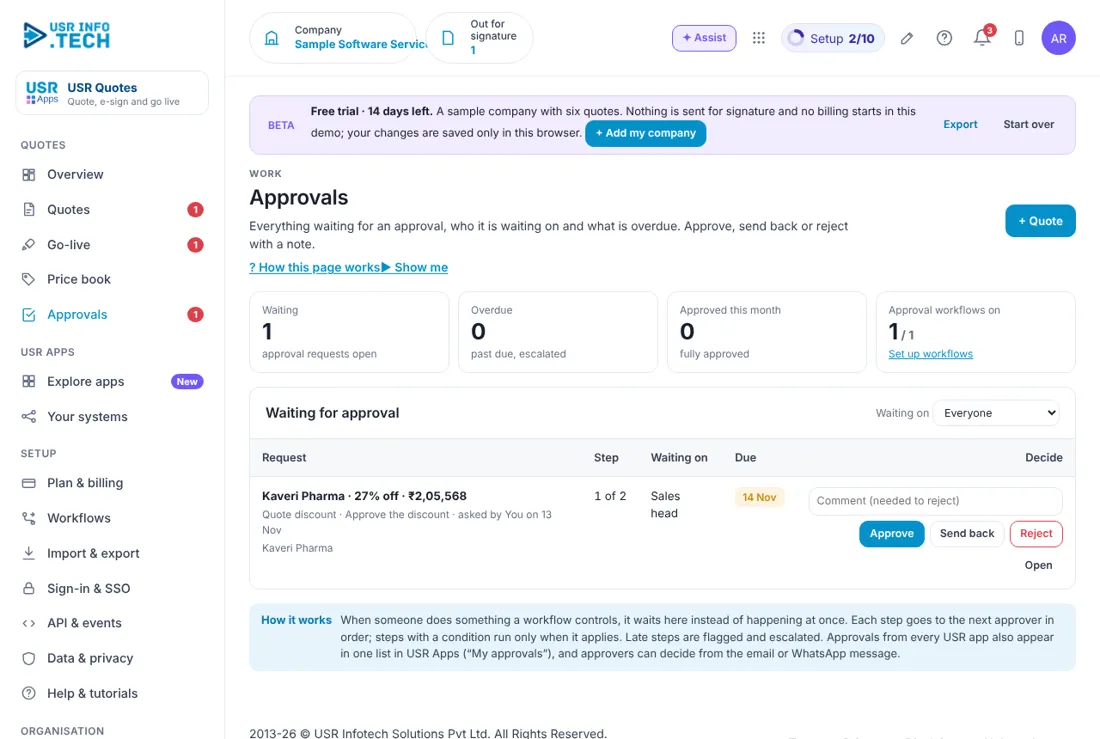
5.5 Approvals
Shows discounts and other items that wait for a decision. Steps: open Approvals, click Approve, Send back or Reject.
| Field or button | What it is for |
|---|---|
| Waiting, Overdue, Approved this month | Counts at the top. |
| Approval workflows on | How many workflows are on. |
| Request, Step, Waiting on, Due | What, which step, who and by when. |
| Comment | Needed if you reject. |
| Approve, Send back, Reject, Open | Your decisions. |
Tip: approvers can also decide from the email or WhatsApp message.
5.6 Plan & billing
Shows your plan, invoices and the plans you can choose. One bill covers every USR app through USR Billing.
| Plan | What it gives |
|---|---|
| Free | ₹0 (US$0). Up to 5 quotes a month with e-signature. |
| Standard | ₹49 (US$0.6) per user a month: price book, bundles, discount approvals, INR and USD. |
| Professional | ₹99 (US$1.2) per user a month: go-live checklist, Billing start, CRM sync and AI nudges. |
| Enterprise | Talk to us: many entities and price books, private hosting. |
| Mid-market | 501 to 5,000 users. Volume pricing per user, in INR or USD. |
INR excludes 18% GST. USD is for customers outside India. If a payment fails, you get a reminder on the due date and 3 and 7 days later. After 21 days the account becomes read-only, never deleted, until it is paid.
Leader guide
Open Overview and read Signed, Live this quarter and Sent to live. Open Go-live to see who is signed but not yet live.
Cheat sheet
| What to do | Where |
|---|---|
| Make a quote | + Quote |
| Nudge a quote | Overview > Needs a push > Nudge |
| Follow to live | Go-live > Open |
| Decide a discount | Approvals |
| Change a price | Price book |
| Change the discount limit | Price book > Approval needed above |
Tips
- Send the quote the same day as the call. Nudge a viewed quote within 3 days.
- Keep the Price book up to date. Set a discount limit that you will not need to break.
If something is not working
| Problem | What to do |
|---|---|
| A quote will not send | It may be waiting for approval because the discount is above the limit. See Approvals. |
| A customer cannot sign | Check the link was sent to the right contact. Use Nudge to send it again. |
| The price in the quote is old | The quote keeps the price from the day it was made. Make a new quote. |
| A go-live is stuck | Open Go-live and see which step is not ticked. |
Questions people ask
Can I quote in dollars? Yes. The Price book holds each price in ₹ and in US$.
Does the customer sign on a phone? Yes. The e-signature works on a phone.
Is there a free plan? Yes. Free allows up to 5 quotes a month with e-signature.
Does it connect to my CRM? Yes, Professional includes CRM sync.
Glossary
Bundle: a discount for 3 or more apps. E-signature: signing on screen. Go-live: steps until the customer is using the app. Off list: discount off list price. Price book: the list of prices. Quote: a priced offer. Stalled: sent more than 7 days ago with no reply.
USR Quotes shares one record with these apps
No retyping between apps: data entered once flows to the next app, on the same login.
USR Quotes is part of USR One. Sales & Marketing Suite from ₹499 ($12) per seat a month, or every app in USR One Complete. Free for up to 10 people.
See USR One
