
USR Partner Portal help
Partners work harder when they know the customer is theirs. An approved registration protects the deal for 90 days. Existing customers cannot be registered, and the portal warns you when a registered name is already your customer.
See the screens
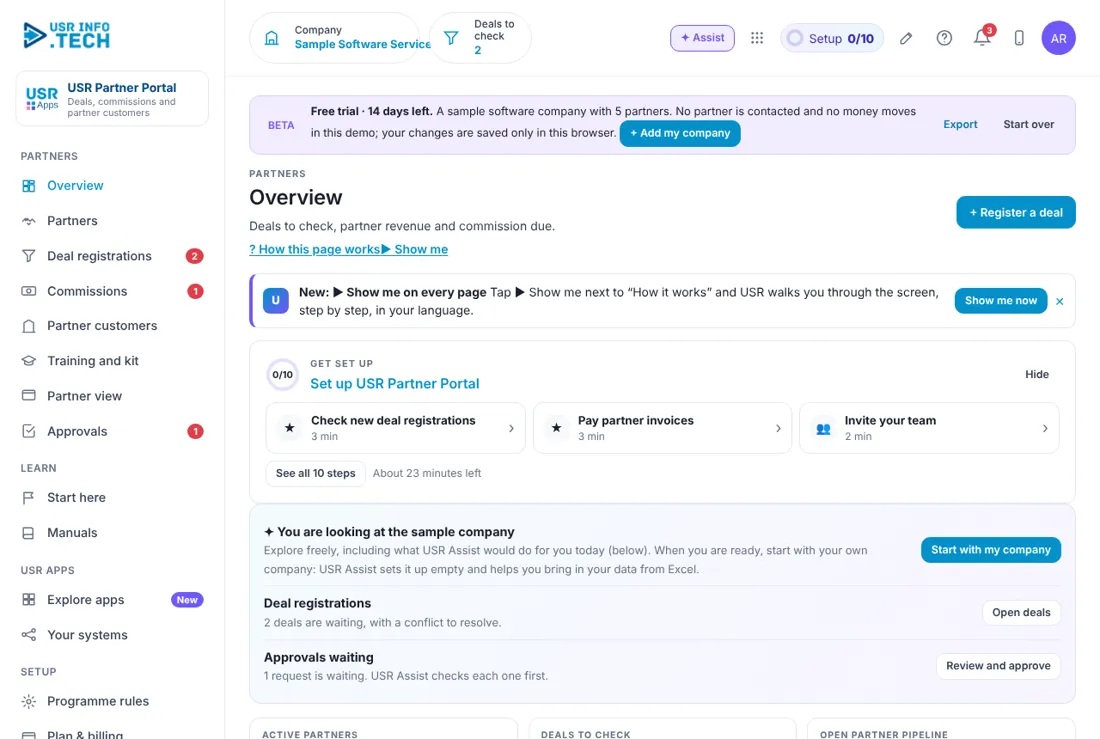
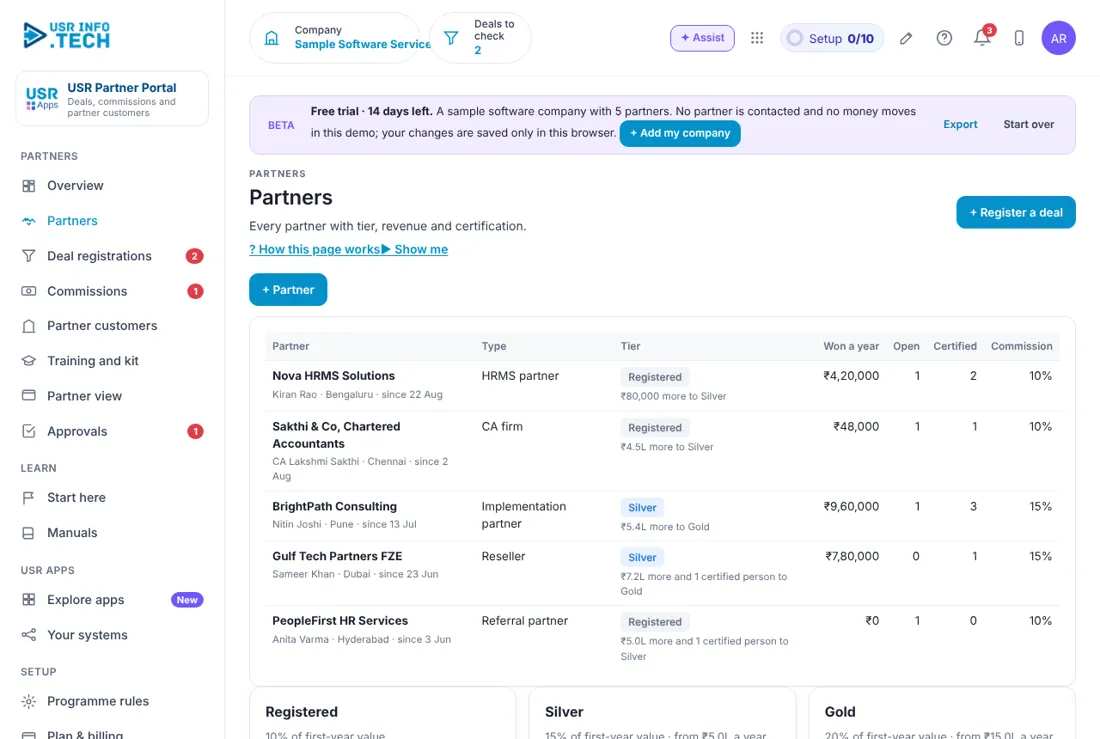
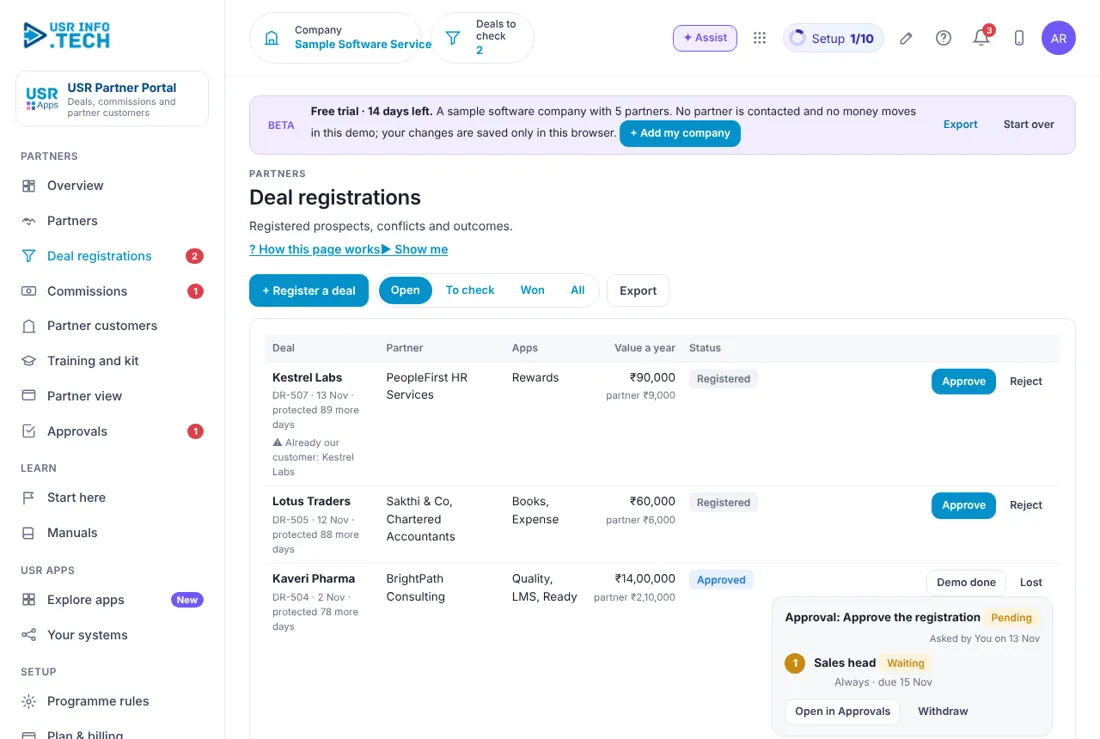
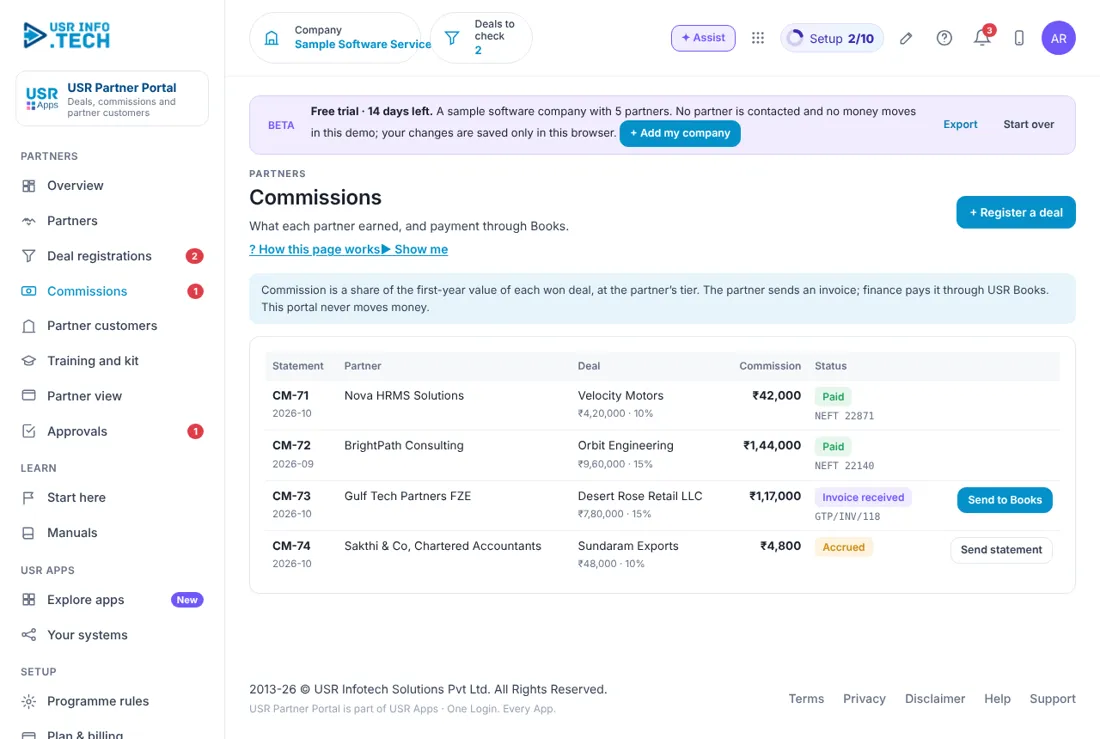
Sample company data. Screens can change as the app improves; the steps stay the same.
Key ideas in simple words
CONCEPT: Partner. A company that sells or supports USR Apps for you, such as a CA firm or reseller.
CONCEPT: Deal registration. A partner tells you about a customer they are working on.
CONCEPT: Deal protection. An approved deal is protected for 90 days so two partners never chase the same customer.
CONCEPT: Tier. Registered, Silver or Gold. A higher tier earns more commission.
CONCEPT: Commission. A share of the first-year value of a won deal, at the partner's tier.
CONCEPT: White-label. A customer sees the partner's own brand, not USR.
CONCEPT: First-line support. The partner answers the customer first. USR is the second line.
CONCEPT: Certified person. A partner's employee who passed all four training courses.
Protect the deal, protect the partner
Partners work harder when they know the customer is theirs. An approved registration protects the deal for 90 days. Existing customers cannot be registered, and the portal warns you when a registered name is already your customer.
Tiers reward results
Registered partners earn 10% of the first-year value. Silver earns 15%, from 5 lakh rupees a year won and 1 certified person. Gold earns 20%, from 15 lakh rupees a year won and 2 certified people.
The portal never moves money
The partner sends an invoice, and finance pays it through USR Books. This keeps payments in one place with the usual approvals.
What each role sees
| Role | What you do and see |
|---|---|
| Partner manager | Everything in the portal. |
| Sales head | Overview, Deal registrations and Approvals. |
| Finance head | Commissions and payments. |
| Partner | Their own deals, customers, kit and commission at partners.usrinfo.tech. They never see other partners' deals. |
HR and admin guide: features step by step
5.1 Overview
What it is: Overview shows how the partner programme is doing and what needs you today.
#### How to do it
- Open Overview.
- Click Open next to an item under Needs you.
#### Fields and buttons
| Field or button | What it is for |
|---|---|
| Active partners | How many, and how many are Gold and Silver. |
| Deals to check | Registered deals waiting, and how many have a conflict. |
| Open partner pipeline | Value of open deals a year. |
| Won through partners | Customers won and their value a year. |
| Commission to pay | Statements waiting to be paid. |
| White-label customers | Customers and their users. |
| Needs you | Deals to check and invoices to pay, each with Open. |
| Won revenue by partner | A bar for each partner. |
| Ask about partners | Type a question and get an answer. |
TIP: Check Needs you every morning.
5.2 Partners
What it is: Partners lists every partner with their type, tier and results.
#### How to do it
- Open Partners.
- Click + Partner.
- Fill in the company, contact and type, and save.
#### Fields and buttons
| Field or button | What it is for |
|---|---|
| Partner | Company, contact, city and the date they joined. |
| Type | HRMS partner, CA firm, Implementation partner, Reseller or Referral partner. |
| Tier | Registered, Silver or Gold, and what is needed for the next tier. |
| Won a year | Value of customers won. |
| Open | Open deals. |
| Certified | People who passed all four courses. |
| Commission | 10%, 15% or 20%. |
| Tier boxes | What each tier earns and needs. |
| + Partner | Adds a partner. |
TIP: Look at the line that says how much more a partner needs for the next tier. Tell them.
5.3 Deal registrations
What it is: Deal registrations lists the customers partners are working on, with protection and value.
#### How to do it
- Open Deal registrations.
- Read the warning, if any.
- Click Approve or Reject.
- Move the deal to Demo done and then Won or Lost.
#### Fields and buttons
| Field or button | What it is for |
|---|---|
| Open, To check, Won, All | Filters. |
| Deal | Customer, number, date and days of protection left. |
| Already our customer | A warning that the name is already your customer. |
| Partner | Who registered it. |
| Apps | Which USR apps. |
| Value a year | The value, with the partner's share. |
| Status | Registered, Approved, Demo, Won or Lost. |
| Approve, Reject, Demo done, Won, Lost | Move the deal. |
| + Register a deal and Export | Add a deal, or download the list. |
WATCH OUT: An existing customer cannot be registered. Reject the deal and tell the partner why.
5.4 Commissions
What it is: Commissions lists the statement for each won deal and whether it is paid.
#### How to do it
- Open Commissions.
- Click Send statement for an accrued commission.
- When the partner's invoice arrives, click Send to Books.
#### Fields and buttons
| Field or button | What it is for |
|---|---|
| Statement | Number and month. |
| Partner and Deal | Who earned it and for which customer, with the first-year value and rate. |
| Commission | The amount. |
| Status | Accrued, Invoice received or Paid, with the payment reference. |
| Send statement | Sends the statement to the partner. |
| Send to Books | Passes the partner's invoice to USR Books for payment. |
WATCH OUT: This portal never moves money. Finance pays through USR Books.
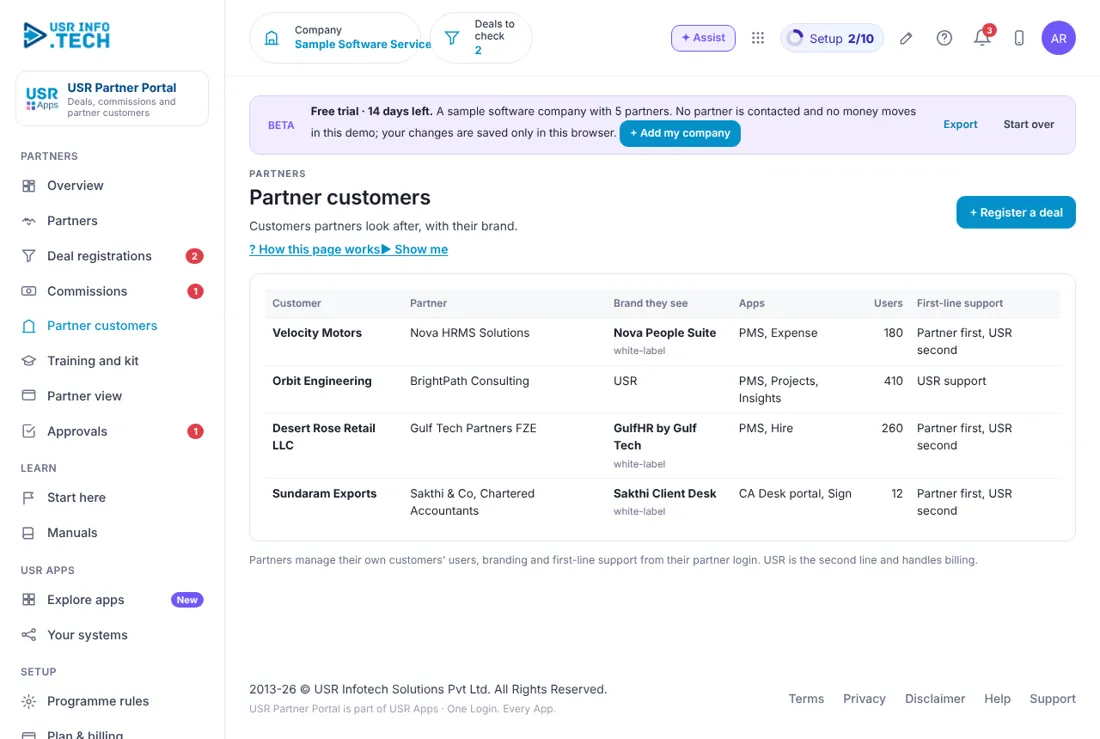
5.5 Partner customers
What it is: Partner customers lists customers who came through partners and the brand they see.
#### How to do it
- Open Partner customers.
- Check the support line for each customer.
#### Fields and buttons
| Field or button | What it is for |
|---|---|
| Customer | The customer company. |
| Partner | The partner who looks after them. |
| Brand they see | USR, or the partner's own white-label brand. |
| Apps | Which apps they use. |
| Users | Number of users. |
| First-line support | Partner first and USR second, or USR support. |
TIP: Partners manage their customers' users, branding and first-line support from their own login. USR handles billing.
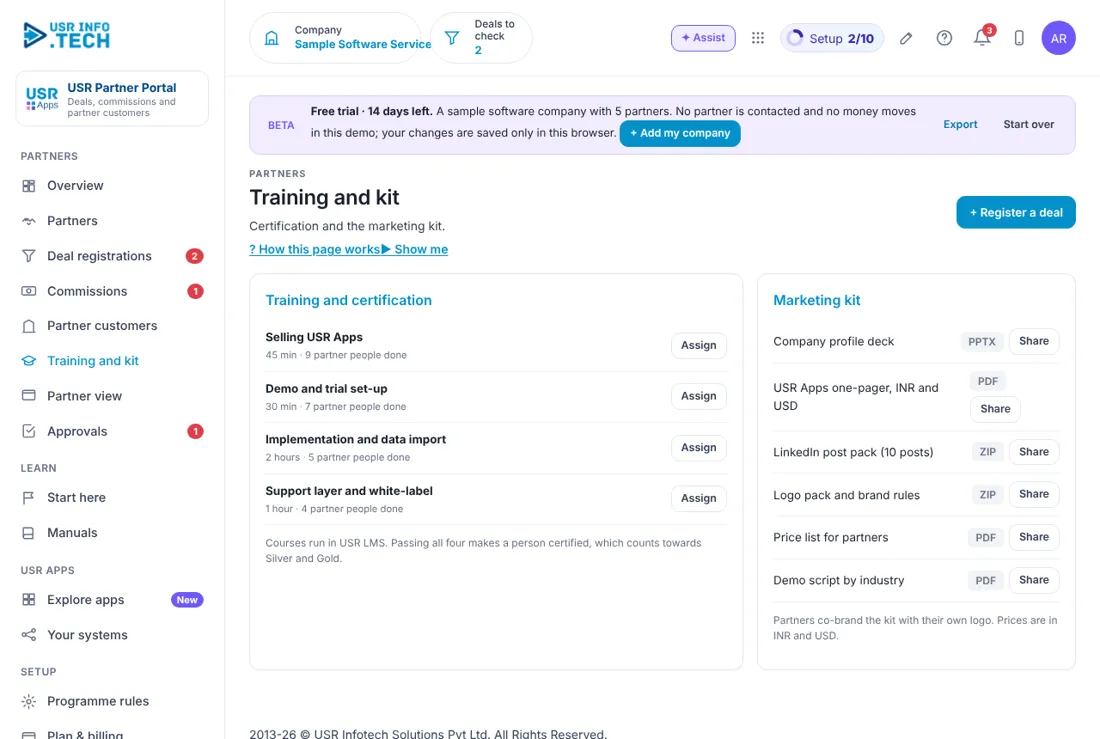
5.6 Training and kit
What it is: Training and kit gives partners courses to learn and material to sell with.
#### How to do it
- Open Training and kit.
- Click Assign next to a course.
- Click Share next to a kit item.
#### Fields and buttons
| Field or button | What it is for |
|---|---|
| Selling USR Apps | 45 minutes. |
| Demo and trial set-up | 30 minutes. |
| Implementation and data import | 2 hours. |
| Support layer and white-label | 1 hour. |
| Assign | Gives the course to a partner's person. Courses run in USR LMS. |
| Marketing kit | Company profile deck, one-pager in INR and USD, LinkedIn post pack, logo pack, price list and demo script, each with Share. |
TIP: Passing all four courses makes a person certified, which counts towards Silver and Gold.
5.7 Partner view
What it is: Partner view shows what a partner sees when they sign in at partners.usrinfo.tech.
#### How to do it
- Open Partner view.
- Read it as the partner sees it.
#### Fields and buttons
| Field or button | What it is for |
|---|---|
| Welcome | The partner's name, company, tier and commission. |
| Your open deals | Their open deals. |
| Won this year | Value won. |
| Commission earned | What they earned. |
| Register a deal, Start a demo, My customers, Marketing kit | Their buttons. |
WATCH OUT: A partner never sees other partners' deals.
5.8 Approvals
What it is: Approvals shows requests that wait for a decision, such as a big deal registration.
#### How to do it
- Open Approvals.
- Click Approve, Send back or Reject.
#### Fields and buttons
| Field or button | What it is for |
|---|---|
| Waiting, Overdue, Approved this month | Counts at the top. |
| Approval workflows on | How many workflows are on. |
| Request, Step, Waiting on, Due | What, which step, who and by when. |
| Comment | Needed if you reject. |
| Approve, Send back, Reject, Open | Your decisions. |
TIP: Approvers can also decide from the email or WhatsApp message.
5.9 Programme rules
What it is: Programme rules sets how long a deal is protected and when a big deal needs approval.
#### How to do it
- Open Programme rules.
- Change a value and save.
#### Fields and buttons
| Field or button | What it is for |
|---|---|
| Deal protection (days) | For example 90. |
| Big deals need approval above (₹ a year) | For example 10,00,000. |
| Partner agreement | Every partner signs the USR Apps Marketplace Partner Agreement through USR Forms and e-Sign before the first deal: IP protection, no customer poaching either way, 3-year term. |
WATCH OUT: A change applies to new deals. Approved deals keep their protection.
5.10 Plan & billing
What it is: Plan & billing shows your plan, invoices and the plans you can choose. One bill covers every USR app through USR Billing.
#### How to do it
- Open Plan & billing.
- Choose a plan.
#### Fields and buttons
| Field or button | What it is for |
|---|---|
| Free | ₹0 (US$0). Up to 3 partners: deal registration and statements. |
| Standard | ₹2,500 (US$30) a month: tiers, conflict checks, partner logins and the kit. |
| Professional | ₹5,000 (US$60) a month: white-label customers, LMS certification, Books and CRM links, AI. |
| Enterprise | Talk to us: many programmes and regions, your own domain, private hosting. |
| Mid-market | 501 to 5,000 users. Volume pricing per user, in INR or USD. |
| Prices | INR excludes 18% GST. USD is for customers outside India. |
WATCH OUT: If a payment fails, you get a reminder on the due date and 3 and 7 days later. After 21 days the account becomes read-only, never deleted, until it is paid.
If something is not working
| Problem | What to do |
|---|---|
| A deal shows Already our customer | An existing customer cannot be registered. Reject the deal and tell the partner. |
| A partner cannot see a deal | Partners see only their own deals. Check the partner on the deal. |
| A commission is not due yet | It is due when the deal is won and the partner has sent an invoice. |
| A big deal is waiting | Deals above the programme limit need approval. See Approvals. |
Questions people ask
#### Partners
How long is a deal protected?
90 days from approval, or the days you set in Programme rules.
Can a partner see other partners' deals?
No.
#### Using the app
Is there a free plan?
Yes. Free allows up to 3 partners.
Who pays the commission?
Finance, through USR Books. The portal never moves money.
Glossary: words you will see
| Word | Meaning |
|---|---|
| Certified person | Passed all four courses. |
| Commission | A share of the first-year value. |
| Deal protection | Days a deal belongs to one partner. |
| Deal registration | A partner tells you about a customer. |
| First-line support | The partner answers first. |
| Tier | Registered, Silver or Gold. |
| White-label | A customer sees the partner's brand. |
USR Partner Portal shares one record with these apps
No retyping between apps: data entered once flows to the next app, on the same login.
USR Partner Portal is part of USR One. Sales & Marketing Suite from ₹499 ($12) per seat a month, or every app in USR One Complete. Free for up to 10 people.
See USR One
