
USR IT help
USR IT keeps a simple record of the laptops, software and logins in your company. It lists every device with its owner, warranty and security health, tracks software licences and unused seats, shows who can sign in where, runs an IT helpdesk with time targets, and gives each joiner and leaver a checklist so no laptop or login is missed.
See the screens
Sample company data. Screens can change as the app improves; the steps stay the same.
Welcome
USR IT keeps a simple record of the laptops, software and logins in your company. It lists every device with its owner, warranty and security health, tracks software licences and unused seats, shows who can sign in where, runs an IT helpdesk with time targets, and gives each joiner and leaver a checklist so no laptop or login is missed.
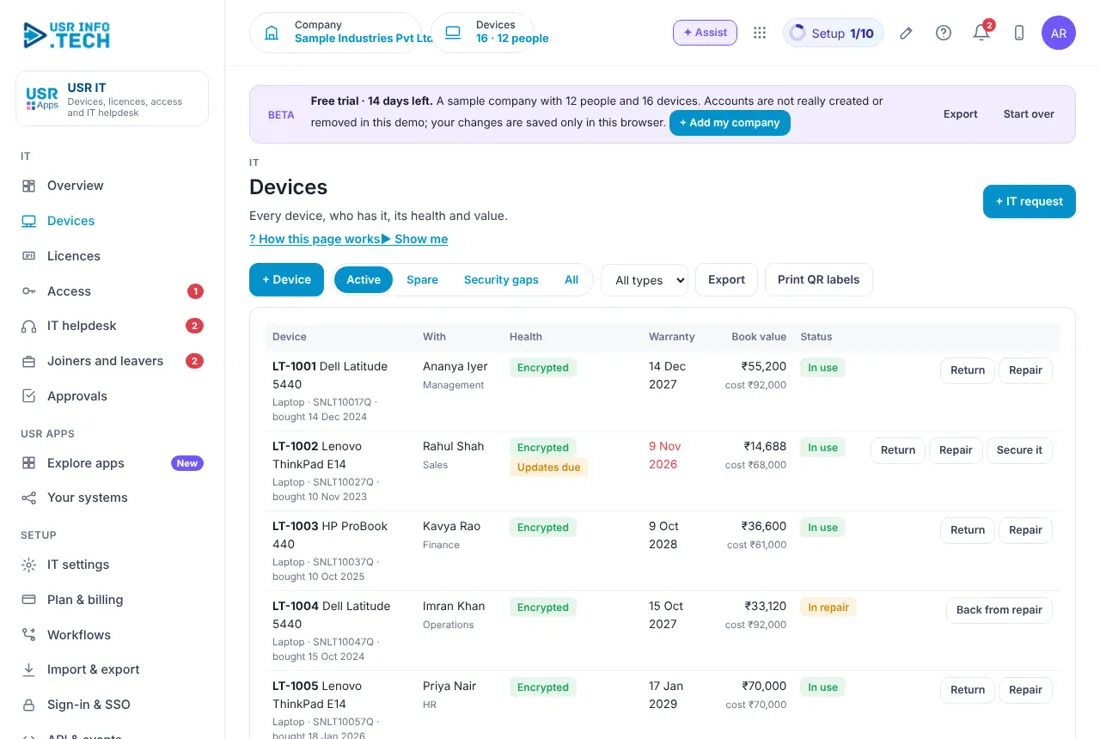
- Device list with owner, warranty, book value and security health (encrypted, updates due)
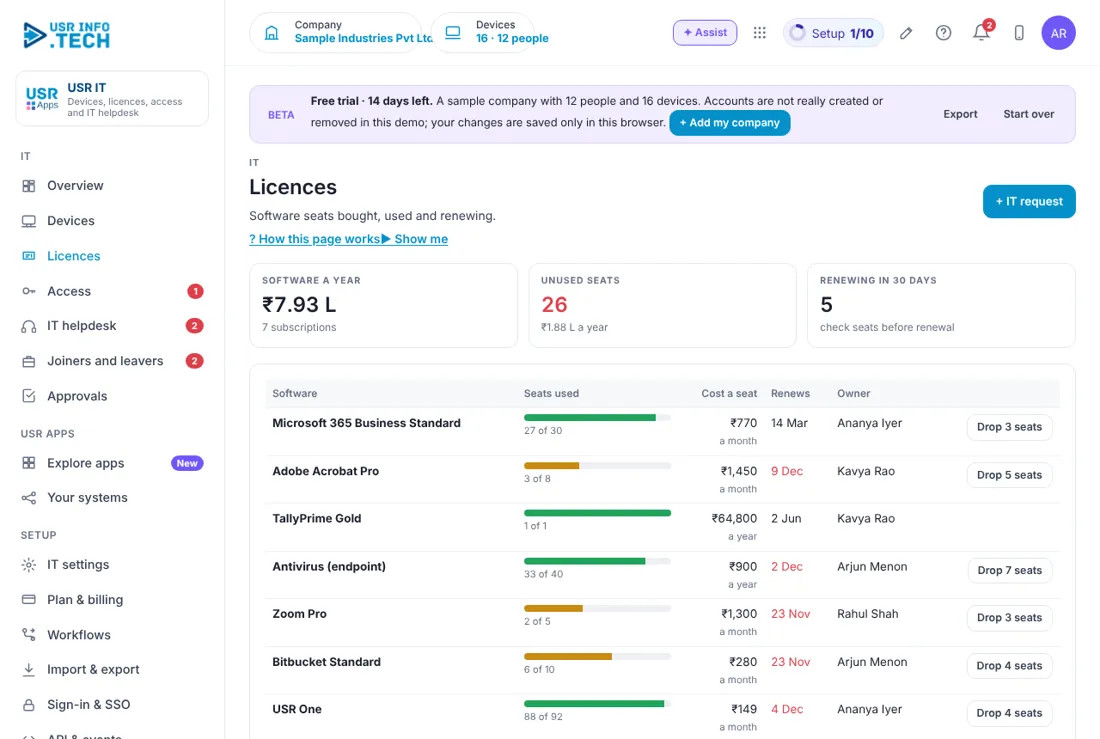
- Licences with seats used, cost, renewal date and the unused seats you can drop
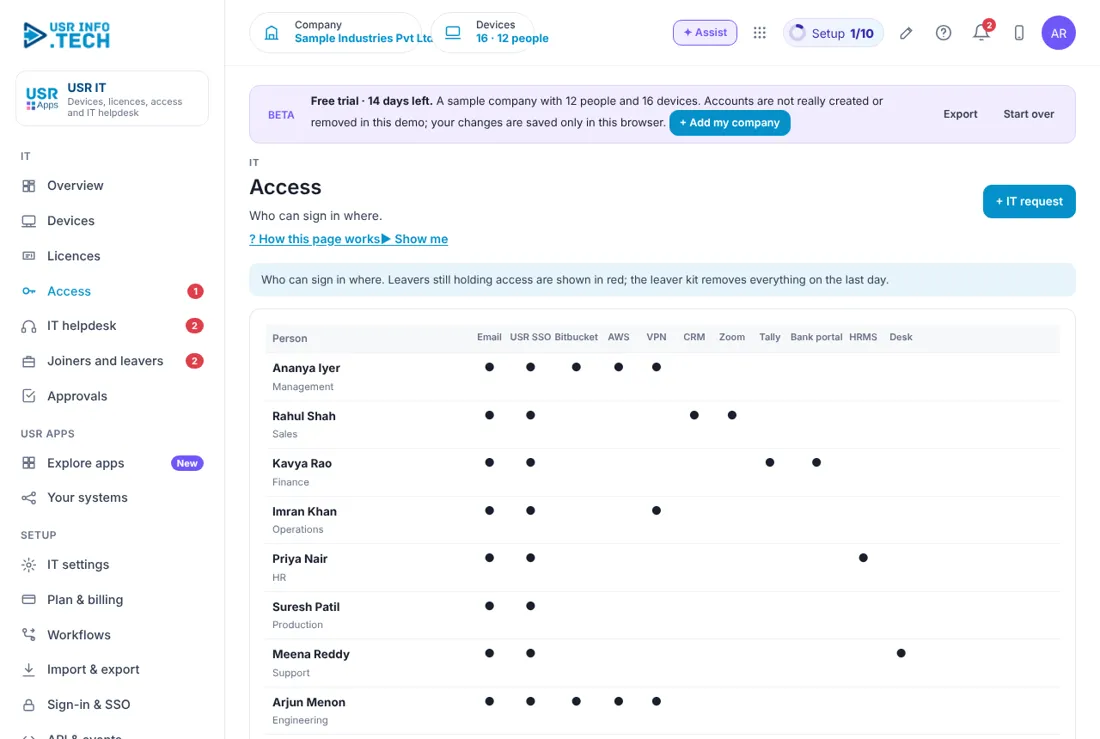
- Access map: who can sign in to which system, with leavers shown in red
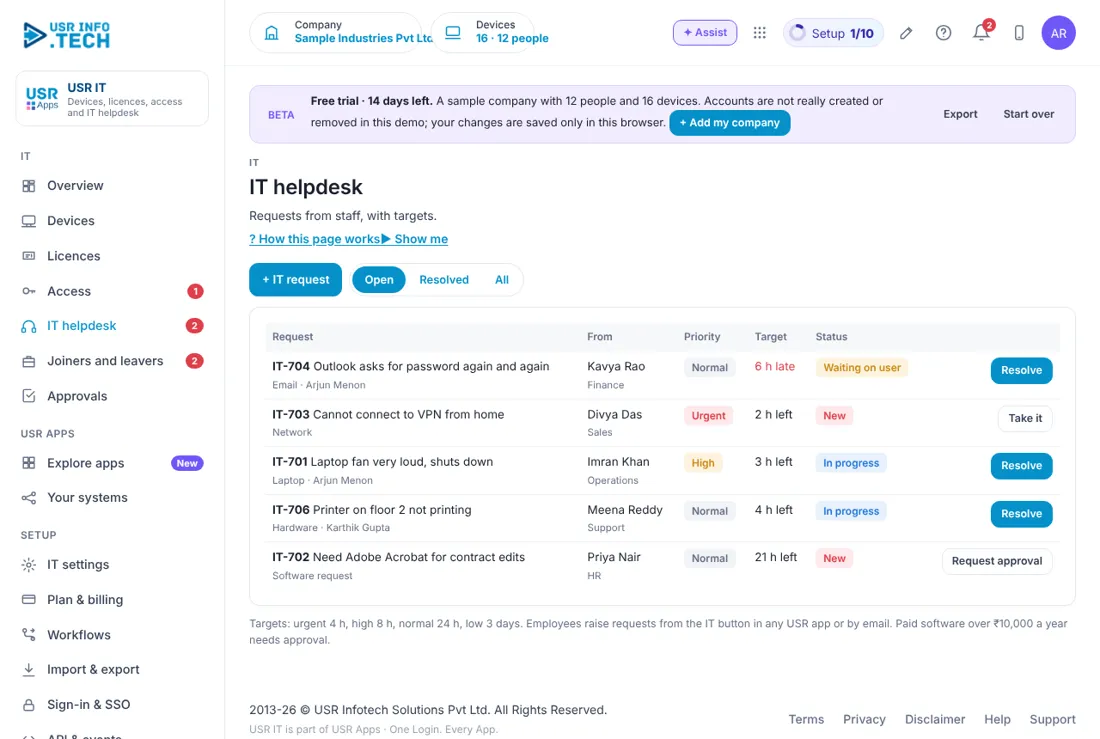
- IT helpdesk with targets: urgent 4 hours, high 8 hours, normal 24 hours, low 3 days
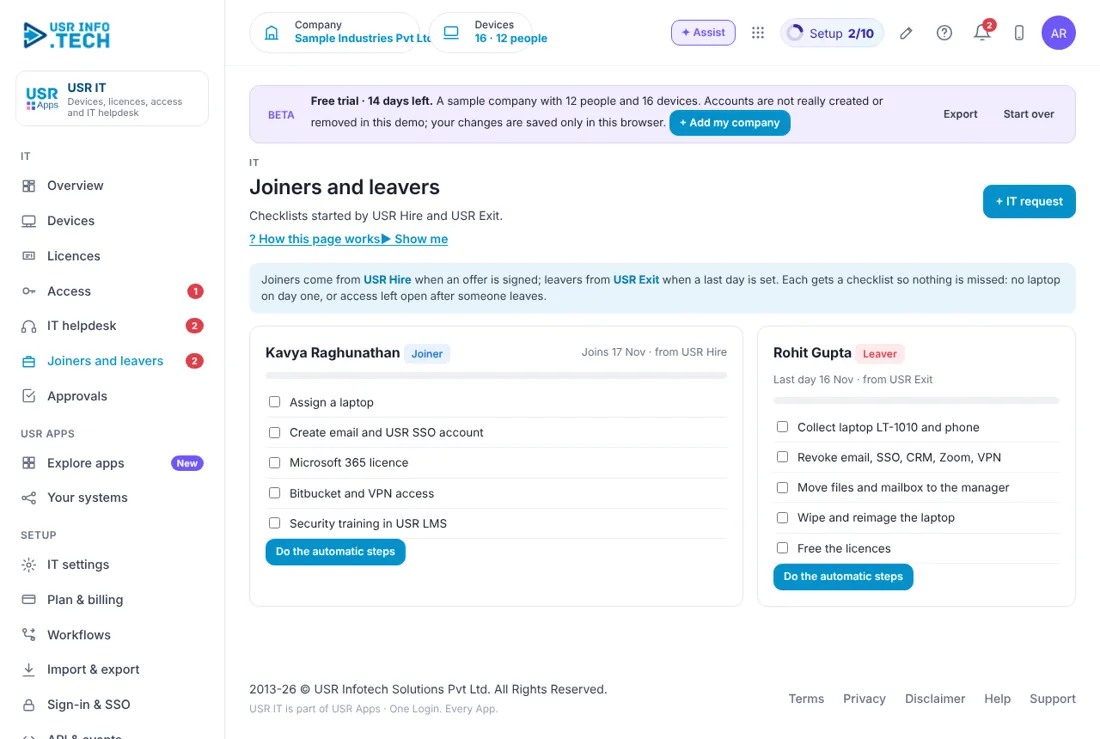
- Joiner and leaver checklists that start from USR Hire and USR Exit
A year in USR IT
| When | What happens | Who |
|---|---|---|
| At the start | Set the written-down value rate, the warranty warning days and the approval limit for software. Install the device agent. | IT admin |
| Every day | Open the Overview. Clear the tickets and the joiner and leaver steps. | IT team |
| Every week | Fix devices that are not encrypted or need updates. Look at tickets past their target. | IT team |
| Every month | Read Licences for unused seats and renewals in the next 30 days. Drop seats nobody uses. | IT admin |
| Every quarter | Read Access. Remove access nobody needs. Check warranties ending soon. | IT head |
| Every year | Plan device replacement from book value and warranty. Review licence costs before renewals. | Management |
Key ideas
- Device. A laptop, desktop or phone the company owns, with a serial number and an owner.
- Book value. What the device is worth in the books after depreciation.
- Security gap. A device that is not encrypted or has updates due.
- Licence. The right to use software, counted in seats.
- Unused seat. A paid seat nobody uses. You can drop it to save money.
- Access. A person's right to sign in to a system such as email, VPN or Zoom.
- IT request. A ticket raised by an employee for help, hardware or software.
- Kit. The checklist for a joiner or a leaver.
Know what you own. You cannot protect what you cannot list. USR IT keeps one list of every device with who has it, when the warranty ends and whether the disk is encrypted. A small device agent on Windows and Mac laptops reports the model, serial, disk encryption and update status every day. It reads no files, browsing or screen.
Pay only for seats in use. Software is bought in seats. Over time people leave and seats go unused, but you still pay. The Licences page shows seats used against seats paid and the money you could save in a year. In the sample company the unused seats cost ₹1.88 L a year. Check it before each renewal.
Joiners and leavers need a checklist. A new person needs a laptop, email, sign-in and training on day one. A leaver must hand back the laptop and lose every login on the last day. USR IT makes a checklist for each. Joiners come from USR Hire when an offer is signed. Leavers come from USR Exit when a last day is set.
Targets keep the helpdesk honest. Every request has a time target by priority: urgent 4 hours, high 8 hours, normal 24 hours and low 3 days. A request past its target shows late in red on the Overview. Paid software above ₹10,000 a year needs approval before it is bought.
Features step by step
5.1 Overview
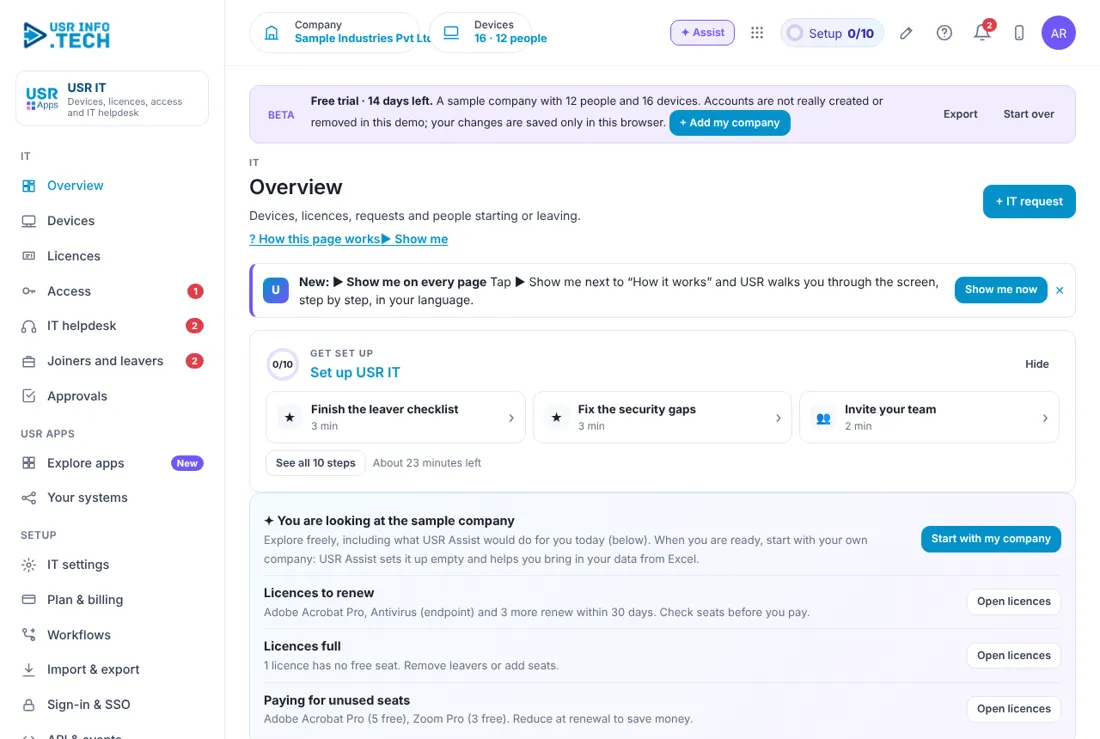
Overview shows the state of your IT on one page and lists what needs you. Devices: How many, how many in use and how many spare. Book value: Worth of all devices after depreciation. Security gaps: Devices not encrypted or not updated. Unused licences: Money a year you could save. Open IT tickets: Requests open, and how many are past target. Joiner and leaver kits: Steps still open. Needs you: Joiners, leavers, tickets, devices and licence renewals to act on. Warranties ending soon: Devices whose warranty is ending or ended. Ask about IT: Ask USR Assist a question about your IT.
5.2 Devices
Devices lists every device with its owner, health, warranty and value. + Device: Add a device. Active, Spare, Security gaps, All: Filter the list. All types: Filter by laptop, desktop and so on. Export and Print QR labels: Download the list, or print labels for the devices. Device: The tag, model, serial number and purchase date. With: Who has it and their team. Health: Encrypted, Not encrypted or Updates due. Warranty: The end date. Red means it has ended. Book value: Value now and the cost. Status: In use or In repair. Return, Repair, Secure it, Back from repair: The next action on each device. Watch out: A device that is not encrypted can leak data if it is lost. Fix it first.
5.3 Licences
Licences shows each software subscription with seats used and what it costs. Software a year: Total cost and how many subscriptions. Unused seats: How many seats nobody uses and the cost a year. Renewing in 30 days: How many renew soon. Software: The product. Seats used: A bar and a count, such as 27 of 30. Cost a seat: Per month or per year. Renews: The renewal date. Red means soon. Owner: Who looks after the subscription. Drop seats: Reduce the seats before renewal.
5.4 Access
Access shows who can sign in to which system. Person: Name and team. System columns: Email, USR SSO, Bitbucket, AWS, VPN, CRM, Zoom, Tally, Bank portal, HRMS and Desk. A dot means access. Red row: A leaver who still has access. Revoke all: Removes every access of that leaver. Watch out: A leaver with open access is a security risk. Revoke it on the last day.
5.5 IT helpdesk
IT helpdesk lists the requests employees raise and how long each has left. + IT request: Raise a request. Open, Resolved, All: Filter the list. Request: The number, the problem and the kind. From: Who raised it and their team. Priority: Urgent, High, Normal or Low. Target: Time left, or how late. Status: New, In progress, Waiting on user or Resolved. Take it, Resolve, Request approval: The next action. Watch out: Software over ₹10,000 a year needs approval. Click Request approval.
5.6 Joiners and leavers
Joiners and leavers gives a checklist to each new person and each person leaving. Joiner card: Name, joining date and the checklist: laptop, email and sign-in, licence, access and training. Leaver card: Name, last day and the checklist: collect devices, revoke access, move files, wipe the laptop and free licences. Tick boxes: Tick each step as it is done. Do the automatic steps: Runs the steps USR IT can do for you. Watch out: Do not close a leaver's card until the laptop is back and every access is revoked.
5.7 Approvals
Approvals holds the requests waiting for a decision, such as a software purchase. Waiting, Overdue, Approved this month: Counts of requests. Approval workflows on: How many workflows are switched on. Waiting on: Filter by who must decide. Approve, Send back, Reject: Your decision. A comment is needed to reject.
5.8 IT settings
IT settings holds the rules and the device agent. Depreciation, written-down value (% a year): 40 in the sample company. Warn before warranty ends (days): 45 in the sample company. Software requests above (₹ a year) need approval: 10,000 in the sample company. Download the agent: The small agent for Windows and Mac laptops.
5.9 Plan & billing
Plan & billing shows your plan and the plans you can choose. One bill covers every USR app through USR Billing. Free: ₹0 (US$0). Up to 25 devices and a basic IT helpdesk. Standard: ₹15 (US$0.18) per employee a month. Assets, licences, IT helpdesk and joiner and leaver kits. Professional: ₹25 (US$0.30) per employee a month. Device agent, access reviews, approvals and AI. Enterprise: Talk to us. Many offices and entities, private hosting and an agreed SLA. Mid-market: 501 to 5,000 users. Volume pricing per user, in INR or USD. Prices: INR excludes 18% GST. Watch out: There is a 14-day Professional trial with no card needed.
If something is not working
| Problem | What to do |
|---|---|
| A device shows no health | The agent may not be installed. Open IT settings and download the agent. |
| A leaver still shows in red on Access | Click Revoke all and check the leaver's kit. |
| A request is past its target | Open IT helpdesk, take it and resolve it, or reset the priority. |
| A software request is stuck | It may be waiting for approval. Open Approvals. |
| I cannot see a page | Your role may not allow it. Ask your administrator. |
Questions people ask
Does the agent read my files? No. It reports the model, serial, disk encryption and update status only. It reads no files, browsing or screen.
How is book value worked out? From the cost and the written-down rate in IT settings, 40% a year in the sample company.
Can I save money on licences? Yes. Licences shows unused seats and their cost a year. Drop them before renewal.
Where do joiners and leavers come from? Joiners come from USR Hire and leavers from USR Exit.
Is there a trial? Yes. A 14-day Professional trial starts when you add your own company.
Glossary
Device: A laptop, desktop or phone the company owns. Book value: The worth of a device after depreciation. Licence: The right to use software, counted in seats. Seat: One person's use of a licence. SSO: One sign-in for many apps. VPN: A safe link to the office network from outside. DPDP: India's Digital Personal Data Protection Act.
USR IT shares one record with these apps
No retyping between apps: data entered once flows to the next app, on the same login.
USR IT is part of USR One. Operations Suite from ₹399 ($10) per seat a month, or every app in USR One Complete. Free for up to 10 people.
See USR One
