
USR Forms & e-Sign help
USR Forms & e-Sign sends documents for signature and collects information through simple forms. Offer letters, NDAs, policy acknowledgements, quote acceptances and vendor declarations come here from the other USR apps. Signers sign on any phone, high-value documents wait for approval before they go out, and every signed copy is checked for tampering and kept for years.
See the screens
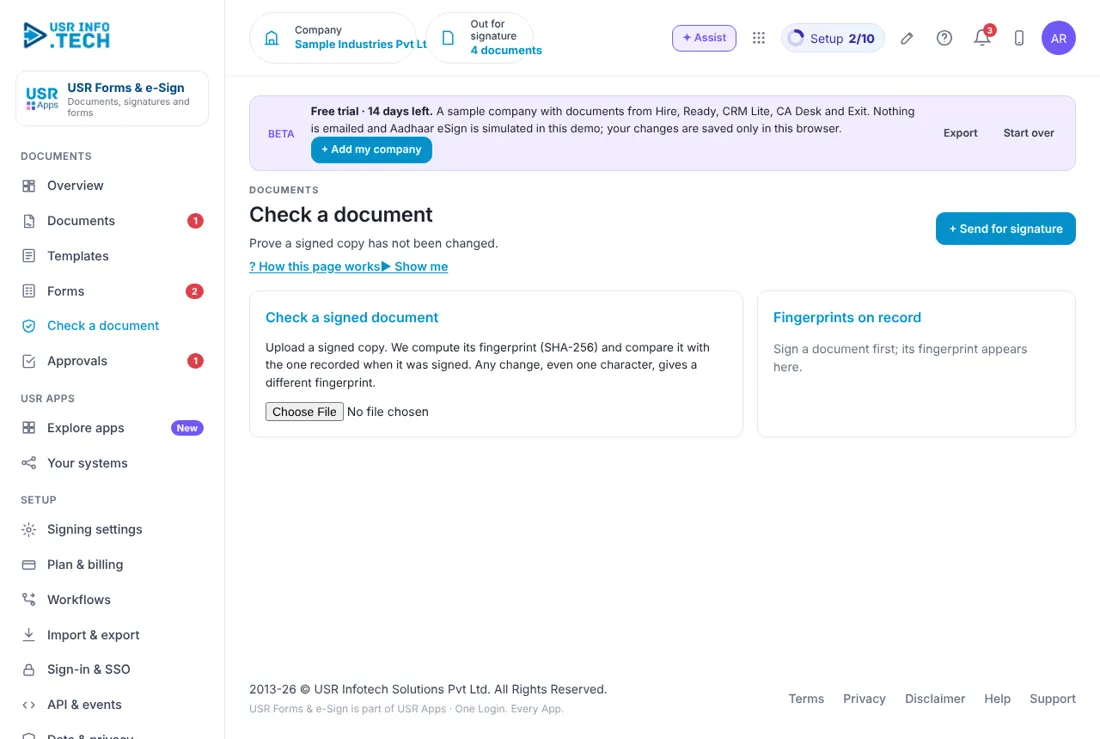
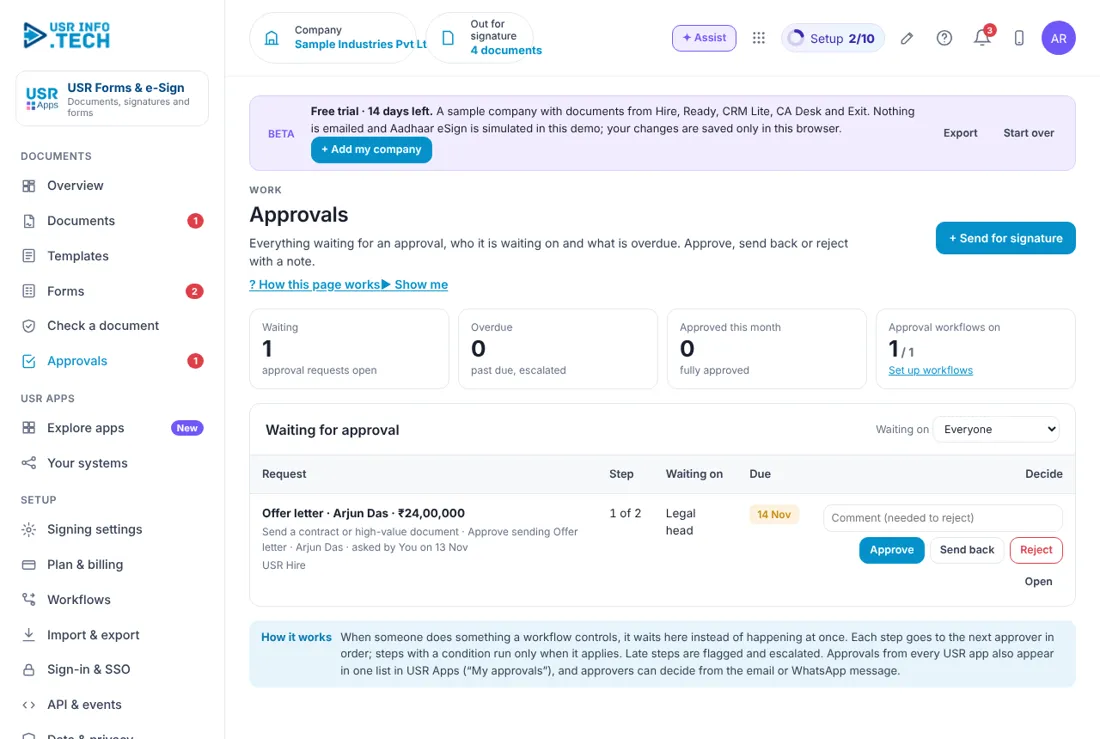
Sample company data. Screens can change as the app improves; the steps stay the same.
Welcome
USR Forms & e-Sign sends documents for signature and collects information through simple forms. Offer letters, NDAs, policy acknowledgements, quote acceptances and vendor declarations come here from the other USR apps. Signers sign on any phone, high-value documents wait for approval before they go out, and every signed copy is checked for tampering and kept for years.
- Send a document for signature with Aadhaar eSign, or a typed or drawn signature with an email OTP
- Templates that other USR apps use: offer letter, NDA, policy acknowledgement, quote acceptance and more
- Forms anyone can fill on a phone: vendor registration, new joiner details, visitor NDA
- Approval before a high-value document is sent, with automatic reminders and expiry
- Tamper check: a fingerprint of every signed copy, so any change is caught
A year in USR Forms & e-Sign
| When | What happens | Who |
|---|---|---|
| At the start | Connect the eSign provider. Set the reminder days, expiry days and how long to keep signed copies. Check the templates. | Admin |
| Every day | Open the Overview. Sign what waits for you. Approve documents waiting to go out. | Signers and approvers |
| Every week | Open Documents and send a reminder for the ones waiting more than 3 days. | HR and sales teams |
| Every month | Read how many documents are completed and how many expired. Clean up forms no longer needed. | Admin |
| Every quarter | Review the templates and the approval rules. Test the tamper check on one document. | Legal head |
| Every year | Review how long signed copies are kept. Check the provider contract and costs. | Management |
Key ideas
- Document. A letter or agreement sent to people to sign.
- Template. A ready document with fields to fill, such as an offer letter.
- Signer. A person who must sign. Signers sign in order.
- Aadhaar eSign. A legally valid signature through the Aadhaar OTP, by a licensed provider.
- Typed or drawn signature. A signature typed or drawn on the screen, confirmed with an email OTP.
- Form. A page people fill in, such as vendor registration.
- Approval. A check by a manager before a document is sent.
- Fingerprint. A code (SHA-256) made from the signed file. Any change gives a different code.
Choose the right kind of signature. Aadhaar eSign is a signature under the IT Act, 2000, given through a licensed eSign provider. It is the stronger evidence, so use it for offer letters, NDAs and engagement letters. A typed or drawn signature with an email OTP is a valid electronic record for letters, acknowledgements and approvals, but it is weaker evidence than eSign.
Some documents cannot be signed online. Under Indian law a negotiable instrument other than a cheque, a power of attorney, a trust deed, a will and a contract for sale or transfer of immovable property cannot be signed electronically. Agreements that need stamp duty use e-stamp paper bought through the provider. This is general information, not legal advice. Ask your lawyer for documents of large value.
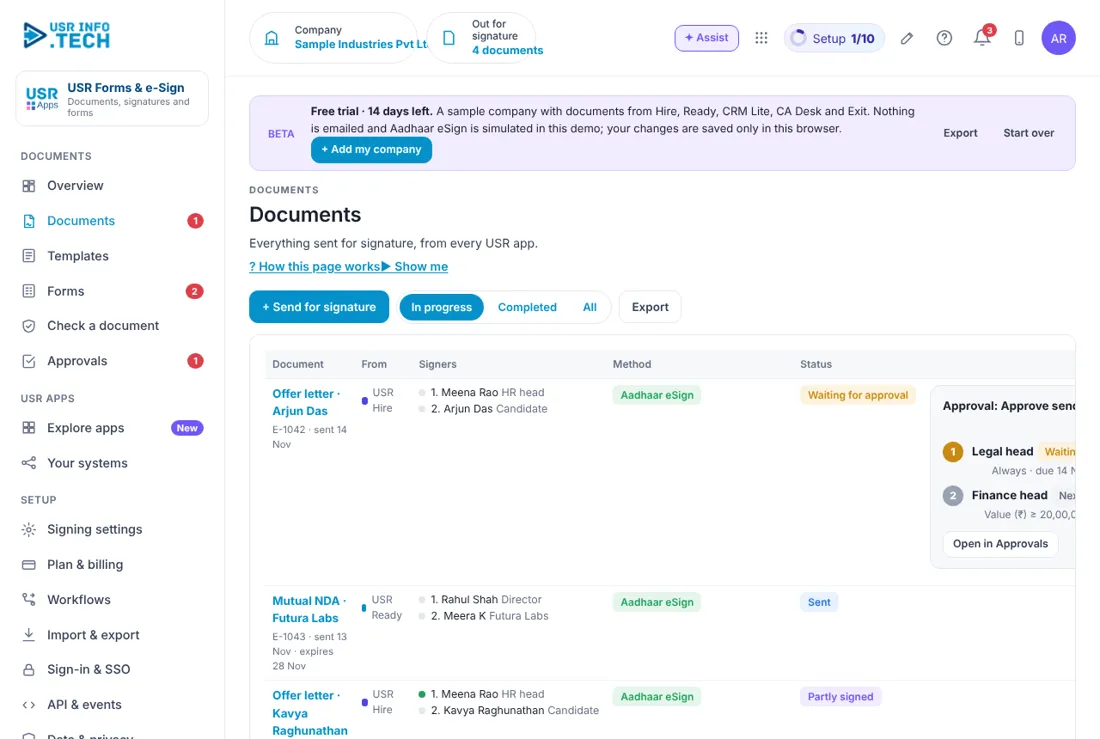
Approve before you send. Some documents should not go out without a check. In the sample company an offer letter above ₹20,00,000 goes first to the Legal head, then to the Finance head. The document waits in Approvals and is sent only after the last approval.
The tamper check. When a document is signed, USR Forms & e-Sign records its fingerprint. Later you can upload a copy on Check a document. If even one character changed, the fingerprint is different and you are told. Signed copies are kept for 8 years in the sample company.
Features step by step
5.1 Overview
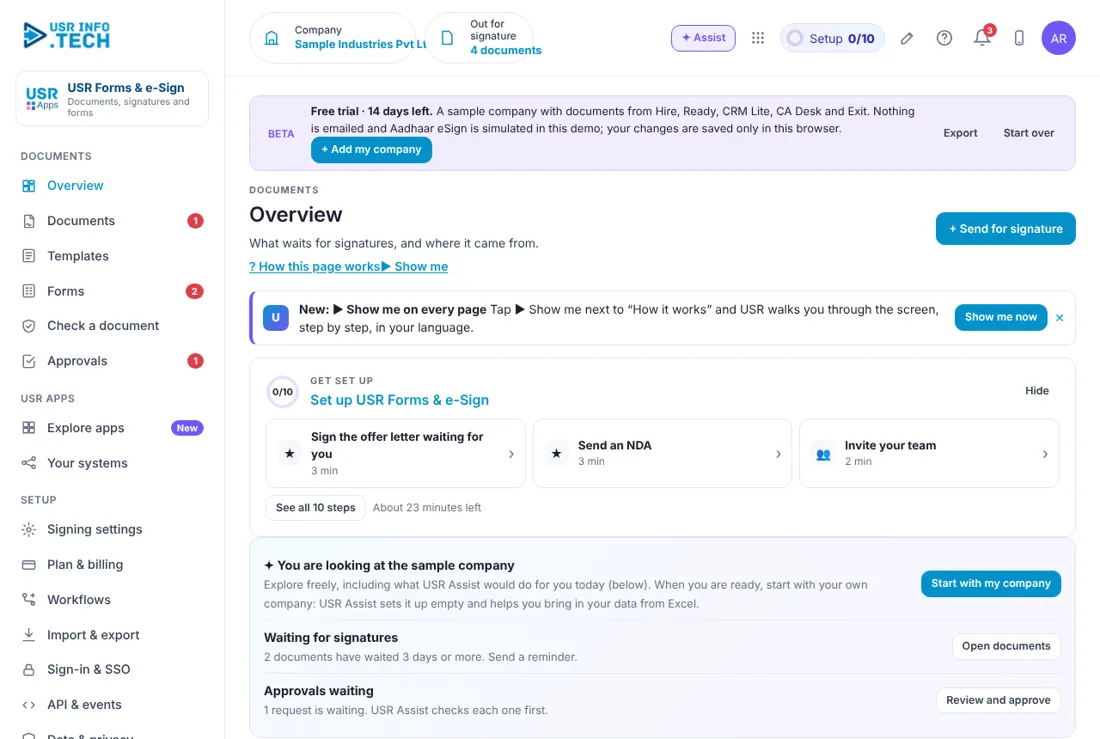
Overview shows what needs you and where documents come from. Get set up: A checklist of 10 steps with the time each takes. Waiting for my signature: Documents you must sign. Out for signature: Documents sent and not yet signed, and how many expire in 3 days. Completed: Documents signed this month and tamper-checked. Waiting for approval: Documents that wait for a manager before sending. Form responses: Answers received and the forms that are live. Needs you: Items to act on first, with Sign now or Open. Documents come from every app: How many documents each USR app has sent here.
5.2 Documents
Documents lists every document you sent and where it stands. + Send for signature: Send a new document. In progress, Completed, All: Filter the list. Export: Download the list. Document: The name, its number, the date sent and when it expires. From: The USR app that sent it, such as USR Hire. Signers: Each signer in order, with a dot that shows who has signed. Method: Aadhaar eSign, or Typed or drawn, with email OTP. Status: Sent, Partly signed, Waiting for approval or Completed. Approval box: For a high-value document, shows who must approve. You can Open in Approvals or Withdraw. Watch out: A document that expires must be sent again.
5.3 Templates
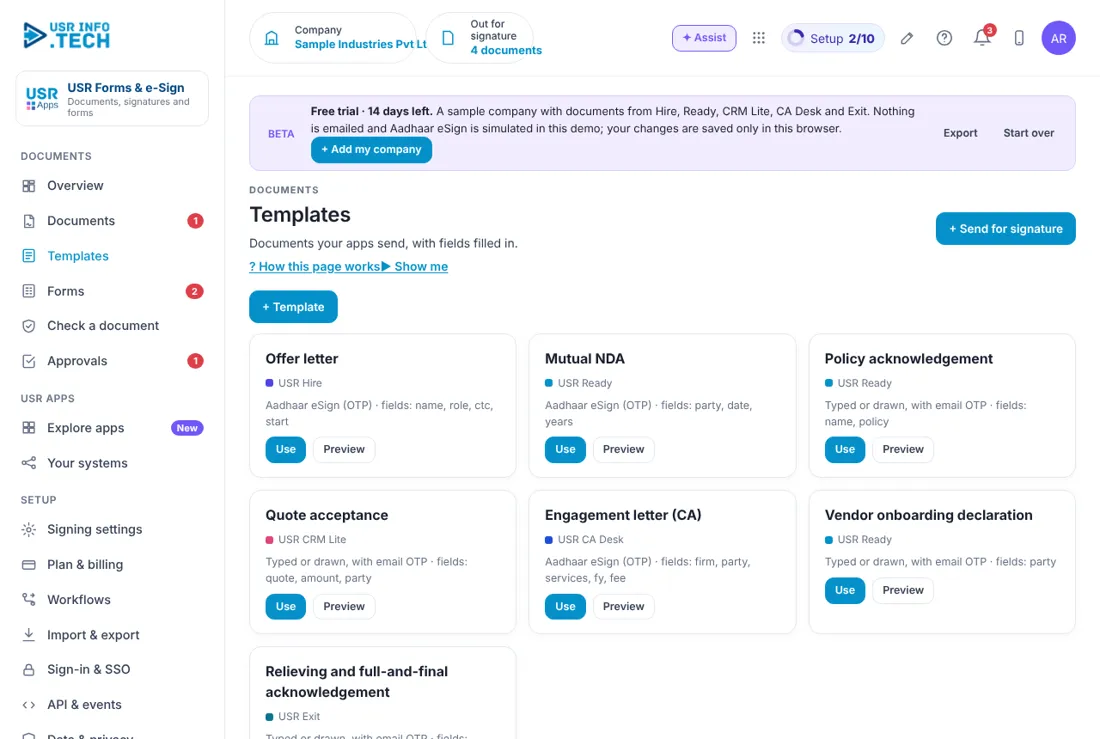
Templates holds the ready documents that you and the other USR apps use. + Template: Make your own template. Template card: The name, the app that uses it, the signature method and the fields to fill. Use: Start a document from the template. Preview: See the template first.
5.4 Forms
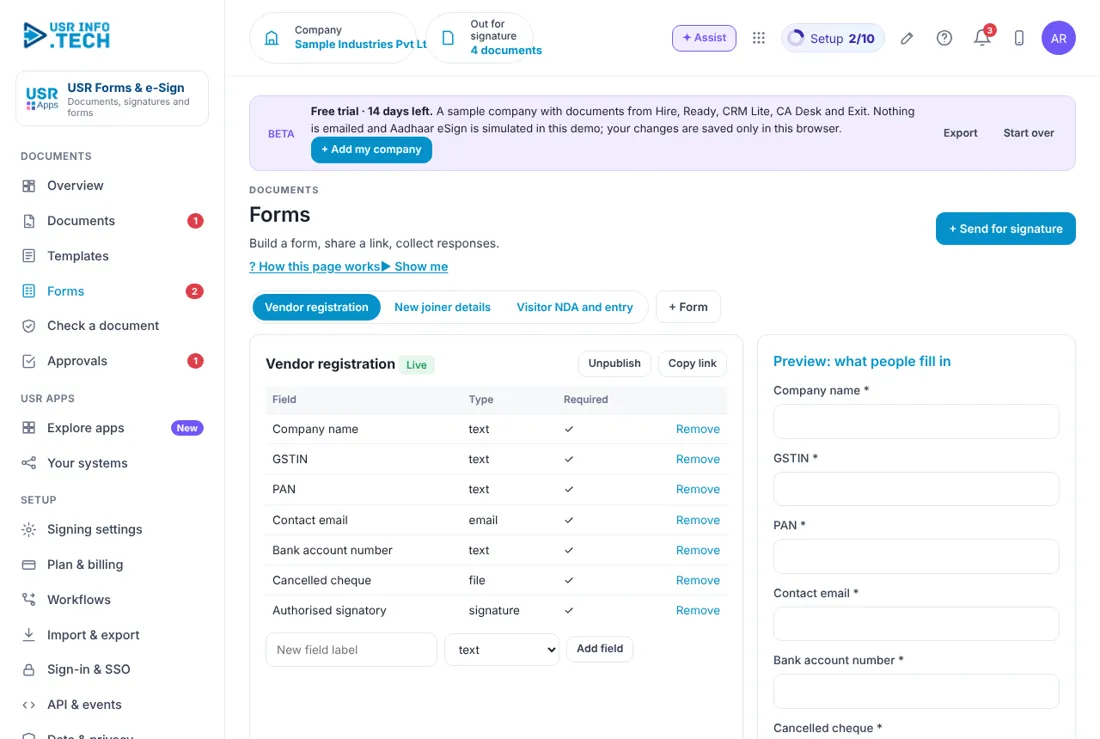
Forms lets you collect information from people with a simple page. Form tabs: Vendor registration, New joiner details and Visitor NDA and entry in the sample company. + Form: Make a new form. Live, Unpublish, Copy link: Switch a form on or off, or copy its link. Field, Type, Required: Each question, its kind (text, email, file, signature) and whether it must be filled. Remove: Delete a field. New field label and Add field: Add a question. Preview: what people fill in: The form as the other person sees it. Submit test response: Try the form.
5.5 Check a document
Check a document tells you whether a signed file has been changed. Check a signed document: Upload a signed copy. It is compared with the fingerprint recorded when it was signed. Fingerprints on record: The fingerprint of every signed document. Watch out: Any change, even one character, gives a different fingerprint.
5.6 Approvals
Approvals holds the documents waiting for a decision before they are sent. Waiting, Overdue, Approved this month: Counts of requests. Approval workflows on: How many workflows are switched on. Waiting on: Filter by who must decide. Request, Step, Waiting on, Due: What, which step of how many, who and by when. Comment: Needed if you reject. Approve, Send back, Reject, Open: Your decision.
5.7 Signing settings
Signing settings holds the rules for signing. Aadhaar eSign and DSC provider: The licensed provider, connected in USR Connect. Remind every (days): 2 in the sample company. Expire after (days): 15 in the sample company. Keep signed copies (years): 8 in the sample company. What the law allows: A short guide: what eSign and typed signatures are good for, what cannot be signed online, and stamp duty. Watch out: The law box is general information, not legal advice.
5.8 Plan & billing
Plan & billing shows your plan and the plans you can choose. One bill covers every USR app through USR Billing. Free: ₹0 (US$0). 10 documents a month, typed or drawn signatures, 2 forms. Standard: ₹799 (US$10) a month per company. Unlimited documents, templates from every USR app, forms, reminders. Professional: ₹1,499 (US$18) a month per company. Approvals, bulk send, tamper check, API. Aadhaar eSign at provider cost. Enterprise: Talk to us. Many entities, your own domain and branding, private hosting. Mid-market: 501 to 5,000 users. Volume pricing per user, in INR or USD. Provider cost: Aadhaar eSign and DSC are billed per signature by the licensed provider, on the same USR bill. Prices: INR excludes 18% GST. Watch out: There is a 14-day Professional trial with no card needed.
If something is not working
| Problem | What to do |
|---|---|
| A signer says the OTP did not come | Ask them to check the email spam folder, or send the document again. |
| A document expired | Send it again from the template. Expiry days are in Signing settings. |
| A document is stuck before sending | It may be waiting for approval. Open Approvals. |
| The tamper check shows a difference | The file was changed after signing. Use the copy kept in Documents. |
| Aadhaar eSign is not available | Connect the licensed provider in USR Connect, then try again. |
Questions people ask
Is an electronic signature valid in India? Yes, for most documents. Aadhaar eSign has the strongest legal weight. Some documents, such as a will or a power of attorney, cannot be signed online. Ask your lawyer.
Do signers need an app? No. They sign on any phone or computer.
How long are signed copies kept? For the years you set in Signing settings, 8 in the sample company.
Which apps send documents here? USR Hire, USR Ready, USR CRM Lite, USR CA Desk and USR Exit.
Is there a trial? Yes. A 14-day Professional trial starts when you add your own company.
Glossary
eSign: A legally valid electronic signature. OTP: A one-time code sent to the signer. Template: A ready document with fields to fill. Signer: A person who must sign. Fingerprint: A code that shows whether a file was changed. DSC: Digital signature certificate. Stamp duty: A state tax on some agreements.
USR Forms & e-Sign shares one record with these apps
No retyping between apps: data entered once flows to the next app, on the same login.
USR Forms & e-Sign is part of USR One. Operations Suite from ₹399 ($10) per seat a month, or every app in USR One Complete. Free for up to 10 people.
See USR One
