
USR Demo Studio help
USR Demo Studio lets a salesperson make a demo for a prospect in one click, with sample data for their industry and the prospect's logo. The prospect opens a private link and explores on their own. You see which screens they looked at and for how long, so you know who is hot and what to say on the call.
See the screens
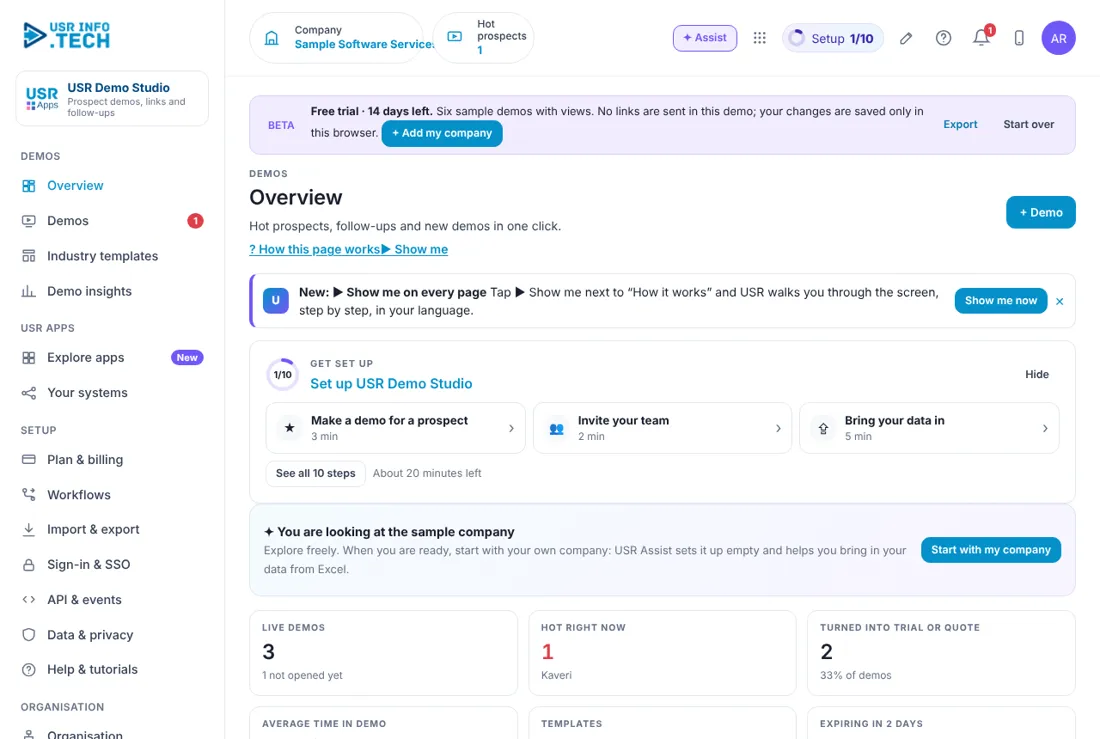
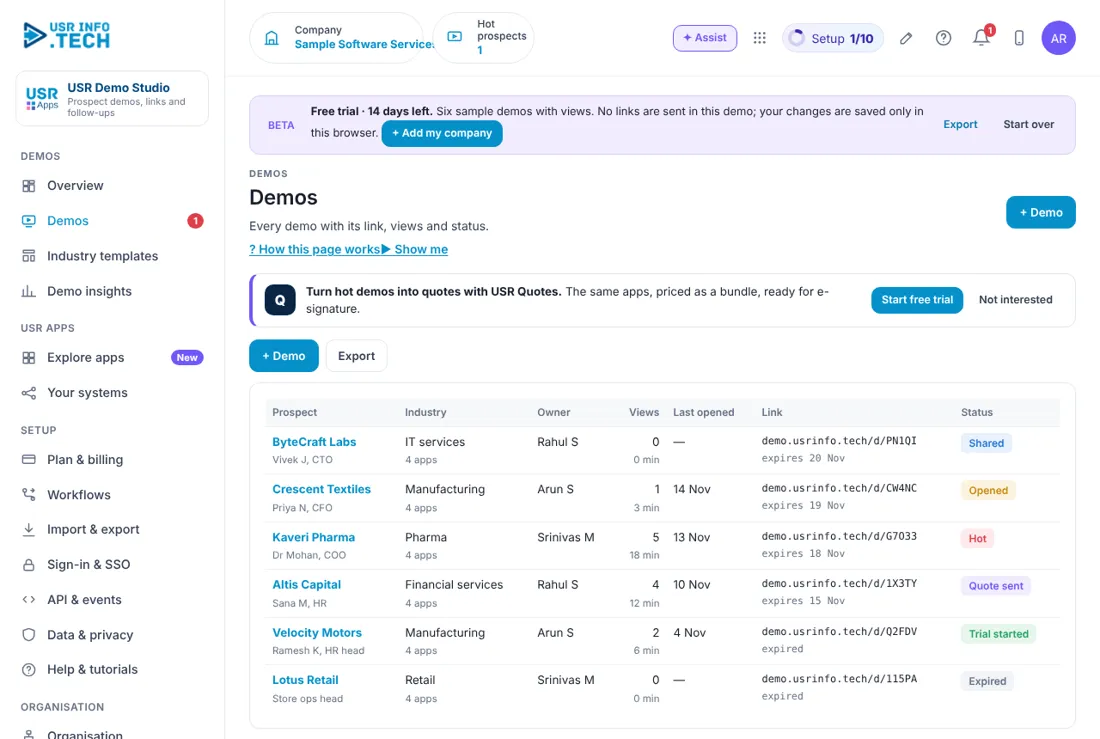
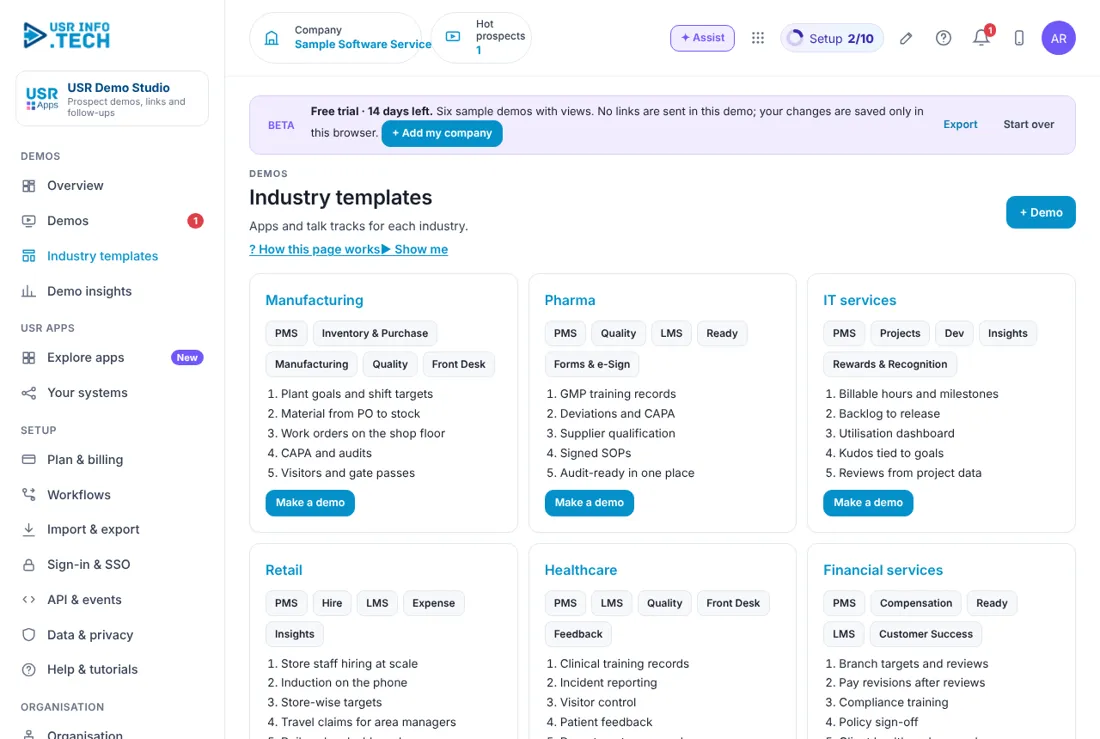
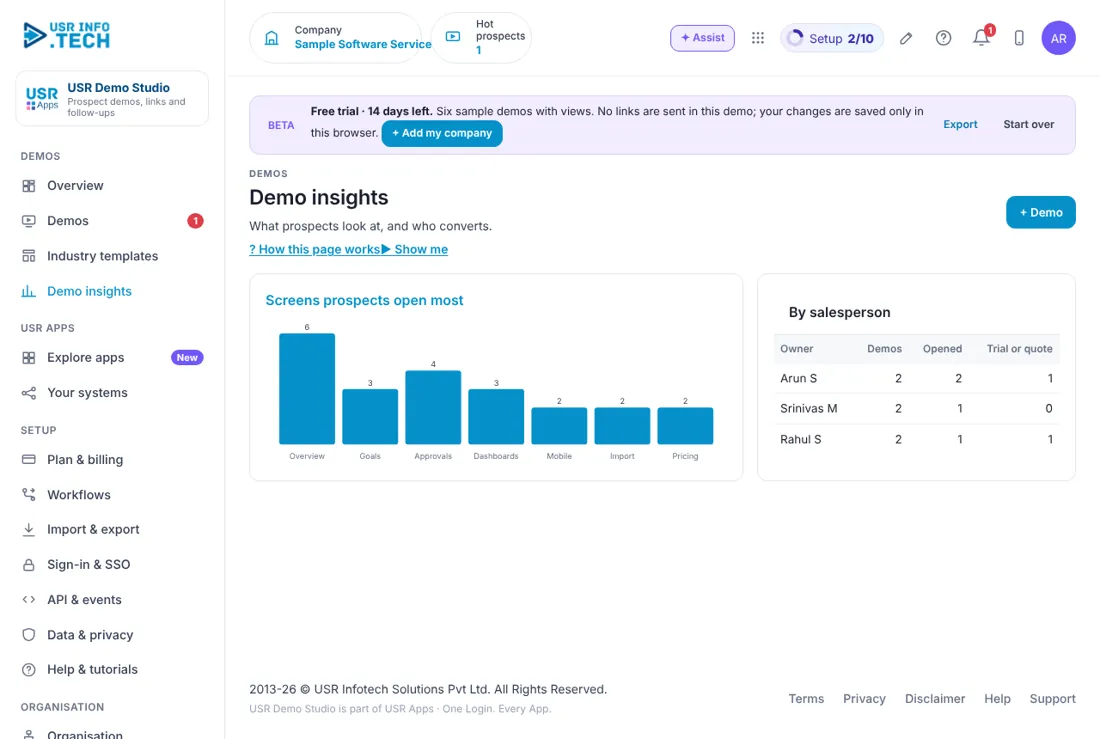
Sample company data. Screens can change as the app improves; the steps stay the same.
Welcome to USR Demo Studio
USR Demo Studio lets a salesperson make a demo for a prospect in one click, with sample data for their industry and the prospect's logo. The prospect opens a private link and explores on their own. You see which screens they looked at and for how long, so you know who is hot and what to say on the call.
OUR USP: One sign-in, one record, one bill. USR Demo Studio is part of USR One, so your people, customers and numbers are never typed twice. AI helps in every app through USR Assist, and AI never takes a decision for you. ISO 27001, ISO 42001 and DPDP Ready.
- A demo in one click from six industry templates
- The prospect's logo and the apps you choose
- A private link by email or WhatsApp, which expires after a few days
- Views and time per screen, so you know what they care about
- One click to turn a hot demo into a trial or a quote
USR ONE: USR Demo Studio feeds hot signals to USR Sales Assistant, turns a hot demo into a quote in USR Quotes and uses sample data like the sample company in every USR app.
A year in USR Demo Studio
Demos follow your selling rhythm. This is how a year looks in USR Demo Studio.
| When | What happens | Who |
|---|---|---|
| At the start of the year | Check the industry templates and the talk tracks. | Sales head |
| Every day | Read Follow up today and make a demo for each new prospect. | Sales |
| Every week | Extend links that are about to expire. Follow up on hot demos. | Sales |
| When a demo is hot | Call the prospect and offer a trial or a quote. | Salesperson |
| Every month | Read Demo insights: screens prospects open most and results by salesperson. | Sales head |
| When a new app is added | Add it to the templates so demos stay current. | Sales head |
Key ideas in simple words
CONCEPT: Demo. A private page with sample data for one prospect.
CONCEPT: Industry template. A ready demo for an industry, with apps and a talk track.
CONCEPT: Talk track. Five points to cover on the call.
CONCEPT: Hot. A prospect who keeps coming back to the demo.
CONCEPT: Views and time. How many times they opened it and for how many minutes.
CONCEPT: Expiring link. A demo link that stops working on a date.
CONCEPT: Turn into a trial. Starts a free trial with the same apps.
CONCEPT: Create quote. Makes a quote in USR Quotes with the apps priced as a bundle.
Show, do not tell
A prospect who explores on their own, with data from their own industry and their own logo, understands the product faster than one who reads a brochure. The demo shows sample data only. Nothing of the prospect's real data is used.
Let the views guide the call
Demo Studio counts screens and time, never what the prospect types. If they keep going back to Approvals, offer a 2-minute walk-through of how a workflow is set up. If they stayed on the overview, offer a short guided call.
Links should expire
A demo link works for a few days, such as 7. This keeps your sample data tidy and gives you a reason to call before it expires.
What each role sees
| Role | What you do and see |
|---|---|
| Salesperson | Their own demos and Follow up today. |
| Sales head | All demos, Industry templates and Demo insights. |
| Prospect | Only the private demo page, with sample data. |
HR and admin guide: features step by step
5.1 Overview
What it is: Overview shows which demos need a call today.
#### How to do it
- Open Overview.
- Click Open next to a prospect in Follow up today.
#### Fields and buttons
| Field or button | What it is for |
|---|---|
| Live demos | How many, and how many have not been opened. |
| Hot right now | Demos where the prospect keeps coming back. |
| Turned into trial or quote | How many, and the share of all demos. |
| Average time in demo | Minutes when opened. |
| Templates | Number of industries. |
| Expiring in 2 days | Links to extend or follow up. |
| Follow up today | Each prospect with status Hot, Opened or Shared, the owner, views, minutes, a tip and Open. |
| New demo in one click | A card for each industry. |
| Ask about demos | Type a question and get an answer. |
TIP: Call a hot prospect on the same day.
5.2 Demos
What it is: Demos lists every demo you made, with its link and how the prospect used it.
#### How to do it
- Open Demos.
- Click + Demo.
- Choose the industry and the prospect.
- Click a prospect name to open its demo.
#### Fields and buttons
| Field or button | What it is for |
|---|---|
| Prospect | Company and contact. |
| Industry | The industry and number of apps. |
| Owner | The salesperson. |
| Views | How many times opened, and minutes. |
| Last opened | The date. |
| Link | The private link and its expiry date. |
| Status | Shared, Opened, Hot, Quote sent, Trial started or Expired. |
| + Demo and Export | Make a demo, or download the list. |
| Turn hot demos into quotes with USR Quotes | A prompt to start a free trial of USR Quotes. |
WATCH OUT: An Expired link stops working. Extend it, or make a new demo.
5.3 A demo
What it is: A demo page is where you set up one prospect's demo and see how they used it.
#### How to do it
- Open a demo.
- Tick the apps and add the logo.
- Click Email link or WhatsApp.
#### Fields and buttons
| Field or button | What it is for |
|---|---|
| Email link, WhatsApp | Send the link. |
| Prospect opens (demo) | Shows you the page as the prospect sees it. |
| Extend 7 days | Gives the link seven more days. |
| Turn into a trial | Starts a free trial with the same apps. |
| Create quote | Makes a quote in USR Quotes. |
| Add their logo | Puts the prospect's logo on the demo. |
| Apps in this demo | Tick the apps to show. |
| Talk track | Five points to cover on the call. Tick each one as you do it. |
| What they looked at | A bar for each screen, with a tip on what to say. |
WATCH OUT: Demo Studio counts screens and time only, never what the prospect types.
5.4 Industry templates
What it is: Industry templates are ready demos for six industries.
#### How to do it
- Open Industry templates.
- Read the five points for your prospect's industry.
- Click Make a demo.
#### Fields and buttons
| Field or button | What it is for |
|---|---|
| Manufacturing | PMS, Inventory & Purchase, Manufacturing, Quality, Front Desk. |
| Pharma | PMS, Quality, LMS, Ready, Forms & e-Sign. |
| IT services | PMS, Projects, Dev, Insights, Rewards & Recognition. |
| Retail | PMS, Hire, LMS, Expense, Insights. |
| Healthcare | PMS, LMS, Quality, Front Desk, Feedback. |
| Financial services | PMS, Compensation, Ready, LMS, Customer Success. |
| Five talk points | Under each industry, such as GMP training records for pharma. |
| Make a demo | Starts a demo with that template. |
TIP: Read the five points before the call. They are the problems that industry cares about.
5.5 Demo insights
What it is: Demo insights shows which screens prospects open most and how each salesperson is doing.
#### How to do it
- Open Demo insights.
- Read the bars and the table.
#### Fields and buttons
| Field or button | What it is for |
|---|---|
| Screens prospects open most | Overview, Goals, Approvals, Dashboards, Mobile, Import and Pricing. |
| By salesperson | Demos made, how many were opened, and how many became a trial or a quote. |
TIP: Spend more time on the screens prospects open most.
5.6 Plan & billing
What it is: Plan & billing shows your plan, invoices and the plans you can choose. One bill covers every USR app through USR Billing.
#### How to do it
- Open Plan & billing.
- Choose a plan.
#### Fields and buttons
| Field or button | What it is for |
|---|---|
| Free | ₹0 (US$0). 3 live demos and industry templates. |
| Standard | ₹499 (US$6) per salesperson a month: unlimited demos, logos, links that expire. |
| Professional | ₹999 (US$12) per salesperson a month: view tracking, follow-up tips, trial and quote in one click. |
| Enterprise | Talk to us: your own demo data, many brands, private hosting. |
| Mid-market | 501 to 5,000 users. Volume pricing per user, in INR or USD. |
| Prices | INR excludes 18% GST. USD is for customers outside India. |
WATCH OUT: If a payment fails, you get a reminder on the due date and 3 and 7 days later. After 21 days the account becomes read-only, never deleted, until it is paid.
If something is not working
| Problem | What to do |
|---|---|
| The prospect cannot open the link | The link may have expired. Open the demo and click Extend 7 days. |
| The demo shows no views | It has not been opened yet. Send a short WhatsApp with one line on what they will see. |
| I cannot make more demos | The Free plan allows 3 live demos. Choose a Standard plan for unlimited demos. |
| The logo does not show | Click Add their logo and upload a clear image. |
Questions people ask
#### Demos
Does the prospect see my real data?
No. A demo uses sample data for the industry.
Can I see what the prospect typed?
No. Demo Studio counts screens and time only, never what they type.
#### Using the app
Is there a free plan?
Yes. Free gives 3 live demos and the industry templates.
Can I turn a demo into a quote?
Yes. Click Create quote on the demo. Professional includes trial and quote in one click.
Glossary: words you will see
| Word | Meaning |
|---|---|
| Demo | A private page with sample data for one prospect. |
| Expiring link | A link that stops working on a date. |
| Hot | A prospect who keeps coming back. |
| Industry template | A ready demo for an industry. |
| Talk track | Five points for the call. |
| Trial | A free trial of the same apps. |
USR Demo Studio shares one record with these apps
No retyping between apps: data entered once flows to the next app, on the same login.
USR Demo Studio is part of USR One. Sales & Marketing Suite from ₹499 ($12) per seat a month, or every app in USR One Complete. Free for up to 10 people.
See USR One
