
USR Dealer Portal help
USR Dealer Portal lets your dealers and distributors order from their own phone, at their own price list, and keeps credit under control. You see new orders, orders on credit hold, dispatches, schemes, claims for damaged or short supply, and each dealer's sales against target.
See the screens
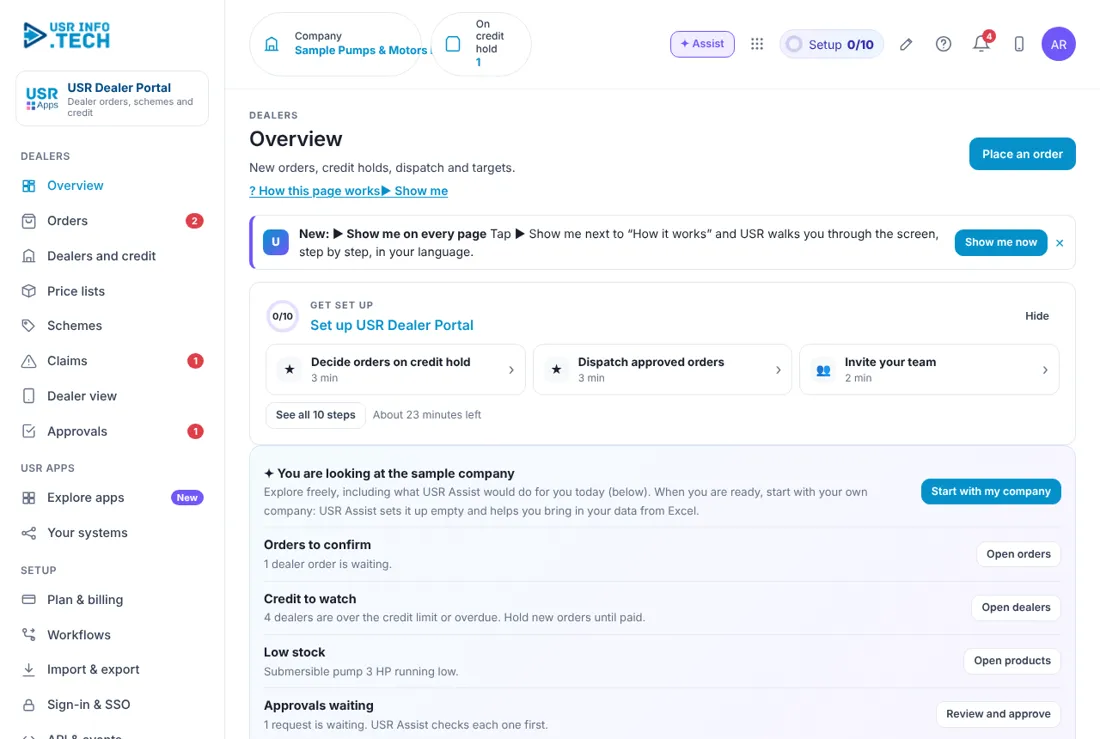
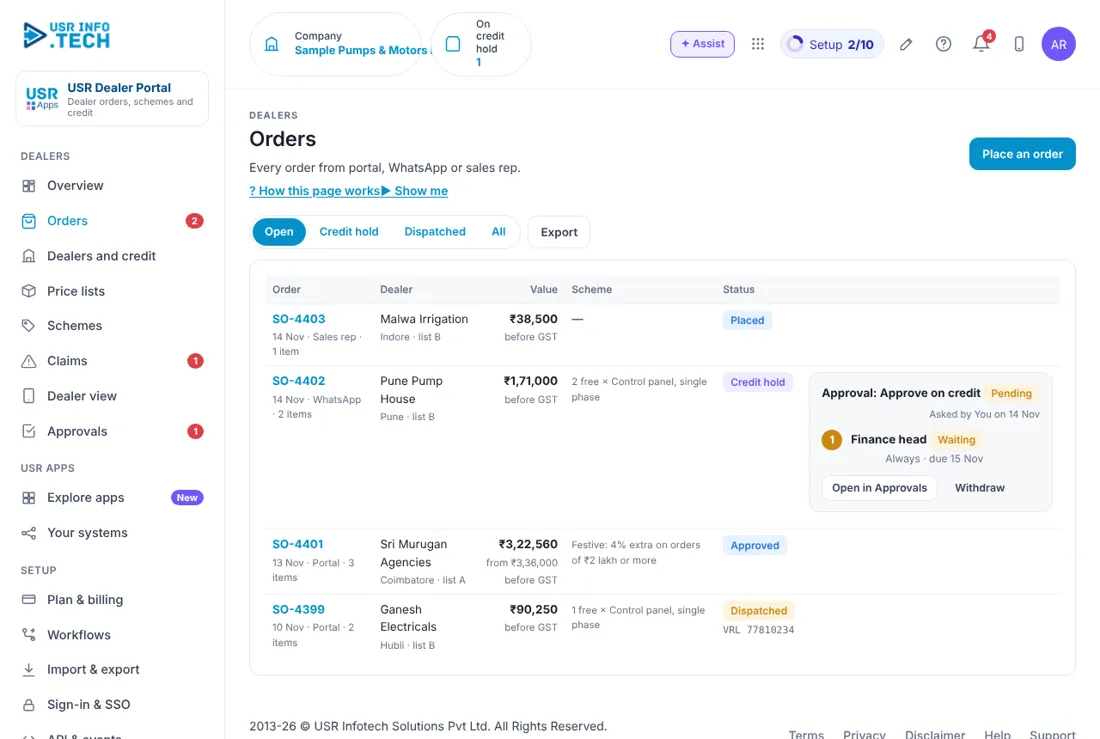
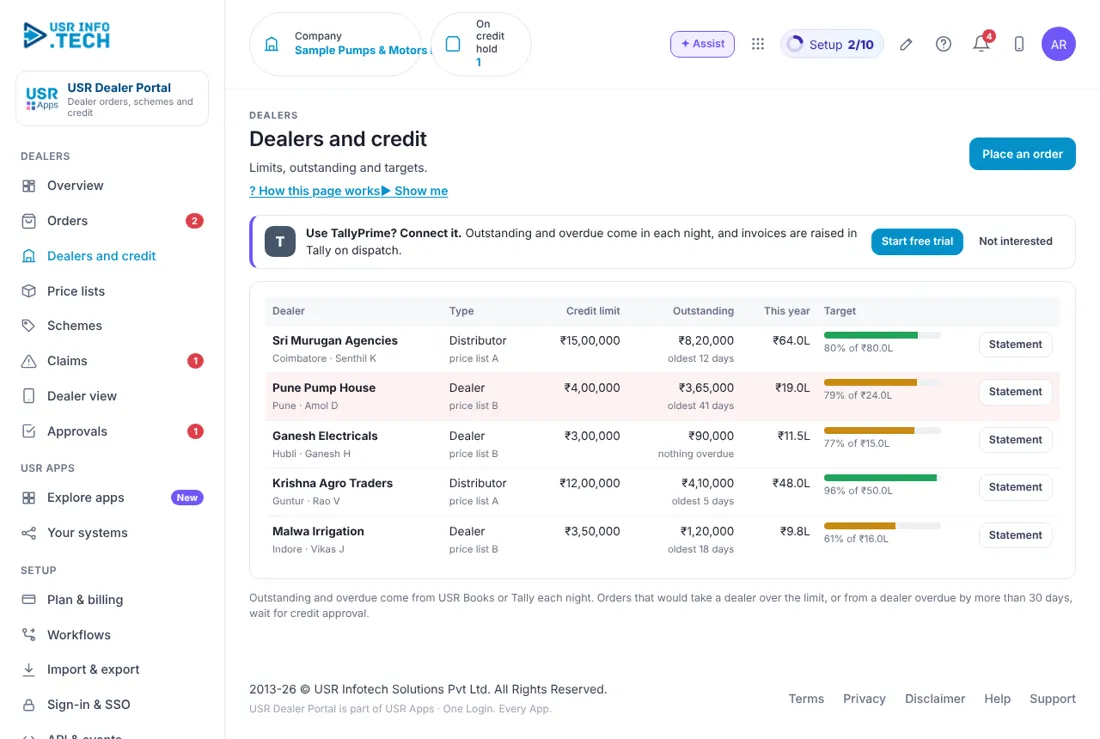
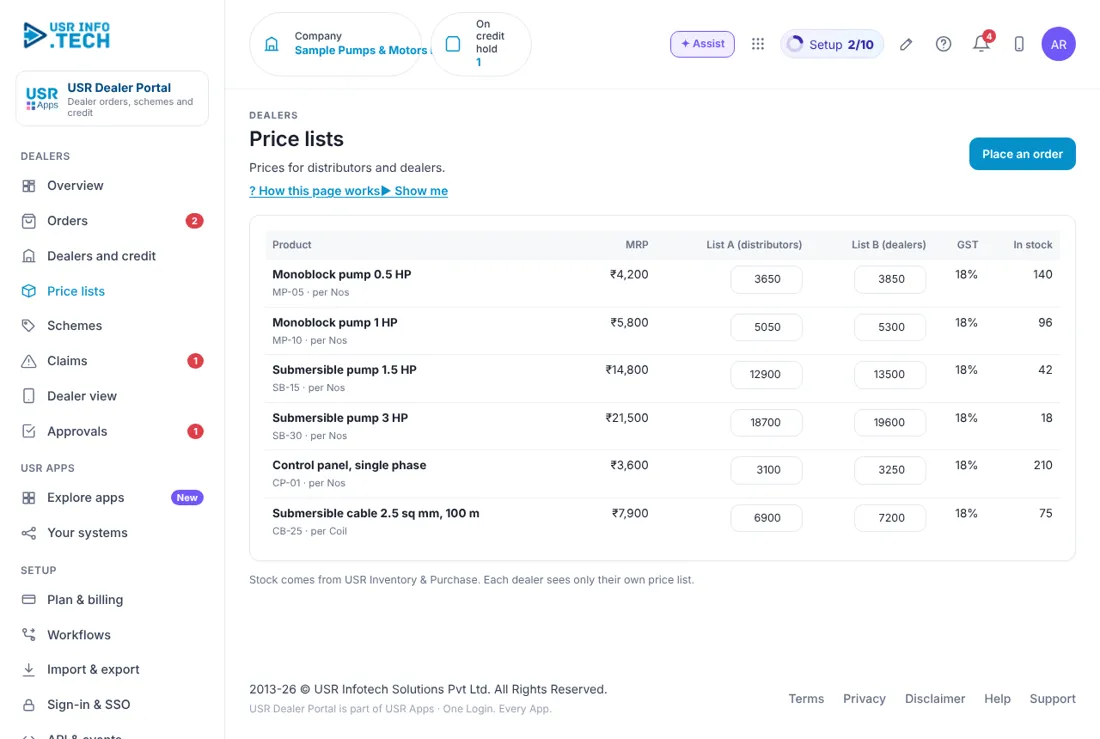
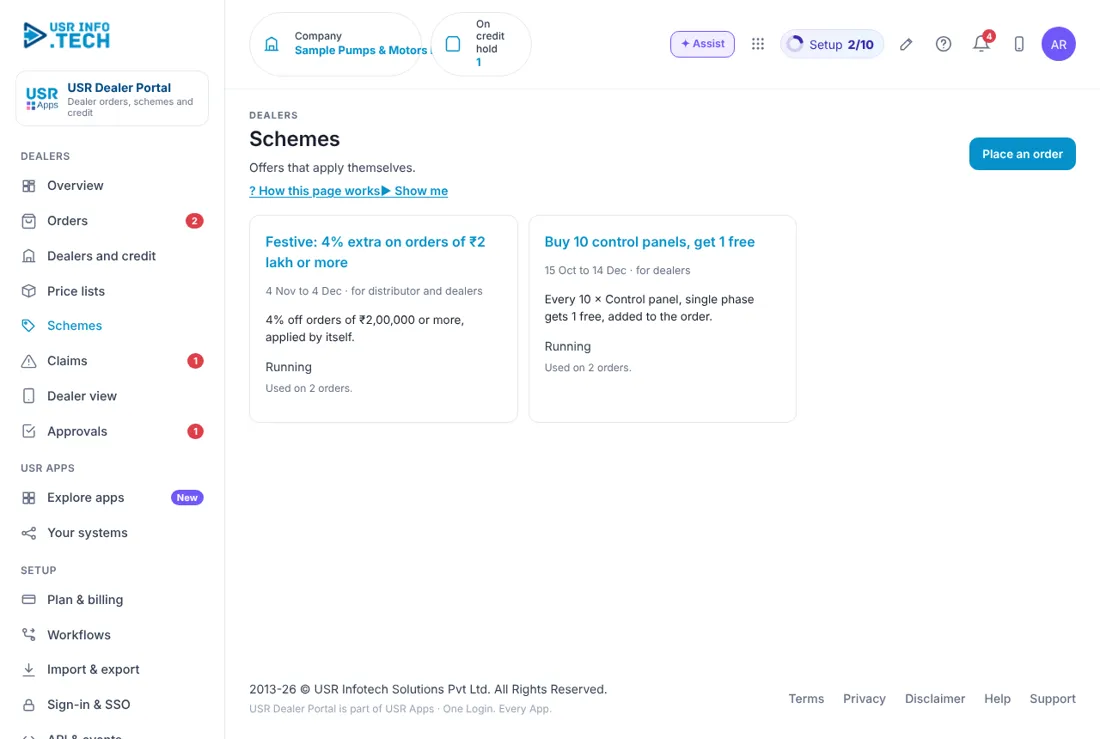
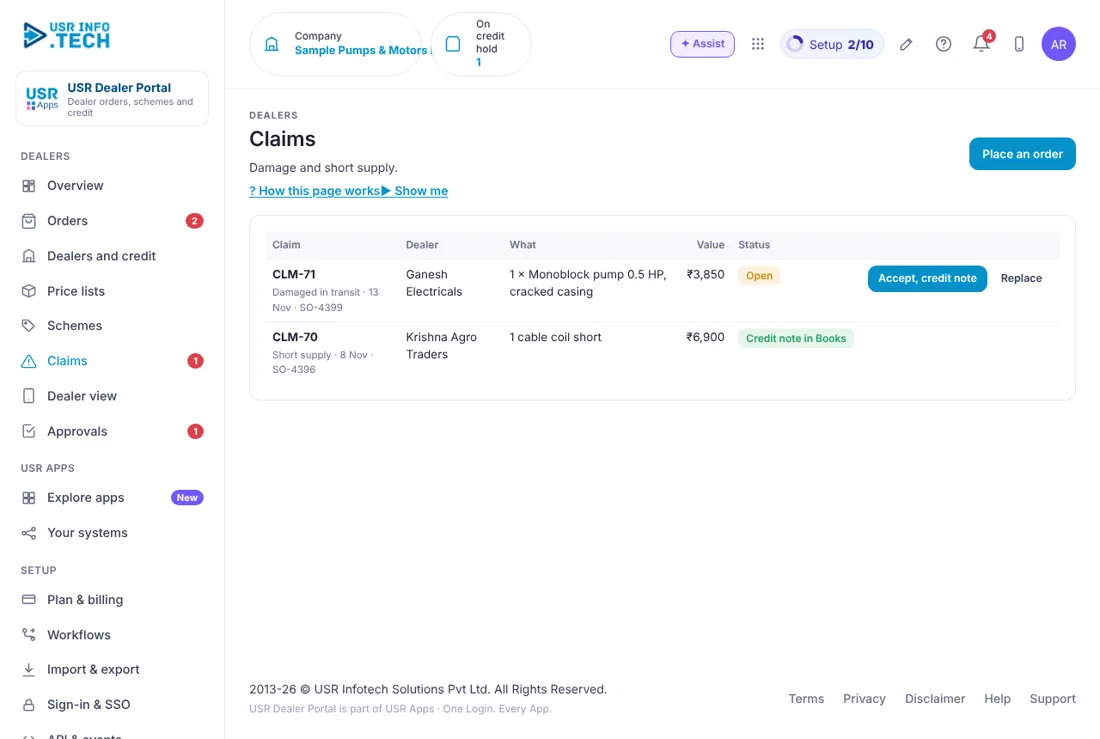
Sample company data. Screens can change as the app improves; the steps stay the same.
Welcome to USR Dealer Portal
USR Dealer Portal lets your dealers and distributors order from their own phone, at their own price list, and keeps credit under control. You see new orders, orders on credit hold, dispatches, schemes, claims for damaged or short supply, and each dealer's sales against target.
OUR USP: One sign-in, one record, one bill. USR Dealer Portal is part of USR One, so your people, customers and numbers are never typed twice. AI helps in every app through USR Assist, and AI never takes a decision for you. ISO 27001, ISO 42001 and DPDP Ready.
- Dealers order on a web page, by WhatsApp or through your sales rep
- A price list for each dealer type, such as distributors and dealers
- Credit limits, with orders held when a dealer is over the limit or overdue
- Schemes that apply by themselves, such as a festive discount or buy 10 get 1 free
- Claims for damage and short supply, with credit note or replacement
USR ONE: USR Dealer Portal reads stock from USR Inventory & Purchase, outstanding from USR Books or Tally, and sends credit-hold decisions to the Approvals list that every USR app shares.
A year in USR Dealer Portal
Dealer business runs on a daily rhythm with seasons. This is how a year looks in USR Dealer Portal.
| When | What happens | Who |
|---|---|---|
| At the start of the year | Set credit limits, targets and price lists for each dealer. | Sales head |
| Every day | Confirm new orders, decide credit holds and dispatch approved orders. | Sales and dispatch |
| Every week | Read Overview: dealers overdue, low stock and open claims. | Sales head |
| When a scheme starts | Add the scheme, with dates and who it is for. | Sales head |
| Every month | Send a statement to each dealer and review sales against target. | Finance, sales |
| When goods are damaged | Open the claim and accept it with a credit note, or replace. | Dispatch in-charge |
Key ideas in simple words
CONCEPT: Dealer. A business that buys from you to resell, such as a distributor or a dealer.
CONCEPT: Price list. A set of prices for a dealer type. List A is for distributors and list B for dealers.
CONCEPT: MRP. The maximum retail price printed on the product.
CONCEPT: Credit limit. The most a dealer may owe you.
CONCEPT: Credit hold. An order waits for approval because it would take the dealer over the limit, or the dealer is overdue by more than 30 days.
CONCEPT: Scheme. A discount or free goods for a time, such as 4% extra on orders of ₹2 lakh or more.
CONCEPT: Claim. A dealer's complaint about damaged or short goods.
CONCEPT: Credit note. A note that reduces what the dealer owes.
Make ordering easy for dealers
Dealers are busy and many are not comfortable with software. They can open a page on their phone, see only their own price list and order. They can also send the list on WhatsApp, or tell your sales rep.
Control credit without arguments
The portal checks the dealer's limit and overdue days for each order. An order that would take a dealer over the limit waits for credit approval from your finance head. Dealers are not blocked by a person's mood but by a rule everyone knows.
Schemes work by themselves
A scheme is set once with dates and the dealer types it is for. When an order qualifies, the discount or free goods are added on their own, and Orders shows which scheme was used.
What each role sees
| Role | What you do and see |
|---|---|
| Sales head | Everything, including price lists and schemes. |
| Dispatch in-charge | Orders to dispatch and Claims. |
| Finance head | Dealers and credit, and credit holds in Approvals. |
| Dealer | Their own price list, order and credit room at dealers.usrinfo.tech. |
HR and admin guide: features step by step
5.1 Overview
What it is: Overview shows today's orders, credit to watch and sales against target.
#### How to do it
- Open Overview.
- Click Open next to an item under Needs you.
#### Fields and buttons
| Field or button | What it is for |
|---|---|
| Orders to confirm, Credit to watch, Low stock, Approvals waiting | Prompts with a button each. |
| New orders | Orders placed and their value. |
| On credit hold | Orders waiting for credit approval. |
| To dispatch | Approved orders to send. |
| Dealers overdue | Dealers overdue by more than 30 days. |
| Sales this year | Value and percentage of target. |
| Open claims | Damage and short supply. |
| Needs you | Orders and claims, each with Open. |
| Sales against target, this year | A bar for each dealer. |
| Ask about dealers | Type a question and get an answer. |
| Place an order | Places an order for a dealer. |
TIP: Read Needs you every morning.
5.2 Orders
What it is: Orders lists every dealer order with its value, scheme and status.
#### How to do it
- Open Orders.
- Click an order number to see its lines.
- Confirm, or wait for the credit decision.
#### Fields and buttons
| Field or button | What it is for |
|---|---|
| Open, Credit hold, Dispatched, All | Filters. |
| Order | Number, date, how it came in (Portal, WhatsApp or Sales rep) and number of items. |
| Dealer | Name, city and price list. |
| Value | Before GST, with the value before the scheme if one applied. |
| Scheme | The scheme that was applied, such as 2 free control panels. |
| Status | Placed, Credit hold, Approved or Dispatched, with the transport reference. |
| Approval box | Who must approve a credit hold, with Open in Approvals and Withdraw. |
| Export | Downloads the list. |
WATCH OUT: An order on credit hold cannot be dispatched until it is approved.
5.3 Dealers and credit
What it is: Dealers and credit shows each dealer's limit, what they owe and how they are doing against target.
#### How to do it
- Open Dealers and credit.
- Click Statement for a dealer.
#### Fields and buttons
| Field or button | What it is for |
|---|---|
| Dealer | Name, city and contact person. |
| Type | Distributor or Dealer, with the price list. |
| Credit limit | The most they may owe. |
| Outstanding | What they owe, and the age of the oldest invoice. |
| This year | Sales so far. |
| Target | A bar and the percentage of target. |
| Statement | Sends the dealer a statement. |
| Row in red | A dealer who is overdue. |
| Connect TallyPrime | Optional. Outstanding comes in each night and invoices are raised in Tally on dispatch. |
WATCH OUT: Outstanding and overdue come from USR Books or Tally each night. They are not live to the minute.
5.4 Price lists
What it is: Price lists hold the price of each product for each dealer type, with stock.
#### How to do it
- Open Price lists.
- Type a new price in the box.
- Save.
#### Fields and buttons
| Field or button | What it is for |
|---|---|
| Product | Name, code and unit. |
| MRP | The maximum retail price. |
| List A (distributors) | The price for distributors. You can edit it. |
| List B (dealers) | The price for dealers. You can edit it. |
| GST | The tax rate. |
| In stock | Stock from USR Inventory & Purchase. |
WATCH OUT: A dealer sees only their own price list.
5.5 Schemes
What it is: Schemes give discounts or free goods for a time.
#### How to do it
- Open Schemes.
- Add a scheme with its dates and rule.
#### Fields and buttons
| Field or button | What it is for |
|---|---|
| Name | For example Festive: 4% extra on orders of ₹2 lakh or more. |
| Dates and who | For example 24 Oct to 23 Nov, for distributors and dealers. |
| Rule | For example 4% off orders of ₹2,00,000 or more, or every 10 control panels get 1 free. |
| Status | Running. |
| Used on | How many orders used it. |
TIP: Set the end date when you start a scheme, so it never runs on by mistake.
5.6 Claims
What it is: Claims lists dealers' complaints about damaged or short goods.
#### How to do it
- Open Claims.
- Read the claim.
- Click Accept, credit note or Replace.
#### Fields and buttons
| Field or button | What it is for |
|---|---|
| Claim | Number, reason, date and the order. |
| Dealer | Who raised it. |
| What | The item and the problem. |
| Value | The value of the claim. |
| Status | Open, or Credit note in Books. |
| Accept, credit note | Accepts the claim and raises a credit note in USR Books. |
| Replace | Sends a replacement instead. |
TIP: Answer a claim within two days. Dealers remember.
5.7 Dealer view
What it is: Dealer view shows what a dealer sees at dealers.usrinfo.tech on their phone.
#### How to do it
- Open Dealer view.
- Read it as the dealer sees it.
#### Fields and buttons
| Field or button | What it is for |
|---|---|
| Catalogue | The dealer's own price list with MRP, and few left when stock is low. |
| - and + | Change the quantity. |
| Your order | The lines and the total before GST. |
| Credit room | How much more the dealer may order. |
| Place order | Places the order. |
TIP: A dealer can also order by sending the list on WhatsApp.
5.8 Approvals
What it is: Approvals shows credit holds and other items that wait for a decision.
#### How to do it
- Open Approvals.
- Click Approve, Send back or Reject.
#### Fields and buttons
| Field or button | What it is for |
|---|---|
| Waiting, Overdue, Approved this month | Counts at the top. |
| Approval workflows on | How many workflows are on. |
| Waiting on | Filter by Sales head, Finance head, Dispatch in-charge, Company admin, Team lead, Department head or Managing director. |
| Request, Step, Waiting on, Due | What, which step, who and by when. |
| Comment | Needed if you reject. |
| Approve, Send back, Reject, Open | Your decisions. |
TIP: Approvers can also decide from the email or WhatsApp message.
5.9 Plan & billing
What it is: Plan & billing shows your plan, invoices and the plans you can choose. One bill covers every USR app through USR Billing.
#### How to do it
- Open Plan & billing.
- Choose a plan.
#### Fields and buttons
| Field or button | What it is for |
|---|---|
| Free | ₹0 (US$0). Up to 5 dealers: orders and price lists. |
| Standard | ₹299 (US$3.6) per dealer a month: credit checks, schemes, dispatch status, WhatsApp orders. |
| Professional | ₹499 (US$6) per dealer a month: claims, statements, Books or Tally sync, targets. |
| Enterprise | Talk to us: many brands and depots, sales-rep app, private hosting. |
| Mid-market | 501 to 5,000 users. Volume pricing per user, in INR or USD. |
| Prices | INR excludes 18% GST. USD is for customers outside India. |
WATCH OUT: If a payment fails, you get a reminder on the due date and 3 and 7 days later. After 21 days the account becomes read-only, never deleted, until it is paid.
If something is not working
| Problem | What to do |
|---|---|
| An order is on credit hold | The dealer is over the limit or overdue by more than 30 days. See Approvals. |
| A dealer cannot see a product | Dealers see only their own price list. Check the product is on it. |
| A scheme did not apply | Check the dates, the dealer type and the order value. |
| Outstanding looks old | It comes from USR Books or Tally each night. Check again tomorrow. |
Questions people ask
#### Dealers
Can a dealer order on WhatsApp?
Yes. They send the list and you place the order, or the portal reads it.
Does a dealer see other dealers' prices?
No. Each dealer sees only their own price list.
#### Using the app
Is there a free plan?
Yes. Free allows up to 5 dealers.
Does it work with Tally?
Yes. Professional includes Books or Tally sync.
Glossary: words you will see
| Word | Meaning |
|---|---|
| Claim | A complaint about damaged or short goods. |
| Credit hold | An order waiting for credit approval. |
| Credit limit | The most a dealer may owe. |
| Credit note | Reduces what a dealer owes. |
| Dealer | A business that buys from you to resell. |
| MRP | Maximum retail price. |
| Price list | Prices for a dealer type. |
| Scheme | A discount or free goods for a time. |
USR Dealer Portal shares one record with these apps
No retyping between apps: data entered once flows to the next app, on the same login.
USR Dealer Portal is part of USR One. Sales & Marketing Suite from ₹499 ($12) per seat a month, or every app in USR One Complete. Free for up to 10 people.
See USR One
