
USR Quality help
USR Quality is the quality system of a factory or a lab. You log deviations, find the root cause, open corrective and preventive actions (CAPA), answer customer complaints, control changes, run audits, keep controlled documents with electronic signatures, and watch the quality of your suppliers. Every record has an owner, a due date and a history, and nothing is ever deleted. It is built for GMP, WHO-GMP and ISO 9001 users.
See the screens
Sample company data. Screens can change as the app improves; the steps stay the same.
Welcome
USR Quality is the quality system of a factory or a lab. You log deviations, find the root cause, open corrective and preventive actions (CAPA), answer customer complaints, control changes, run audits, keep controlled documents with electronic signatures, and watch the quality of your suppliers. Every record has an owner, a due date and a history, and nothing is ever deleted. It is built for GMP, WHO-GMP and ISO 9001 users.
- Deviations, CAPA, customer complaints and change control in one place
- Due dates and overdue flags, so inspectors never find an open surprise
- Audits, supplier quality with defects in parts per million, and incoming inspection
- Controlled documents: SOPs with versions, review dates, e-signature and training in USR LMS
- Reports, cost of poor quality and a one-page management review summary
A year in USR Quality
| When | What happens | Who |
|---|---|---|
| At the start | Set the timelines and the standards. Load the SOPs. Plan the audits for the year. | QA head |
| Every day | Open the Dashboard. Clear overdue deviations, CAPAs and complaints. Sign approvals. | QA team |
| Every week | Review open deviations and complaints. Check changes waiting for assessment. | QA head |
| Every month | Read Reports and the root-cause chart. Review supplier quality and incoming inspection. | QA head |
| Every quarter | Do internal audits. Check CAPA effectiveness. | QA team |
| Every year | Review the documents that are due. Write the management review summary. | Management |
Key ideas
- Deviation. Something that did not go as the procedure says, such as a temperature that was too high.
- CAPA. Corrective and preventive action: what you do to fix the cause and stop it happening again.
- Complaint. A problem reported by a customer, with its batch.
- Change control. A planned change to a process, material, supplier, equipment or facility, assessed before it is made.
- Root cause. The real reason, found with the 6M: man, machine, method, material, measurement and environment.
- SOP. A standard operating procedure: the written way to do a task.
- SCAR. Supplier corrective action request.
- Cost of poor quality. What rejects, rework and complaints cost you.
Nothing is deleted. Every change to a record is kept in its history with who, what and when. Records are never deleted, only closed. This is what inspectors want to see.
From deviation to CAPA. A deviation is logged, investigated and its root cause found. If the cause could happen again, a CAPA is opened with an owner and a date. After the action is done, an effectiveness check confirms the problem has not come back. Only then is the CAPA closed.
Signatures and timelines. In the sample company, electronic signature is required on approvals and closures, with name, reason and password. Complaints are acknowledged within 2 days and answered within 30 days. Deviations close within 30 days and CAPAs are due within 60 days. You can change these under Settings.
Cost of poor quality. Quality is not only a rule. A deviation, a rejected lot or a complaint costs money. The Dashboard and Reports show the cost of poor quality for the last 6 months, so management can see what quality problems cost.
Features step by step
5.1 Dashboard
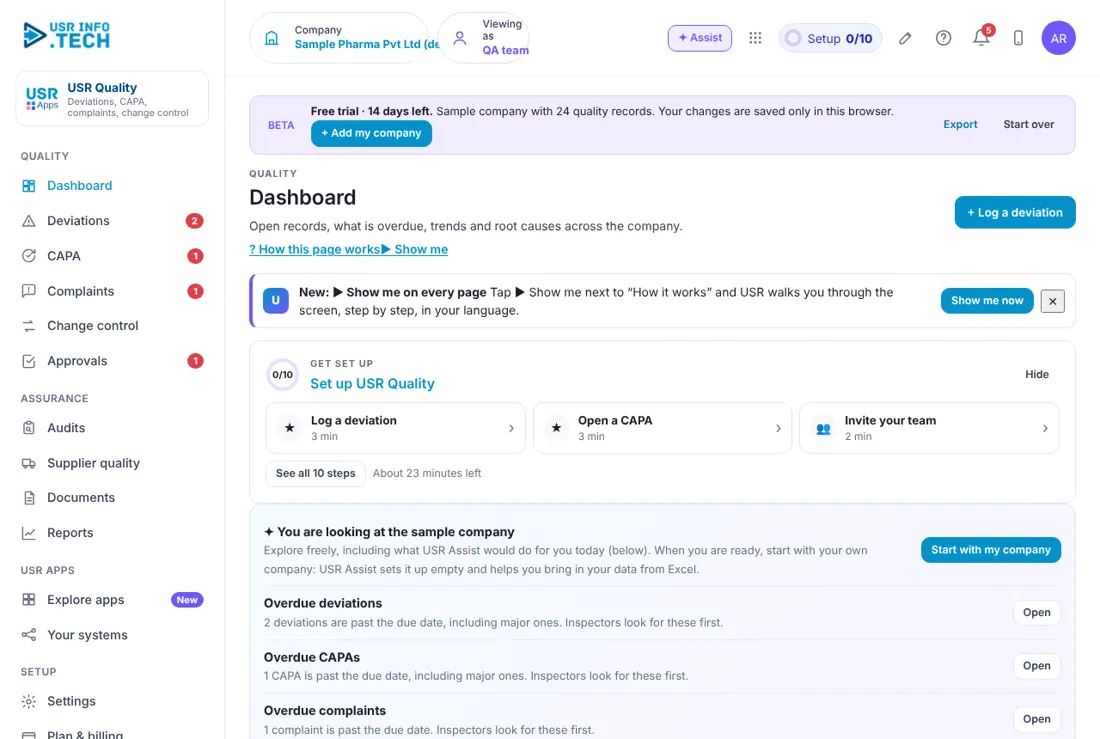
Dashboard shows what is overdue and the main numbers of your quality system. Overdue deviations, CAPAs and complaints: What is past its due date, with an Open button. Documents due for review: SOPs due for periodic review within 30 days. Open records: How many deviations and complaints are open. Overdue: How many are past their due date. CAPA on time: The share of closed CAPAs that finished on time. Days to close: The average days to close a deviation or complaint. Changes waiting: Changes waiting for assessment or approval. Cost of poor quality: For the last 6 months. Deviations and complaints per month: A line chart. Root causes: A Pareto chart by 6M. Needs attention and By area: The items that need you, and the areas with most records.
5.2 Deviations
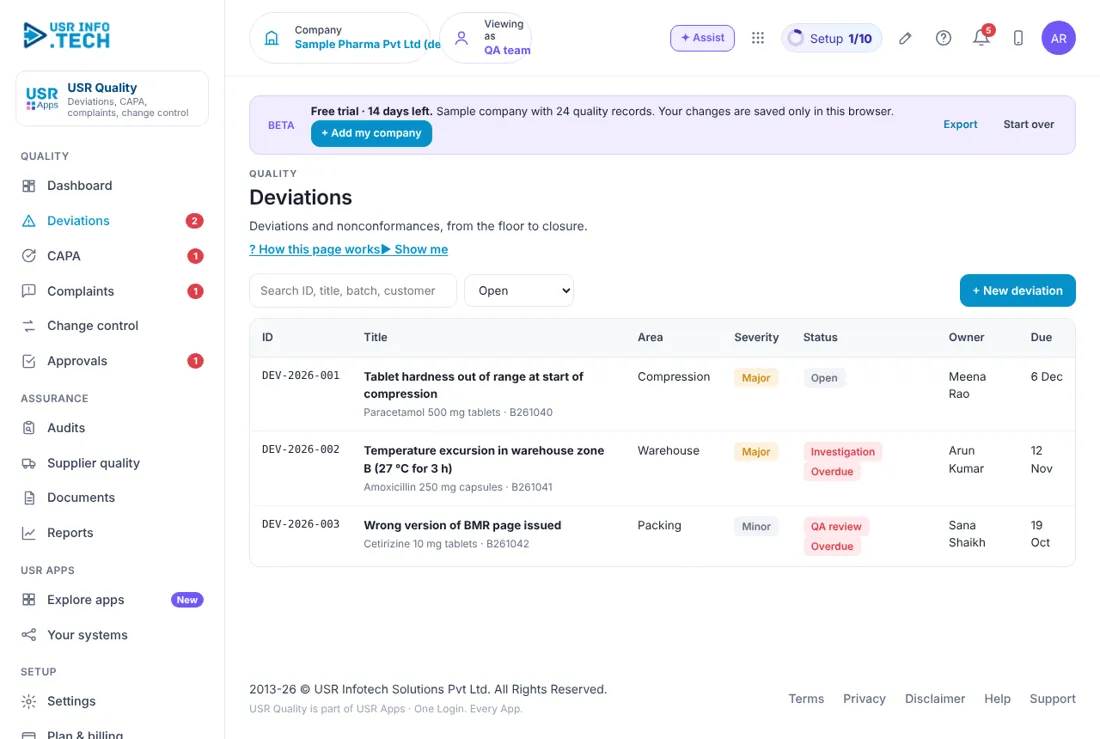
Deviations lists every departure from the procedure and where it has reached. Search and filter: Search by ID, title or batch. Choose Open, or another status. ID: DEV-year-number. Title: What happened, with the product and batch. Area: Where it happened, such as Compression or Warehouse. Severity: Minor, Major or Critical. Status: Open, Investigation, QA review and so on. Overdue shows in red. Owner and Due: Who and by when. + New deviation: Log a new deviation. Watch out: Log a deviation the same day. Late logging is a finding in itself.
5.3 CAPA
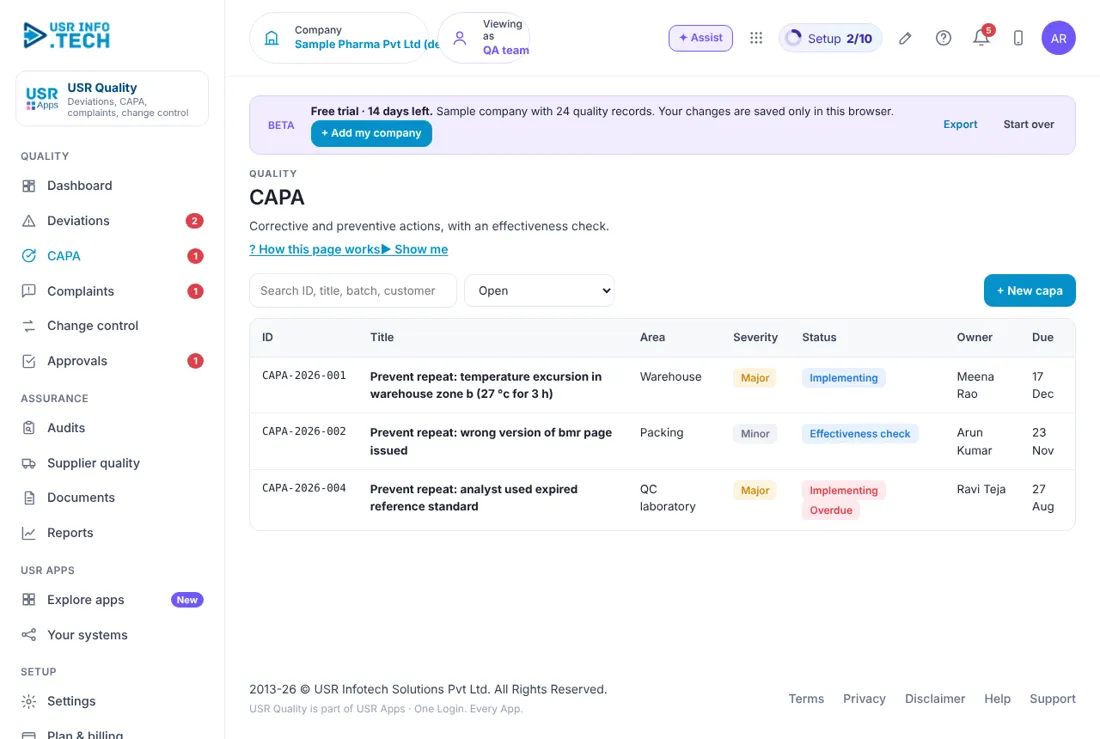
CAPA tracks the actions that fix a cause and stop it coming back. ID: CAPA-year-number. Title: What is to be prevented. Area and Severity: Where, and how serious. Status: Implementing, Effectiveness check and so on. Owner and Due: Who and by when. Overdue shows in red. + New capa: Open a CAPA.
5.4 Complaints
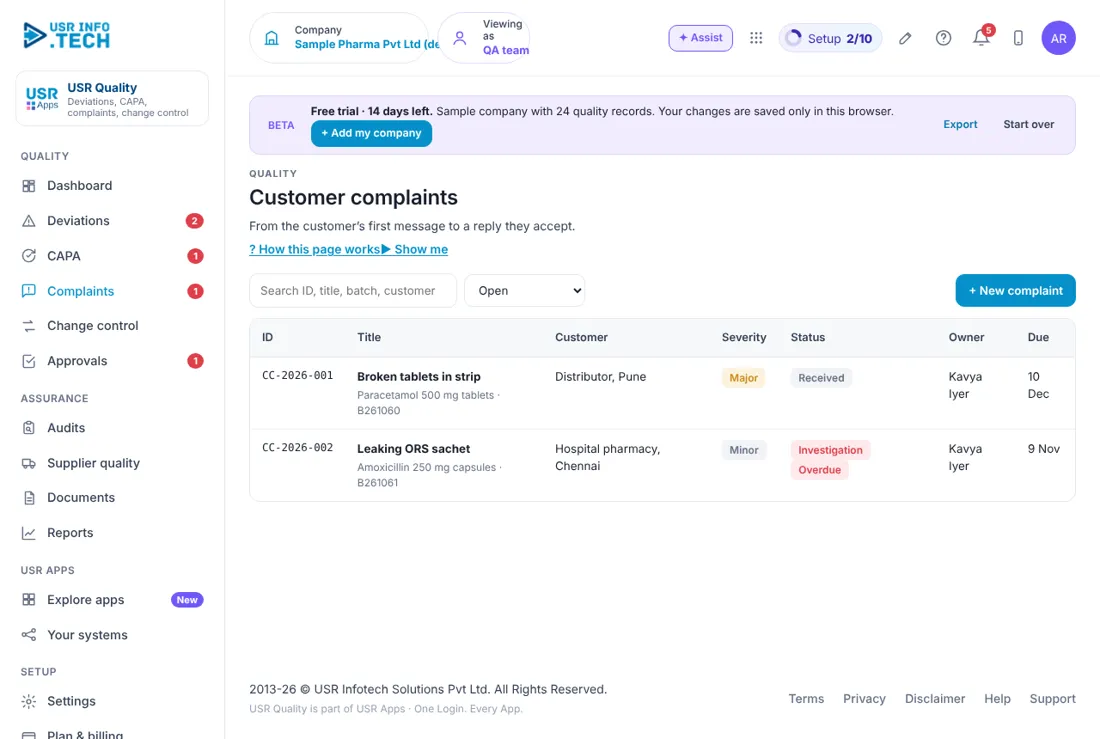
Customer complaints records every problem a customer reports and your answer. ID: CC-year-number. Title: The problem, with the product and batch. Customer: Who complained. Severity: Minor, Major or Critical. Status: Received, Investigation and so on. Owner and Due: Who answers and by when. + New complaint: Log a complaint. Watch out: An overdue complaint shows in red. Inspectors look at these first.
5.5 Change control
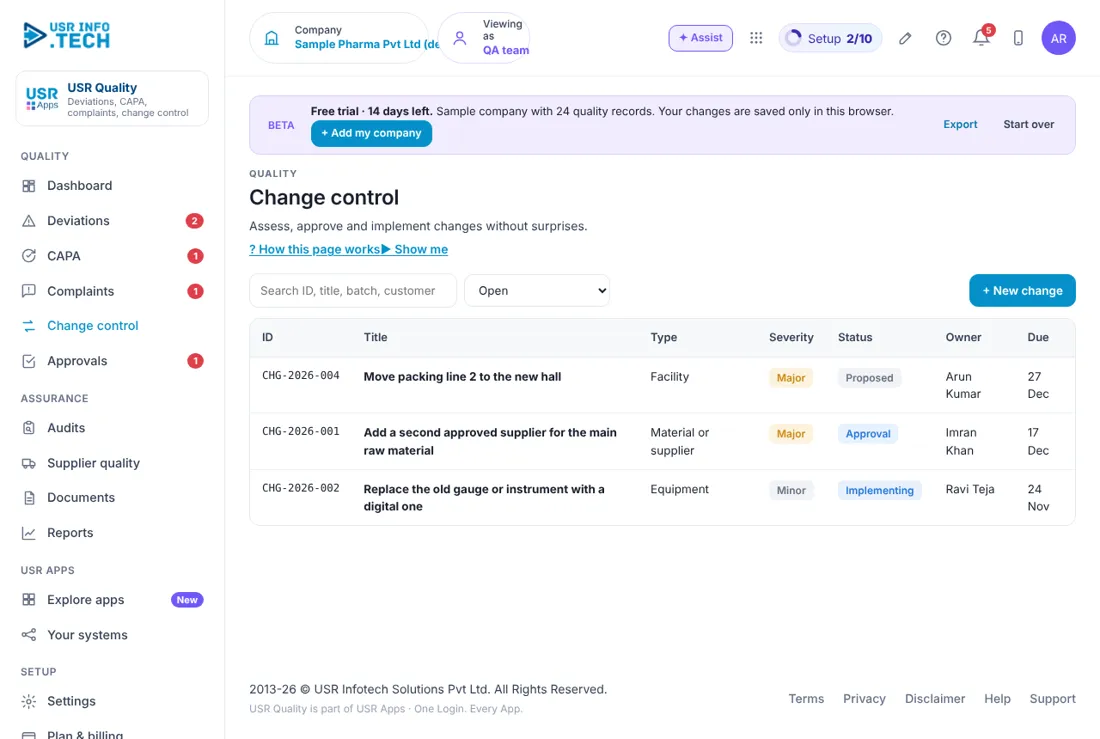
Change control makes sure a change is assessed and approved before it is made. ID: CHG-year-number. Title: The change. Type: Facility, Material or supplier, Equipment and so on. Severity: Minor or Major. Status: Proposed, Approval, Implementing. Owner and Due: Who and by when. + New change: Propose a change. Watch out: Do not make the change until it is approved.
5.6 Approvals
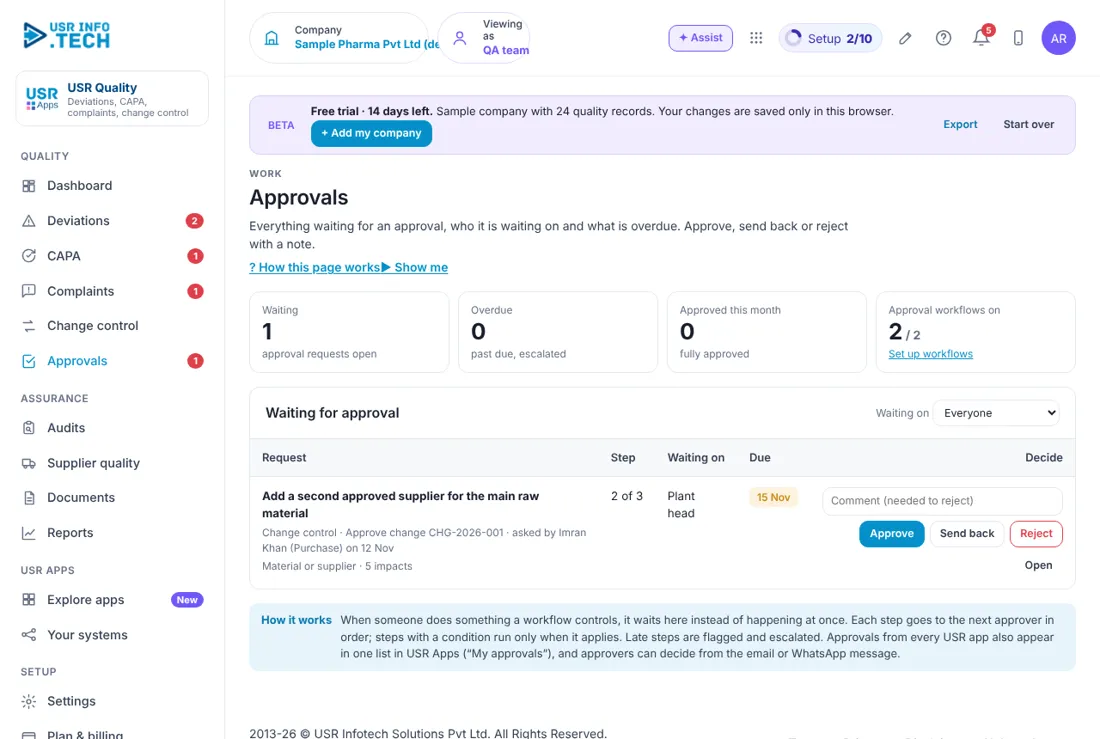
Approvals holds the requests waiting for a decision, such as a change. Waiting, Overdue, Approved this month: Counts of requests. Approval workflows on: How many workflows are switched on. Request, Step, Waiting on, Due: What, which step of how many, who and by when. Approve, Send back, Reject: Your decision. A comment is needed to reject. Open: See the request in full.
5.7 Audits
Audits plans and records internal, supplier and customer audits. ID: AUD-year-number. Title: The audit. Type: Customer, Supplier or internal, and the standard, such as Revised Schedule M (GMP). Severity: The grade of findings. Status: Planned, In progress or Report. Owner and Due: Who and by when. + New audit: Plan an audit.
5.8 Supplier quality
Supplier quality shows how good your suppliers are, from incoming inspection and audits. Approved suppliers, Incoming inspection, Corrective actions: The three tabs. Supplier and Category: The supplier from USR Ready and what it supplies. Status: Approved or Conditional. Defects (ppm): Defective parts per million from incoming inspection. Open SCAR: Supplier corrective action requests that are open. Last audit and Next audit: Dates. An overdue audit shows in red.
5.9 Documents
Documents holds your controlled SOPs, specifications and the quality manual. Effective documents: How many are in force. Under review: Documents being revised. Review due in 60 days: Documents due or overdue for review. Linked to training: Documents with training in USR LMS. Number, Title and Version: For example SOP-QA-001, Deviation handling, 3.0. Effective and Review by: The dates. Status: Effective or Under review. Revise and Approve: Make a new version, or approve one with an electronic signature. + New document: Add a document. Watch out: Each revision goes through change control and needs approval before it is effective.
5.10 Reports
Reports gives the key figures and helps you write the management review. Key figures: Deviations raised, customer complaints, complaints answered on time, CAPA open and overdue, changes closed, audit findings open, supplier rejections and cost of poor quality, for the last 6 months. Management review: The inputs ISO 9001 clause 9.3 asks for. Write the management review summary: USR Assist writes a one-page note with the inputs, the main risks and the decisions needed. Download as a Word file: Take the summary away. Export all records (CSV): All records for your own analysis. Watch out: The summary is a draft. Read it before you present it.
5.11 Settings
Settings holds the timelines and rules for your quality system. Acknowledge complaints within: 2 days in the sample company. Answer complaints within: 30 days in the sample company. Close deviations within: 30 days. CAPA due within: 60 days. Review documents every: 24 months. Electronic signature: Required, with name, reason and password, and an audit trail. Standards this company follows: For example Revised Schedule M (GMP), WHO-GMP and ISO 9001. Watch out: Changing a timeline changes the due date of new records.
5.12 Plan & billing
Plan & billing shows your plan and the plans you can choose. One bill covers every USR app through USR Billing. Free: ₹0 (US$0). 1 site, 20 records a month. Starter: ₹2,499 (US$29) a month. 1 site, deviations, complaints, CAPA, documents. Growth: ₹5,833 (US$68) a month. Change control, audits, supplier quality, AI, e-signatures. Group: ₹12,499 (US$149) a month. Up to 5 sites, combined management review. Enterprise: Talk to us. Validation pack, private hosting, agreed SLA. Mid-market: 501 to 5,000 users. Volume pricing per user, in INR or USD. Yearly or Monthly: The prices shown are for the yearly option, where you pay for 10 months. INR excludes 18% GST. Watch out: There is a 14-day Growth trial with no card needed.
If something is not working
| Problem | What to do |
|---|---|
| A record shows Overdue | Open it and finish the next step, or ask the owner. If the date must move, change it with a reason. |
| I cannot approve a document | Your role may not allow it. Ask your administrator. Approval also needs your electronic signature. |
| A supplier is missing from Supplier quality | Suppliers live in USR Ready. Add the supplier there. |
| A CAPA will not close | It needs an effectiveness check first. |
| I cannot see a page | Your role may not allow it. Ask your administrator. |
Questions people ask
Does it follow GMP? It is built for Revised Schedule M (GMP), WHO-GMP and ISO 9001 users. It keeps a history of every change and uses electronic signatures. Your company is still responsible for validation and its own procedures.
Can records be deleted? No. Records are never deleted, only closed. Every change is kept with who, what and when.
Is there an audit trail? Yes. Every change to a record is kept in its history.
Where do suppliers come from? From USR Ready, so there is one supplier list for purchase, finance and quality.
Is there a trial? Yes. A 14-day Growth trial starts when you add your own company.
Glossary
CAPA: Corrective and preventive action. Deviation: A departure from a written procedure. GMP: Good manufacturing practice. SOP: Standard operating procedure. SCAR: Supplier corrective action request. ppm: Parts per million: defective parts in every million. Pareto: A chart that shows the few causes behind most problems. 6M: Man, machine, method, material, measurement and environment.
USR Quality shares one record with these apps
No retyping between apps: data entered once flows to the next app, on the same login.
USR Quality is part of USR One. Operations Suite from ₹399 ($10) per seat a month, or every app in USR One Complete. Free for up to 10 people.
See USR One
