
USR Meetings & Actions help
USR Meetings & Actions makes sure every meeting ends with decisions that somebody does. You plan a meeting from a ready template, run it with an agenda, write the minutes (USR AI can draft them from the decisions), and turn each decision into an action item with an owner and a date. Late actions show in red, and each action can be linked to a company goal or sent to USR Projects.
See the screens
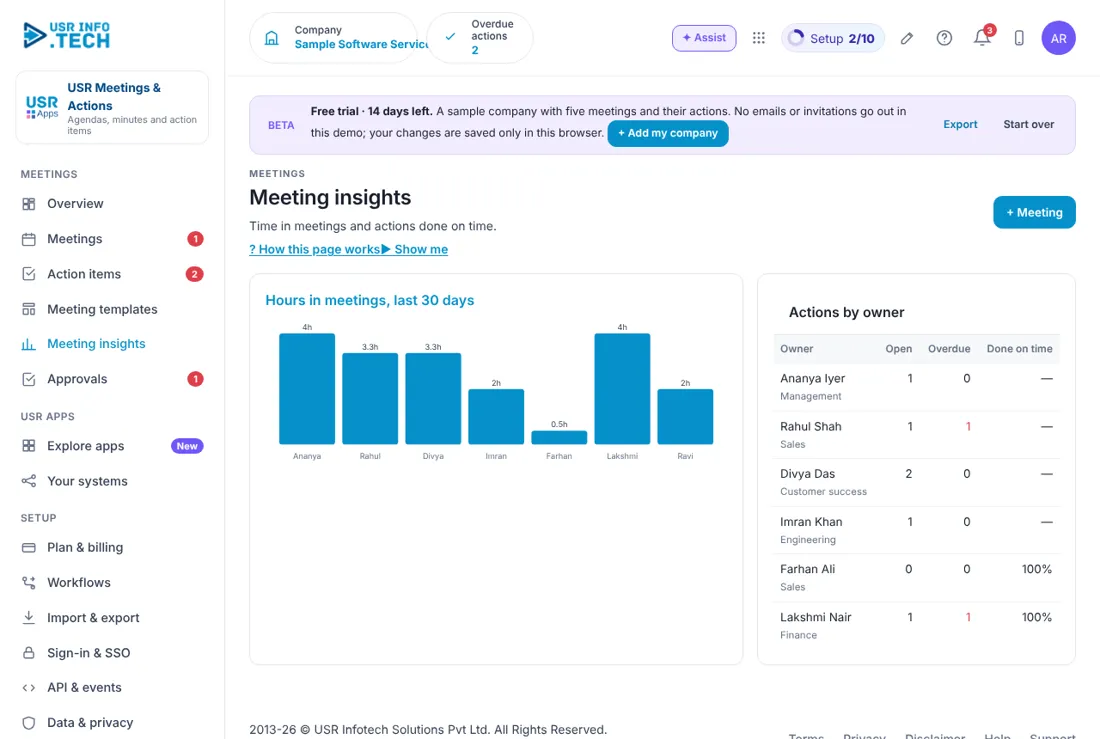
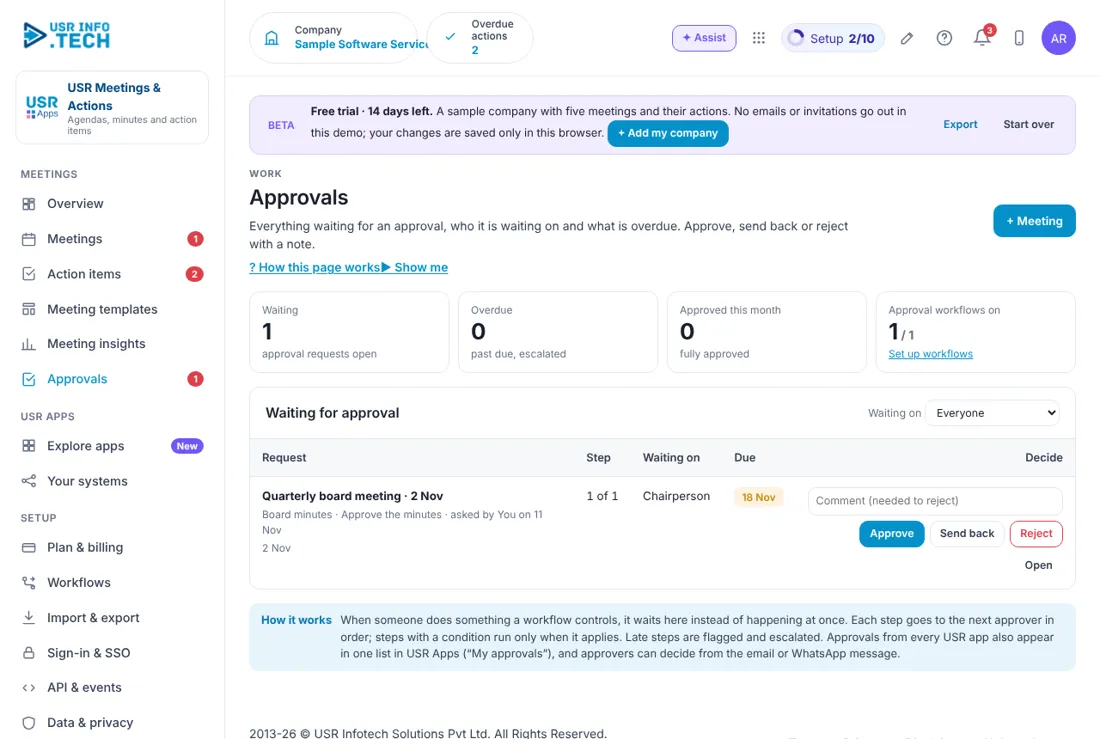
Sample company data. Screens can change as the app improves; the steps stay the same.
Welcome
USR Meetings & Actions makes sure every meeting ends with decisions that somebody does. You plan a meeting from a ready template, run it with an agenda, write the minutes (USR AI can draft them from the decisions), and turn each decision into an action item with an owner and a date. Late actions show in red, and each action can be linked to a company goal or sent to USR Projects.
- Meeting templates for management review, sales huddle, one-to-one and board meeting
- Minutes drafted by USR AI from the decisions, sent within a day
- Action items with owner, date and status, and late ones in red
- Each action linked to a goal, so work follows the company's priorities
- Meeting insights: hours spent in meetings and actions done on time by owner
A year in USR Meetings & Actions
| When | What happens | Who |
|---|---|---|
| At the start | Choose the templates. Set up the weekly, monthly and board series. Invite the people. | Admin |
| Every day | Open the Overview. Mark actions done. Nudge late owners. | Everyone |
| Every week | Run the management review and the sales huddle. Send the minutes within a day. | Chair |
| Every month | Read Meeting insights: hours in meetings and actions done on time. | Management |
| Every quarter | Hold the board meeting. Get the minutes approved by the chairperson. | Directors |
| Every year | Review the meeting series. Drop meetings that no longer help. | Management |
Key ideas
- Meeting. A planned discussion with a date, a time, people and an agenda.
- Series. A meeting that repeats, such as every Monday.
- Template. A ready agenda for a kind of meeting.
- Minutes. A short record of what was decided.
- Action item. A task from a meeting, with an owner and a date.
- Chair. The person who leads the meeting and approves the minutes.
- Linked goal. The company goal that an action helps to reach.
- Carry-over. An open action that comes to the next meeting of the series.
A meeting without actions is a waste. The point of a meeting is what happens after it. USR Meetings & Actions turns each decision into an action item with one owner and one date. The next meeting of the series opens with last week's open actions, so nothing is forgotten.
Send the minutes the same day. People remember a meeting for a few hours. The Overview shows Minutes not sent and asks you to send them within a day. USR AI can draft the minutes from the decisions you noted. You read the draft, change it and send it. AI never sends minutes by itself.
Board minutes need approval. The minutes of a board meeting wait for the chairperson. In the sample company the Quarterly board meeting shows Chair to approve and sits in Approvals until it is approved. This gives you a clean, signed record.
Actions follow goals. Each action can be linked to a goal, such as Renewal rate above 92%. The Overview shows how many actions are linked to goals. When an action is bigger than one task, click To Projects and it becomes a task in USR Projects.
Features step by step
5.1 Overview
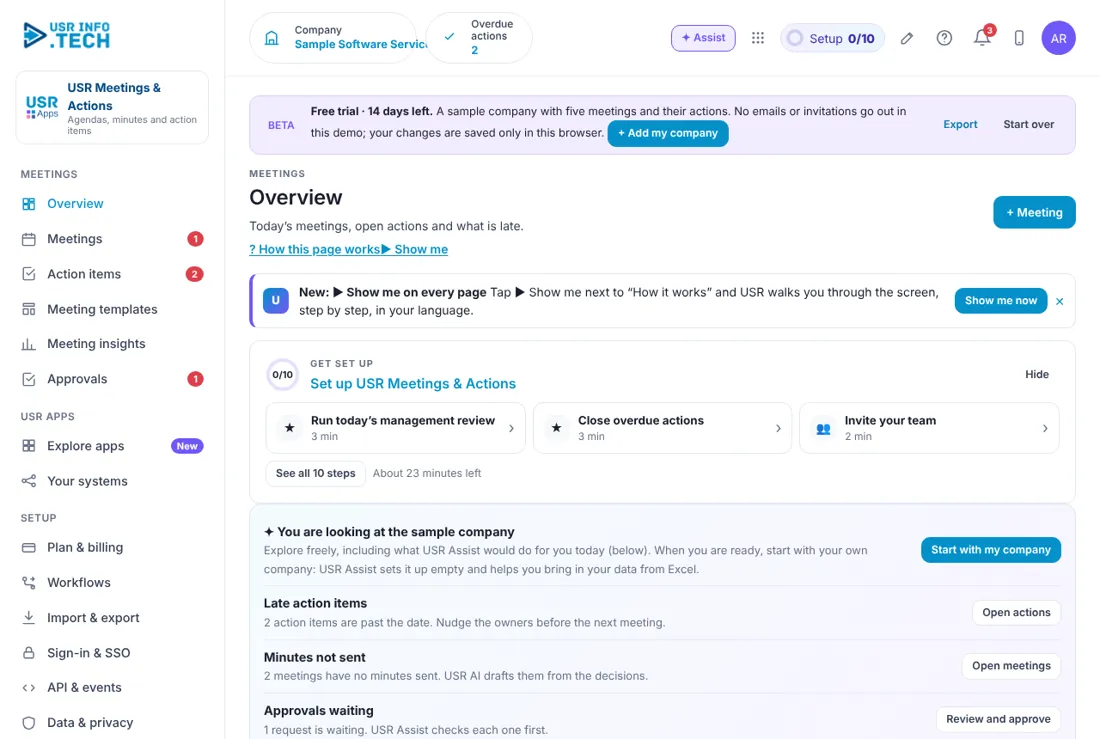
Overview shows today's meetings and what is late. Get set up: A checklist of 10 steps with the time each takes. Late action items: Actions past their date, with Open actions. Minutes not sent: Meetings with no minutes, and USR AI drafts them from the decisions. Approvals waiting: Requests waiting for a decision. Meetings today: How many, and the time. My open actions: Your actions, and how many are late. Overdue actions: Late actions across the company. Done on time: The share of closed actions finished on time. Linked to goals: The share of actions linked to a goal. Coming up: The next meetings, with Start or Open. Overdue actions list: Each late action with Done. Ask about meetings: Ask USR Assist, such as what we decided about a customer.
5.2 Meetings
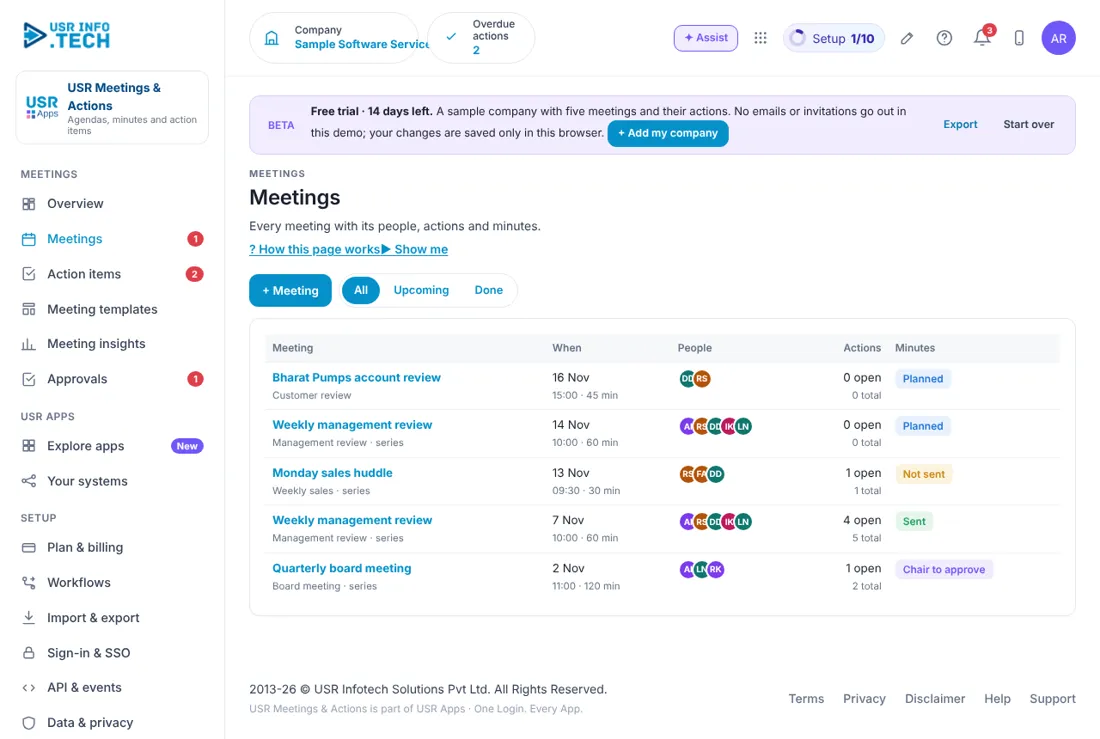
Meetings lists every meeting, the people and the state of the minutes. + Meeting: Plan a new meeting. All, Upcoming, Done: Filter the list. Meeting: The name, the kind and whether it is a series. When: The date, time and how long. People: Round marks with the initials of those invited. Actions: How many are open and how many in total. Minutes: Planned, Not sent, Sent or Chair to approve. Watch out: Board minutes show Chair to approve until the chairperson approves them.
5.3 Action items
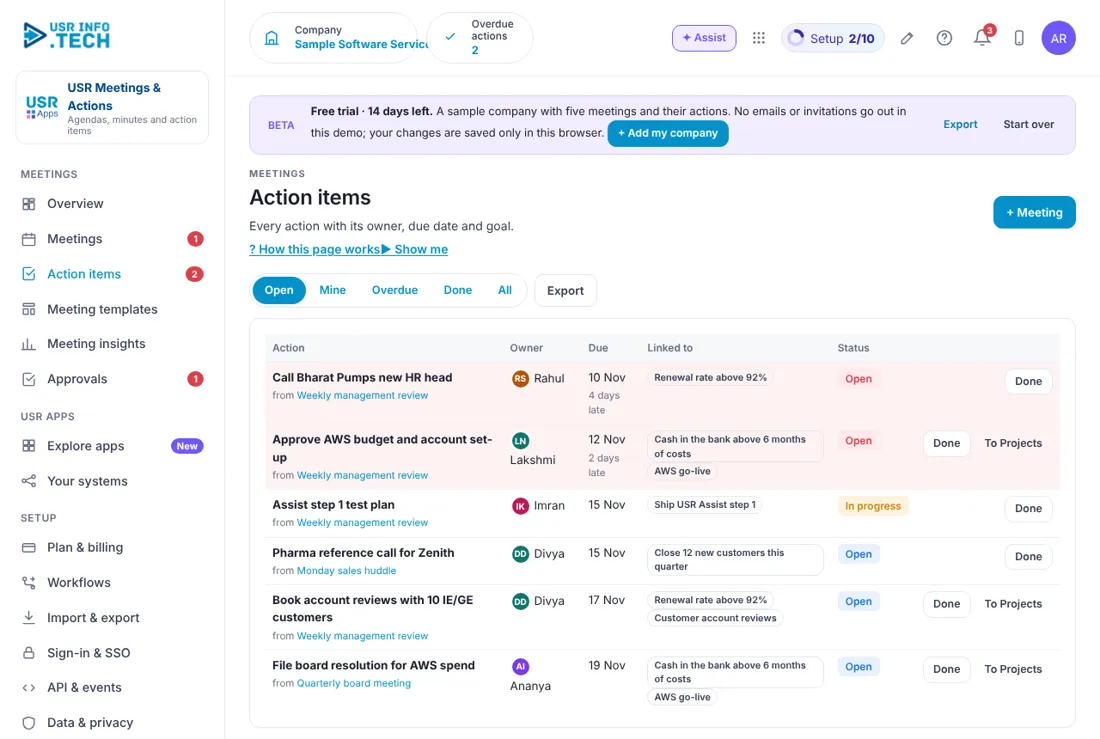
Action items lists everything that was decided and who will do it. Open, Mine, Overdue, Done, All: Filter the list. Export: Download the list. Action: What to do, and the meeting it came from. Owner: Who does it. Due: The date, and how many days late. Late rows are shaded red. Linked to: The company goal it supports. Status: Open, In progress or Done. Done: Mark the action done. To Projects: Send the action to USR Projects as a task.
5.4 Meeting templates
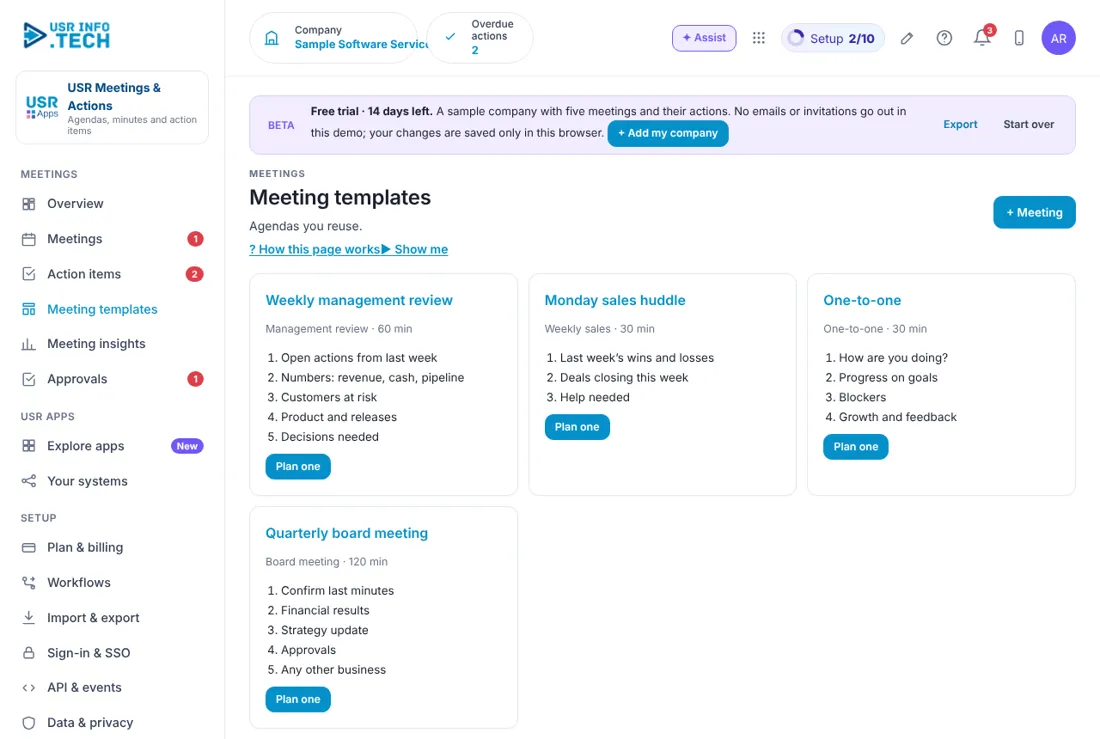
Meeting templates give you a ready agenda for each kind of meeting. Weekly management review: 60 minutes: open actions, numbers, customers at risk, product and releases, decisions needed. Monday sales huddle: 30 minutes: last week's wins and losses, deals closing this week, help needed. One-to-one: 30 minutes: how are you doing, progress on goals, blockers, growth and feedback. Quarterly board meeting: 120 minutes: confirm last minutes, financial results, strategy update, approvals, any other business. Plan one: Make a meeting from the template. + Meeting: Plan a meeting without a template.
5.5 Meeting insights
Meeting insights shows how much time meetings take and whether actions get done. Hours in meetings, last 30 days: A bar for each person. Actions by owner: Open, overdue and done on time for each owner.
5.6 Approvals
Approvals holds the requests waiting for a decision, such as board minutes. Waiting, Overdue, Approved this month: Counts of requests. Approval workflows on: How many workflows are switched on. Waiting on: Filter by who must decide. Request, Step, Waiting on, Due: What, which step, who and by when. Comment, Approve, Send back, Reject, Open: Your decision. A comment is needed to reject.
5.7 Plan & billing
Plan & billing shows your plan and the plans you can choose. One bill covers every USR app through USR Billing. Free: ₹0 (US$0). Up to 10 people: agendas, minutes and actions. Standard: ₹49 (US$0.6) per user a month. Series with carry-over, goals and projects, WhatsApp. Professional: ₹99 (US$1.2) per user a month. AI minutes, board approvals, calendar sync, insights. Enterprise: Talk to us. Board portal, many entities, private hosting. Mid-market: 501 to 5,000 users. Volume pricing per user, in INR or USD. Prices: INR excludes 18% GST. Watch out: There is a 14-day Professional trial with no card needed.
If something is not working
| Problem | What to do |
|---|---|
| Minutes show Not sent | Open the meeting, check the draft and send it. |
| An action shows late | Open Action items, choose Overdue, and ask the owner, or change the date with a reason. |
| Board minutes are stuck | They are waiting for the chairperson. Open Approvals. |
| An action is not linked to a goal | Open the action and choose a goal. |
| I cannot see a meeting | You may not be invited. Ask the organiser. |
Questions people ask
Does AI write the minutes? USR AI drafts them from the decisions you noted. You read, change and send them. It never sends by itself.
Can I make a meeting repeat? Yes. Plan it as a series, such as every Monday. Open actions come to the next meeting.
Can an action become a project task? Yes. Click To Projects on the action.
Who approves board minutes? The chairperson, in Approvals.
Is there a trial? Yes. A 14-day Professional trial starts when you add your own company.
Glossary
Minutes: A short record of what was decided. Action item: A task from a meeting, with an owner and a date. Series: A meeting that repeats. Chair: The person who leads the meeting. Carry-over: An open action that comes to the next meeting. Huddle: A short meeting for a team. Agenda: The list of topics for a meeting.
USR Meetings & Actions shares one record with these apps
No retyping between apps: data entered once flows to the next app, on the same login.
USR Meetings & Actions is part of USR One. Operations Suite from ₹399 ($10) per seat a month, or every app in USR One Complete. Free for up to 10 people.
See USR One
