
USR Manufacturing help
USR Manufacturing plans and runs your production. You list what each product is made of in a bill of materials, plan what to make from sales orders and forecasts, release work orders, record hours and output on the shop floor, send parts out for job work, and see the true cost of every work order. It works with USR Inventory for materials, USR Books for costs, USR Quality for deviations and USR Workforce Plan for people.
See the screens
Sample company data. Screens can change as the app improves; the steps stay the same.
Welcome
USR Manufacturing plans and runs your production. You list what each product is made of in a bill of materials, plan what to make from sales orders and forecasts, release work orders, record hours and output on the shop floor, send parts out for job work, and see the true cost of every work order. It works with USR Inventory for materials, USR Books for costs, USR Quality for deviations and USR Workforce Plan for people.
- Bills of materials with sub-assemblies, scrap and standard cost
- Material planning from sales orders and forecasts, with shortages and purchase requests
- Work orders from Planned to Released, In progress and Completed
- Shop floor cards for operators on a phone or tablet
- Job work challans with the ITC-04 working, production costing and reject reports
A year in USR Manufacturing
| When | What happens | Who |
|---|---|---|
| At the start | Add the work centres and the bills of materials. Set the overheads, reject limit and turnover band. | Plant head |
| Every day | Open the Dashboard. Release work orders and clear material shortages. Operators record output. | Production team |
| Every week | Open Material planning, check demand and send purchase requests. Check Capacity. | Planner |
| Every month | Read Production costing and Quality and rejects. Receive back job work. | Plant head |
| Every quarter | Update the forecast. Review the standard cost of each product. | Plant head, finance |
| Every half-year or year | Download the ITC-04 working for job work and give it to your CA. | Accounts |
Key ideas
- Bill of materials (BOM). The list of parts, quantities and scrap that go into one unit of a product.
- Work order. An instruction to make a quantity of a product by a date.
- Work centre. A place or line where work is done, such as an assembly bench, with people, hours and a rate.
- Operation. One step of making a product, done at a work centre.
- Net to make. Demand minus finished stock minus work orders already open.
- Standard cost. What one unit should cost, from the BOM and the routing.
- Actual cost. What one unit really cost: materials, hours at the work-centre rate and overheads.
- Job work. Sending material to an outside party for a process, such as powder coating, and receiving it back.
Plan before you make. Demand is the open sales orders from USR Inventory plus your forecast. Net to make is demand minus finished stock minus work orders already open. Materials needed come from the BOM, with scrap, checked against stock and orders already placed. Shortages go to USR Inventory as purchase requests.
Standard cost and actual cost. The standard cost comes from the BOM. The actual cost is the materials issued, plus the hours booked on the shop floor at the work-centre rate, plus overheads of 8% in the sample company, divided by the good units. The difference is the variance, with a reason. Closing a work order posts the cost of production to USR Books.
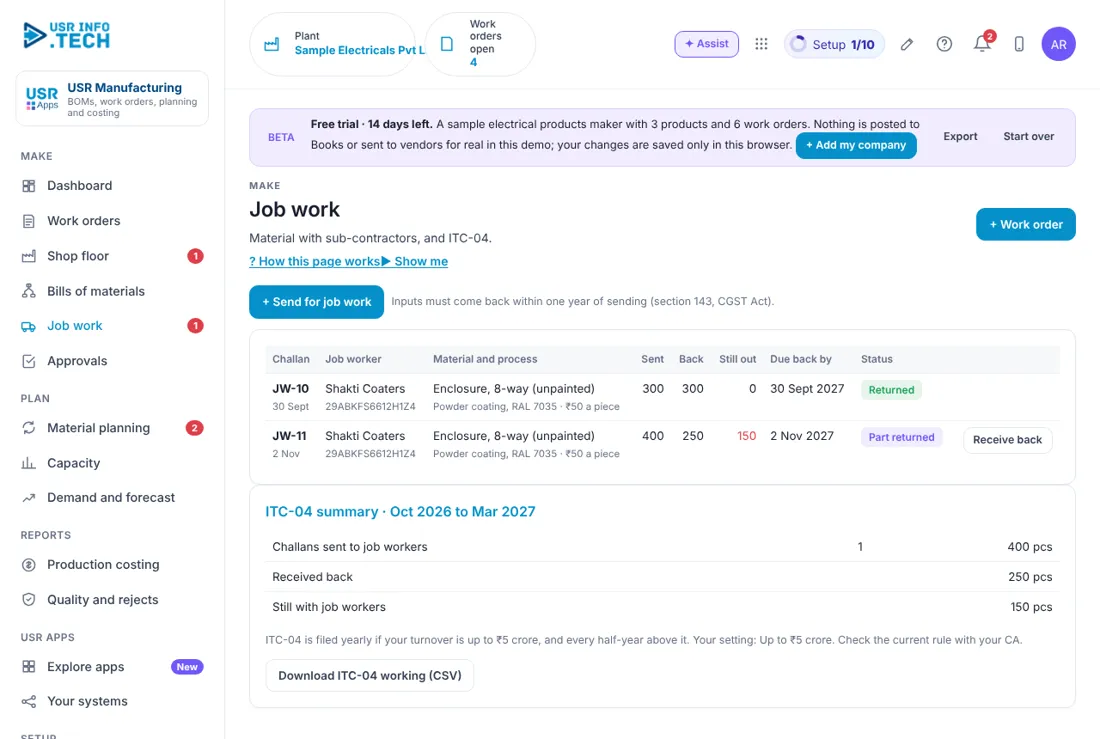
Job work and ITC-04. When you send material out for a process, you give a challan. Inputs must come back within one year of sending, under section 143 of the CGST Act. USR Manufacturing keeps the challans and prepares the ITC-04 working: yearly if turnover is up to ₹5 crore, and every half-year above it. Check the current rule with your CA.
Features step by step
5.1 Dashboard
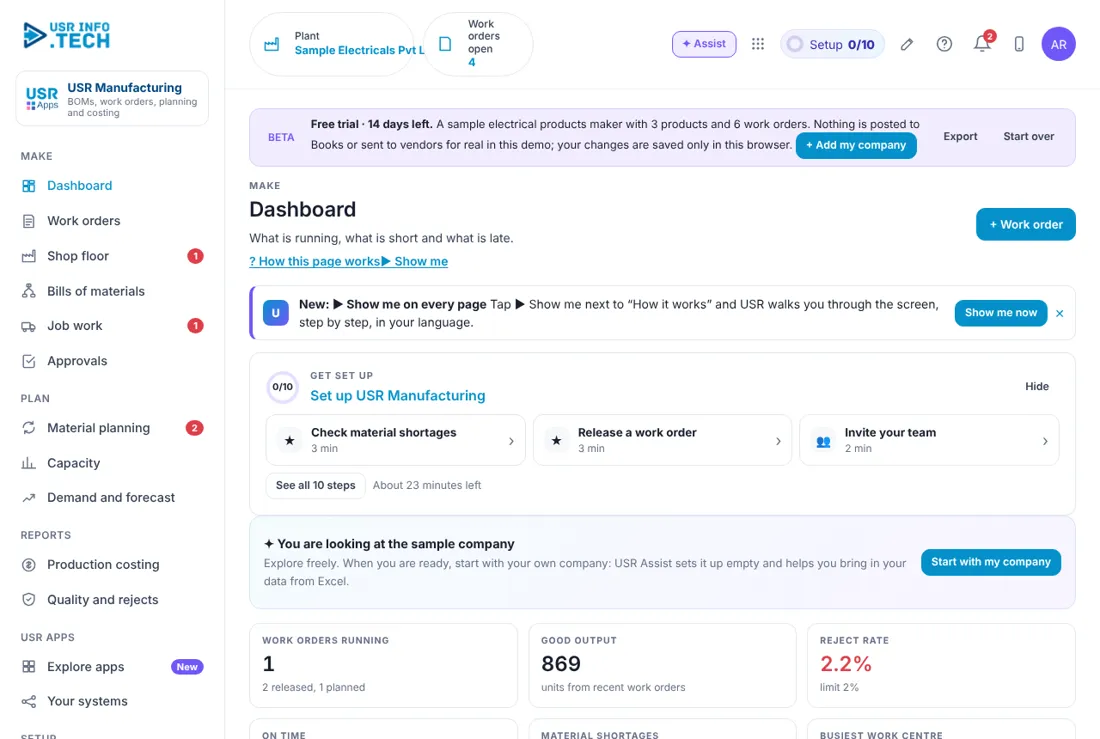
Dashboard shows what needs you today and the main numbers of your plant. Get set up: A checklist of 10 steps with the time each takes. Work orders running: How many are released or planned. Good output: Good units from recent work orders. Reject rate: Rejects against the limit, 2% in the sample company. On time: The share of completed orders that finished on time. Material shortages: Materials you are short of. Busiest work centre: The most loaded centre in the next 10 days. Load on each work centre: A bar for each centre. Needs you: Shortages, work orders ready to release and job work still out.
5.2 Work orders
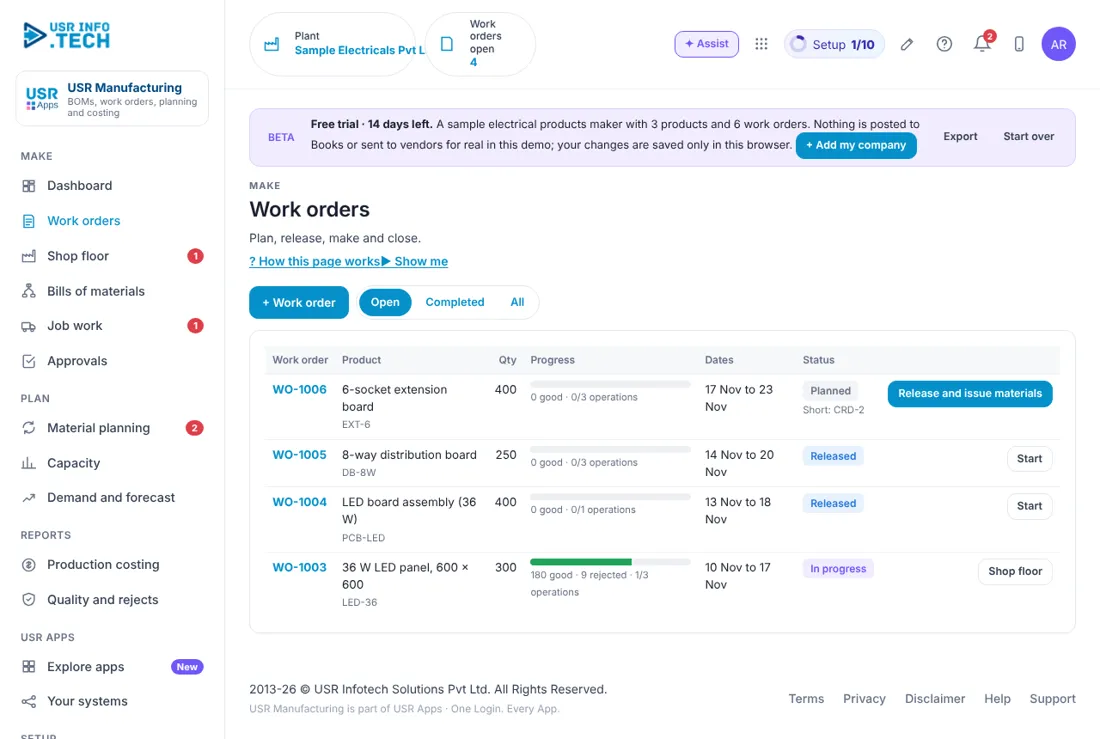
Work orders lists everything you are making and how far it has come. + Work order: Create a work order. Open, Completed, All: Filter the list. Work order and Product: The number, the product and its code. Qty: How many to make. Progress: Good and rejected units, and operations done. Dates: Start and end dates. Status: Planned, Released, In progress or Completed. A Planned order shows what it is Short of. Release and issue materials, Start, Shop floor: The next action for each status. Watch out: A Planned order that is Short of a material cannot be released with confidence. Fix the shortage first.
5.3 Shop floor
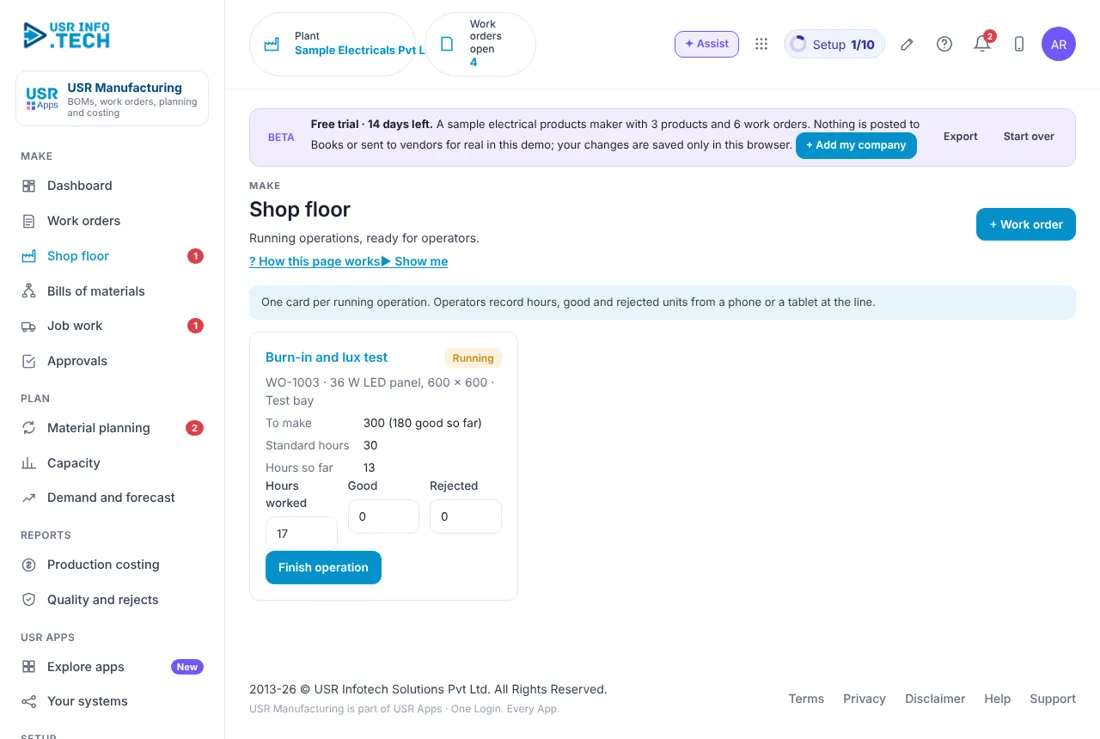
Shop floor shows one card for every running operation. Operators record their work here. Operation card: The operation, the work order, the product and the work centre. To make and Standard hours: The target quantity and the standard hours. Hours so far: Hours already booked. Hours worked, Good, Rejected: What the operator enters. Finish operation: Saves the entry and finishes the step.
5.4 Bills of materials
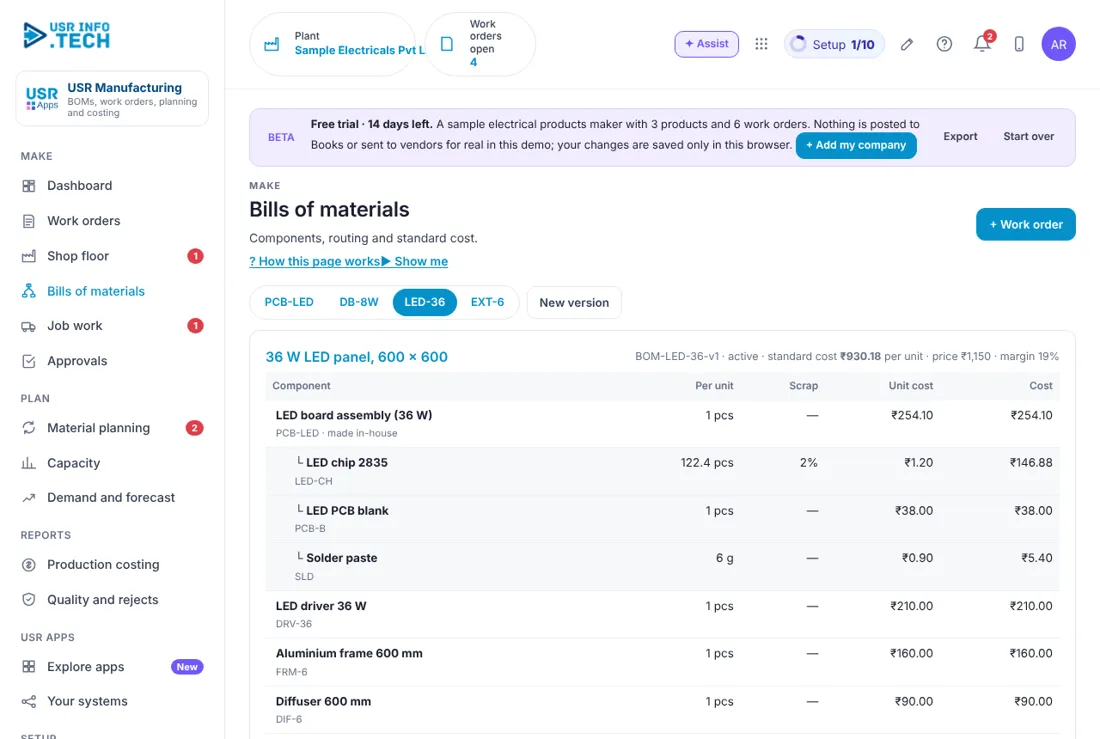
A bill of materials lists every part that goes into one unit of a product. Product tabs: One tab for each product. New version: Make a new version of the BOM. Header: The BOM version, active status, standard cost, price and margin. Component: The part and its code, and whether it is made in-house. Per unit and Scrap: The quantity for one unit and the scrap allowed. Unit cost and Cost: The cost of one and the cost for the quantity. Sub-assembly: A part that is itself made from other parts, shown indented. Materials: The total material cost. Watch out: Change a BOM by making a new version. Old work orders keep the version they were made with.
5.5 Job work
Job work tracks material you send to outside parties for a process and receive back. + Send for job work: Make a challan to send material out. Challan and Job worker: The challan number, date, and the party with its GSTIN. Material and process: What is sent and what is done, with the rate. Sent, Back and Still out: The quantities. Due back by: One year from sending, under section 143 of the CGST Act. Status: Returned or Part returned. Receive back: Record goods that come back. ITC-04 summary: Challans sent, received back and still with job workers. Download ITC-04 working (CSV): A file for your CA. Watch out: Inputs not received back within one year have tax consequences. Watch the Still out column.
5.6 Approvals
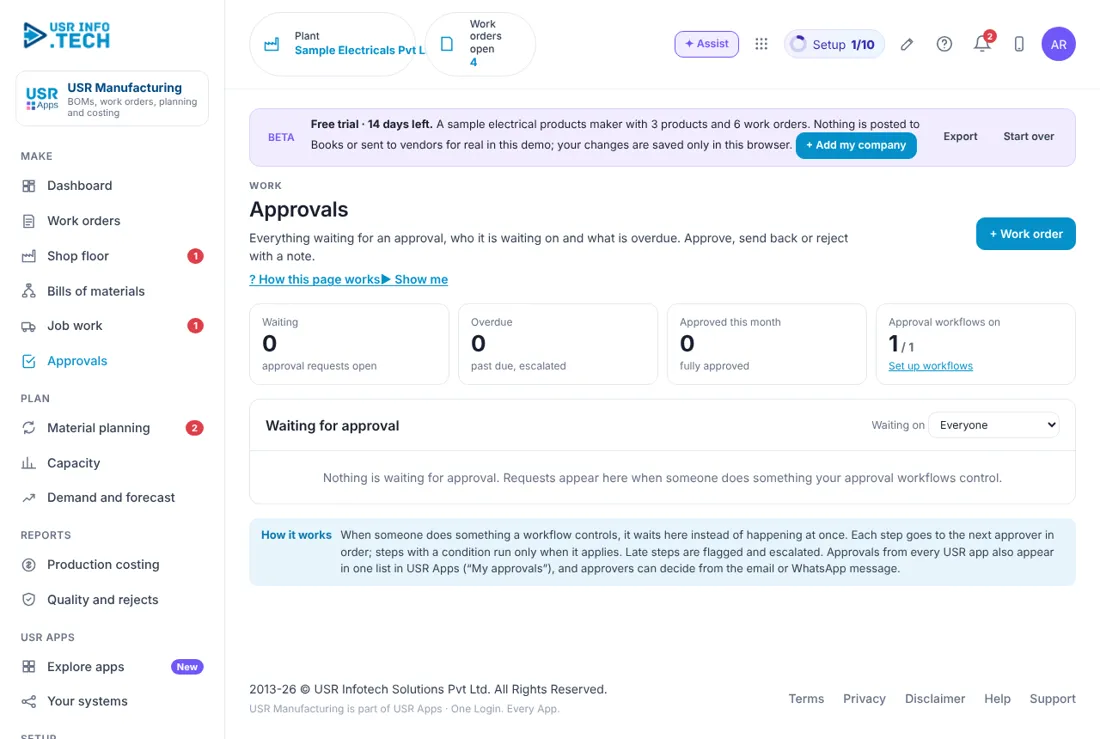
Approvals holds the requests waiting for a decision. Waiting, Overdue, Approved this month: Counts of requests. Approval workflows on: How many workflows are switched on. Waiting on: Filter by who must decide. Approve, Send back, Reject: Your decision. A comment is needed to reject.
5.7 Material planning
Material planning shows what to make and which materials you must buy. What to make: For each product: Orders, Forecast, In stock, In work orders and Net to make. Forecast box: Type your own forecast for the product. Plan work order: Make a work order for the net quantity. Sub-assembly rows: Shown as Covered when stock and work orders are enough. Materials: Needed, In stock, On order and Short for each material. Vendor · lead time: The usual vendor and how many days it takes. For: The work orders that need it. Send purchase requests to USR Inventory: Sends all shortages to purchasing.
5.8 Capacity
Capacity shows how loaded each work centre is over the next 10 working days. Work centre and People: The centre and how many people work there. Hours a day: Edit to plan an extra shift. Rate: The cost per hour. Load, next 10 days: Standard hours of operations not yet done on open work orders. Capacity: Hours available in the period. Used: The share of capacity used.
5.9 Demand and forecast
Demand and forecast shows what customers have ordered and what you expect to sell. Product: Each product you make. Open sales orders: Quantity on open sales orders from USR Inventory. Forecast, next 4 weeks: Your own forecast. You can edit it. Price, Standard cost and Margin: Selling price, cost and margin. Suggest a forecast: USR Assist suggests a forecast for you to check. Watch out: A suggested forecast is only a suggestion. You decide the number.
5.10 Production costing
Production costing shows what each work order really cost against its standard. Work order and Product: The order and what it makes. Good: Good units made. Standard per unit: The cost from the BOM. Actual per unit: Materials, hours at the centre rate, and overheads, divided by good units. Variance: Actual against standard, in percent. Why: The reason, such as rejects, extra hours or higher material prices.
5.11 Quality and rejects
Quality and rejects shows how many units fail and whether that is within your limit. Product: Each product made. Good, Rejected and Reject rate: The counts and the rate. Within limit: Shown when the rate is below the limit, 2% in the sample company. Raise a deviation in USR Quality: Opens a deviation in USR Quality when the rate is above the limit.
5.12 Work centres
Work centres lists the lines and benches where you make things. Name: For example SMT line or Assembly benches. People, hours and rate: How many people, hours a day and cost an hour. Used by: The products that use this centre. Watch out: The rate decides the labour cost in production costing. Keep it current.
5.13 Materials
Materials shows what production needs from USR Inventory. Item: The material and its code. Type: Material, or another type. Stock and On order: From USR Inventory. Cost: The unit cost. Vendor: The usual vendor, or Job work.
5.14 Manufacturing settings
Manufacturing settings holds the rules for costing and planning. Overheads (% of material and labour): 8 in the sample company. Reject limit (%): 2 in the sample company. Capacity window (working days): 10 in the sample company. Turnover band (for ITC-04): Up to ₹5 crore, or above. Connected: USR Inventory, USR Books, USR Quality and USR Workforce Plan, and what each gives. Watch out: Changing overheads changes the actual cost of new work orders.
5.15 Plan & billing
Plan & billing shows your plan and the plans you can choose. One bill covers every USR app through USR Billing. Free: ₹0 (US$0). Up to 3 products: BOMs and work orders. Standard: ₹1,499 (US$18) a month per company. Material planning, routings, shop floor, costing. Professional: ₹2,499 (US$30) a month per company. Capacity, job work and ITC-04, quality link, approvals, AI. Enterprise: Talk to us. Many plants, machine connectivity (IoT), private hosting. Mid-market: 501 to 5,000 users. Volume pricing per user, in INR or USD. Prices: INR excludes 18% GST. Watch out: There is a 14-day Professional trial with no card needed.
If something is not working
| Problem | What to do |
|---|---|
| A work order is Short of a material | Open Material planning, send a purchase request to USR Inventory, or release when the material arrives. |
| I cannot release a work order | Check the Short note on the order and that a BOM is active for the product. |
| The cost looks too high | Open Production costing and read the Why. A running order spreads its cost over the units made so far. |
| Job work is overdue | Open Job work and check the Still out column. Inputs must come back within one year. |
| The reject rate is red | Open Quality and rejects and click Raise a deviation in USR Quality. |
Questions people ask
Does it need USR Inventory? Yes. Materials, finished goods, sales orders and purchase requests come from and go to USR Inventory.
Can I make a sub-assembly? Yes. A part in a BOM can itself have a BOM. It is shown indented.
Does it post to USR Books? Yes. Closing a work order posts the cost of production, and job-work charges post as well.
Is there a free plan? Yes. Free allows up to 3 products with BOMs and work orders.
Is there a trial? Yes. A 14-day Professional trial starts when you add your own company.
Glossary
BOM: Bill of materials: the parts that make one unit. Work order: An instruction to make a quantity of a product. Work centre: A line or bench where work is done. WIP: Work in progress: goods that are partly made. Variance: The difference between actual and standard cost. Job work: Sending material out for a process and getting it back. ITC-04: The GST return for goods sent for job work. CAPA: Corrective and preventive action.
USR Manufacturing shares one record with these apps
No retyping between apps: data entered once flows to the next app, on the same login.
USR Manufacturing is part of USR One. Operations Suite from ₹399 ($10) per seat a month, or every app in USR One Complete. Free for up to 10 people.
See USR One
