
USR Maintenance help
USR Maintenance keeps your machines running. Operators raise a breakdown by scanning the QR sticker on the machine. Technicians see the work, ask for spare parts and close it. Preventive plans raise work before things fail, by days or by run hours. Instruments are tracked for calibration, and the Insights page shows downtime, mean time to repair and mean time between failures.
See the screens
Sample company data. Screens can change as the app improves; the steps stay the same.
Welcome
USR Maintenance keeps your machines running. Operators raise a breakdown by scanning the QR sticker on the machine. Technicians see the work, ask for spare parts and close it. Preventive plans raise work before things fail, by days or by run hours. Instruments are tracked for calibration, and the Insights page shows downtime, mean time to repair and mean time between failures.
- Equipment register with class A, B and C, run hours and a QR sticker for each machine
- Breakdown work orders raised from a phone, with downtime, parts and technician
- Preventive plans by days or by run hours, with overdue marked in red
- Calibration with a do-not-use flag, lab, certificate upload and next due date
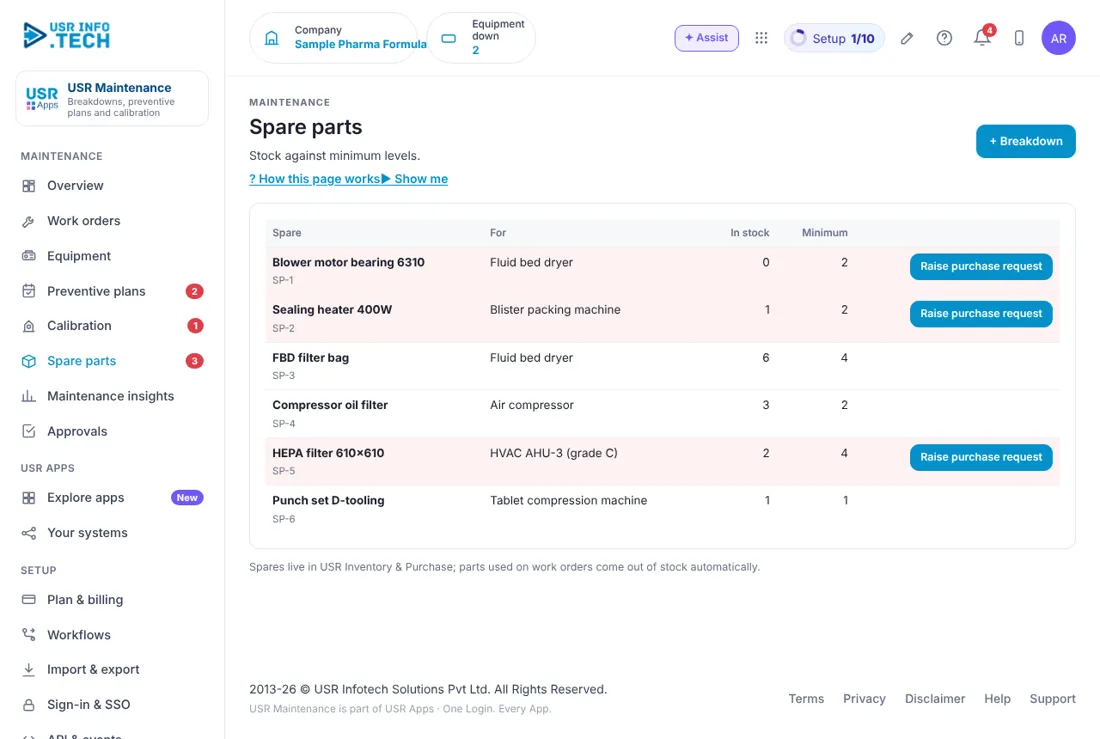
- Spare parts with minimum levels and purchase requests, plus downtime and MTBF insights
A year in USR Maintenance
| When | What happens | Who |
|---|---|---|
| At the start | Add every machine and instrument. Set the class, the preventive plans and the minimum spares. | Maintenance head |
| Every day | Open the Overview. Close breakdowns. Raise work orders for overdue preventive work. | Technicians |
| Every week | Check Preventive plans, Calibration due dates and Spare parts below minimum. | Maintenance head |
| Every month | Read Maintenance insights: downtime, repair time and PM on time. | Plant head |
| Every quarter | Send instruments to the calibration lab. Review the machines that break most. | Maintenance head |
| Every year | Review the preventive plans. Plan the big shutdowns and the spare parts for them. | Plant head |
Key ideas
- Equipment. A machine or instrument you maintain, with a class and run hours.
- Class A, B, C. A: production stops without it. B: slows production. C: no direct impact.
- Breakdown. A machine stops or fails. It becomes a work order.
- Preventive maintenance (PM). Planned work done before the machine fails, by days or by run hours.
- Calibration. Checking an instrument against a standard. A late instrument is flagged do not use.
- MTTR. Mean time to repair: the average time from breakdown to running.
- MTBF. Mean time between failures: the average running time between breakdowns.
- QR sticker. A sticker on the machine. An operator scans it with a phone to raise a breakdown.
Class A machines come first. Not every machine matters equally. Class A means production stops without it, so its preventive plans and spares matter most. Look at class A first when you plan your week.
Preventive plans by days or by run hours. A plan can repeat every 30 days, or every 2,000 run hours. For the second kind, run hours come from the machine's counter or a daily entry, and the page shows the hours left before the work is due. A plan that is late is shown in red, with the days late.
Calibration and the do-not-use flag. An instrument past its calibration date is flagged do not use until it is calibrated. When the lab returns it, you upload the certificate and the next due date is set for you. This matters for GMP and for ISO audits.
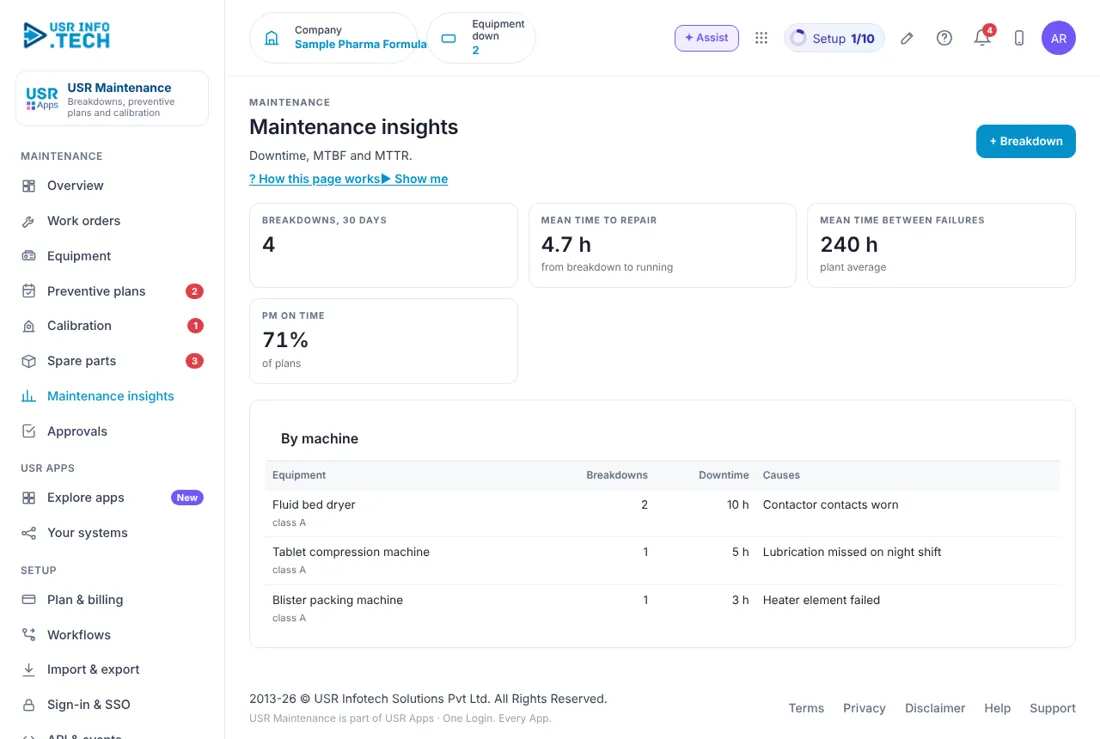
What the numbers tell you. MTTR shows how fast you repair. MTBF shows how long machines run between failures. PM on time shows how well you keep to your plans. If PM on time is low, breakdowns usually follow.
Features step by step
5.1 Overview
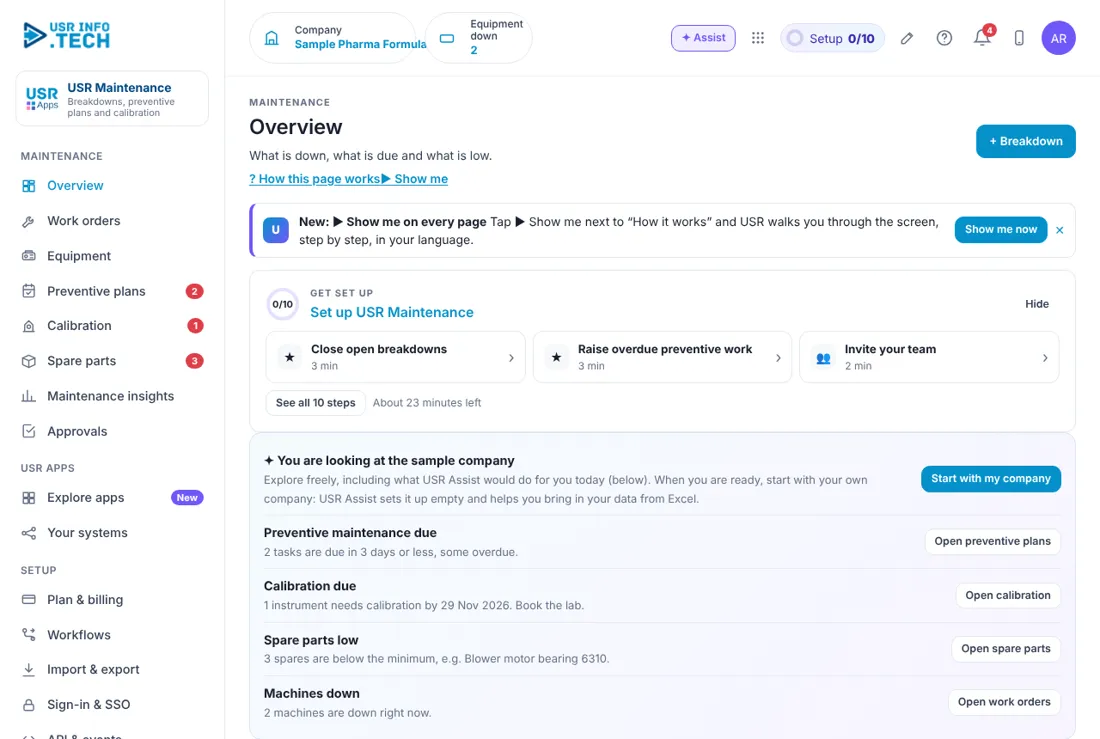
Overview shows what needs you today and the main numbers of your plant. Get set up: A checklist of 10 steps with the time each takes. Equipment down: Machines that are down now. Open work orders: How many are open and how many wait for parts. PM overdue: Preventive work past its date, and PM on time. Calibration overdue: Instruments not to be used until calibrated. Spares below minimum: Spare parts to buy. Mean time to repair: The average for the last 30 days. Needs you now: The items to act on first, each with an Open button. Downtime by machine, 30 days: A bar for each machine, in hours. Ask about maintenance: Type a question, such as which machine breaks most, and USR Assist answers. + Breakdown: Raise a breakdown.
5.2 Work orders
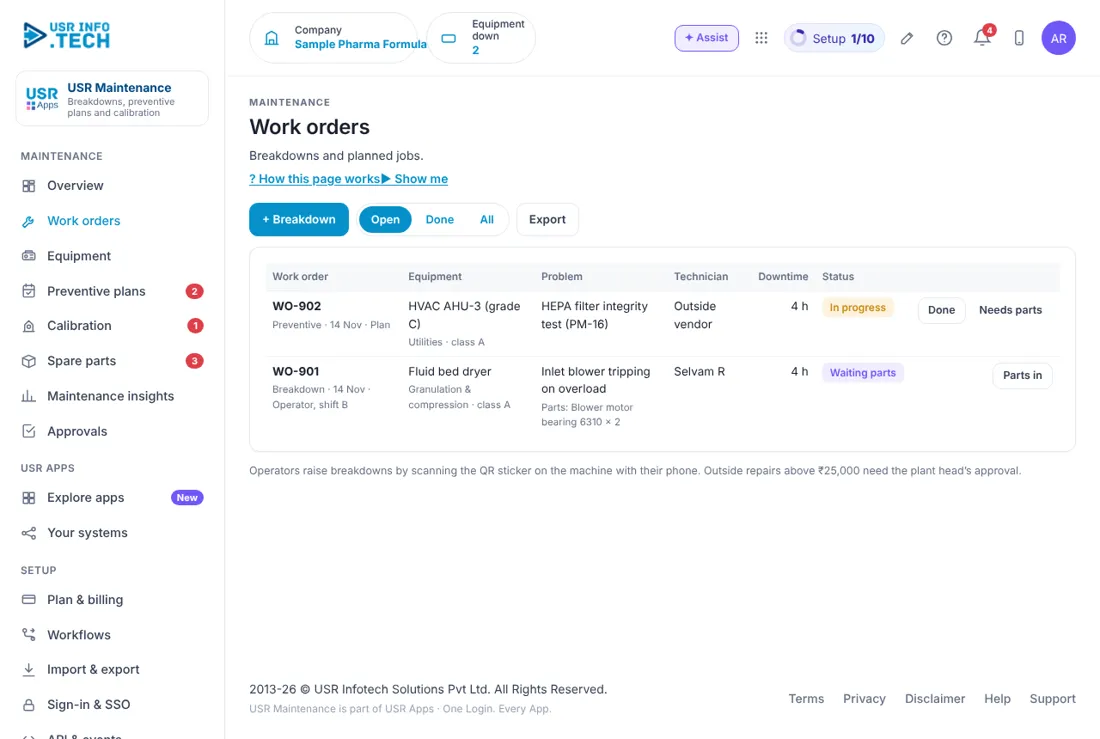
Work orders lists every breakdown and preventive job. + Breakdown: Raise a breakdown. Open, Done, All: Filter the list. Export: Download the list. Work order: The number, the type (Breakdown or Preventive), the date and who raised it. Equipment: The machine, its area and class. Problem: What happened, and the parts used. Technician: Who is doing it, or Outside vendor. Downtime: Hours the machine was down. Status: In progress, Waiting parts and so on. Done, Needs parts, Parts in: The next action. Watch out: Outside repairs above ₹25,000 need the plant head's approval.
5.3 Equipment
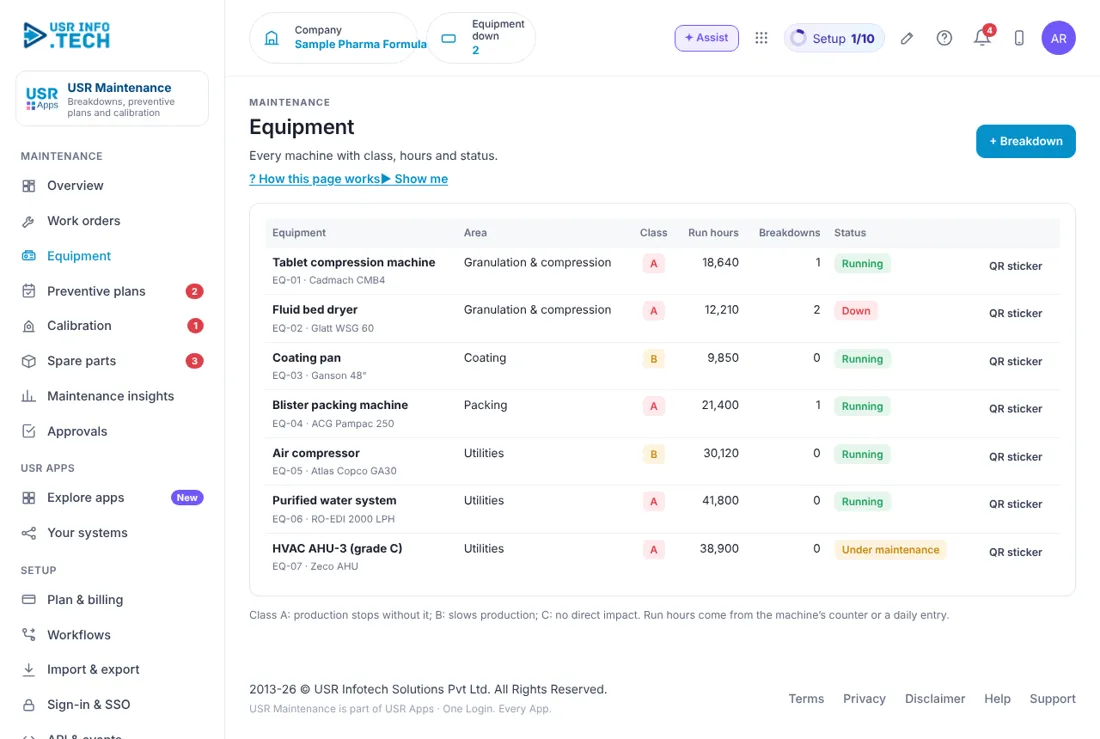
Equipment is the register of every machine you maintain. Equipment: The machine, its code and its make or model. Area: Where it is. Class: A, B or C. Run hours: From the machine's counter or a daily entry. Breakdowns: How many so far. Status: Running, Down or Under maintenance. QR sticker: Print the sticker for the machine.
5.4 Preventive plans
Preventive plans raise work before a machine fails. Plan: The job, such as Filter bag change and cleaning, and its code. Equipment: The machine. Every: Days, or run hours. Last done and Next due: The dates, or the hours left. Late plans are in red. Raise work order: Make a work order for the job. Mark done: Record that the job is done. Watch out: A red row is late. Do it first.
5.5 Calibration
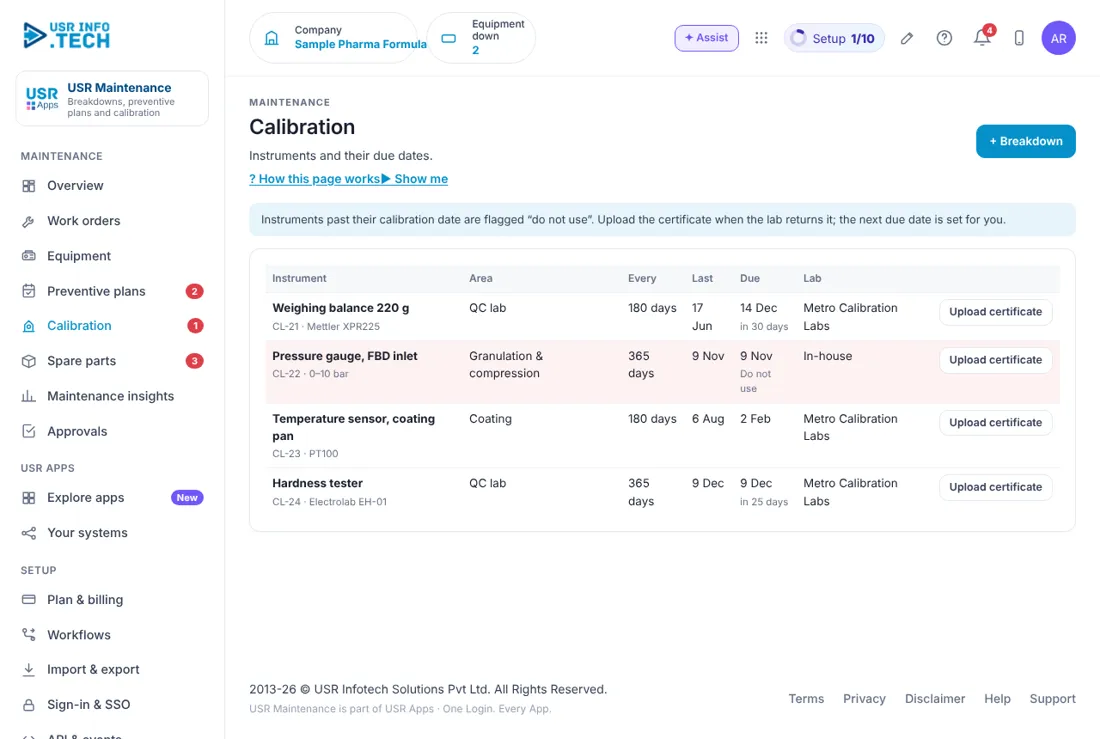
Calibration tracks every instrument that must be checked against a standard. Instrument: The instrument, its code and its make. Area: Where it is used. Every, Last and Due: The interval and the dates. Lab: The calibration lab, or In-house. Do not use: Shown for an instrument past its due date. Upload certificate: Add the certificate when the lab returns the instrument. The next due date is set for you. Watch out: An instrument shown as Do not use must not be used for any reading until it is calibrated.
5.6 Spare parts
Spare parts shows what you hold for your machines and what is running low. Spare: The part and its code. For: The machine it fits. In stock and Minimum: What you have and the least you want to hold. Raise purchase request: Ask purchase to buy it, for parts below the minimum.
5.7 Maintenance insights
Maintenance insights shows how well your maintenance is working. Breakdowns, 30 days: How many in the last month. Mean time to repair: From breakdown to running. Mean time between failures: The plant average. PM on time: The share of plans done on time. By machine: Breakdowns, downtime and the causes for each machine.
5.8 Approvals
Approvals holds the requests waiting for a decision, such as a large outside repair. Waiting, Overdue, Approved this month: Counts of requests. Approval workflows on: How many workflows are switched on. Waiting on: Filter by who must decide. Approve, Send back, Reject: Your decision. A comment is needed to reject.
5.9 Plan & billing
Plan & billing shows your plan and the plans you can choose. One bill covers every USR app through USR Billing. Free: ₹0 (US$0). Up to 10 machines: register, breakdowns, PM. Standard: ₹99 (US$1.2) per machine a month. QR breakdowns, PM by days or hours, spares. Professional: ₹149 (US$1.8) per machine a month. Calibration, MTBF and MTTR, Inventory, audit trail for GMP. Enterprise: Talk to us. Many plants, machine sensors, private hosting. Mid-market: 501 to 5,000 users. Volume pricing per user, in INR or USD. Prices: INR excludes 18% GST. Watch out: There is a 14-day Professional trial with no card needed.
If something is not working
| Problem | What to do |
|---|---|
| A machine shows Down for a long time | Open its work order. It may be waiting for a part. Click Parts in when the part arrives. |
| A preventive plan is late | Click Raise work order on the plan, then Mark done after the job. |
| An instrument shows Do not use | It is past its calibration date. Calibrate it, then upload the certificate. |
| A spare part is not in the list | Spares live in USR Inventory & Purchase. Add the item there. |
| The QR sticker will not scan | Print the sticker again from Equipment and check the phone camera has permission. |
Questions people ask
How does an operator report a breakdown? The operator scans the QR sticker on the machine with a phone and describes the problem.
Can plans run by hours, not days? Yes. A plan can repeat every number of days, or every number of run hours.
Does it help with GMP or ISO audits? The Professional plan keeps an audit trail and calibration certificates. Your company is still responsible for its own procedures.
How is it priced? Per machine a month on the Standard and Professional plans. Free allows up to 10 machines.
Is there a trial? Yes. A 14-day Professional trial starts when you add your own company.
Glossary
PM: Preventive maintenance: planned work before a failure. MTTR: Mean time to repair. MTBF: Mean time between failures. Calibration: Checking an instrument against a known standard. Class A, B, C: How much a machine matters to production. Run hours: The hours a machine has run. QR sticker: A sticker that opens the machine's page when scanned.
USR Maintenance shares one record with these apps
No retyping between apps: data entered once flows to the next app, on the same login.
USR Maintenance is part of USR One. Operations Suite from ₹399 ($10) per seat a month, or every app in USR One Complete. Free for up to 10 people.
See USR One
