
USR Inventory & Purchase help
USR Inventory & Purchase tells you what stock you have, where it is and what it is worth. It suggests what to reorder, turns that into purchase orders, receives the goods, matches the vendor bill to the order and the receipt, and dispatches sales orders. It works for many warehouses, batches with expiry dates and serial numbers, and it posts to USR Books.
See the screens
Sample company data. Screens can change as the app improves; the steps stay the same.
Welcome
USR Inventory & Purchase tells you what stock you have, where it is and what it is worth. It suggests what to reorder, turns that into purchase orders, receives the goods, matches the vendor bill to the order and the receipt, and dispatches sales orders. It works for many warehouses, batches with expiry dates and serial numbers, and it posts to USR Books.
- Items, stock levels and movements for every warehouse
- Reorder suggestions grouped by vendor, with one-click purchase orders
- Three-way bill matching: order, receipt and vendor bill
- Sales orders with reserve, pack and dispatch, and batch-wise first-expiry-first-out
- Stock value, slow and expiring stock, and vendor performance reports
A year in USR Inventory & Purchase
| When | What happens | Who |
|---|---|---|
| At the start | Add the warehouses and items. Set the reorder levels, the valuation rules and the purchase approval limit. | Stores head |
| Every day | Open the Dashboard. Receive goods, dispatch orders and clear approvals. | Stores team |
| Every week | Open Reorder, check the suggested quantities and raise purchase orders. Match the vendor bills. | Purchase team |
| Every month | Read Stock value, Slow and expiring and Vendor performance. Check the stock value against USR Books. | Finance head |
| Every quarter | Do a stock count in each warehouse. Plan the slow-moving stock. | Stores head |
| At year end | Count everything, post the adjustments and check the closing stock value. | Finance head |
Key ideas
- Item. A product you buy, hold or sell, with its HSN code, GST rate and how it is tracked.
- Warehouse. A place where stock is kept, such as Bengaluru main.
- On hand. All the stock physically in the warehouse.
- Available. On hand minus what is reserved for sales orders.
- Reorder level. The stock level below which the item needs to be bought again.
- Batch. A lot of an item with its own number and, often, an expiry date.
- Serial number. A unique number for one piece, such as one router or one laptop.
- Three-way match. Checking the purchase order, the goods receipt and the vendor bill agree.
Available is not the same as on hand. On hand counts everything on the shelf. Available takes away what is already reserved for sales orders. Always look at Available before you promise stock to a customer.
How reordering works. An item needs reordering when available stock plus stock already on order falls below its reorder level. The suggested quantity brings it back to twice the reorder level. Lead times come from each vendor's past deliveries, and the suggestions are grouped by vendor so you can raise one purchase order for each.
Match the bill before you pay. The vendor's bill is checked against the order and what arrived. A price difference within the tolerance, 2% in the sample company, passes. A bigger difference needs a reason or a credit note before the bill is posted to USR Books.
First expiry, first out. For items with expiry dates, dispatch always picks the batch that expires first. This keeps old stock from being wasted.
Features step by step
5.1 Dashboard
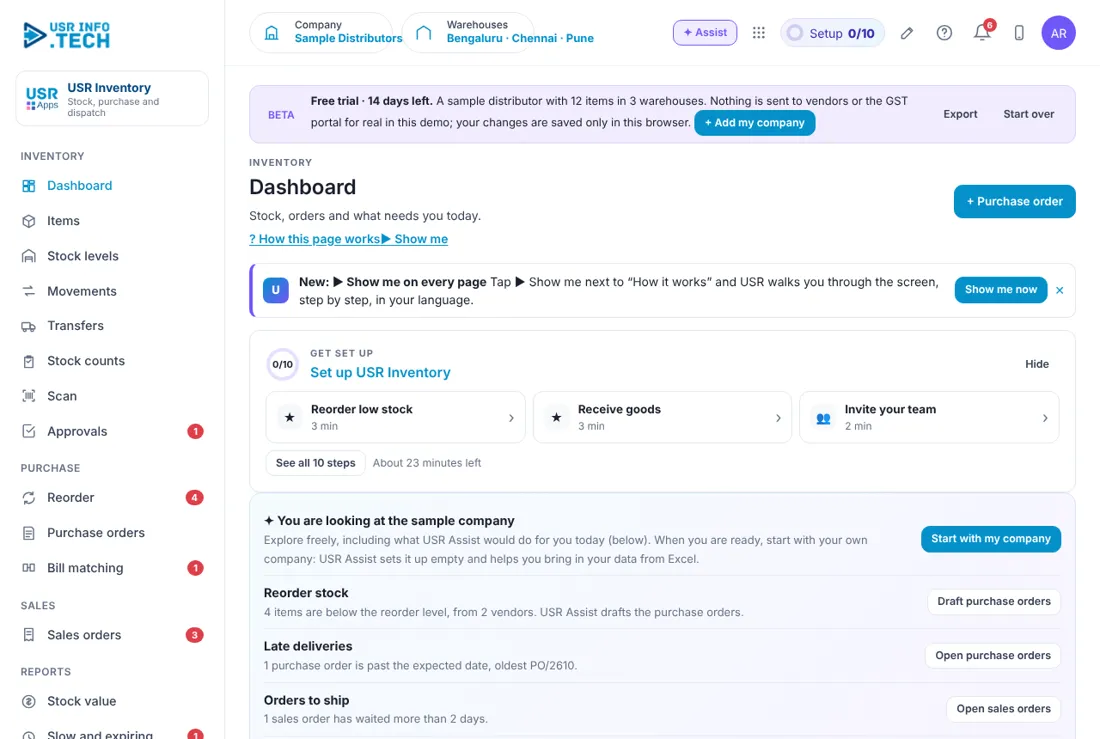
Dashboard shows what needs you today and the main numbers of your stock. Get set up: A checklist of 10 steps with the time each takes. Reorder stock: Items below the reorder level, with Draft purchase orders. Late deliveries: Purchase orders past the expected date. Orders to ship: Sales orders that have waited more than 2 days. Approvals waiting: Requests waiting for a decision, with Review and approve. Stock value: Total value at weighted average cost. Below reorder level, Open purchase orders, Bills to match: The counts that need action. Orders to dispatch, Expiring in 90 days: Sales orders waiting and batches near expiry. + Purchase order: Start a new purchase order.
5.2 Items
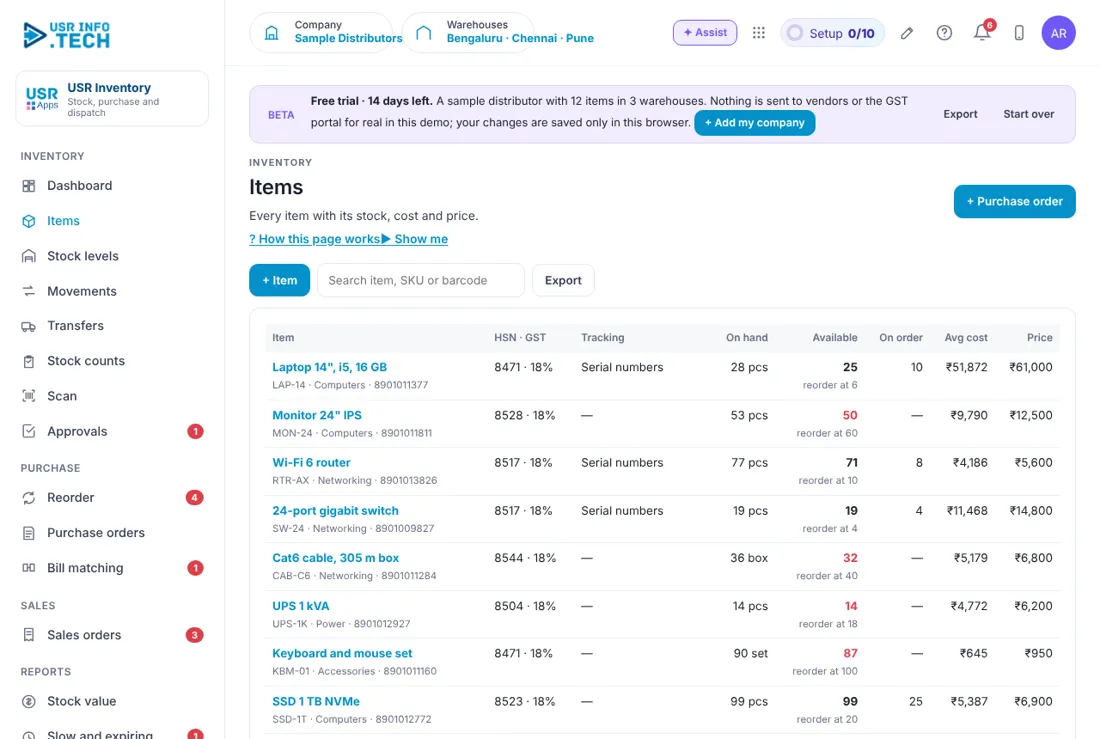
Items is the list of everything you buy, hold or sell. Item: The name of the product. HSN · GST: The HSN code and the GST rate. Tracking: Serial numbers, Batches, or Batches and expiry. On hand: All stock in all warehouses. Available: On hand minus what is reserved. On order: Stock on open purchase orders. Avg cost and Price: Weighted average cost and selling price. + Item, Search and Export: Add an item, find one, or download the list. Watch out: Choose the tracking when you create the item. Batches and serial numbers cannot be added later without a recount.
5.3 Stock levels
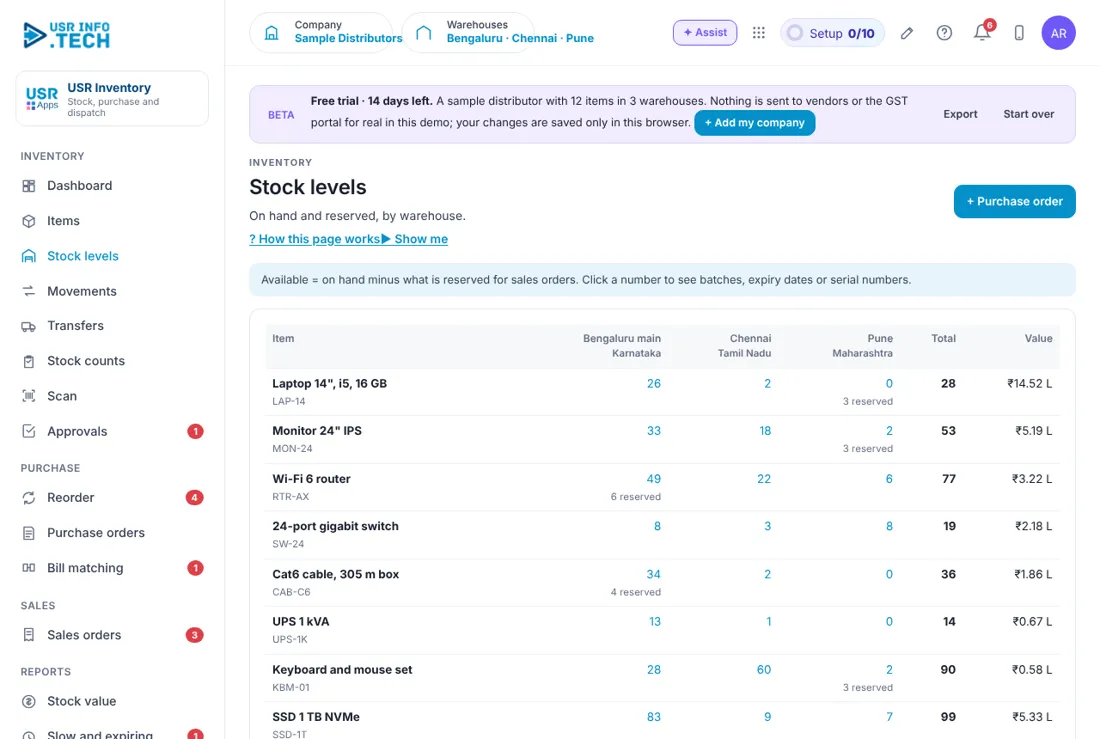
Stock levels shows how much of each item is in each warehouse. Warehouse columns: Bengaluru main, Chennai and Pune in the sample company. On hand and Available: Available is on hand minus what is reserved for sales orders. Click a number: Opens the batches, expiry dates or serial numbers behind it.
5.4 Movements
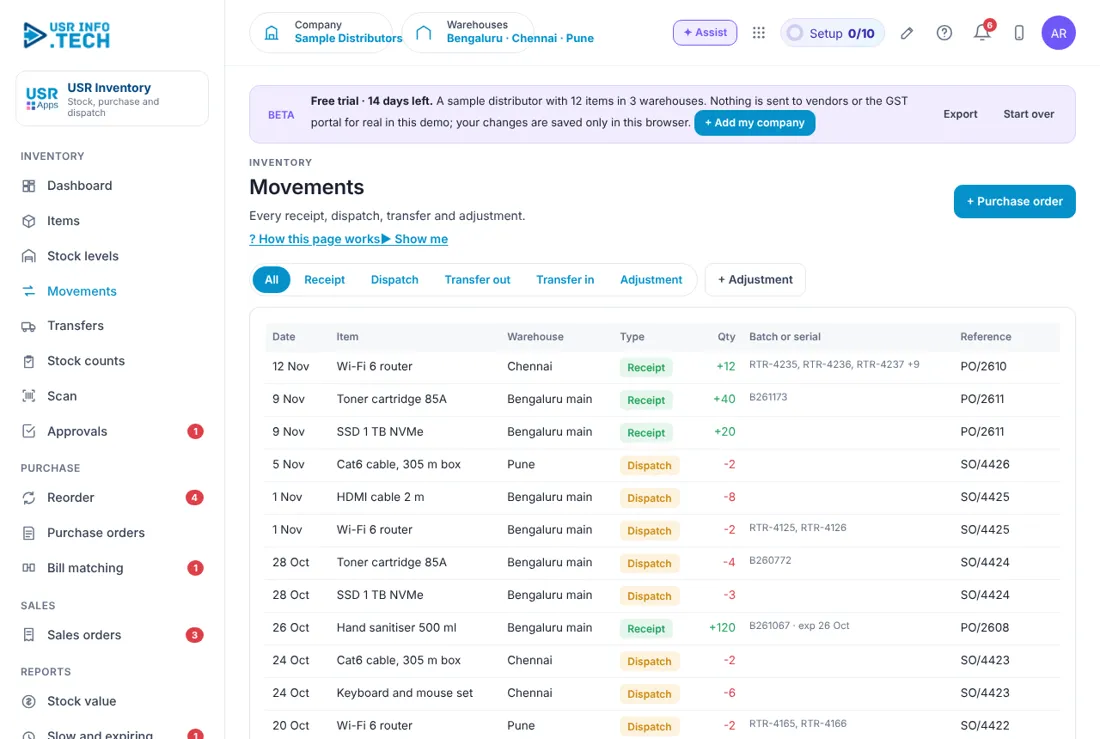
Movements is the full history of every stock coming in or going out. All, Receipt, Dispatch, Transfer out, Transfer in, Adjustment: Filter by the kind of movement. Date, Item and Warehouse: When, what and where. Type and Qty: Receipt in green, dispatch in orange, with the quantity. Batch or serial: The batch number, expiry or serial numbers. Reference: The purchase order or sales order behind the movement. + Adjustment: Correct stock for damage, loss or a count difference. Watch out: Every adjustment is logged. Give a clear reason.
5.5 Transfers
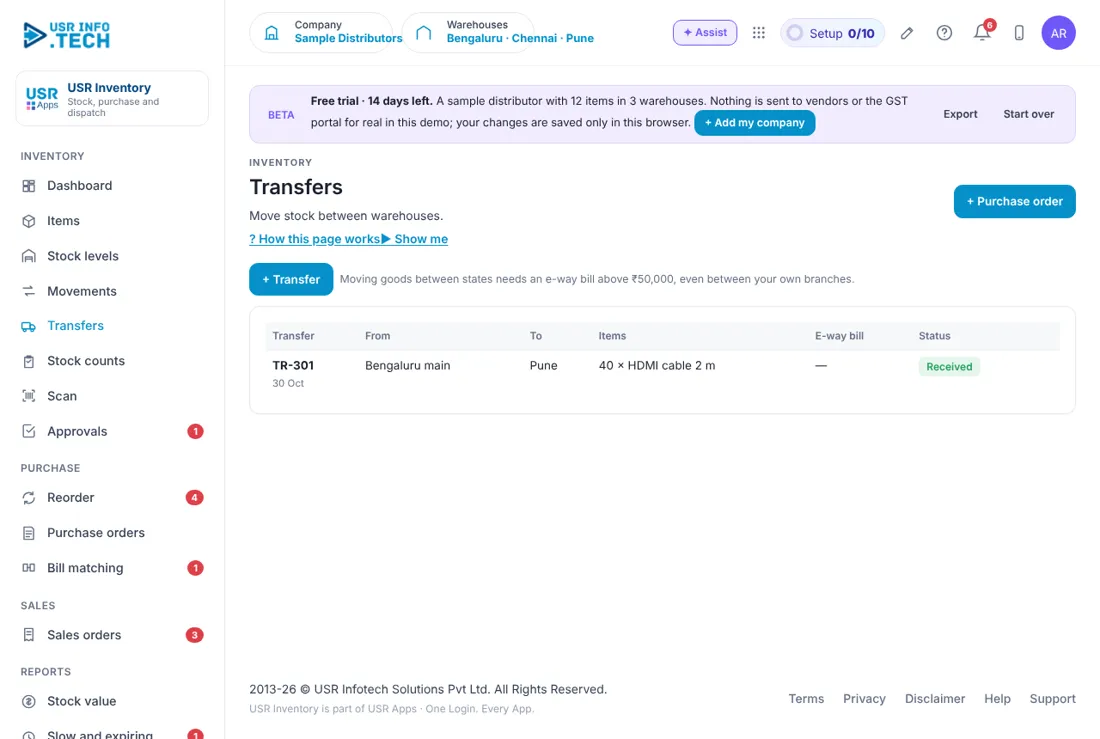
Transfers moves stock from one warehouse to another. + Transfer: Start a transfer between warehouses. Transfer, From and To: The number, the sending and the receiving warehouse. Items: What is moving and how many. E-way bill: The e-way bill number when one is needed. Status: For example Received. Watch out: Moving goods between states needs an e-way bill above ₹50,000, even between your own branches.
5.6 Stock counts
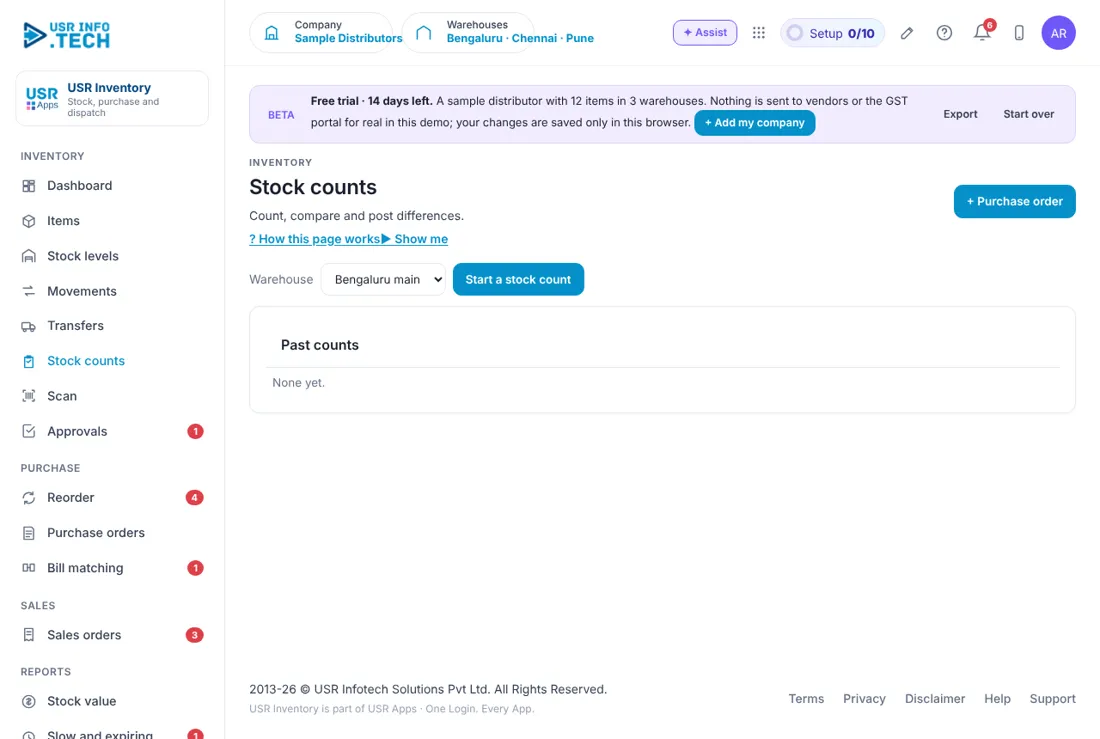
Stock counts compares what the system says with what is on the shelf. Warehouse: Choose the warehouse to count. Start a stock count: Begin a new count. Past counts: The counts you have done before.
5.7 Scan
Scan finds an item from a barcode, an SKU or a serial number. Scan or type a barcode: Type or scan a barcode, SKU or serial number. Find: Show the item and where its stock is. Phone and scanner: On a phone, a scanner gun or the camera fills the box.
5.8 Approvals
Approvals holds the requests waiting for a decision, such as a large purchase order. Waiting, Overdue, Approved this month: Counts of requests. Approval workflows on: How many workflows are switched on. Waiting on: Filter by who must decide. Request, Step, Due: What, which step and by when. Approve, Send back, Reject: Your decision. A comment is needed to reject. Open: See the request in full.
5.9 Reorder
Reorder lists the items that are running low and drafts the purchase orders. Below reorder level: Available plus on order is below the reorder level. Suggested quantity: Brings the item back to twice the reorder level. Lead time: Taken from each vendor's past deliveries. Grouped by vendor: One block for each vendor. Create purchase order: Makes a draft purchase order for that vendor. Check the reorder levels: Open the items to change the levels.
5.10 Purchase orders
Purchase orders lists every order you have placed with vendors. + Purchase order: Start a new order. Open, Billed, All: Filter the list. Order, Vendor and Deliver to: The number, the vendor and the warehouse. Items: Received so far out of ordered, for each item. Total incl. GST: The order value with GST. Status: Draft, Pending approval, Sent, Part received, Received or Billed. Approve and send, Receive goods, Match bill: The next action for each status. Approval box: For large orders, shows who must approve. You can Open in Approvals or Withdraw. Watch out: An order of ₹1,00,000 or more including GST waits for the Finance head before it is sent.
5.11 Bill matching
Bill matching compares the order, the goods received and the vendor's bill. Waiting for the bill: Goods received, but the vendor bill is not entered yet. Enter the vendor bill: Type in the bill. Ordered, Received, Billed: The three quantities for each item. PO rate, Bill rate and Difference: The price difference in percent. Price variance: A tag when the difference is above the tolerance. Accept with a reason: Pass the bill with a written reason. Ask the vendor for a credit note: Send the difference back to the vendor. Watch out: A difference of more than 2% needs a reason before the bill posts to USR Books.
5.12 Sales orders
Sales orders lists what customers have ordered and what is ready to send. + Sales order: Add an order. To dispatch, Dispatched, All: Filter the list. Order, Customer and From: The number, the customer and the warehouse. Items and Value incl. GST: What is ordered and its value. Status: Short, Reserved, Packed or Dispatched. Check stock, Packed, Dispatch: The next action for each status. Orders from USR CRM Lite: Deals won in USR CRM Lite arrive here.
5.13 Stock value
Stock value shows what your stock is worth, by category, by warehouse and by item. By category: Value and share for each category, with a total. By warehouse: Value and share for each warehouse. Item table: On hand, average cost and value for each item. Export: Download the report.
5.14 Slow and expiring
Slow and expiring shows stock that may be wasted. Expiring within 90 days: Batches near expiry, with the days left. Sell first: Mark the batch to be sold first. Slow-moving: no sale in 60 days: Items that have not sold, with the pieces and value. Plan: Decide what to do with a slow item.
5.15 Vendor performance
Vendor performance shows which vendors deliver on time and which do not. Vendor: Name, state and GSTIN. Orders received and Spend incl. GST: How many orders and how much you spent. Usual delivery: The usual number of days. On time: The share delivered by the expected date. Bill differences: Price differences found at bill matching.
5.16 Warehouses
Warehouses lists the places where you keep stock. + Warehouse: Add a warehouse. Warehouse card: Name, place, number of items and stock value. Watch out: The Free plan allows one warehouse. Standard allows 3.
5.17 Inventory settings
Inventory settings holds the rules for your stock. Valuation method: Weighted average. FIFO is shown for reference. Bill price tolerance (%): How much price difference passes bill matching. The sample company uses 2. Slow-moving after (days): 60 in the sample company. Expiry warning (days): 90 in the sample company. Purchase orders need approval from (₹): The order value from which approval is needed. Company: GSTIN, state, and where Books, Vendors and Customers come from. Watch out: Changing the approval limit affects every new purchase order.
5.18 Plan & billing
Plan & billing shows your plan and the plans you can choose. One bill covers every USR app through USR Billing. Free: ₹0 (US$0). One warehouse, 200 items, purchase and sales orders. Standard: ₹799 (US$10) a month per company. 3 warehouses, batches and serials, bill matching, e-way bill fields. Professional: ₹1,499 (US$18) a month per company. Unlimited warehouses, approvals, stock counts on phone, AI reorder. Enterprise: Talk to us. Many companies, manufacturing (coming next), private hosting. Mid-market: 501 to 5,000 users. Volume pricing per user, in INR or USD. Prices: INR excludes 18% GST. Watch out: There is a 14-day Professional trial with no card needed.
If something is not working
| Problem | What to do |
|---|---|
| An item is on the Reorder list but I have stock | Reorder looks at available stock plus stock on order. Reserved stock is taken away. Check Stock levels. |
| A sales order shows Short | There is not enough available stock. Open Reorder, raise a purchase order, or transfer stock from another warehouse. |
| A purchase order is stuck | It may be waiting for approval. Open Approvals and check who must decide. |
| A bill will not post | The price difference is above the tolerance. Click Accept with a reason, or ask the vendor for a credit note. |
| Stock value does not match USR Books | Check for movements that were not posted, and for adjustments. Compare the stock value report with the inventory ledger. |
Questions people ask
Does it work for many warehouses? Yes. The Free plan has one warehouse, Standard has 3 and Professional has unlimited.
Can I track batches and serial numbers? Yes, on the Standard plan and above. Choose the tracking on each item.
How is stock valued? At weighted average cost.
Does it post to USR Books? Yes. Purchases, sales and stock adjustments post to USR Books.
Is there a trial? Yes. A 14-day Professional trial starts when you add your own company.
Glossary
HSN: A code for a product used on GST invoices. GST: Goods and Services Tax. GSTIN: The GST number of a business. E-way bill: A document needed to move goods worth more than ₹50,000. FEFO / FIFO: First expiry, first out. First in, first out. Weighted average: A way to value stock: the average of what you paid, weighted by quantity. Three-way match: Order, receipt and bill checked together.
USR Inventory & Purchase shares one record with these apps
No retyping between apps: data entered once flows to the next app, on the same login.
USR Inventory & Purchase is part of USR One. Operations Suite from ₹399 ($10) per seat a month, or every app in USR One Complete. Free for up to 10 people.
See USR One
