
USR Front Desk help
USR Front Desk runs the front gate and reception of an office or a factory. Hosts invite visitors, visitors check in on a kiosk with a QR code, and the host is told straight away. It also issues gate passes for material going out and coming in, books meeting rooms and desks, records parcels, and shows who is on site now, so you can print an emergency list at once.
See the screens
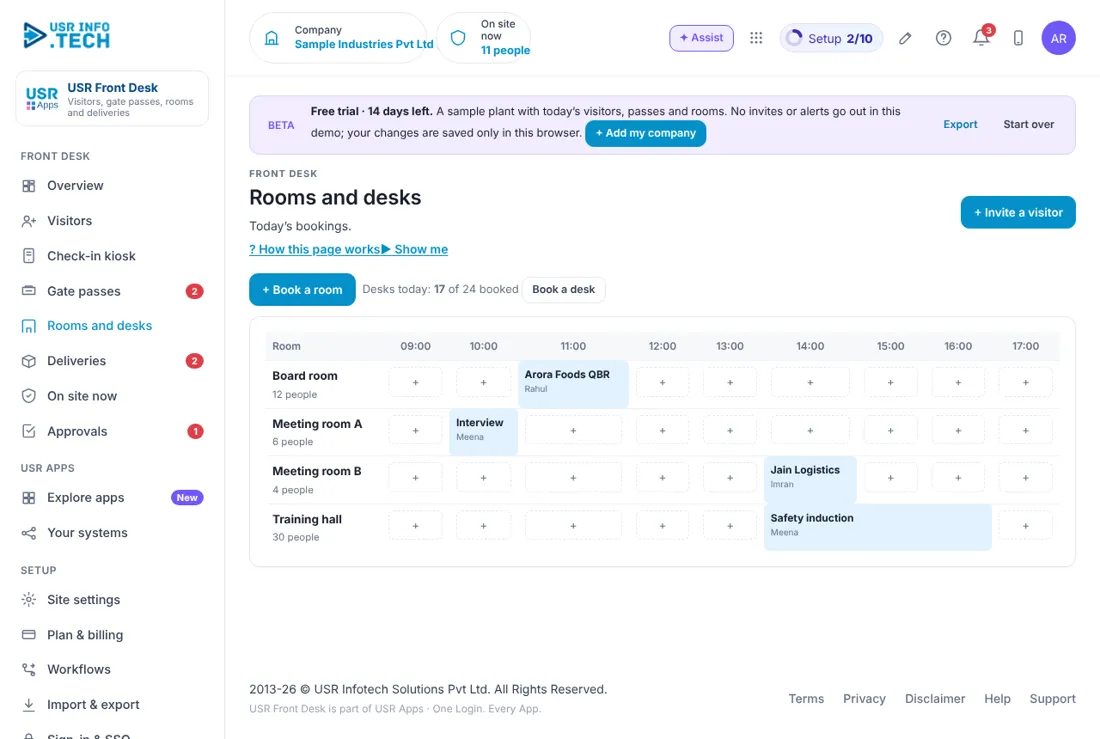
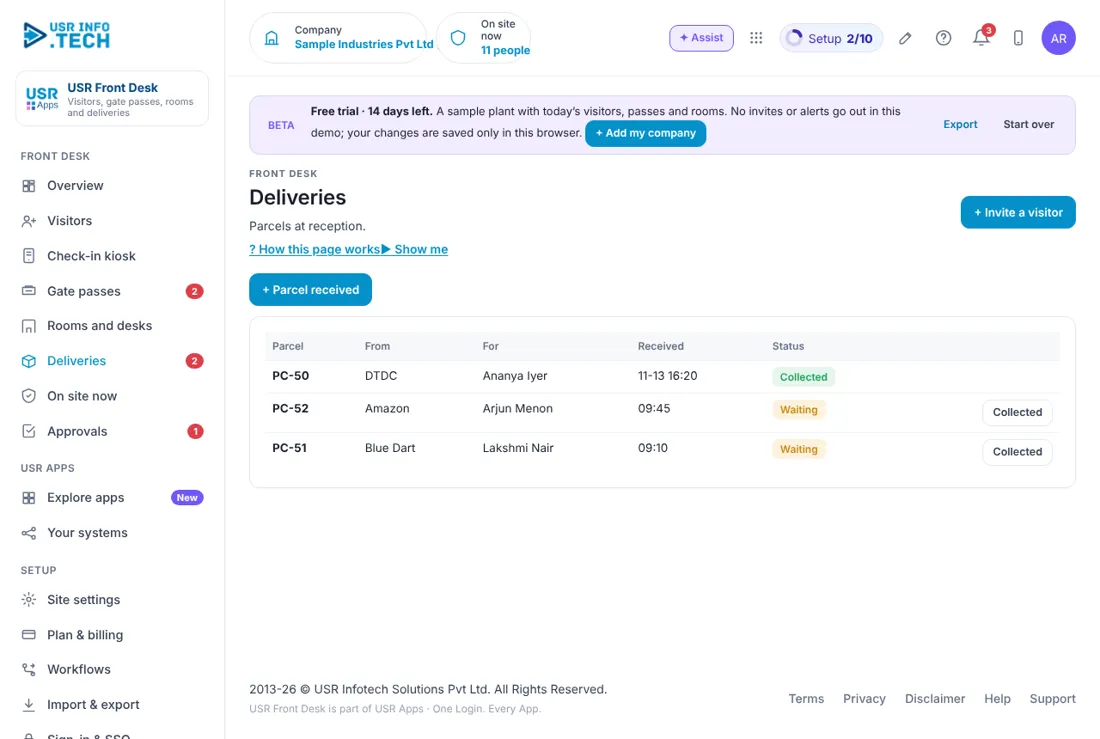
Sample company data. Screens can change as the app improves; the steps stay the same.
Welcome
USR Front Desk runs the front gate and reception of an office or a factory. Hosts invite visitors, visitors check in on a kiosk with a QR code, and the host is told straight away. It also issues gate passes for material going out and coming in, books meeting rooms and desks, records parcels, and shows who is on site now, so you can print an emergency list at once.
- Visitor invites with a QR code, a kiosk for check-in and badges at the desk
- Gate passes for material in and out, with approval for high-value items
- Meeting rooms and desks booked on a simple grid
- Parcels recorded at reception and collected by the person they are for
- On site now: visitors and contract staff, with an emergency list
A year in USR Front Desk
| When | What happens | Who |
|---|---|---|
| At the start | Set the site name, the areas that need an NDA, the gate-pass approval limit and the days to keep visitor details. | Admin |
| Every day | Open the Overview. Check in expected visitors. Approve gate passes. Hand over parcels. | Reception |
| Every week | Look for returnable gate passes that are overdue. Check room bookings. | Admin |
| Every month | Review visitors by area. Check the parcel list is clear. | Security head |
| Every quarter | Run an emergency drill with the On site now list. | Security head |
| Every year | Review the NDA areas and the days visitor details are kept. | Management |
Key ideas
- Visitor. A person from outside who comes to your site, usually invited by a host.
- Host. The employee the visitor is meeting.
- Kiosk. A tablet at reception where visitors scan their QR code to check in.
- Gate pass. A permit for material going out or coming in through the gate.
- Returnable pass. A pass for material that must come back by a date.
- NDA. A non-disclosure agreement signed by visitors to sensitive areas.
- Walk-in. A visitor who came without an invite.
- Emergency list. The list of everyone on site now, for a fire or a drill.
Invite first, so check-in takes seconds. When a host invites a visitor, the visitor gets a QR code and a short code. At the kiosk the visitor scans it or types the code, and the host is told straight away. A visitor with no invite is a walk-in, and reception records them.
Gate passes follow the value. An outward pass worth more than ₹50,000, or for material that is not coming back, needs the plant head's approval before the gate lets it through. Security checks the pass at the gate. Returnable material that is not back by its date is shown in red as overdue.
Visitor privacy. Visitor details are deleted after a set number of days, 90 in the sample company, so you do not keep personal data longer than you need, as the DPDP Act expects. ID numbers are shown only in part, such as the last 4 digits.
Emergency list. On site now lists the visitors and the contract staff inside. In an emergency click Send emergency list or Print, and tick each person Safe at the assembly point. Employees on site come from USR HRMS attendance in the live app.
Features step by step
5.1 Overview
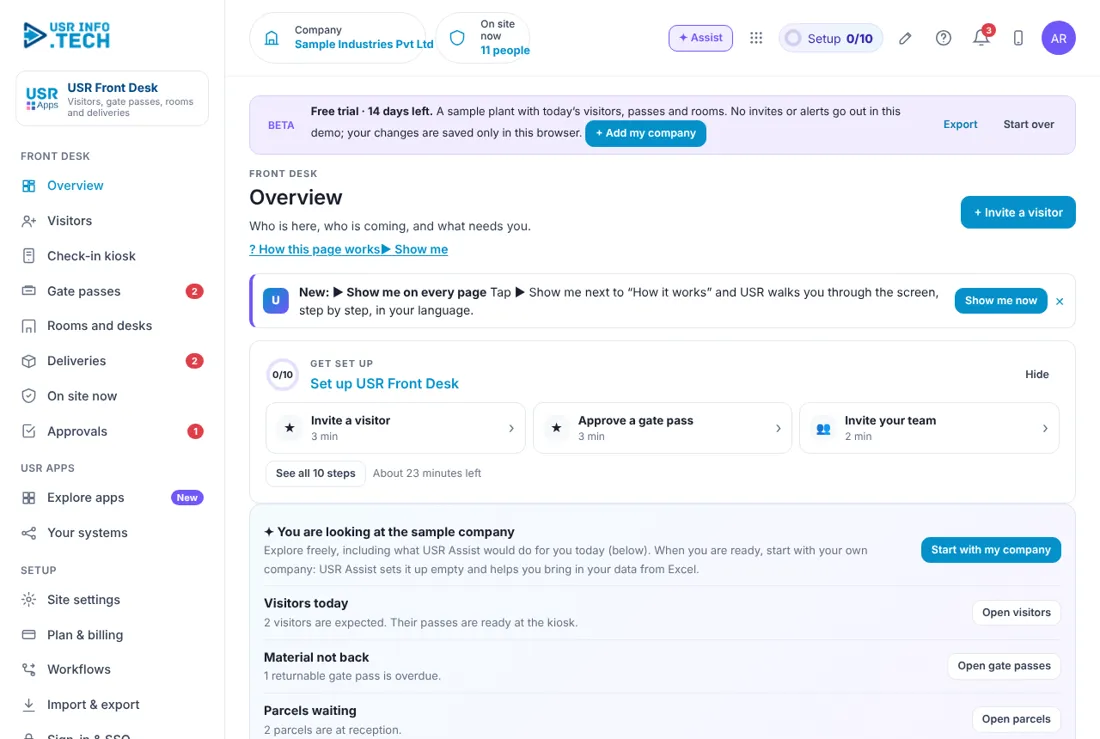
Overview shows who is on site and what needs reception today. On site now: Visitors and contract staff inside. Expected today: Visitors due, with their times. Gate passes waiting: Passes to approve. Returnables overdue: Material that should be back. Rooms booked today: Room-hours booked. Parcels to collect: Parcels at reception. Today at your site: The list of visitors with their host and status: Expected, On site or Left. Check in and Check out: Buttons on each visitor. Quick actions: + Invite a visitor, Walk-in, Open kiosk, + Gate pass and Emergency list. Ask the front desk: Type a question, such as who is on the production floor.
5.2 Visitors
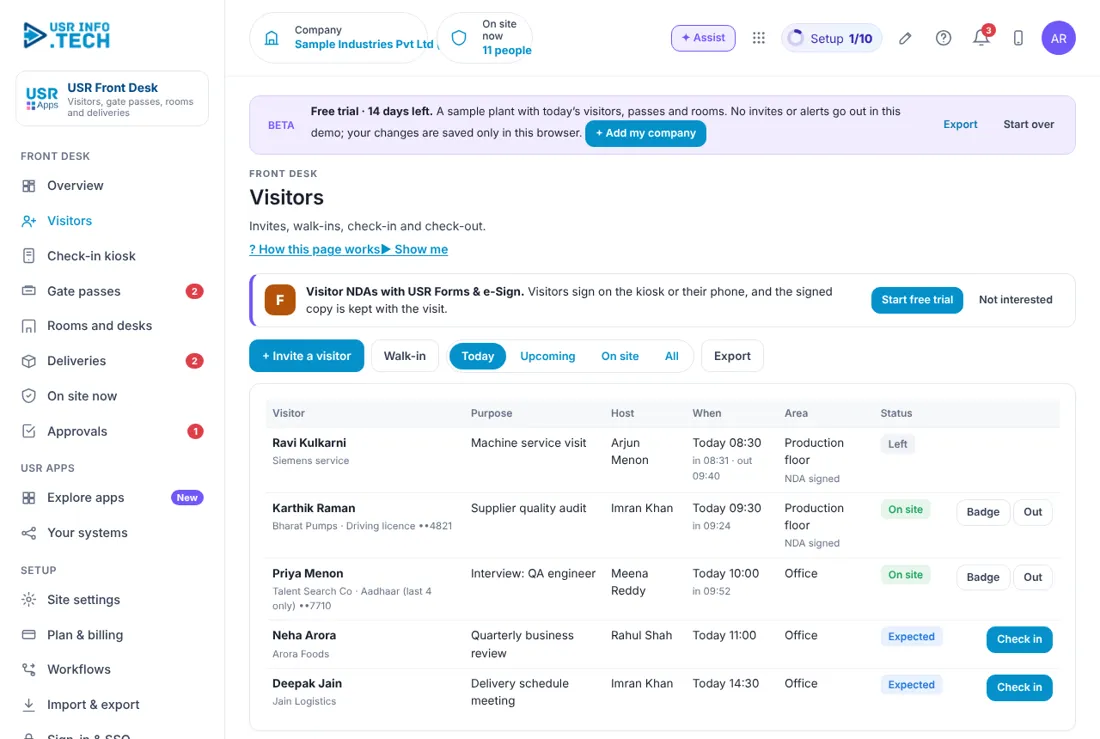
Visitors lists everyone who is expected, on site or has left. + Invite a visitor and Walk-in: Invite ahead, or record a visitor who has come without an invite. Today, Upcoming, On site, All: Filter the list. Export: Download the list. Visitor: Name, company and the ID type with only part of the number. Purpose and Host: Why they came and whom they meet. When: The planned time, and the time in and out. Area: Where they go, and whether the NDA is signed. Status: Expected, On site or Left. Check in, Badge and Out: The next action. Watch out: Visitors to areas that need an NDA must sign before they enter.
5.3 Check-in kiosk
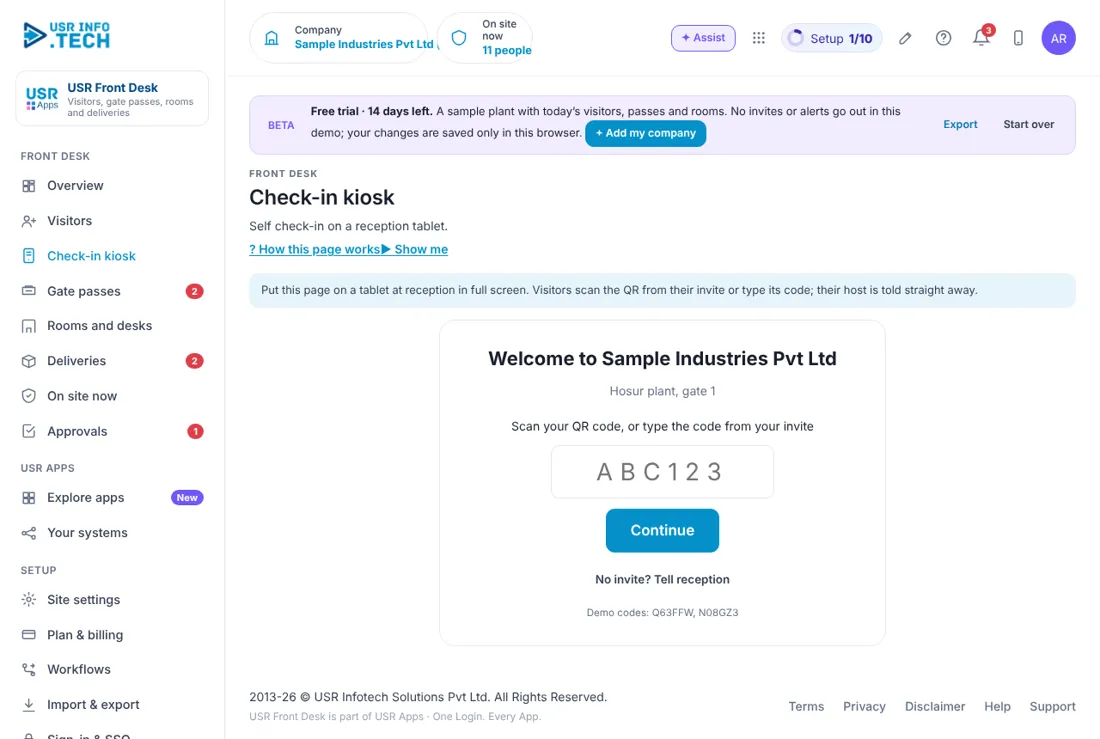
The check-in kiosk is the screen visitors use to check themselves in. Welcome: Your company and site name. Code box: The visitor scans the QR code, or types the code from the invite. Continue: Checks the visitor in and tells the host. No invite? Tell reception: For walk-ins.
5.4 Gate passes
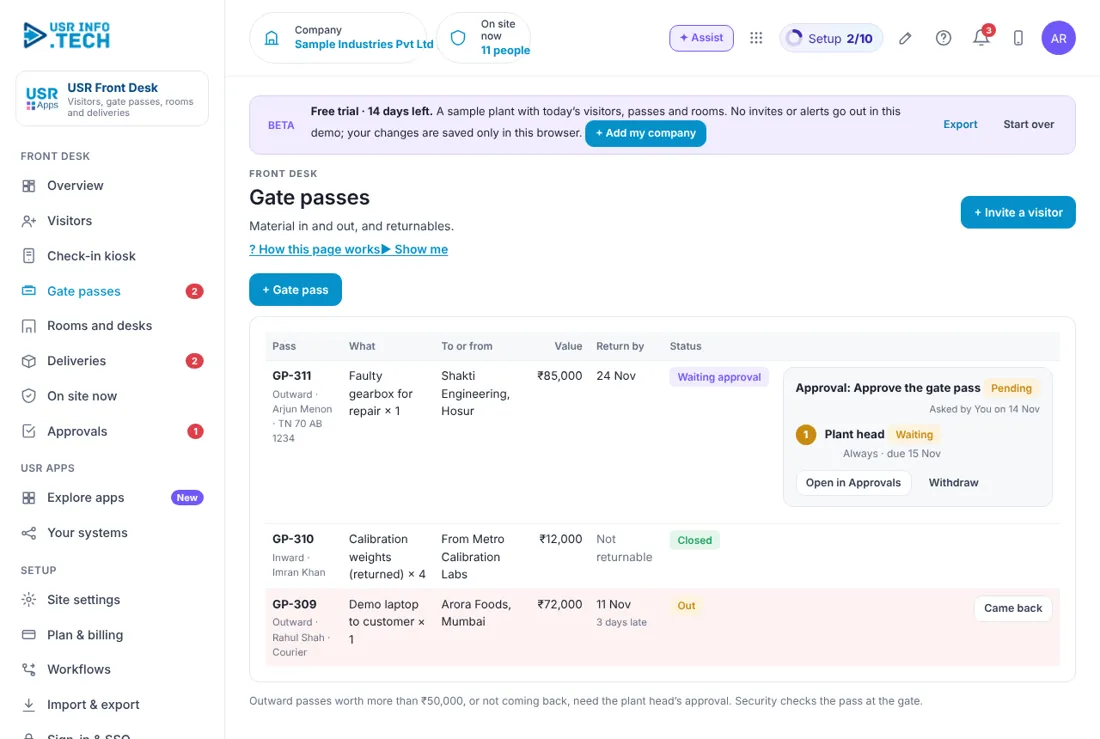
Gate passes controls material going out and coming in through the gate. + Gate pass: Make a new pass. Pass: The number, whether Outward or Inward, who and the vehicle. What and To or from: The material and the party. Value: The value of the material. Return by: The date, or Not returnable. A late return shows in red with the days late. Status: Waiting approval, Out, Closed and so on. Approval box: For a high-value pass, shows who must approve. You can Open in Approvals or Withdraw. Came back: Record that returnable material is back. Watch out: Outward passes worth more than ₹50,000, or not coming back, need the plant head's approval.
5.5 Rooms and desks
Rooms and desks is a grid to book meeting rooms and desks. Room and time grid: Each room, with its seats, across the hours of the day. + in a cell: Click a free hour to book it. Booked block: Shows the meeting and who booked it. + Book a room: Book a room with a form. Desks today: How many desks are booked out of the total. Book a desk: Book a desk.
5.6 Deliveries
Deliveries records parcels at reception until the person collects them. + Parcel received: Record a new parcel. Parcel: The parcel number. From and For: The courier or sender, and the person it is for. Received: The date and time. Status: Waiting or Collected. Collected: Click when the person takes the parcel.
5.7 On site now
On site now shows who is inside, and helps in an emergency. Send emergency list: Sends the list of people on site. Print: Prints the list. Visitors on site: Each visitor, their company, area, host and time in, with a Safe box. Contract staff on site: Each contract company, how many people and where they work. Employees: Come from USR HRMS attendance in the live app.
5.8 Approvals
Approvals holds the requests waiting for a decision, such as a gate pass. Waiting, Overdue, Approved this month: Counts of requests. Approval workflows on: How many workflows are switched on. Request, Step, Waiting on, Due: What, which step, who and by when. Approve, Send back, Reject: Your decision. A comment is needed to reject. Open: See the request in full.
5.9 Site settings
Site settings holds the rules for your site. Site name: For example Hosur plant, gate 1. Delete visitor details after (days): 90 in the sample company. Gate passes need approval above (₹): 50,000 in the sample company. Areas that need an NDA: For example Production floor and R&D lab. Visitors sign through USR Forms & e-Sign. Watch out: Visitor details are deleted after the number of days you set. Choose it with your DPDP policy in mind.
5.10 Plan & billing
Plan & billing shows your plan and the plans you can choose. One bill covers every USR app through USR Billing. Free: ₹0 (US$0). One site, up to 100 visitors a month. Standard: ₹1,500 (US$18) a site a month. Kiosk, QR invites, badges, gate passes. Professional: ₹3,000 (US$36) a site a month. Rooms and desks, NDAs, deliveries, emergency list, HRMS attendance. Enterprise: Talk to us. Many sites, turnstile and camera integration, private hosting. Mid-market: 501 to 5,000 users. Volume pricing per user, in INR or USD. Prices: INR excludes 18% GST. Watch out: There is a 14-day Professional trial with no card needed.
If something is not working
| Problem | What to do |
|---|---|
| A visitor says the code does not work | Check the code on the invite, or ask reception to check them in from the Visitors page. |
| A visitor stays On site after leaving | Click Out on the Visitors page. |
| A gate pass is stuck | It may be waiting for the plant head. Open Approvals. |
| Material did not come back | Open Gate passes and look for the red row. Click Came back when it returns. |
| The kiosk shows the wrong site | Check the Site name in Site settings. |
Questions people ask
Do visitors need an app? No. They scan the QR code on the kiosk or their phone, or type the short code.
How long are visitor details kept? For the number of days you set in Site settings, 90 in the sample company. They are then deleted.
Can visitors sign an NDA? Yes, through USR Forms & e-Sign, on the kiosk or on their phone.
Does it know who my employees are? Employees on site come from USR HRMS attendance in the live app.
Is there a trial? Yes. A 14-day Professional trial starts when you add your own company.
Glossary
Host: The employee a visitor is meeting. Kiosk: The tablet where visitors check in. Walk-in: A visitor who came without an invite. Gate pass: A permit for material to go in or out. Returnable: Material that must come back by a date. NDA: Non-disclosure agreement. DPDP: India's Digital Personal Data Protection Act.
USR Front Desk shares one record with these apps
No retyping between apps: data entered once flows to the next app, on the same login.
USR Front Desk is part of USR One. Operations Suite from ₹399 ($10) per seat a month, or every app in USR One Complete. Free for up to 10 people.
See USR One
