
USR Dev help
USR Dev helps a product and engineering team ship software in a calm, steady way. Ideas and customer requests arrive in a Backlog, the team pulls them into a two-week Sprint, moves each item across a Sprint board, tracks every bug with a fix-by time, runs test cases before each release, and releases only when the checks pass. Customers who raised a USR Desk ticket are told when their bug is fixed.
See the screens
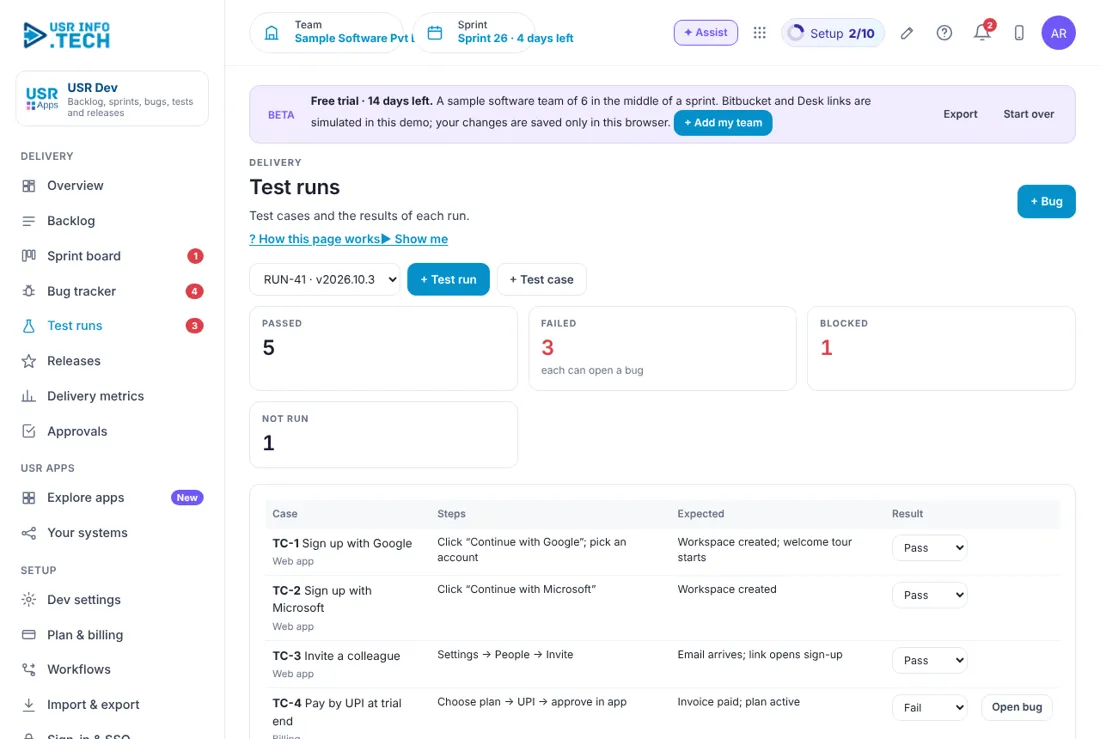
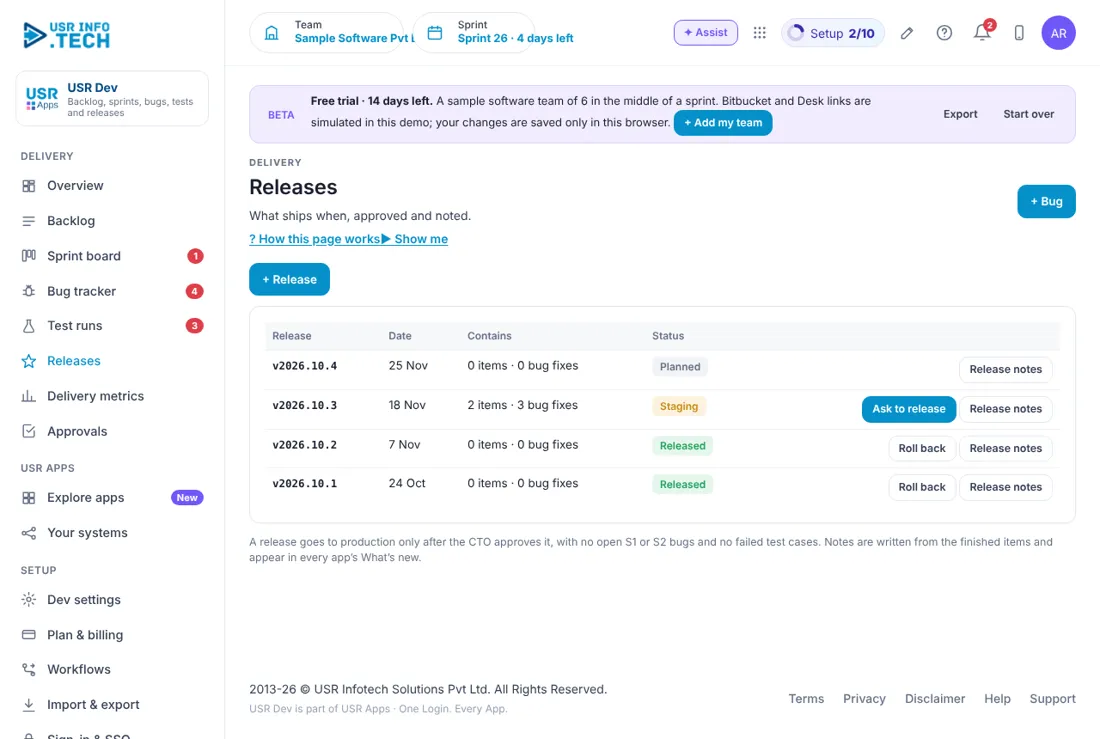
Sample company data. Screens can change as the app improves; the steps stay the same.
Welcome
USR Dev helps a product and engineering team ship software in a calm, steady way. Ideas and customer requests arrive in a Backlog, the team pulls them into a two-week Sprint, moves each item across a Sprint board, tracks every bug with a fix-by time, runs test cases before each release, and releases only when the checks pass. Customers who raised a USR Desk ticket are told when their bug is fixed.
- Backlog that fills from the Requirements pipeline, USR Desk tickets and your own team
- Sprint board with To do, In progress, In review, In QA and Done, and a burndown chart
- Bug tracker with severity, owner and a fix-by clock (S1 in 4 hours, S2 in 24 hours)
- Test runs with pass, fail and blocked, and one click to open a bug from a failed test
- Releases with notes that appear in every app's What's new, and a release approval
- Delivery metrics: velocity, plan accuracy, releases and bugs fixed, shared with USR Insights
A year in USR Dev
| When | What happens | Who |
|---|---|---|
| At the start | Set the sprint length, story point scale and definition of done in Dev settings. Add your components. Connect Bitbucket and USR Desk. | Admin |
| Every sprint start | The product owner ranks the Backlog. The team clicks Add to sprint on the top items. | Product owner |
| Every day | Open the Overview. Move items across the Sprint board. Triage new bugs and give each an owner. | Team |
| Every sprint end | Close the sprint. Read Delivery metrics. Unfinished items return to the Backlog. | Team lead |
| Every release | Run a test run, fix failed cases, and click Ask to release for approval. | QA and CTO |
| Every quarter | Read velocity and plan accuracy with the leaders. Adjust the sprint size. | Leaders |
Key ideas
- Backlog. The ranked list of work that is waiting to be done.
- Story. A piece of work that a user can see, such as Sign up with Google.
- Story points. A size for an item. The scale is 1, 2, 3, 5, 8, 13.
- Sprint. A fixed period, usually 14 days, in which the team finishes a set of items.
- Sprint board. Columns that show where each item is.
- Bug. Something that does not work as it should.
- Severity. How bad a bug is: S1 critical, S2 major, S3 minor, S4 cosmetic.
- Test case. One check with steps and an expected result.
- Release. A version of the product that goes to customers, such as v2026.10.3.
- Definition of done. The checks an item must pass before it is Done.
Small, steady sprints beat big surprises. A sprint is a short, fixed period. The team picks only as much work as it can finish. At the end, what is done is shown to customers and what is not goes back to the Backlog. The burndown chart on the Overview shows the points still open against an ideal grey line, and tells you in words when you are Behind pace.
Every bug has a clock. Each bug has a severity and a fix-by time: S1 within 4 hours, S2 within 24 hours, S3 within 5 days and S4 within 20 days. The Bug tracker shows how many hours are left, and turns red when a bug is late. A bug raised from a USR Desk ticket updates the customer when it is fixed.
Test before you release. A test run is a list of test cases for one release. Each case is marked Pass, Fail, Blocked or Not run. A failed case has an Open bug button, so the problem goes straight into the Bug tracker. A release goes to production only when no S1 or S2 bug is open and no test case has failed.
Customers are part of the loop. Items arrive from the Requirements pipeline in every USR app, from USR Desk tickets and from your own team. The Backlog shows where each came from. When the item is released, its notes appear in every app's What's new, so customers see what changed.
Features step by step
5.1 Overview
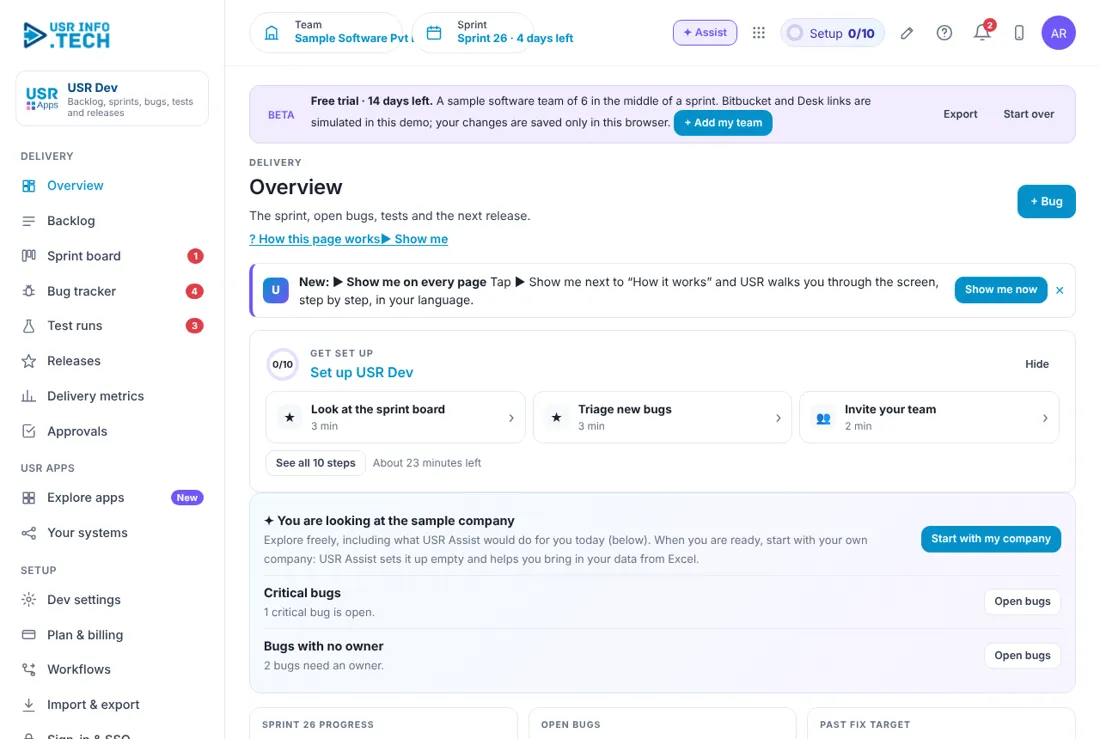
Overview shows how the sprint is going and what needs attention today. Get set up: A checklist of 10 steps with the time each takes. Bugs with no owner: Bugs that need someone to take them. Sprint progress: Percent of points done and days left. Open bugs: How many are open and how many are critical or major. Past fix target: Bugs that are late. Last test run: Cases passed out of the total. Next release: The version, where it is and the date. Burndown chart: Grey is the ideal pace. Blue is the points still open. Needs attention: The most urgent bugs, reviews and failed tests, each with an Open button. Watch out: Behind pace means the team needs to move something out or ask for help.
5.2 Backlog
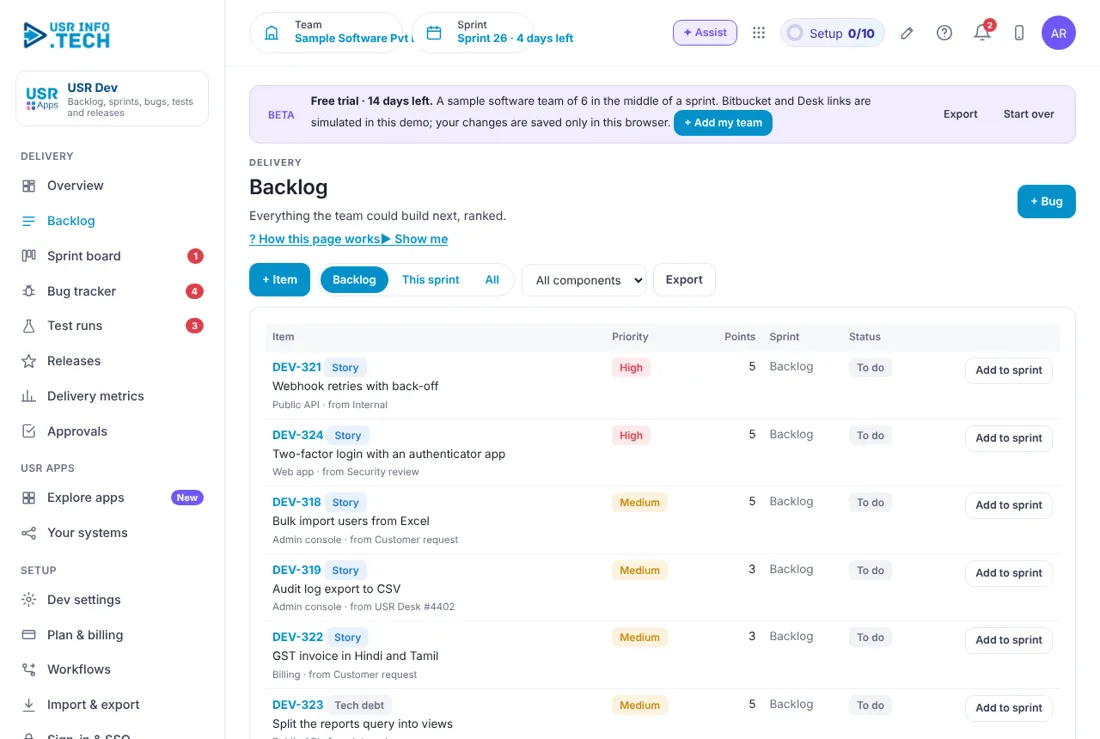
Backlog is the ranked list of work waiting to be done. + Item: Add a story, improvement or tech debt item. + Bug: Report a bug. Backlog, This sprint, All: Filter the list. All components: Filter by part of the product. Export: Download the list. Item: The number, kind, title, component and where it came from. Priority: High, Medium or Low. Points: The size of the item. Add to sprint: Pull the item into the current sprint. Watch out: An item without points cannot be planned well.
5.3 Sprint board
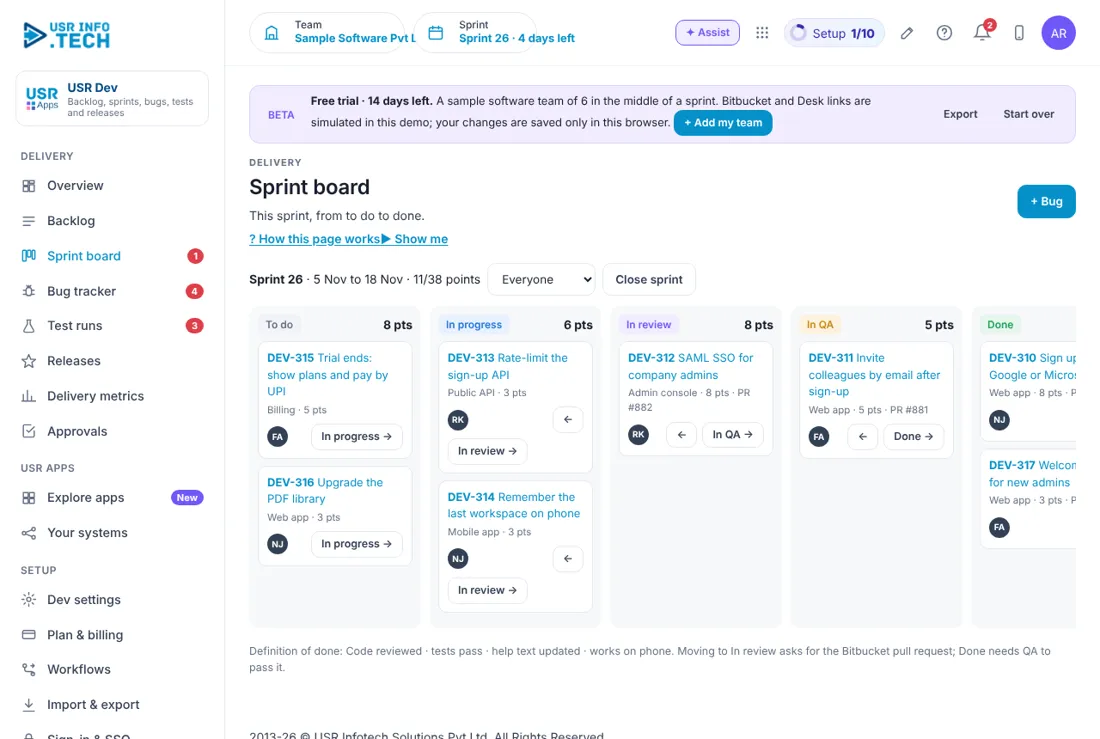
Sprint board shows each item in the column where it is. Sprint header: The sprint name, dates and points done out of the total. Everyone: Filter the board by person. Close sprint: End the sprint and send unfinished items back. To do, In progress, In review, In QA, Done: The five columns, each with its points. Arrow buttons: Move an item to the next or previous column. Definition of done: Shown under the board. Done needs QA to pass. Watch out: Moving to In review asks for the Bitbucket pull request.
5.4 Bug tracker
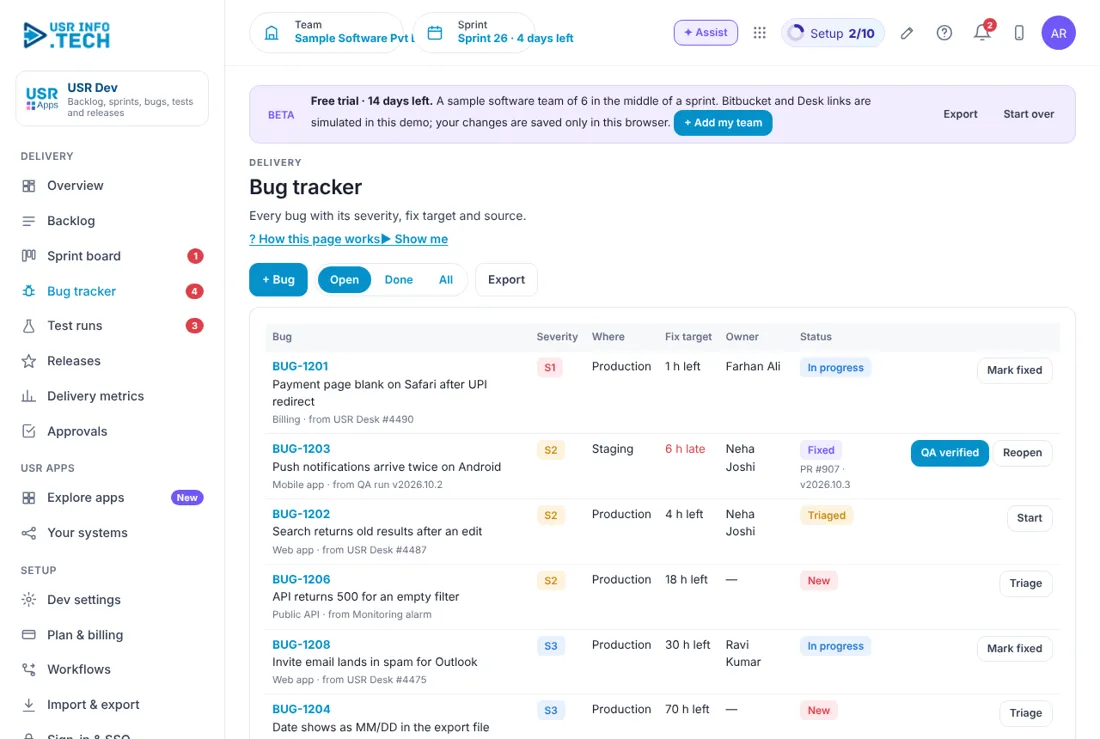
Bug tracker lists every bug with its severity and how much time is left. + Bug: Report a bug. Open, Done, All: Filter the list. Export: Download the list. Severity: S1 critical, S2 major, S3 minor, S4 cosmetic. Where: Production or Staging. Fix target: Hours left, or hours late in red. Owner: Who is fixing it. A dash means no owner. Status: New, Triaged, In progress, Fixed. Triage, Start, Mark fixed, QA verified, Reopen: Move the bug on. Watch out: A late bug is shown in red. Fix S1 and S2 first.
5.5 Test runs
Test runs lets QA check a release before it goes out. Run selector: Choose a test run, such as RUN-41 for v2026.10.3. + Test run: Start a new run. + Test case: Add a case with steps and an expected result. Passed, Failed, Blocked, Not run: Counts for the run. Case: The name and the part of the product. Steps and Expected: What to do and what should happen. Result: Choose Pass, Fail, Blocked or Not run. Open bug: On a failed case, creates a bug. Watch out: A failed case stops the release until it is fixed.
5.6 Releases
Releases lists every version and where it stands. + Release: Plan a new version. Release: The version, such as v2026.10.3. Date: The planned or actual date. Contains: How many items and bug fixes. Status: Planned, Staging or Released. Ask to release: Sends the release for approval. Roll back: Go back to the earlier version. Release notes: Notes written from the finished items. Watch out: A release needs approval and no open S1 or S2 bug.
5.7 Delivery metrics
Delivery metrics shows how fast and how well the team delivers. Average velocity: Points done per sprint over the last 6 sprints. Plan accuracy: Done divided by planned. Releases: Releases this month against the goal. Bugs fixed: Fixed out of all bugs. Velocity: planned vs done: A bar pair for each sprint. Open bugs by severity: A bar for each of S1 to S4. Watch out: These numbers also feed USR Insights.
5.8 Approvals
Approvals holds requests waiting for a decision, such as a release. Waiting, Overdue, Approved this month: Counts of requests. Approval workflows on: How many workflows are switched on. Waiting on: Filter by approver. Waiting for approval: The list. It is empty when nothing waits. Watch out: Late approvals are flagged and escalated.
5.9 Dev settings
Dev settings holds your way of working and your connections. Sprint length (days): Usually 14. Story point scale: For example 1, 2, 3, 5, 8, 13. Definition of done: The checks before an item is Done. Components: The parts of your product. Click + Add for more. Bitbucket: Pull requests and builds link to items. USR Desk: Raise a bug from a ticket and tell the customer. GitHub, GitLab: Connect through USR Connect. Jira: Import your backlog, or keep both in sync. Watch out: Change the sprint length only between sprints.
5.10 Plan & billing
Plan & billing shows your plan and the plans you can choose. One bill covers every USR app through USR Billing. Free: ₹0 (US$0). Up to 10 users: backlog, board and bug tracker. Standard: ₹149 (US$1.8) per user a month. Sprints, test runs, releases, USR Desk link. Professional: ₹299 (US$3.6) per user a month. Release approvals, metrics in Insights, AI specs and notes. Enterprise: Talk to us. Many teams and products, private hosting, agreed SLA. Mid-market: 501 to 5,000 users. Volume pricing per user, in INR or USD. Prices: INR excludes 18% GST. Watch out: There is a 14-day Professional trial with no card needed.
If something is not working
| Problem | What to do |
|---|---|
| A bug shows late | Open the Bug tracker, check the owner, and fix S1 and S2 first. |
| I cannot move an item to In review | It needs the Bitbucket pull request. Add it first. |
| I cannot move an item to Done | QA must pass it first. |
| A release will not go out | Check for open S1 or S2 bugs and failed test cases. |
| A bug has no owner | Click Triage and choose an owner. |
Questions people ask
Can I import from Jira? Yes. Connect Jira in Dev settings to import your backlog or keep both in sync.
What do story points mean? They are a size, not hours. Use the scale in Dev settings.
Who is told when a bug is fixed? The customer who raised the USR Desk ticket.
Who approves a release? The approver set in your workflow, shown in Approvals.
Is there a trial? Yes. A 14-day Professional trial starts when you add your own company.
Glossary
Backlog: The ranked list of work waiting to be done. Sprint: A fixed period in which the team finishes a set of items. Story point: A size for an item. Velocity: Points done per sprint. Burndown: A chart of points still open. Severity: How bad a bug is, S1 to S4. Tech debt: Work that keeps the product healthy but is not a new feature. Pull request: A request to review and join code changes. Release notes: A short note of what changed.
USR Dev shares one record with these apps
No retyping between apps: data entered once flows to the next app, on the same login.
USR Dev is part of USR One. Operations Suite from ₹399 ($10) per seat a month, or every app in USR One Complete. Free for up to 10 people.
See USR One
