
USR CA Desk help
USR CA Desk is the daily workspace of a chartered accountant's firm. It lists every due date for every client under GST, TDS, Income-tax, ROC, PF, ESI and accounts, shows who is doing what on a work board, chases clients for documents, tracks notices and shows which clients earn the firm money. Clients get a simple portal with no app to install.
See the screens
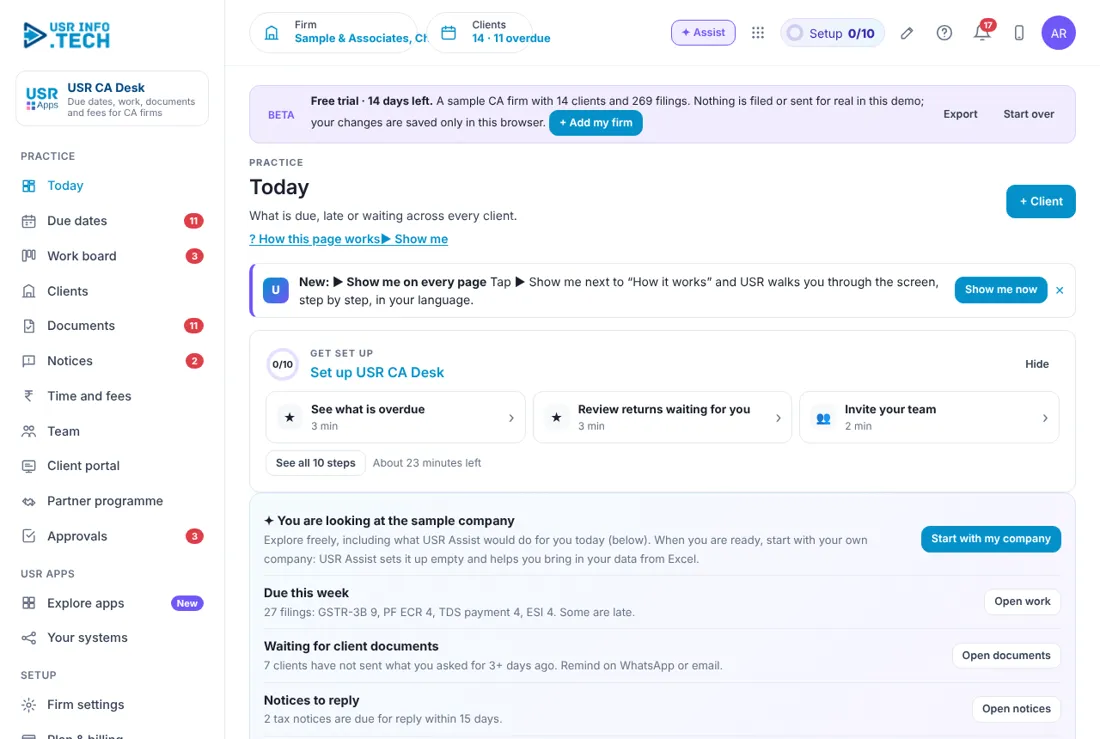
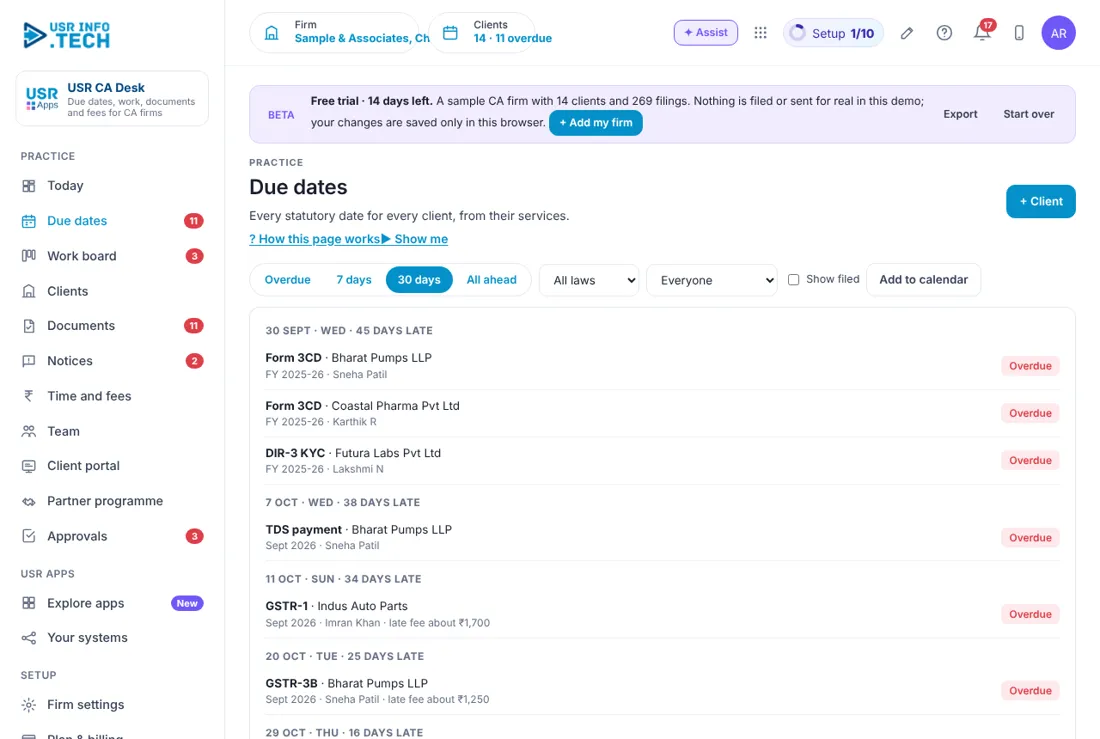
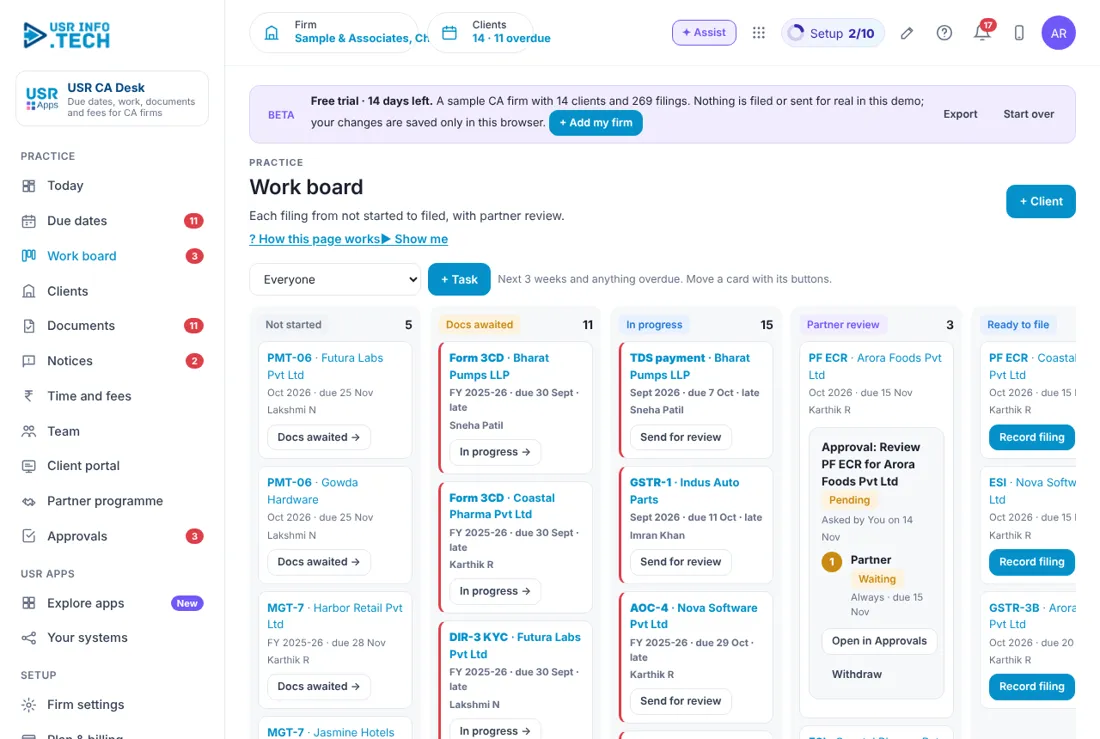
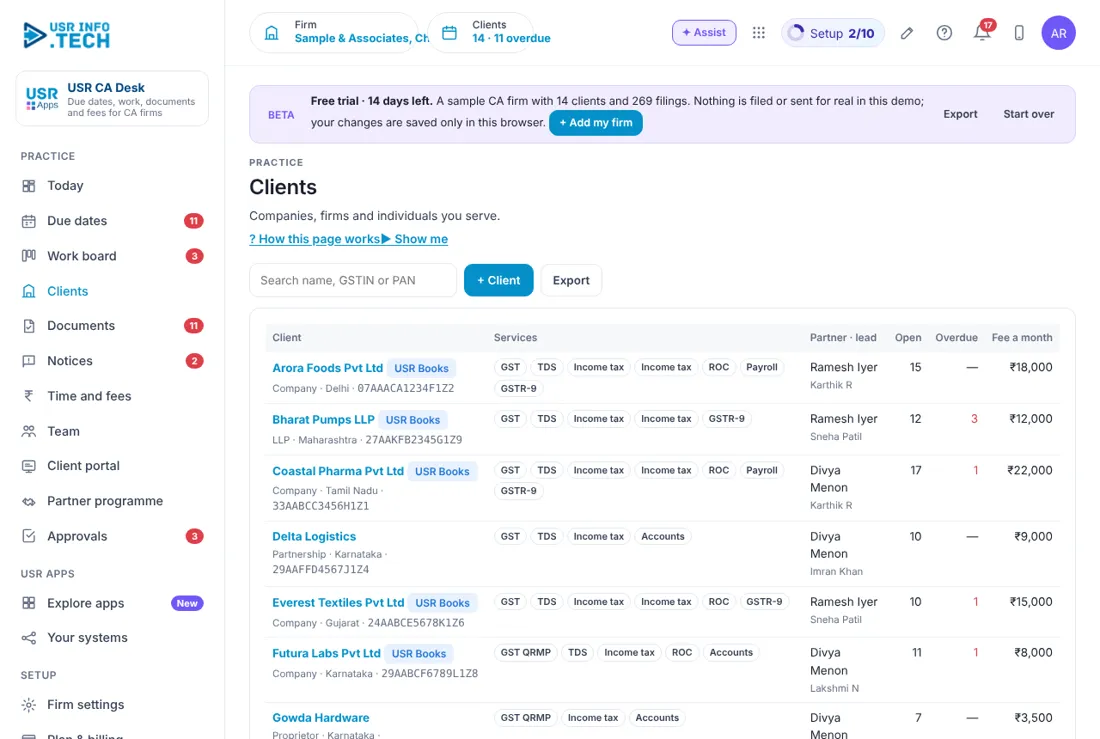
Sample company data. Screens can change as the app improves; the steps stay the same.
Welcome
USR CA Desk is the daily workspace of a chartered accountant's firm. It lists every due date for every client under GST, TDS, Income-tax, ROC, PF, ESI and accounts, shows who is doing what on a work board, chases clients for documents, tracks notices and shows which clients earn the firm money. Clients get a simple portal with no app to install.
- Every filing for every client in one calendar, with late fees shown
- A work board from Not started to Ready to file, with partner review
- Document requests by email or WhatsApp, with reminders
- Notices with reply-by dates and a drafted reply
- Fee invoices and the clients who cost more time than they pay
A year in USR CA Desk
| When | What happens | Who |
|---|---|---|
| At the start of the year | Add clients and services. Check the firm settings and the default hourly cost. | Partner |
| Every day | Open Today. Clear the overdue filings and the approvals waiting. | Everyone |
| Every week | Read Due dates for the next 7 days. Remind clients who owe documents. | Seniors |
| Every month | Do GST, TDS, PF, ESI and monthly books. Raise fee invoices. | Team |
| Every quarter | TDS returns, advance tax and GSTR-1 (Q) for QRMP clients. | Team |
| When the government extends a date | Record it once in Firm settings. Every client's task moves. | Partner |
| Every year | ITR, audit forms, AOC-4, MGT-7 and DIR-3 KYC. | Partners |
Key ideas
- Client. A company, LLP, firm, proprietor or individual you serve, with its services.
- Service. What you do for a client, such as GST, TDS or Income tax.
- Due date. The last day for a filing. Dates follow the GST, Income-tax, Companies Act, EPF and ESI rules.
- Work board. Cards for each filing, moved from Not started to Ready to file.
- Partner review. A partner checks the return before it is filed (maker and checker).
- Document request. A message asking the client for a document, by email or WhatsApp.
- Notice. A letter from the tax department, with a reply-by date.
- Client portal. A page where the client uploads documents, sees dates and pays fees. They sign in with a code sent to their email.
The calendar leads, not memory: due dates are made from each client's services, and overdue items show first with the late fee you may owe. By default every return goes to a partner for review before it is filed.
Features step by step
5.1 Today
What needs you now. Cards: Overdue filings, Due in 7 days, Waiting for partner review, Documents awaited, Open notices, Fees to collect. Lists: Needs you this week, Next 14 days (with staff name and status). Start every day here.
5.2 Due dates
The calendar of every filing. Choose Overdue, 7 days, 30 days or All ahead; filter by law (GST, TDS, Income tax, ROC, Payroll, Accounts) or person; Show filed; Add to calendar. Status: Overdue, Not started, In progress, Docs awaited, Partner review, Ready to file. Late fee is shown on overdue GST and TDS items. Deal with overdue first.
5.3 Work board
Columns: Not started, Docs awaited, In progress, Partner review, Ready to file. Move a card with its button (for example Send for review). After filing click Record filing. + Task adds a non-standard task. Cards past their date have a red edge.
5.4 Clients
Each client: name, type, state, GSTIN, services (GST, GST QRMP, TDS, Income tax, ROC, Payroll, GSTR-9, Accounts), partner and lead, open and overdue tasks, monthly fee. + Client adds one and the due dates are made for you. Export downloads the list. Choose QRMP only for clients who file GST quarterly.
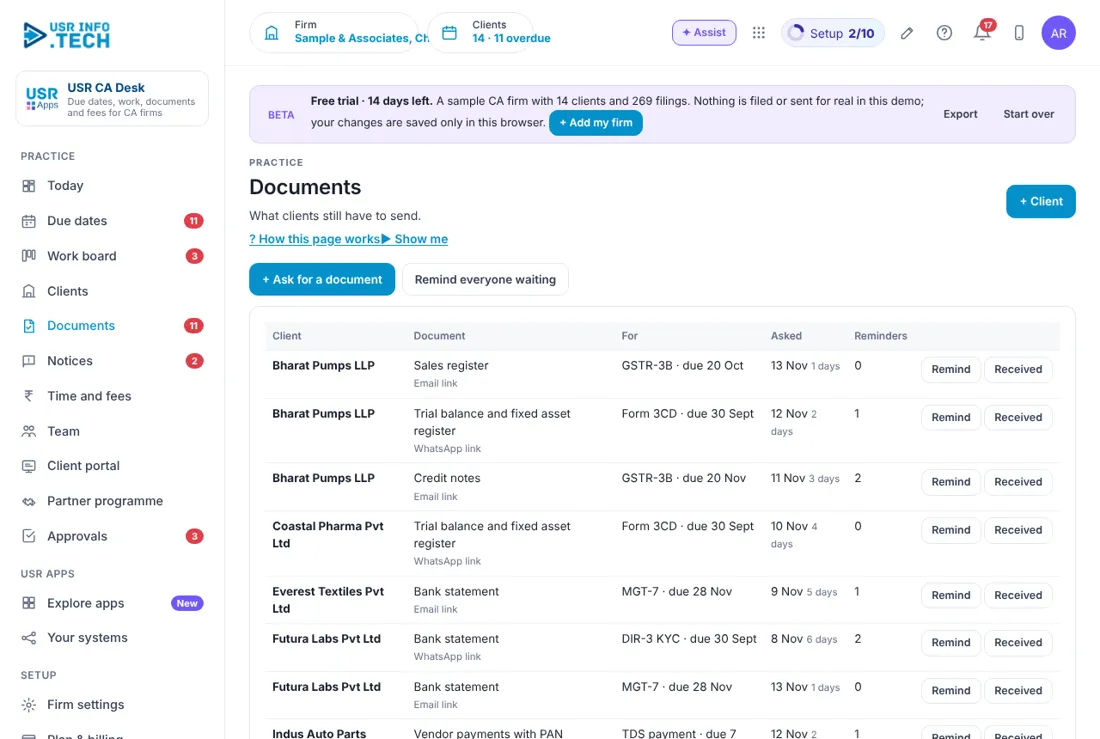
5.5 Documents
What you asked clients for and not yet received: client, document, filing and due date, date asked, channel (email or WhatsApp link), reminders sent. Buttons: Remind, Received, + Ask for a document, Remind everyone waiting. Files are kept encrypted for 8 years as the Income-tax Act needs.
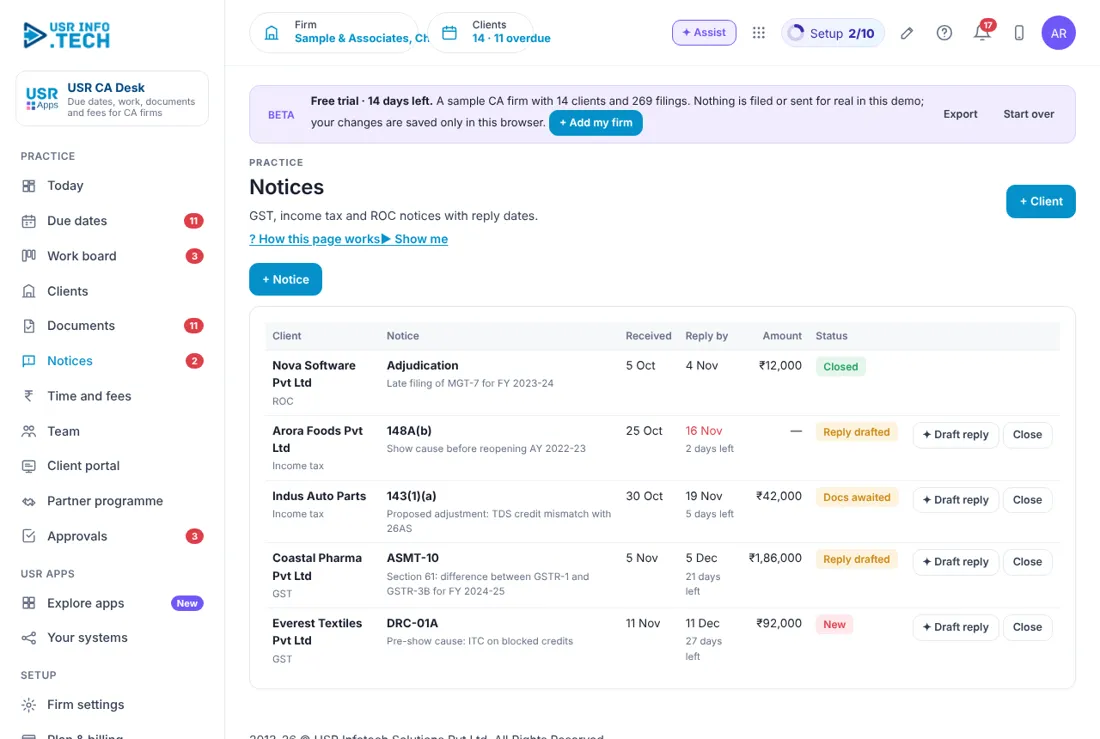
5.6 Notices
Letters from the tax department (such as 143(1)(a), ASMT-10, DRC-01A): received date, reply-by date with days left, amount, status (New, Docs awaited, Reply drafted, Closed). + Notice adds one; Draft reply gives an AI draft; Close ends it. Always read a drafted reply before it goes out.
5.7 Time and fees
Billed this month (before GST), To collect, Hours logged (last 45 days). Fee invoices with Mark paid. Raise this month's invoices makes them for all clients. Least profitable clients compares fee with time cost at staff rates. Hours by person. Check Least profitable clients every quarter.
5.8 Team
Person, role (Partner, Senior, Article assistant, Accounts executive), open tasks, due in 7 days, overdue, clients led. Article assistants' hours are tracked for the ICAI training record. Leave and attendance stay in your HRMS.
5.9 Client portal
What the client sees: We need from you (Upload), Coming up, Filed for you (with acknowledgement numbers), Invoices (Pay by UPI). Choose a client in Viewing as. Give access from the client's page. No app to install.
5.10 Partner programme
Free USR CA Desk, Books, Tally, Billing and Expense for firms of up to 25 people. Clients who start USR Apps get the setup fee waived and a 3-month parallel run. USR CA Partner badge and certificate. The programme pays no commission, in line with the professional rules for CAs. Enter firm, city and state, accept the agreement, click Join the programme. Referrals go both ways only when the client asks, with their consent.
5.11 Approvals
Counts: Waiting, Overdue, Approved this month, workflows on. Filter by role. Approve, Send back or Reject (comment needed to reject), Open. Approvers can decide from email or WhatsApp.
5.12 Firm settings
Firm name, ICAI registration number, firm GSTIN, default hourly cost. Send document reminders on WhatsApp as well as email. Every return goes to a partner for review before filing. Reminders go 7, 3 and 1 days before a due date. Due-date extensions: when CBDT, CBIC or MCA extends a date, choose the form, period and new date and click Apply extension. It moves every client's task and tells clients, so check the date twice.
5.13 Plan & billing
14-day Professional trial, no card needed. Free: ₹0 (US$0), up to 10 clients. Standard: ₹1,499 (US$18) a month per firm, 100 clients, 5 users, portal. Professional: ₹2,999 (US$36) a month per firm, unlimited clients, partner review, notices, time and fees, AI drafts, 15 users. Enterprise: talk to us. Mid-market 501 to 5,000 users: volume pricing. Professional is free for partner firms up to 25 people. INR excludes 18% GST.
If something is not working
| Problem | What to do |
|---|---|
| A filing is missing for a client | Open the client and check the services. Dates are made from the services. |
| A client cannot open the portal | Give access from the client's page. They sign in with a code sent to their email. |
| A date looks wrong after an extension | Check the form, period and new date in Firm settings > Due-date extensions. |
| I cannot add more clients | The Free plan allows 10 clients. Choose Standard or Professional. |
Questions people ask
Does CA Desk file returns for me? No. It tracks and prepares the work. You record the filing after it is done on the government site.
Who sees a client's data? Only your firm and that client.
Is there a free plan? Yes, up to 10 clients.
Is there a partner programme? Yes. Firms of up to 25 people get Professional free. It pays no commission.
Glossary
QRMP: quarterly return with monthly payment for GST. TDS: tax deducted at source. Partner review: a partner checks a return before filing. Notice: a letter from the tax department. ICAI: the Institute of Chartered Accountants of India.
USR CA Desk shares one record with these apps
No retyping between apps: data entered once flows to the next app, on the same login.
USR CA Desk is part of USR One. Finance Suite from ₹999 ($25) per company a month, or every app in USR One Complete. Free for up to 10 people.
See USR One
