
USR Books help
USR Books keeps your accounts in step with the rest of your business. GST invoices come from USR Billing, vendor bills from USR Ready, payroll from USR HRMS and your bank statement from your bank, all in balanced books, with GSTR-1, GSTR-3B and TDS ready each month.
See the screens
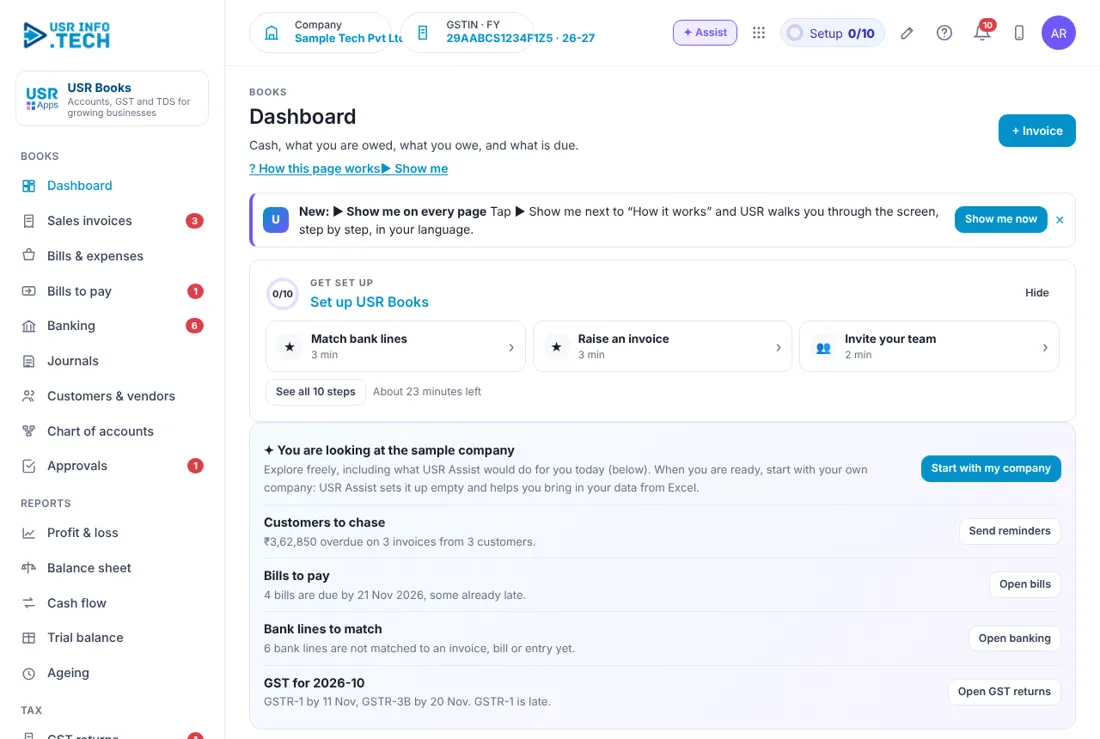
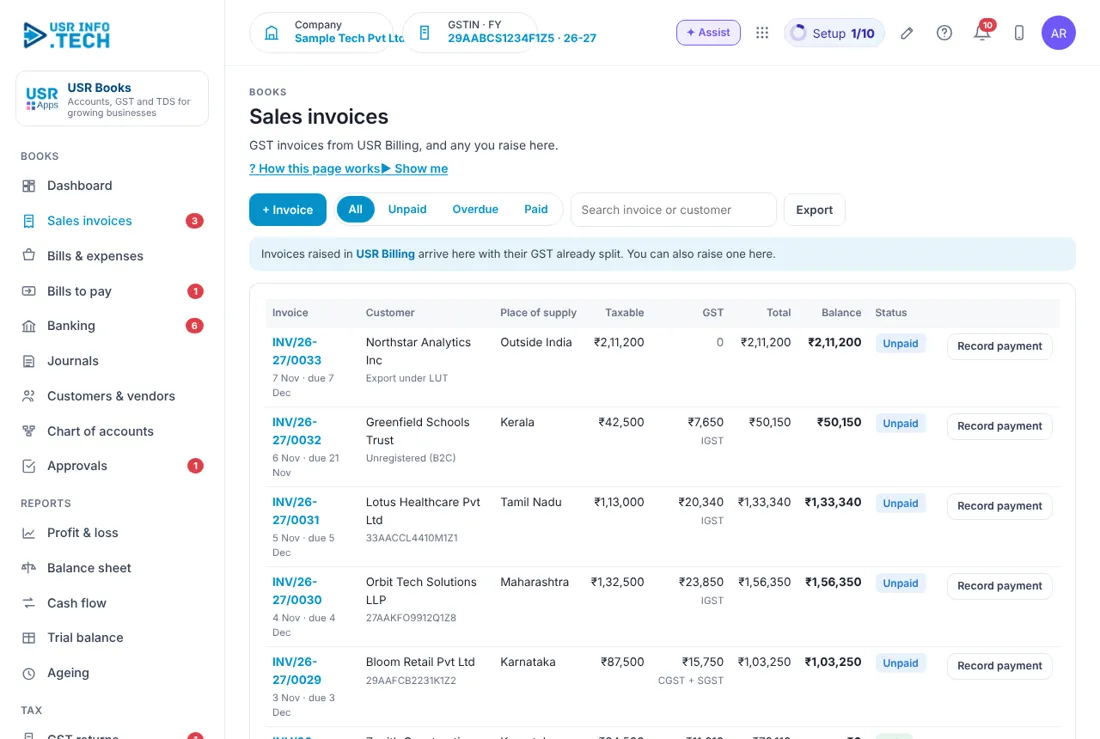
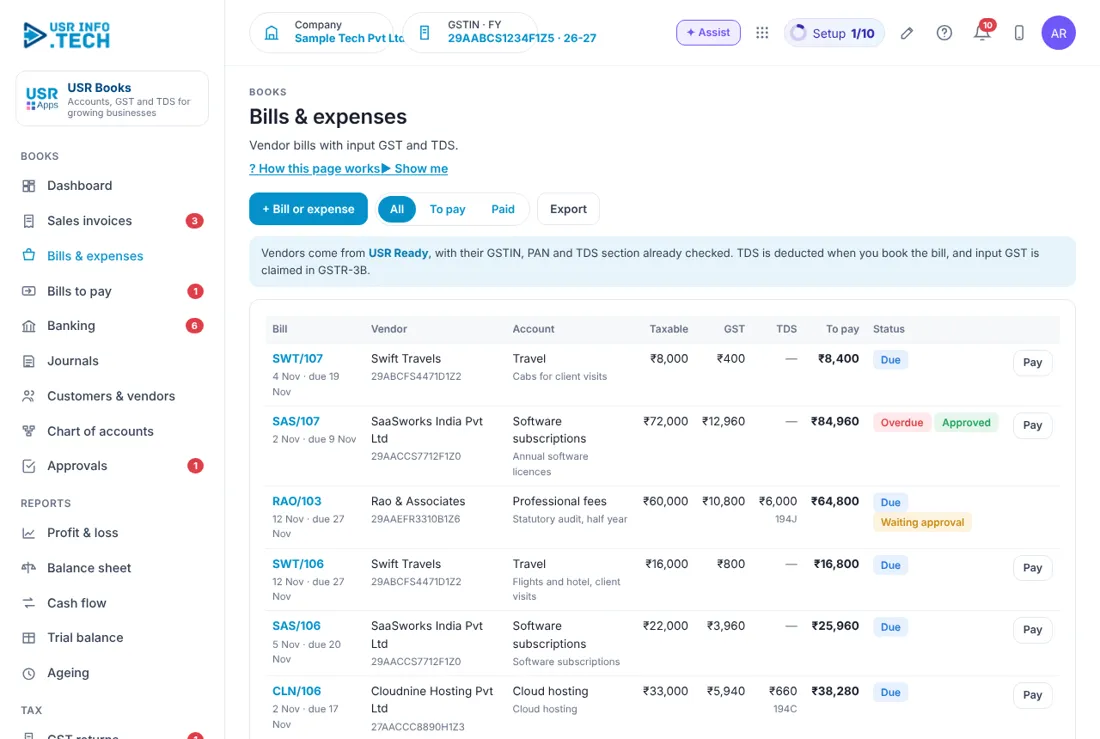
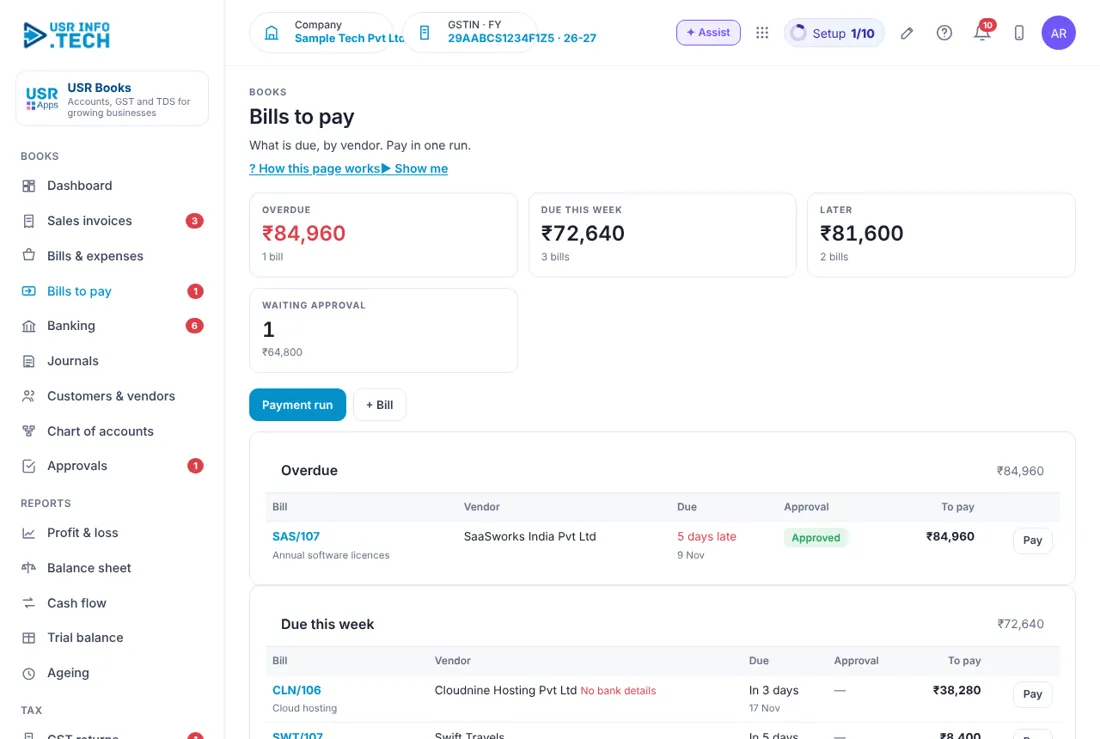
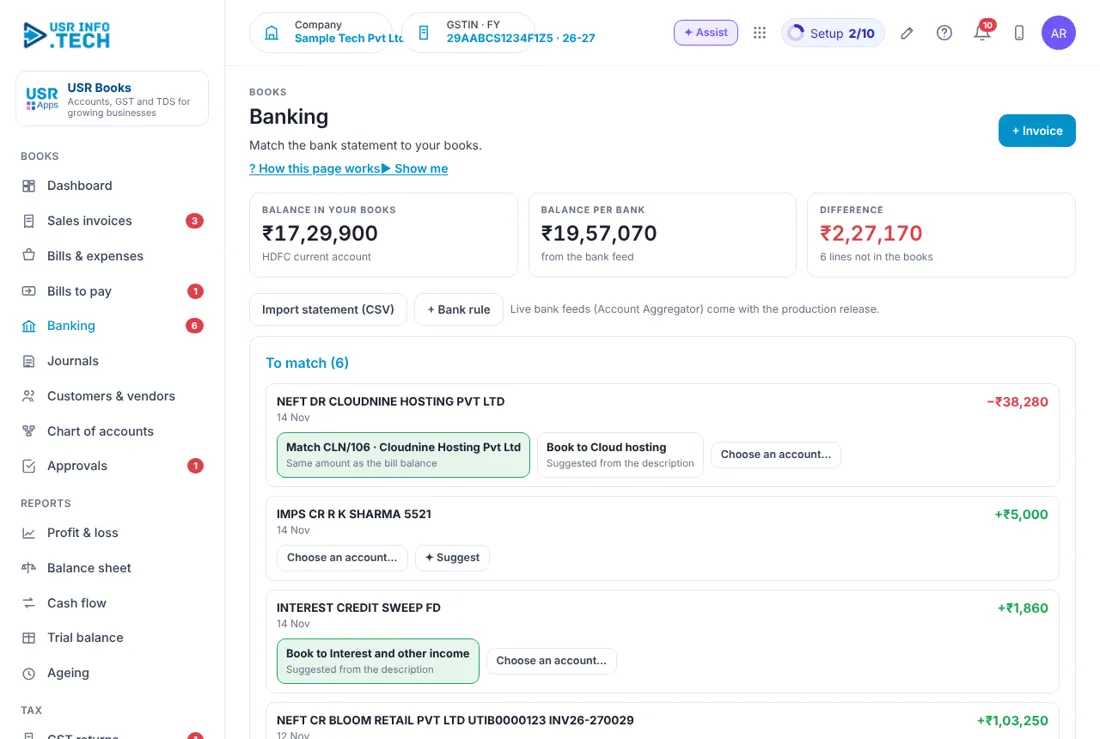
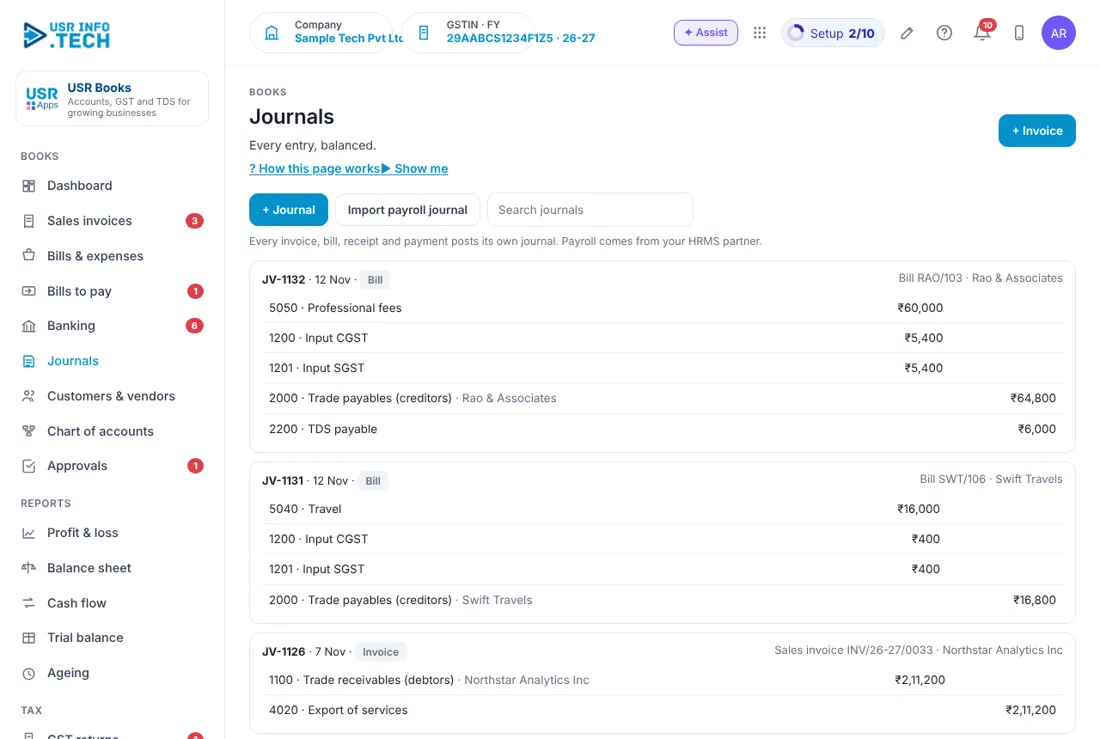
Sample company data. Screens can change as the app improves; the steps stay the same.
Welcome to USR Books
USR Books keeps your accounts in step with the rest of your business. GST invoices come from USR Billing, vendor bills from USR Ready, payroll from USR HRMS and your bank statement from your bank, all in balanced books, with GSTR-1, GSTR-3B and TDS ready each month.
- Sales invoices and vendor bills with GST and TDS
- Banking: match the bank statement to your books, with bank rules
- Profit & loss, balance sheet, cash flow, trial balance and ageing
- GSTR-1 and GSTR-3B prepared from your entries; TDS by section
- Invite your CA to sign in with one login
- Sync with TallyPrime, or move from another tool
A year in USR Books
| When | What happens | Who |
|---|---|---|
| When you start | Fill in Books settings (GSTIN, TAN, LUT). Bring opening balances in. Invite your CA. | Accountant |
| Every day | Book bills. Match the bank in Banking. | Accountant |
| Every week | Open Bills to pay. Pay in one run. | Finance head |
| By the 11th | Check GST returns: GSTR-1. | Accountant, CA |
| By the 7th and 20th | TDS deposit, then GSTR-3B. | Accountant, CA |
| Every quarter | TDS returns. Review Ageing. | CA |
| Year end | Lock books up to the year-end date. Share the balance sheet with your CA. | Finance head |
Key ideas in simple words
- Ledger. An account such as Bank, Sales or Rent. All ledgers make the Chart of accounts.
- Journal. One balanced entry: debits equal credits.
- Input GST. GST you paid on purchases, which you can claim back.
- TDS. Tax deducted at source when you pay a vendor, deposited by section.
- Bank rule. A rule that books a regular bank line on its own, such as bank charges.
- Lock date. Books up to this date cannot be changed.
GOOD TO KNOW: Due dates in this help page are the usual Indian dates; always check with your CA, because the government can change them.
Who does what
| Role | What you do | What you see |
|---|---|---|
| Accountant | Books bills and journals, matches the bank, prepares returns | Everything except settings |
| Finance head | Approves large payments, reads reports, locks books | Everything |
| Accountant (CA) | Reviews entries and files returns | Read and comment; can be allowed to post |
| Business owner | Reads the Dashboard and reports | Dashboard and Reports |
Quick start
- Open USR Books from the Finance group on Home.
- Open Setup > Books settings. Enter GSTIN, TAN and the financial year start.
- Open Setup > Tally & migration, or Import & export, and bring in opening balances.
- Open Banking and upload last month's bank statement.
- Match three lines, and add a bank rule for bank charges.
- Open Reports > Profit & loss.
YOU SHOULD SEE: Profit & loss shows last month's income and expenses, and Banking shows matched lines.
Features step by step
5.1 Dashboard
Cash, what you are owed, what you owe, and what is due this week.
Tip: Click any tile to open the list behind it.
5.2 Sales invoices
GST invoices from USR Billing, and any you raise here with + Invoice. Generate e-invoice IRN when your turnover needs it.
Tip: Do not raise the same invoice in both apps.
5.3 Bills & expenses
Vendor bills with input GST and TDS. + Bill or expense, attach the bill, choose the vendor and GST rate, then Book bill.
Tip: Approved claims from USR Expense arrive here on their own.
5.4 Bills to pay
What is due, by vendor. Tick bills and pay in one run, then Download bank file for your bank.
Tip: Large payments go for approval first.
5.5 Banking
Match the bank statement to your books. + Bank rule to book regular lines on their own.
Tip: Match every day; it takes minutes, not hours.
5.6 Journals
Every entry, balanced. + Journal for adjustments, with a narration.
Tip: Use Import payroll journal for salaries from USR HRMS.
5.7 Customers & vendors
Shared with CRM Lite, Billing and USR Ready, with GSTIN and PAN checked as you type.
Tip: Fix a GSTIN once; every app uses it.
5.8 Chart of accounts
Ledgers and their balances today. + Account to add one.
Tip: Keep the standard ledgers; add only what you need.
5.9 Reports
Profit & loss, Balance sheet, Cash flow, Trial balance and Ageing for any period.
Tip: Share reports with your CA by inviting them, not by email.
5.10 GST returns
GSTR-1 and GSTR-3B prepared from your entries. Check, then Mark as filed after you file.
Tip: USR Books prepares the figures; you or your CA file them on the GST portal.
5.11 TDS
Deducted, due and deposited, by section and by deductee.
Tip: Deposit by the 7th of the next month.
5.12 Tally & migration
Sync with TallyPrime, or move from another tool with Moving from another tool.
Tip: Run both side by side for one month before you switch.
BEING COMPLETED: Direct filing on the GST portal (today you file the prepared figures yourself). Nothing here is promised by date.
Works with other USR apps
USR Books shares one record with every USR app. Add these next to save more typing:
| App | What flows |
|---|---|
| USR Billing | Invoices and payments flow in with GST. |
| USR Expense | Approved claims arrive as bills to pay. |
| USR HRMS | Payroll journal each month. |
| USR Inventory & Purchase | Goods received become vendor bills. |
| USR CA Desk | Your CA firm tracks your due dates. |
If something is not working
| Problem | What to do |
|---|---|
| The trial balance does not match | Open Journals and look for an entry without a narration or with the wrong date. |
| A bank line will not match | Check the amount and date; split it if it pays two bills. |
| GSTR-1 looks short | Check that every invoice from USR Billing has the customer's GSTIN. |
| I cannot change an old entry | The books are locked up to the lock date. Ask your finance head. |
| I cannot sign in | Use the same Google account or employee ID as before. Ask your admin to reset your PIN. |
| A page is missing | Menus follow your access. Ask your admin. |
Questions people ask
Does USR Books file my returns? No. It prepares GSTR-1, GSTR-3B and TDS figures. You or your CA file them.
Can my CA use it? Yes. Use + Invite your CA. Or use Find me a CA firm.
Can I keep TallyPrime? Yes. USR Tally keeps both in sync.
Is it only for India? GST and TDS are for India. Books, banking and reports work everywhere.
Glossary: words you will see
- GSTR-1. monthly return of sales
- GSTR-3B. monthly summary return and GST payment
- TAN. tax deduction account number
- IRN. invoice reference number for e-invoices
- Ageing. how long money has been waiting
- Trial balance. every ledger with its debits and credits
USR Books shares one record with these apps
No retyping between apps: data entered once flows to the next app, on the same login.
USR Books is part of USR One. Finance Suite from ₹999 ($25) per company a month, or every app in USR One Complete. Free for up to 10 people.
See USR One
