

People · How-to guide
Key points
- A pay revision runs in 5 stages: planning, manager review, pending approval, approved, sent to payroll.
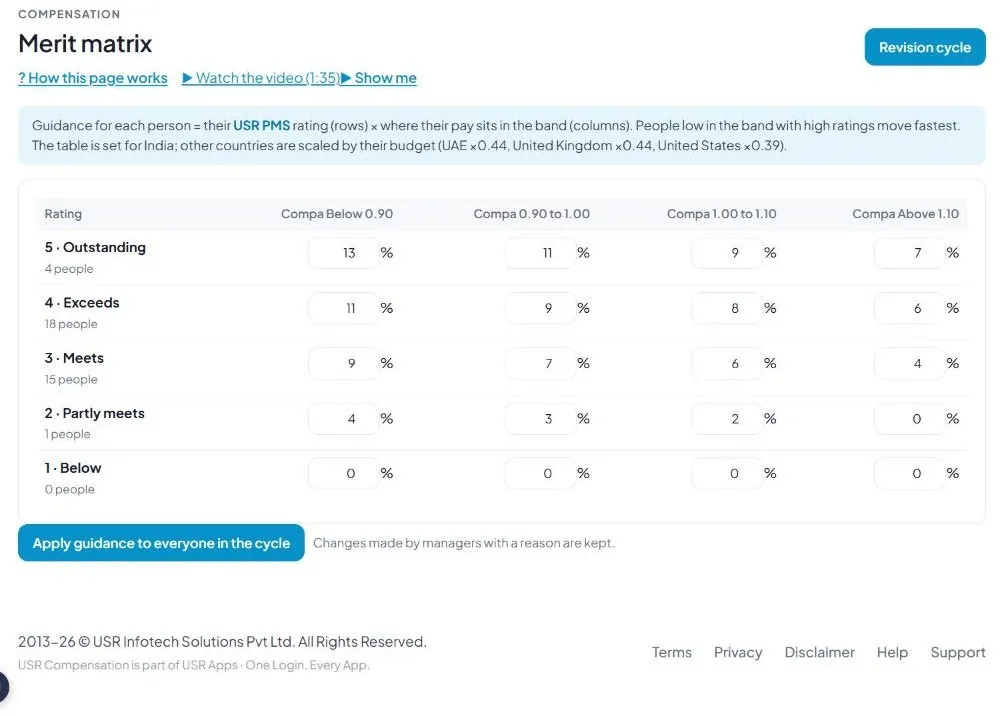
- The merit matrix suggests an increase from the USR PMS rating and the person's position in the pay band.
- Managers can change a suggestion, but only with a reason that stays on record.
- Checks flag pay below minimum wage, basic under half of pay and gender gaps of 5% or more, before approval.
- Free for up to 10 people; included in USR One from ₹39 ($1) per employee a month.
Year-end reviews are closing in many companies, and increments come next. In a lot of small and mid-size businesses this still happens in a spreadsheet: managers email numbers, HR adds them up the night before payroll, and nobody can explain why one person got 12% and another 6%. Good people notice, and some of them leave.
This guide follows one yearly task, the pay revision, from the review rating to the signed letter in USR Compensation. The steps come from the USR Compensation user manual, and the screens show a sample company.
5
stages in a revision cycle, from planning to payroll
USR Compensation user manual5 × 4
merit matrix: ratings by position in the pay band
USR Compensation user manual5%
gender pay gap in a grade that is flagged
USR Compensation user manual₹0
for companies with up to 10 people
usrinfo.tech/pricingOne revision, five stops: from the review rating to the new pay in payroll.
Before the cycle: bands, budget and the law
The HR head starts with pay bands: a minimum, mid-point and maximum yearly pay for each grade. The compa-ratio is a person's pay divided by the band mid-point, so 1.00 means exactly at the mid-point. Then set the revision budget as a percentage of pay, per country if you have people abroad.
Run the labour-law checks before the cycle opens, not after. For India, USR Compensation checks minimum wages by state and skill, equal pay, statutory bonus and the wage rule of the Code on Wages, 2019: if allowances and other excluded parts go above half of total pay, the excess counts as wages. The four labour codes have applied since 21 November 2025 and prohibit gender discrimination in pay. Our article on the PF ceiling and the 50% wage rule shows what this does to PF and gratuity.
| Role | What they do in the cycle |
|---|---|
| HR head | Sets bands, budget and the merit matrix; opens the cycle |
| Managers | Review the proposals for their team; change one only with a reason |
| Finance head | Approves the cycle against the budget |
| CEO | Approves only when the cycle is over budget |
| HR and payroll | Send letters for signature and approved changes to payroll |
Step by step: run the revision cycle
- Close reviews in USR PMS, so every person has a final rating from 1 to 5.
- In USR Compensation, open Revision cycle and set the effective date.
- Click Apply guidance to everyone in the cycle to fill the proposed percentage from the merit matrix.
- Managers check their team and change a percentage only with a reason.
- Fix every flag, then click Send for approval.
The route runs from the HR head to the finance head, and to the CEO only if the cycle is over budget. Late steps are escalated, so a cycle does not wait on one inbox, and the budget used per country stays visible at the top of the screen.
How the merit matrix keeps increases fair
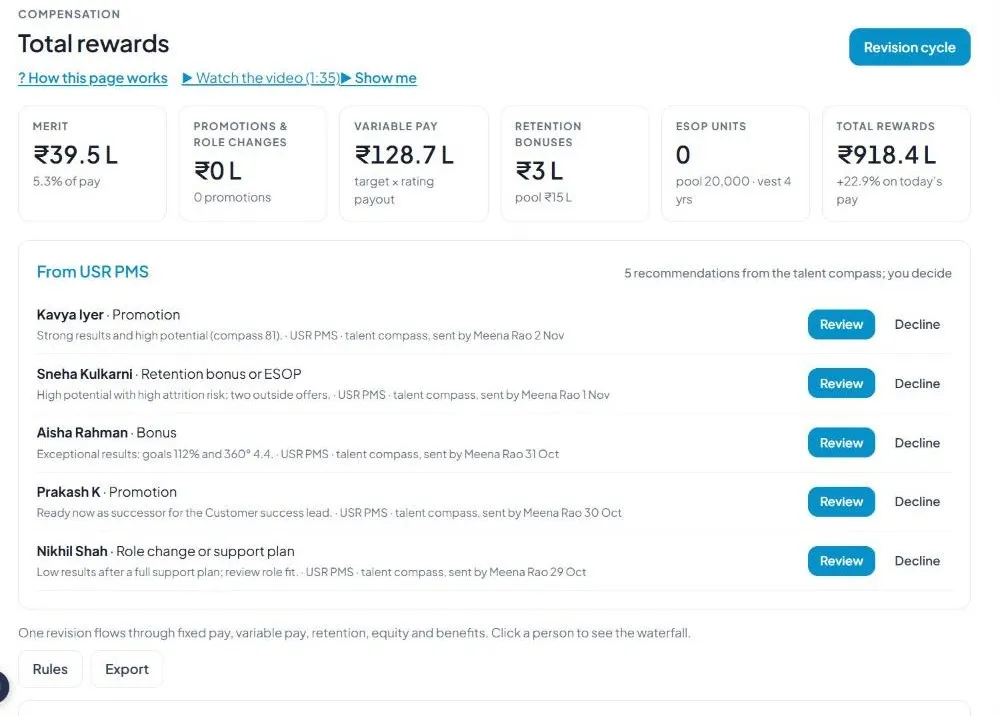
The matrix has ratings as rows, from 5 Outstanding to 1 Below, and the position in the band as columns: below 0.90, 0.90 to 1.00, 1.00 to 1.10 and above 1.10. You put a percentage in each cell. A strong performer who sits low in the band moves fastest; one already high in the band gets a smaller rise to fixed pay, and the total rewards view lets you look at variable pay or a retention bonus instead.
| Rating | Low in band | Near the mid-point | High in band |
|---|---|---|---|
| 5 Outstanding | Largest rise | Large rise | Moderate rise |
| 3 Meets | Moderate rise | Standard rise | Small rise |
| 1 Below | Small or none | None | None |
The direction most companies use. Your own percentages go in each cell.
Approvals, letters and payroll
Once the cycle is approved, letters open for signature through USR Sign (Aadhaar eSign, DSC or e-signature), and each employee acknowledges theirs. On the effective date, approved changes go to payroll in USR HRMS, or to any other HRMS as a file or API push. USR Compensation never runs payroll or moves money itself.
A back-dated change creates arrears for the months owed, and they go to payroll too. Every change stays in the pay master with its effective date and reason, so when someone asks next year why their pay moved, the answer is one click away.
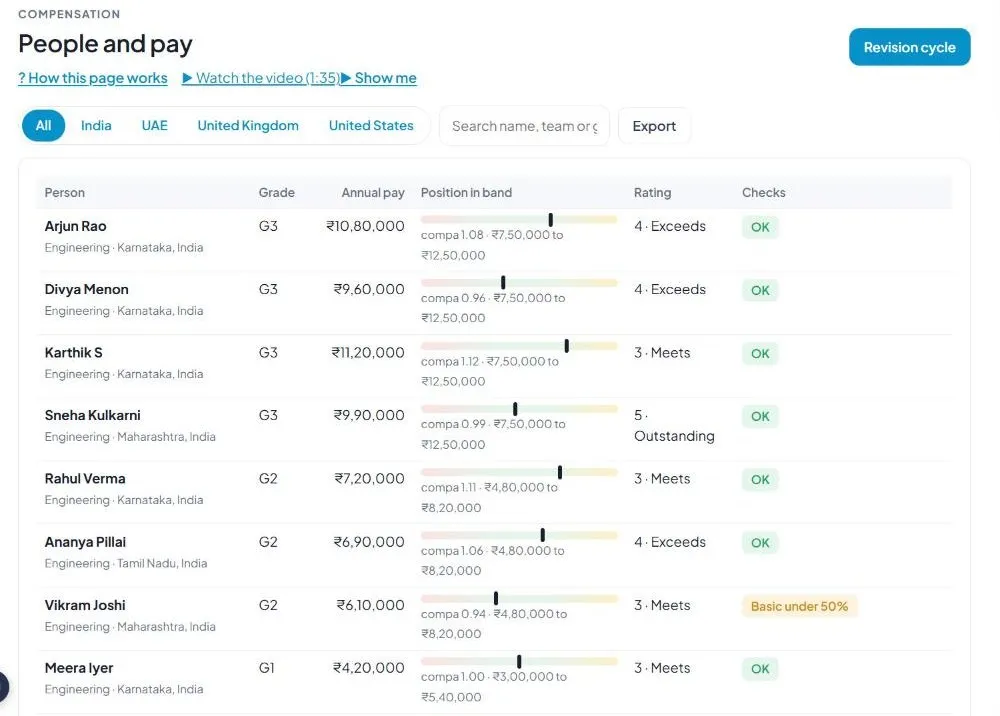
Sample company data from the USR Compensation user manual. Screens can change as the app improves; the steps stay the same.
USR Compensation is included in USR One from ₹39 ($1) per employee a month, with every other app. Companies with up to 10 people use every app free. See pricing for details.
Plan this year's increments, free
Start today. No sales call needed.
- Every USR app free for up to 10 people, including USR Compensation
- Increment and bell curve planner: test a merit matrix against your budget before the cycle opens
- USR Compensation user manual: every screen, step by step
Copy this: year-end increment routine
- Close all reviews and agree the final ratings
- Check the pay band for every grade
- Run labour-law checks and fix the flags
- Set the budget and the effective date
- Apply the merit matrix to everyone in the cycle
- Managers adjust, with a reason for every change
- Approve, then send letters for e-signature
- Send approved changes to payroll before it closes
Questions we hear
Where do the ratings come from?
From USR PMS. When reviews close, each person's final rating feeds the merit matrix in USR Compensation. Managers can still change a suggested increase, but only with a reason that stays on record.
Does USR Compensation run payroll?
No. It sends approved changes to USR HRMS, or to any other HRMS, on the effective date, as a CSV or Excel file or through an API. It never runs payroll or moves money itself.
Are the labour-law rates in the app current?
Rule packs are kept current by USR Managed Services, and the rates in the sample company are only samples. Check them against the latest government notification with your labour-law adviser before you approve a cycle.
Partners wanted: domestic, regional and global HR, payroll and CA partners can write to apps@usrinfo.tech.
Powered by USR Apps · ISO 27001 · ISO 42001 · DPDP Ready · Partners wanted: apps@usrinfo.tech
Sources
- USR Compensation user manual, read 24 Nov 2026: pay bands, compa-ratio, merit matrix, revision cycle, labour-law checks, letters and the payroll hand-off.
- USR PMS user manual, read 24 Nov 2026: review cycles and final ratings.
- PIB, Ministry of Labour and Employment: Government announces implementation of four Labour Codes, 21 Nov 2025, read 24 Nov 2026: codes in force from 21 November 2025; gender discrimination in pay prohibited, equal pay for equal work.
- PIB explainer: Code on Wages, 2019, Nov 2025, read 24 Nov 2026: allowances and contributions above 50% of total pay are added to wages.
- USR pricing, read 24 Nov 2026: USR One from ₹39 ($1) per employee a month; every app free up to 10 people.
Last checked: 24 Nov 2026. General information, not legal or tax advice. Minimum wages and rules differ by state; check with your labour-law adviser or CA before you approve a cycle.