
USR LMS help
USR LMS gives your people short courses and learning paths, tracks mandatory compliance training and certificates for audits, handles requests for paid external training, and lets you turn a policy, SOP or slide deck into a course with a quiz using AI. Learners study on a phone or a computer, and managers see who is late.
See the screens
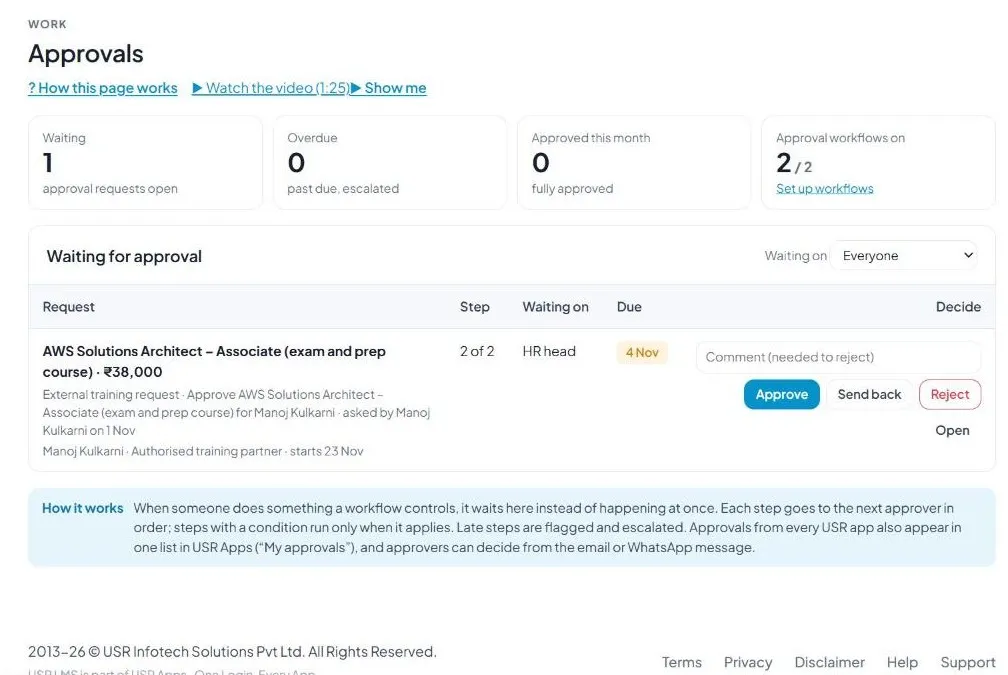
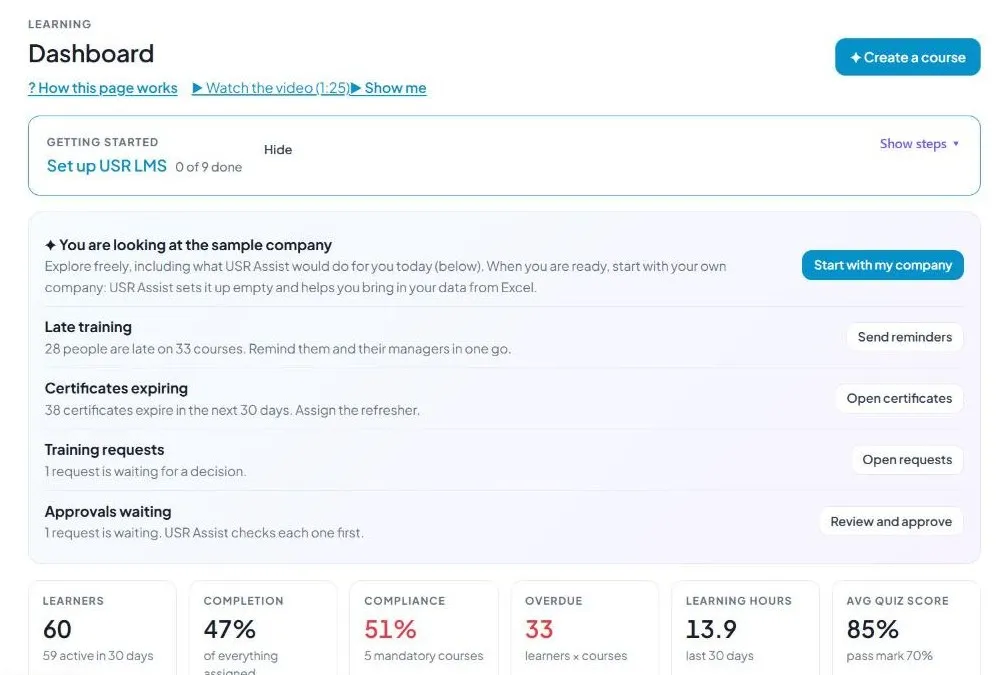
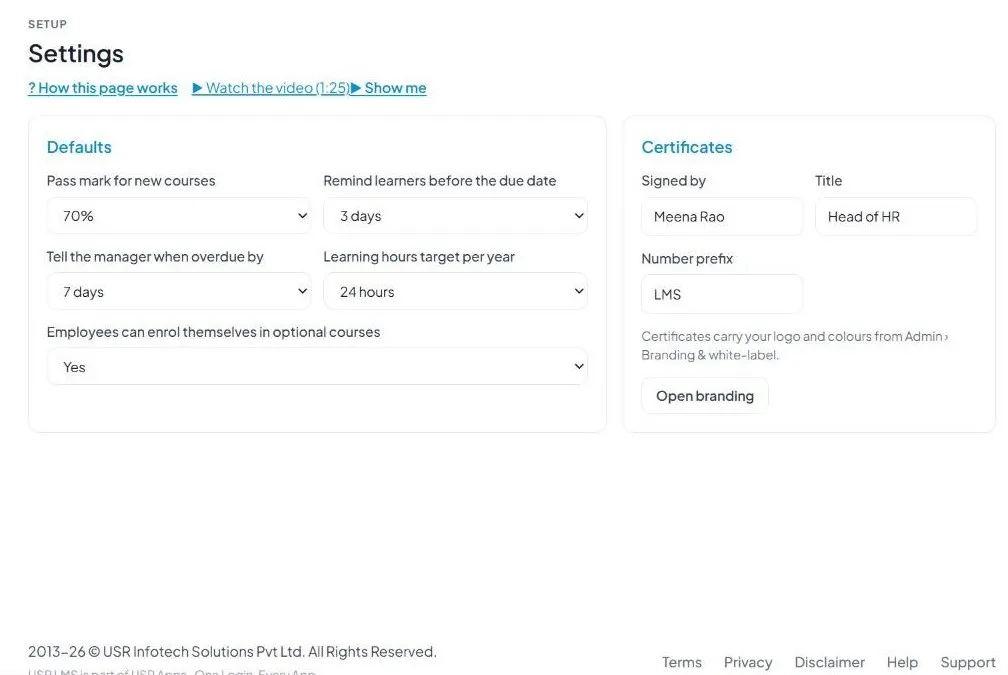
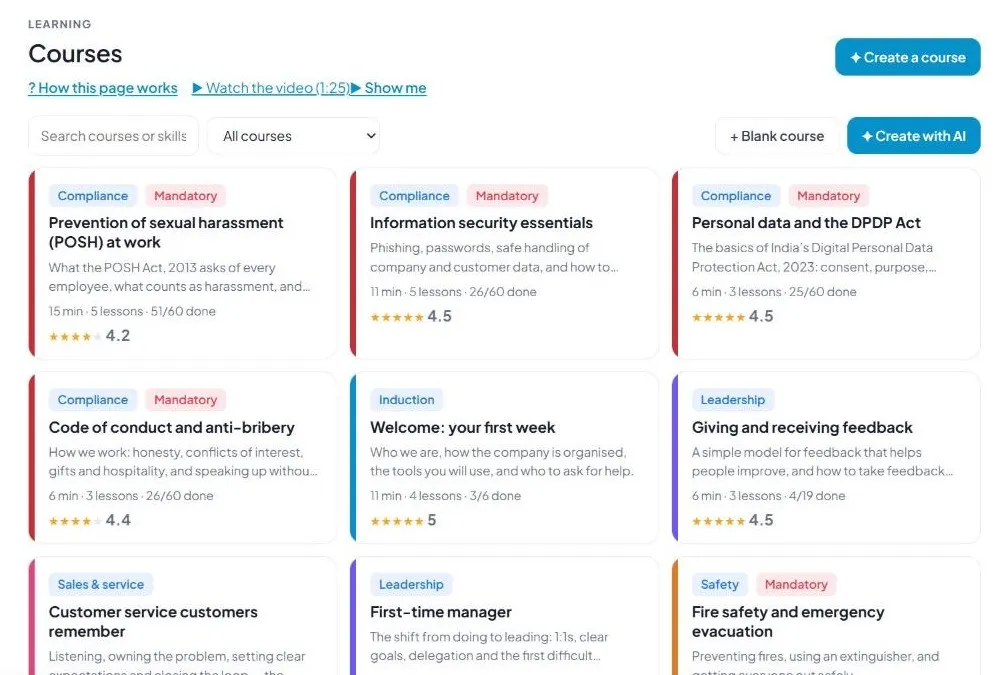
Sample company data. Screens can change as the app improves; the steps stay the same.
Welcome to USR LMS
USR LMS gives your people short courses and learning paths, tracks mandatory compliance training and certificates for audits, handles requests for paid external training, and lets you turn a policy, SOP or slide deck into a course with a quiz using AI. Learners study on a phone or a computer, and managers see who is late.
OUR USP: One sign-in, one record, one bill. USR LMS is part of USR One, so your people, customers and numbers are never typed twice. AI helps in every app through USR Assist, and AI never takes a decision for you. ISO 27001, ISO 42001 and DPDP Ready.
- Courses and learning paths, with quizzes and pass marks
- AI studio that creates courses, quizzes and WhatsApp micro-lessons from your documents
- Assignments to departments, levels, locations or named people
- Compliance tracking and certificates that auditors can verify
- Training requests with approval, and reports for the management review
USR ONE: USR LMS takes its people list from USR HRIS (or your HRMS), gives the induction path to new joiners on its own, and shares skills built with USR PMS. Approvals appear in the same Approvals list as every other USR app.
A year in USR LMS
Learning follows the year. This is how a year looks in USR LMS.
| When | What happens | Who |
|---|---|---|
| At the start of the year | Assign the Annual compliance path to every employee. Check the pass mark, reminders and learning hours target in Settings. | HR |
| Every new joiner | The induction path is assigned automatically, due 7 days after joining. | Automatic, HR |
| Every month | Read the Dashboard. Send reminders to people who are late. Share the overdue list with managers. | HR, managers |
| 30 days before a certificate expires | Renewals are assigned automatically. Check Compliance for expiring certificates. | HR |
| Whenever someone asks | Decide training requests for paid courses, certifications and conferences. | Manager, HR head, Finance |
| Before audits | Download the audit report from Compliance. | HR |
| Every quarter | Read Reports and write the learning summary for the management review. | Leaders, HR |
Key ideas in simple words
CONCEPT: Course. A short set of lessons with a quiz.
CONCEPT: Lesson. One part of a course, a few minutes long.
CONCEPT: Learning path. An ordered set of courses, such as New joiner induction.
CONCEPT: Assignment. A course or path given to people, with a due date.
CONCEPT: Mandatory. Training that everyone given it must finish by the due date.
CONCEPT: Pass mark. The score needed to pass a quiz, for example 70%.
CONCEPT: Certificate. Proof of completion with a number and a QR code anyone can verify.
CONCEPT: Compliance. Mandatory training you need for audits, such as POSH, information security and data privacy.
CONCEPT: AI studio. A tool that drafts a course from your text or document. You review it before it is published.
Short, practical learning works best
People finish short lessons. Most USR LMS courses take 6 to 15 minutes. Keep your own courses short too, with a quiz at the end of each module and one practical task.
Compliance training is a legal and audit need
Auditors and clients ask for proof that your people completed POSH, information security, data privacy, code of conduct and safety training. A certificate counts until it expires, and renewals are assigned 30 days before. The Compliance page shows completion by department and gives the audit report.
AI helps, people decide
The AI studio drafts a course in about a minute. AI never publishes on its own. You review and edit everything, and mandatory courses also need the HR head's approval.
What each role sees
| Role | What you do and see |
|---|---|
| Learner | My learning: their to-do list, progress, certificates and courses to explore. |
| Manager | My team: who is late, and their team's training requests. |
| HR or admin | Everything: courses, AI studio, assignments, compliance, certificates, reports and settings. |
| Approver | Approvals, to decide training requests. |
| Auditor or client | Verify a certificate by its number or QR code. |
HR and admin guide: features step by step
5.1 Dashboard
What it is: Dashboard shows what needs you today and how learning is going.
#### How to do it
- Open Dashboard.
- Click Send reminders when people are late.
- Click a card to go to its page.
#### Fields and buttons
| Field or button | What it is for |
|---|---|
| Late training | People late on courses, with Send reminders to remind them and their managers. |
| Certificates expiring | Certificates that expire in the next 30 days, with Open certificates. |
| Training requests | Requests waiting for a decision. |
| Approvals waiting | Requests waiting for you. USR Assist checks each one first. |
| Learners, Completion, Compliance, Overdue | Cards for the whole company. |
| Learning hours and Avg quiz score | Hours in the last 30 days and the average score against the pass mark. |
| Completion by department | A bar for each department. |
| Mandatory training | Completion of each mandatory course. |
| Coming up and New and needed | Courses due soon, development plans in USR PMS that ask for a course, requests and drafts. |
| Create a course | Starts the AI studio. |
TIP: Look at the Dashboard every Monday.
5.2 My learning
What it is: My learning is the learner's own page. It lists what to do, progress, certificates and courses to explore.
#### How to do it
- Open My learning.
- Click Continue or Start on a course.
- Finish the lessons and pass the quiz.
#### Fields and buttons
| Field or button | What it is for |
|---|---|
| Progress circle | The share of assigned courses done. |
| Continue | Opens the course where the learner stopped. |
| To do | Courses with Overdue, Not started or In progress, Mandatory tags and due dates. |
| Certificates | Each certificate with its number, a Renew soon tag and Download. |
| Explore | Optional courses the learner can enrol in. |
TIP: Learners can also open it on a phone.
5.3 Courses
What it is: Courses is the library of all courses with filters and ratings.
#### How to do it
- Open Courses.
- Click a course to open it.
- Click + Blank course to write your own.
#### Fields and buttons
| Field or button | What it is for |
|---|---|
| Search and filter | Search by name or skill. Filter All courses, Mandatory, Drafts, Waiting for approval or by category. |
| Course card | Category, Mandatory tag, name, short description, minutes, lessons, how many have finished and the rating. |
| + Blank course | Starts an empty course. |
| Create with AI | Opens the AI studio. |
| Draft and Made with AI | Tags for courses not yet published. |
WATCH OUT: A mandatory course needs the HR head's approval before it is published.
5.4 AI studio
What it is: AI studio drafts a course from your idea or your document. You review everything before it is published.
#### How to do it
- Open AI studio.
- Describe what people should learn, or add your material.
- Click Create the course.
- Review and edit the draft, then publish.
#### Fields and buttons
| Field or button | What it is for |
|---|---|
| What should people learn? | Describe the course in a sentence. |
| Who is it for | All staff, New joiners, Managers or a department. |
| Category | Compliance, Induction, Safety, Skills, Leadership, Sales & service, Product or Tools. |
| Length | 10 minutes, 20 minutes, 30 minutes, 45 minutes or 1 hour. |
| Language | English, Hindi, Bengali, Marathi, Telugu, Tamil, Gujarati, Kannada, Malayalam, Punjabi, Arabic and more. |
| Style | Simple and practical, Story with a work example, or Formal. |
| Include | A quiz in each module and a practical task. |
| Your material | A policy, SOP, slide deck or even a photo of notes. |
| More ways AI helps | Policy to course, Quiz from a document, WhatsApp micro-lessons, Translate a course and Learner tutor. |
WATCH OUT: AI never publishes on its own. Check the facts, especially for compliance courses.
5.5 Learning paths
What it is: Learning paths put courses in order, for example New joiner induction.
#### How to do it
- Open Learning paths.
- Click Assign this path.
- Choose who and the due date.
#### Fields and buttons
| Field or button | What it is for |
|---|---|
| Path card | Name, courses in order with minutes and mandatory tags. |
| Total time and who it is for | For example 43 min in all, New joiners (automatic). |
| Progress | The share complete. |
| Assign this path | Assigns the whole path. |
| Edit and + New path | Change or create a path. |
TIP: Use the induction path so every new joiner gets the same start.
5.6 Assignments
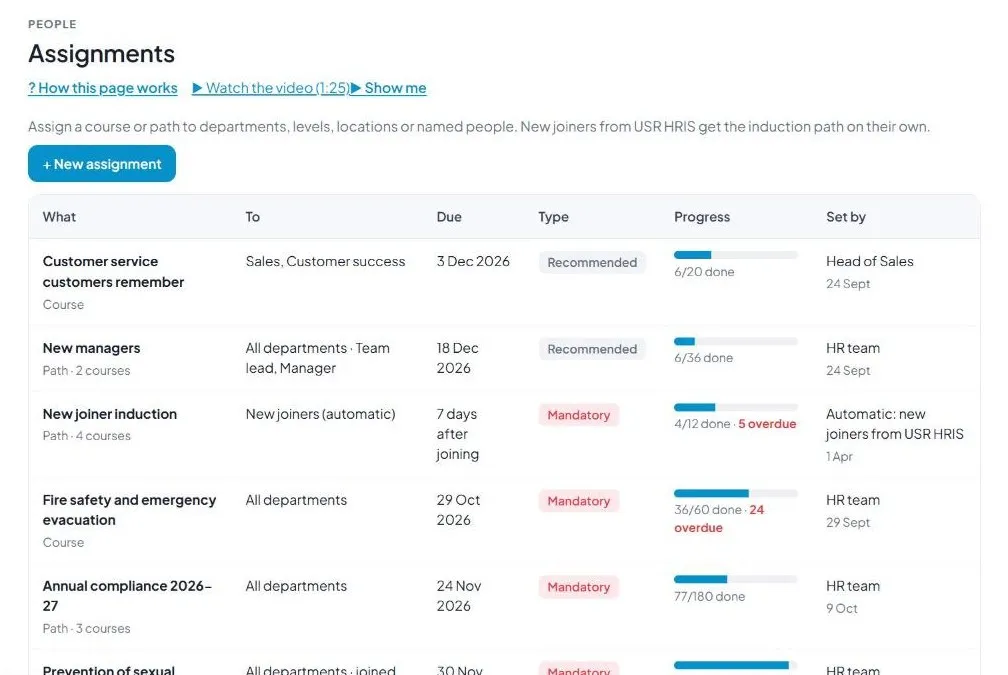
What it is: Assignments gives a course or path to departments, levels, locations or named people. New joiners from USR HRIS get the induction path on their own.
#### How to do it
- Open Assignments.
- Click + New assignment.
- Choose what, who, due date and Mandatory or Recommended.
#### Fields and buttons
| Field or button | What it is for |
|---|---|
| What | The course or path. |
| To | Who gets it. |
| Due | The date, or days after joining. |
| Type | Mandatory or Recommended. |
| Progress | Done and overdue counts. |
| Set by | Who assigned it and when. |
| + New assignment | Creates an assignment. |
WATCH OUT: Mandatory training that is late is reported to managers.
5.7 Learners
What it is: Learners lists everyone with their training. Learners come from USR HRIS or your HRMS, and leavers are removed with their records kept.
#### How to do it
- Open Learners.
- Search for a person.
- Open them to see their courses.
#### Fields and buttons
| Field or button | What it is for |
|---|---|
| Search and department filter | Find a person or a department. |
| Learner | Name, level and location. |
| Department | Where they work. |
| Assigned, Done, Overdue, Hours | Their learning. |
| IDP | A tag when a development plan asks for a course. |
5.8 My team
What it is: My team shows a manager the learning of their own team.
#### How to do it
- Open My team.
- Look for overdue courses.
- Remind the person.
#### Fields and buttons
| Field or button | What it is for |
|---|---|
| Team members | Each person with their assigned, done and overdue courses. |
| Remind | Nudges someone who is late. |
5.9 Compliance
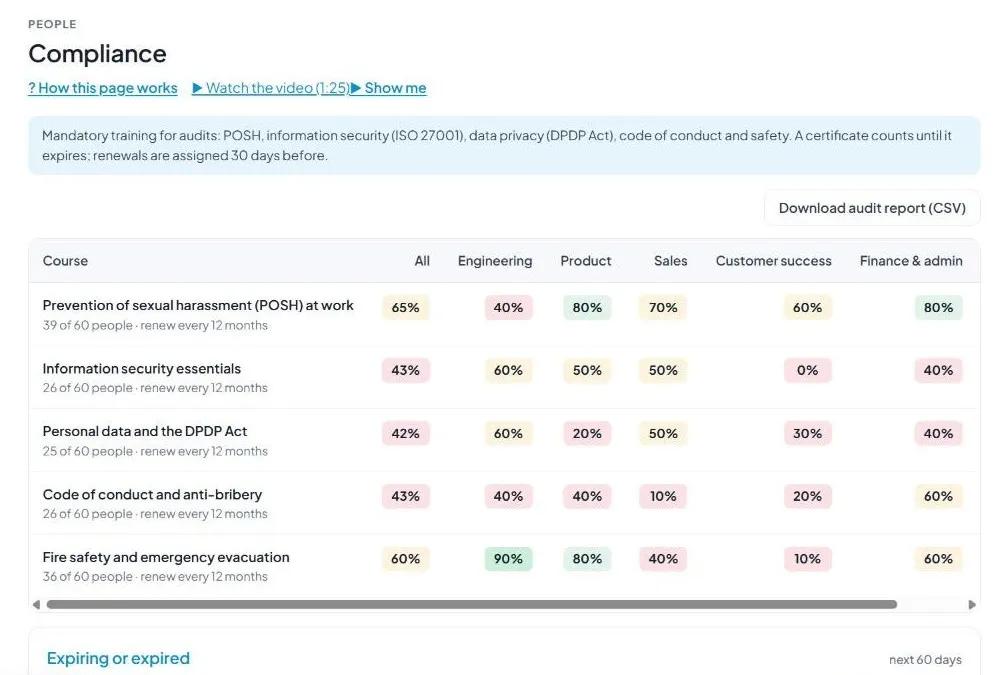
What it is: Compliance tracks mandatory training for audits: POSH, information security (ISO 27001), data privacy (DPDP Act), code of conduct and safety.
#### How to do it
- Open Compliance.
- Look for red departments.
- Click Assign renewals now.
- Click Download audit report (CSV) before an audit.
#### Fields and buttons
| Field or button | What it is for |
|---|---|
| Course and department grid | Completion for each course, by department, in colours. |
| Renew every 12 months | How often the course repeats. |
| Expiring or expired | Certificates expiring in the next 60 days, with the person and date. |
| Assign renewals now | Assigns refresher courses. |
| Download audit report (CSV) | A file for auditors. |
WATCH OUT: A certificate counts until it expires. Renewals are assigned 30 days before.
5.10 Certificates
What it is: Certificates lists every certificate issued. Clients and auditors can verify a number or scan the QR code.
#### How to do it
- Open Certificates.
- Type a number to verify.
- Click View to open or print one.
#### Fields and buttons
| Field or button | What it is for |
|---|---|
| Verify a certificate | Type a number such as LMS-2026-00187. |
| Signed by | The person and title on certificates. Change in Settings. |
| See a sample certificate | Opens a sample. |
| Number, Learner, Course, Issued, Valid to | The list. |
| View | Opens the certificate. |
TIP: Certificates carry your logo and colours from Branding & white-label.
5.11 Training requests
What it is: Training requests handles external courses, certifications and conferences that cost money.
#### How to do it
- Open Training requests.
- Click + Request training.
- Give the training, the cost, the date and the reason.
#### Fields and buttons
| Field or button | What it is for |
|---|---|
| Approval rule | Manager first, then the HR head above ₹25,000, then finance above ₹1,00,000. |
| + Request training | Asks for a course. |
| Approval steps | Each step with Approved, Waiting or Not needed. |
| Open in Approvals and Withdraw | Opens it or withdraws the request. |
| Training, For, Cost, Starts, Status | Each request. |
WATCH OUT: A rejected request shows the reason so the person can ask again.
5.12 Approvals
What it is: Approvals shows training requests and mandatory courses that wait for a decision.
#### How to do it
- Open Approvals.
- Read the request.
- Click Approve, Send back or Reject.
#### Fields and buttons
| Field or button | What it is for |
|---|---|
| Waiting, Overdue, Approved this month | Counts at the top. |
| Approval workflows on | How many of your workflows are on. |
| Request, Step, Waiting on, Due | What, which step, who and by when. |
| Comment | Needed if you reject. |
| Approve, Send back, Reject, Open | Your decisions. |
TIP: Approvers can also decide from the email or WhatsApp message.
5.13 Reports
What it is: Reports show learning for the management review.
#### How to do it
- Open Reports.
- Click Write the learning summary.
- Click Export course report (CSV) if you need a file.
#### Fields and buttons
| Field or button | What it is for |
|---|---|
| Completions per month | A line chart. |
| Learning hours by department | Bars against the target hours per person per year. |
| Write the learning summary | AI writes a short note on compliance, completion, overdue training, ratings and what to fix. |
| Export course report (CSV) | Downloads the report. |
| Course performance | Learners, completion, average score and rating for each course. |
| Skills built | Completions per skill, shared with USR PMS. |
5.14 Settings
What it is: Settings holds the defaults for courses and the certificate.
#### How to do it
- Open Settings.
- Change a value and save.
#### Fields and buttons
| Field or button | What it is for |
|---|---|
| Pass mark for new courses | 60%, 70%, 80% or 90%. |
| Remind learners before the due date | 1 day, 3 days or 7 days. |
| Tell the manager when overdue by | 3 days, 7 days or 14 days. |
| Learning hours target per year | 12, 24, 40 or 60 hours. |
| Employees can enrol themselves | Yes, or No, only assigned courses. |
| Signed by, Title, Number prefix | For certificates. |
| Open branding | Opens logo and colours. |
5.15 Plan & billing
What it is: Plan & billing shows your plan, invoices and the plans you can choose. One bill covers every USR app through USR Billing.
#### How to do it
- Open Plan & billing.
- Choose a billing cycle and a plan.
#### Fields and buttons
| Field or button | What it is for |
|---|---|
| Free | ₹0 (US$0). Up to 25 learners, 5 courses and the ready library. |
| Starter | ₹2,083 (US$24) per company a month. Up to 100 learners, certificates and mobile learning. |
| Growth | ₹4,999 (US$58) per company a month. Up to 500 learners, AI studio and compliance tracking. |
| Group | ₹11,666 (US$138) per company a month. Up to 5 companies and 2,000 learners. |
| Enterprise | Talk to us: unlimited learners, private hosting and an agreed SLA. |
| Billing cycle | Monthly, Quarterly (save 4%), Half-yearly (11 for 12) or Yearly (10 for 12). |
| Prices | INR excludes 18% GST. USD is for customers outside India. |
WATCH OUT: If a payment fails, you get a reminder on the due date and 3 and 7 days later. After 21 days the account becomes read-only, never deleted, until it is paid.
If something is not working
| Problem | What to do |
|---|---|
| A person did not get a course | Check Assignments. They may not be in the department, level or location chosen. |
| A learner cannot enrol in a course | Settings may say Employees can enrol themselves: No. Assign the course instead. |
| A certificate does not verify | Check the number, for example LMS-2026-00187. It may have expired. |
| The AI course is wrong | Edit the draft. AI never publishes on its own, so nothing is live until you publish. |
| A new joiner has no induction | Check the person is in USR HRIS and the New joiner induction path is on. |
Questions people ask
#### Courses
Can I make a course from my own policy?
Yes. Use the AI studio, add your policy, and review the draft.
Can learners study on a phone?
Yes. Starter and above include mobile learning.
#### Using the app
Is there a free plan?
Yes. Free allows up to 25 learners, 5 courses and the ready library.
How do auditors check a certificate?
They type the number on the Certificates page, or scan the QR code on the certificate.
Glossary: words you will see
| Word | Meaning |
|---|---|
| AI studio | Drafts a course with AI. |
| Assignment | Training given to people. |
| Certificate | Proof of completion. |
| Course | A set of lessons with a quiz. |
| IDP | Individual development plan, in USR PMS. |
| Learning path | Courses in order. |
| Mandatory | Must be finished by the due date. |
| Pass mark | Score needed to pass. |
USR LMS shares one record with these apps
No retyping between apps: data entered once flows to the next app, on the same login.
USR LMS is part of USR One. People Suite from ₹39 ($1) per employee a month, or every app in USR One Complete. Free for up to 10 people.
See USR One
