
USR HRIS help
USR HRIS keeps your people's records in one place: who works here, in which team, at which location, and who they report to. Every other USR People app (HRMS, PMS, Hire, Compensation and more) reads the same list, so nobody types a person twice.
See the screens
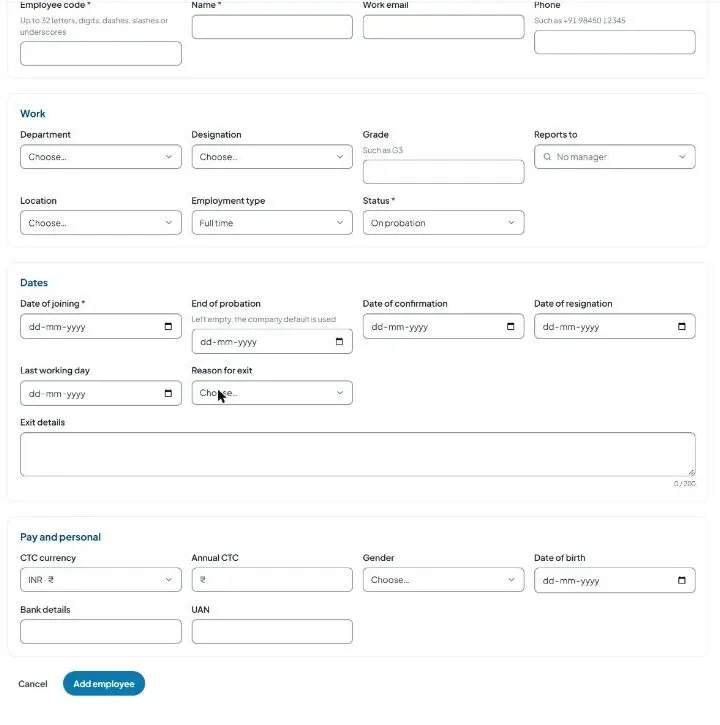
Sample company data. Screens can change as the app improves; the steps stay the same.
Welcome
USR HRIS keeps your people's records in one place: who works here, in which team, at which location, and who they report to. Every other USR People app (HRMS, PMS, Hire, Compensation and more) reads the same list, so nobody types a person twice.
- One list of everyone, from joining to exit
- Departments, designations and locations you control
- Add people one by one or import them from Excel (CSV)
- Status always visible: Joining soon, On probation, Active, Notice period, Exited
- Photo, sign-in email and sign-in link for each person, sent by HR
A year in USR HRIS
| When | What happens | Who |
|---|---|---|
| Week 1 | Add departments, designations and locations, then import or add all people. | HR or admin |
| Every joining | Add the new person, set status Joining soon, send the sign-in email. | HR |
| Joining day | Change the status to On probation or Active. | HR |
| Any time | Moves, promotions, manager changes: edit the record. Other apps see the change. | HR |
| Resignation | Fill date of resignation, last working day and reason; status becomes Notice period. | HR |
| Last working day | Set the status to Exited. The history stays. | HR |
| Every quarter | Check Reports to is filled for everyone and exited people are marked. | HR |
Key ideas
- Employee record. One page per person.
- Employee code. A unique ID (for example SF-1008). It is how USR matches people on import and across apps.
- Status. Joining soon, On probation, Active, Notice period or Exited.
- Department, Designation, Grade (such as G3), Location, Employment type (Full time, Part time, Contract, Intern, Consultant, Trainee).
- Reports to. The manager. Builds the org structure and drives approvals in other apps.
- CTC. Cost to company. UAN. Universal Account Number for provident fund.
Most companies keep people in several places that drift apart. USR HRIS is the one list: Leave, Payroll, Performance, Hiring, Compensation and Exit all read it. When HR fixes something once, every app shows the fix.
Features step by step
5.1 Overview
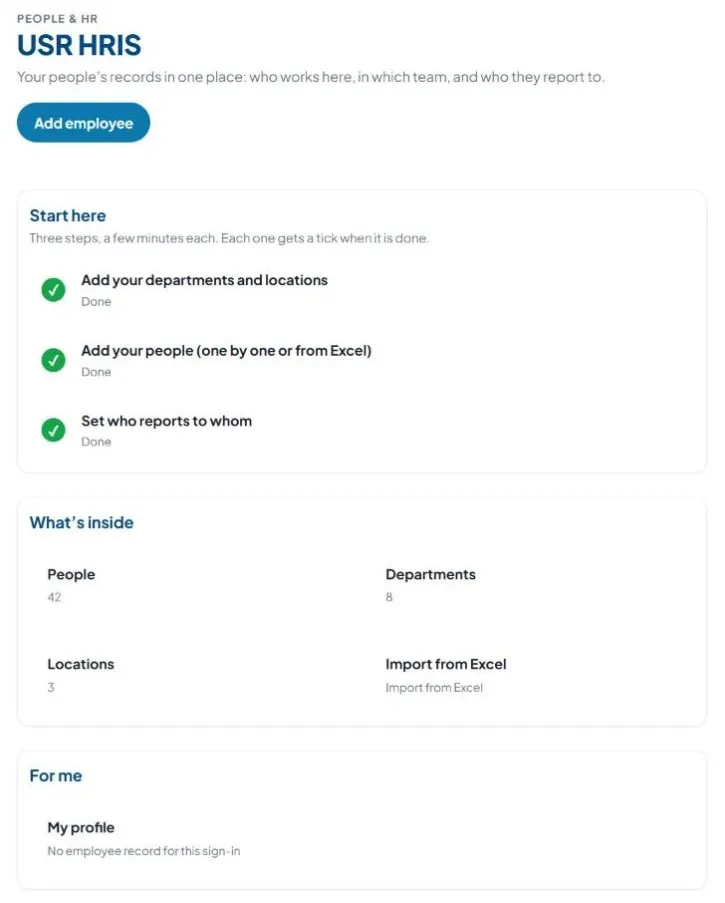
Starting page: Add employee, Start here (three set-up steps), What's inside (People, Departments, Locations, Import from Excel), shortcut to My profile, Ask USR Assist.
5.2 Employees
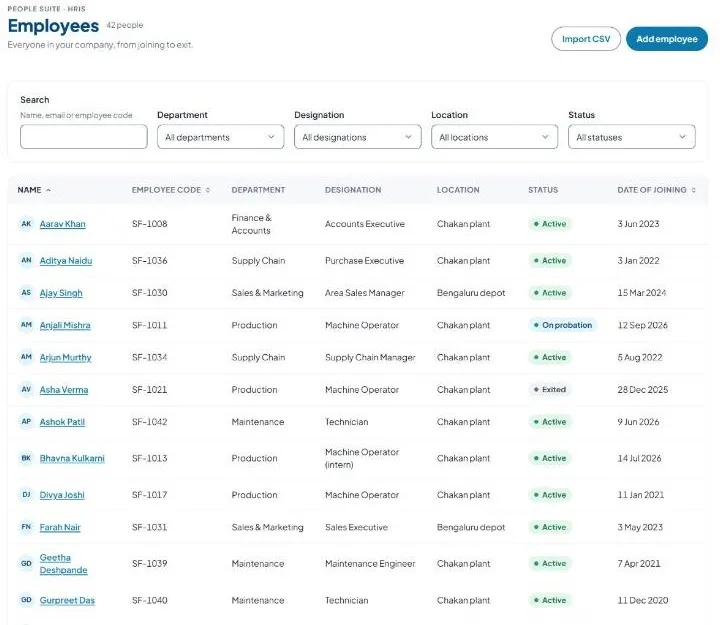
Full list from joining to exit. Search by name, email or code. Filters: Department, Designation, Location, Status. Columns: Name, Employee code, Department, Designation, Location, Status, Date of joining. Import CSV, Add employee. 20 people per page. A person marked Exited appears only when the Status filter allows it.
5.3 Add an employee
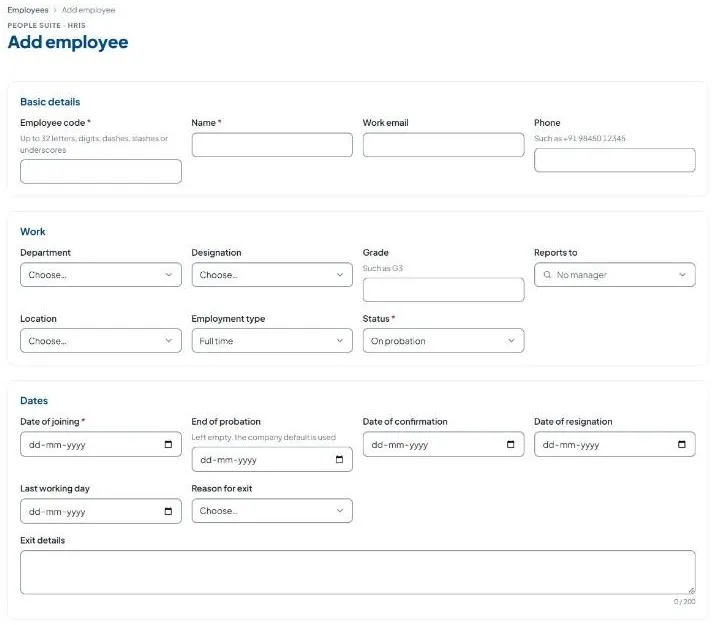
Four sections: Basic details, Work, Dates, Pay and personal. Required: Employee code (unique, up to 32 letters, digits, dashes, slashes or underscores), Name, Status, Date of joining. Work email is used for sign-in and must match the email they sign in with. Also: phone (+91 98450 12345 style), department, designation, grade, reports to, location, employment type, end of probation, date of confirmation, CTC currency (INR or USD) and annual CTC, gender, date of birth, bank details, UAN. Pay and personal details are visible only to people your admin gives access to.
5.4 The employee record
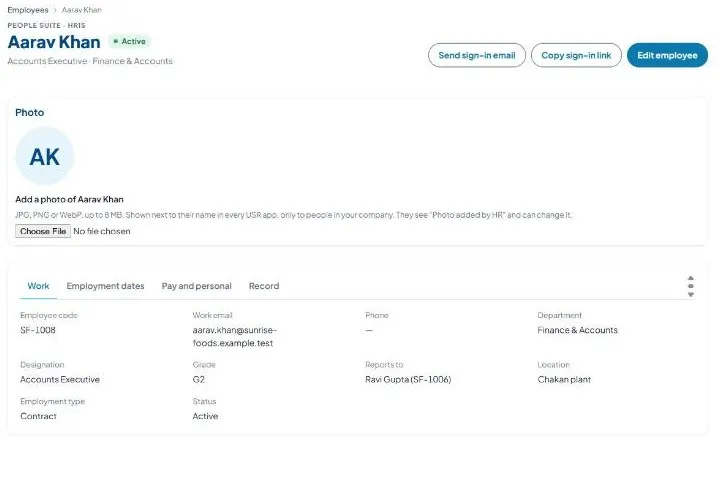
Top: name and status. Buttons: Send sign-in email, Copy sign-in link, Edit employee. Photo: JPG, PNG or WebP up to 8 MB. Tabs: Work, Employment dates, Pay and personal, Record.
5.5 Help a person sign in
A person signs in with the email in their record. HR can send the link. Without a work email they cannot sign in.
5.6 Photos
Shown next to the name in every USR app, only to people in your company.
5.7 to 5.9 Departments, Designations, Locations
Add them before people so the form has choices. Department: name, optional short code. Designation: name, optional department. Location: name, city, state. Each has Add and Edit.
5.10 Import employees from Excel
Adds or updates many people from a CSV (up to 5 MB, header row). A known employee code updates that person; blank cells keep what is stored. Required columns: code, name, date_of_joining. Optional: email, phone, department, designation, grade, manager, location, employment_type, status, date_of_leaving, ctc_annual, gender, date_of_birth. Dates: 2026-10-19, 19-10-2026 or 19/10/2026. Check codes before you import.
5.11 Someone is leaving or has left
Do not delete people who leave. Record the exit; history stays and other apps (Exit, Payroll) can use it.
5.12 My profile
Your own page: photo and the Look setting.
If something is not working
| Problem | What to do |
|---|---|
| Import says a column is missing | The first row needs code, name and date_of_joining. |
| A date is not read | Use 2026-10-19, 19-10-2026 or 19/10/2026. |
| My profile says no employee record | Ask HR to add your email to the employee list. |
| A designation or department is not in the list | Add it first on Designations or Departments. |
| The person cannot sign in | Check the work email and click Send sign-in email again. |
Questions people ask
Who can see salary details? Only people your admin gives access to (Access scopes).
Can I update people in bulk later? Yes. Import a CSV with the same employee codes.
Can I add a person without an email? Yes. Only code, name, status and joining date are required. They cannot sign in until an email is added.
How do I record that someone left? Edit employee, fill Last working day and Reason for exit, set Status to Exited.
Which apps use this list? USR HRMS, PMS, Hire, LMS, Compensation, Exit and the other People apps.
Glossary
Employee code: a unique ID. CSV: a simple spreadsheet file. Org structure: who reports to whom. Probation: the first months before confirmation. Notice period: time between resigning and the last day. UAN: provident fund number. CTC: cost to company.
USR HRIS shares one record with these apps
No retyping between apps: data entered once flows to the next app, on the same login.
USR HRIS is part of USR One. People Suite from ₹39 ($1) per employee a month, or every app in USR One Complete. Free for up to 10 people.
See USR One
