
USR Hire help
USR Hire runs your hiring from the plan to the first day: positions, jobs, CVs and applications, interviews and scorecards, offers with approval, candidate messages on email, WhatsApp and SMS, and the hand-over of the new joiner to USR HRIS.
See the screens
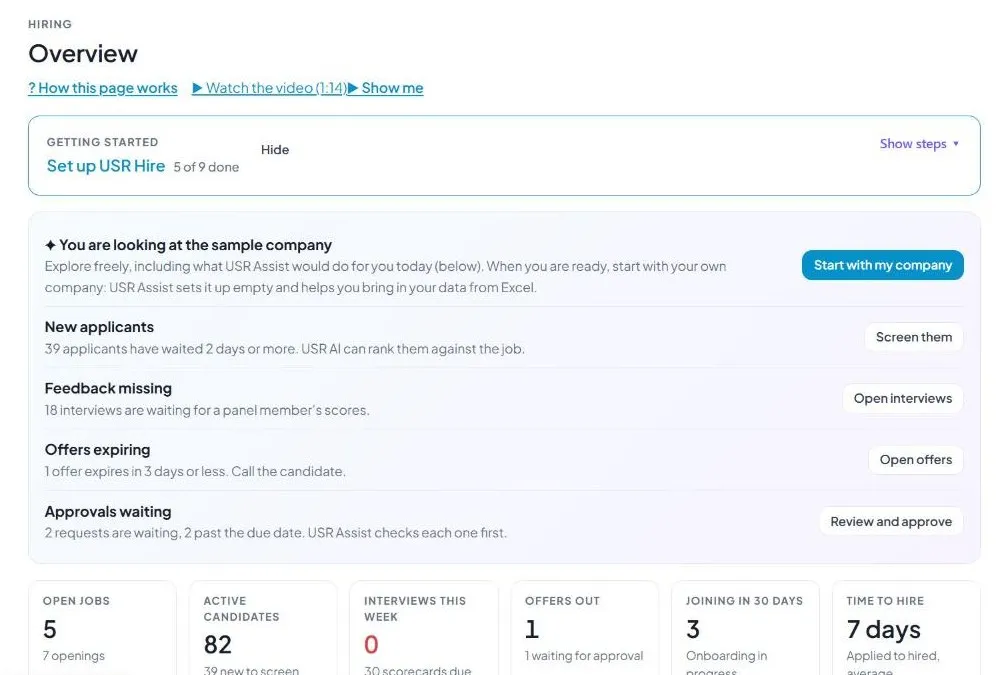
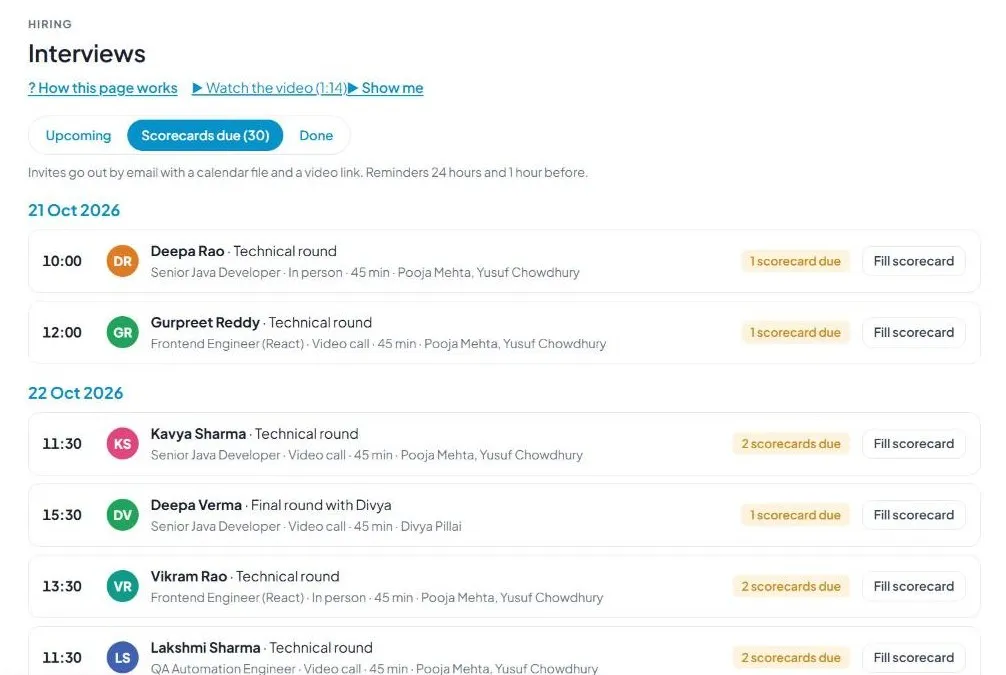
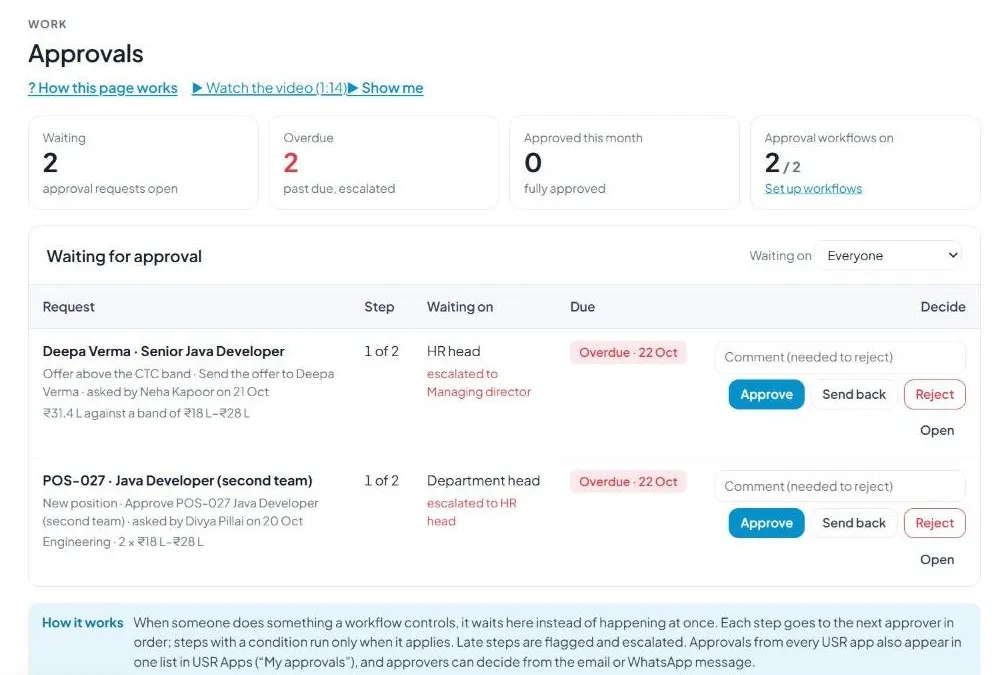
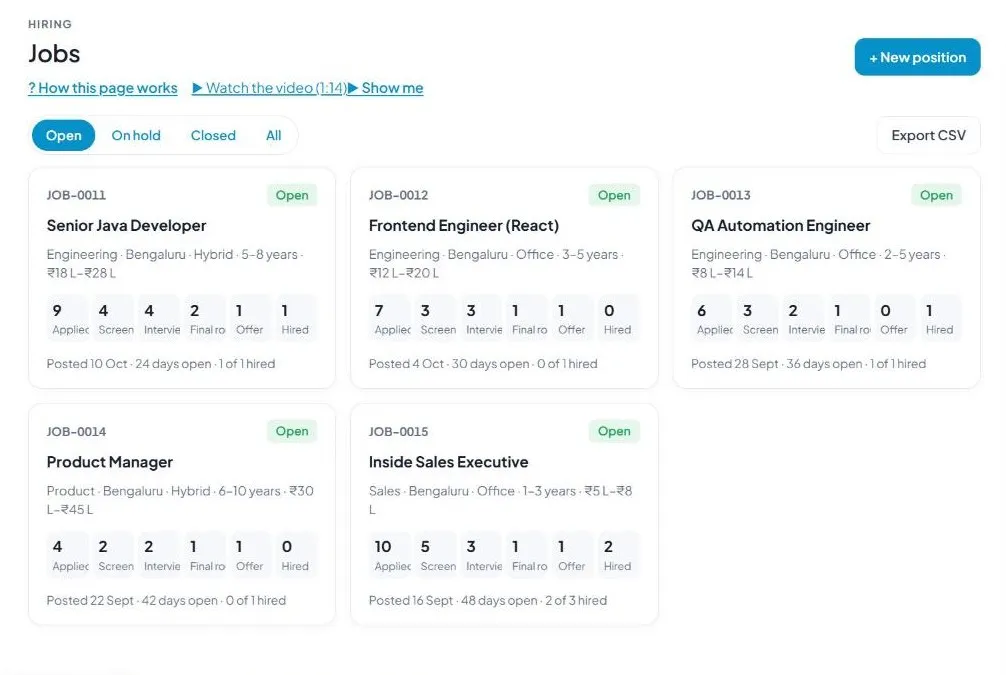
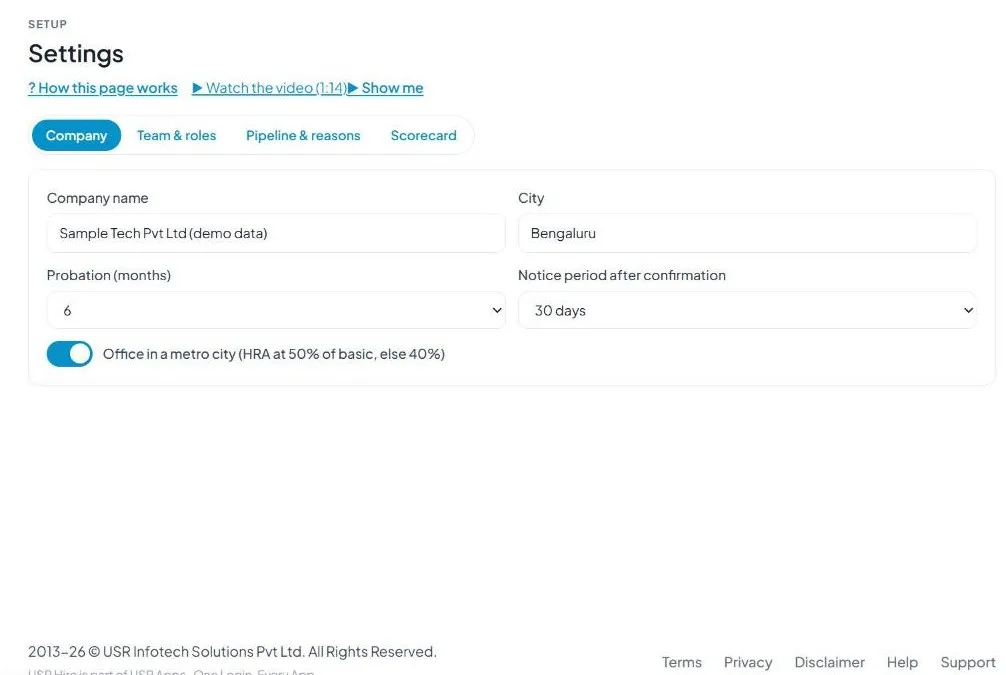
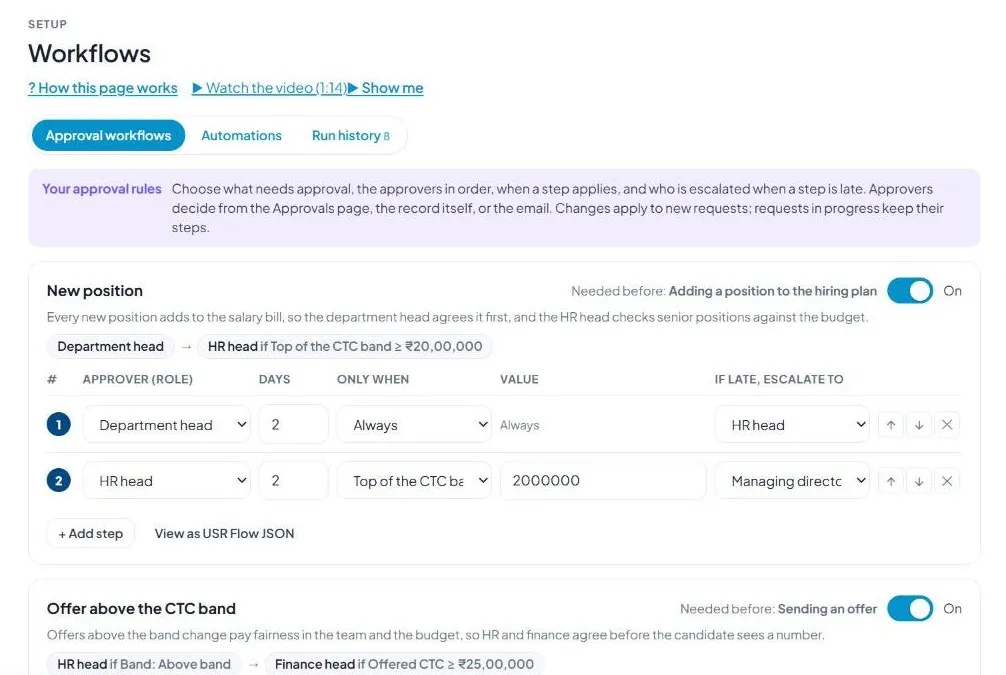
Sample company data. Screens can change as the app improves; the steps stay the same.
Welcome
USR Hire runs your hiring from the plan to the first day: positions, jobs, CVs and applications, interviews and scorecards, offers with approval, candidate messages on email, WhatsApp and SMS, and the hand-over of the new joiner to USR HRIS.
- Hiring plan: positions approved before they become jobs
- CV inbox: up to 50 CVs at a time, checked before anything is added
- Interviews with invites, reminders and scorecards
- Offers with a CTC band check and approval
- Careers page, talent pool with consent, onboarding
A year in USR Hire
| When | What happens | Who |
|---|---|---|
| Start of the year | Add the positions to fill in the Hiring plan. | HR, department heads |
| Position approved | A job is opened and the Careers page shows it. | HR, recruiter |
| Every day | New candidates arrive; the recruiter screens them. | Recruiter |
| Every week | Interviews run; panel members fill scorecards. | Recruiter, interviewers |
| Candidate chosen | An offer is made. Above the CTC band it waits for approval. | Recruiter, HR head, finance head |
| After acceptance | Onboarding tasks and background check run. | HR |
| Joining day | The joiner is sent to USR HRIS. | HR |
| Every quarter | Read Insights: funnel, sources, time to fill. | HR, leaders |
Key ideas
- Position. A role you plan to fill (headcount, department, CTC band, New position or Replacement). Needs approval before it becomes a job.
- Job. An open role with an ID such as JOB-0011 and a pipeline.
- Stage. Applied, Screening, Interviews, Final round, Offer, Hired or Not selected.
- Match score. How well a profile matches the job.
- Source. Careers page, Naukri, LinkedIn, Employee referral, Indeed, Campus, Agency, Talent pool or CV upload.
- Scorecard. A panel member's marks and comments.
- CTC band. Lowest and highest yearly pay for a job; an offer outside it needs approval.
- Offer status. Draft, Waiting for approval, Sent, Accepted.
- Talent pool. People who agreed to be kept for future jobs. Consent lasts 12 months.
Requests wait on the Approvals page, each step to the next approver, late steps escalated. Sample rules: New position, and Offer above the CTC band. USR Hire does not collect age, religion, caste, marital status or health, and the CV reader does not use them. Candidates added from a CV get a consent email, as the DPDP Act expects.
Features step by step
5.1 Overview
Get set up steps; New applicants waiting 2 days or more (Screen them); Feedback missing (Open interviews); Offers expiring in 3 days (Open offers); Approvals waiting. Numbers: Open jobs, Active candidates, Interviews this week, Offers out, Joining in 30 days, Time to hire. Hiring funnel across all open jobs.
5.2 Hiring plan
Every position for the year with counts (Positions, Approved, Waiting), yearly CTC budget, department, headcount, CTC band, reason, status (Draft, Waiting for approval, Approved). + New position, Send for approval, View job. High CTC also goes to the HR head.
5.3 Jobs
Pipeline per job: Applied, Screening, Interviews, Final round, Offer, Hired. Details: department, city, work mode, experience, CTC range, posted date, days open. Filter Open, On hold, Closed, All. Export CSV.
5.4 Candidates
Search by name, company, skill or email. Filter by job, stage, source; sort Latest first or Best match first. Columns: Candidate, Job, Stage, Match, Source, Exp., Current to expected CTC, Notice, Updated. + Add candidate, Upload CVs, Import, Export CSV.
5.5 CV inbox
Drop up to 50 CVs. Formats: PDF, Word, RTF, ODT, text, scanned PDF, photos (JPG, PNG, HEIC), handwritten. Nothing is added until you check and confirm. Duplicates matched by email, mobile, or name and company. Never read: age, gender, photo, religion, caste, marital status, health. Scans, photos and handwriting need the Claude reader, which works when the page is open in claude.ai.
5.6 Interviews
Tabs: Upcoming, Scorecards due, Done. Invites by email with calendar file and video link; reminders 24 hours and 1 hour before.
5.7 Offers
Counts: Drafts, Waiting for approval, Sent, Acceptance rate. Band: In band or Above band. Valid until date. The letter goes for e-signature and the signed PDF is kept with the candidate.
5.8 Engagement
Messages sent, delivered, read, replied. Waiting for your reply; Going quiet (Nudge). Automatic journeys: application received, interview invites and reminders, offer follow-up, before day 1, nudges, talent pool alerts. Message a group by job, stage and channel (Email, WhatsApp, SMS). WhatsApp uses approved templates.
5.9 Approvals
Requests waiting; overdue ones are flagged and escalated. Approvers can decide from the page, the record or the email.
5.10 Onboarding
Follows each accepted candidate to day 1: joining in 30 days, background checks, tasks overdue, completed. Send joiners to USR HRIS.
5.11 Careers page and 5.12 Talent pool
Public job page with your logo and colours; candidates apply in English, Hindi, Tamil, Kannada and more. Talent pool consent lasts 12 months, with a reminder to renew.
5.13 Insights and reports
Funnel and conversion; KPIs for USR PMS (jobs, hires, days to hire, offer acceptance by recruiter; Send to USR PMS goal sheets); sources and hire rate; interviewers' scorecards on time; time to fill by job. Export CSV.
5.14 Offer letters
Templates for Offer, Appointment and Internship letters with merge fields (name, job title, department, company, city, probation, notice, CTC, joining date, expiry, sender). Annexure A adds the CTC breakup.
5.15 Settings and 5.16 Workflows
Settings: Company (probation 3, 6 or 12 months; notice 30, 60 or 90 days; metro office), Team and roles, Pipeline and reasons, Scorecard. Workflows: approval rules (New position; Offer above the CTC band: HR head and finance head), automations, run history. Changes apply to new requests only.
5.17 Import and export
Import candidates, jobs or team members from Excel, Sheets, Naukri RMS, LinkedIn or another ATS, or an HRMS list. Smart import matches columns and spots duplicates. Export all data (Excel, CSV ZIP, JSON backup, file links). USR never signs in to another system for you. When leaving, download everything first: data is kept 30 days, then deleted, and your admin receives a certificate.
If something is not working
| Problem | What to do |
|---|---|
| A position cannot become a job | It needs approval first. Check Hiring plan and Approvals. |
| An offer is stuck | It is above band and waiting for approval. Open Approvals. |
| CV reading is off for scans and photos | They work when the page is open in claude.ai. |
| A candidate shows twice | Check the second record; duplicates match by email, mobile, or name and company. |
| Interview invite not received | Check the candidate's email and spam. |
| WhatsApp not sent | It uses approved templates through your WhatsApp Business account. |
Questions people ask
Does it collect age or religion? No.
How long in the talent pool? Consent lasts 12 months, with a renewal reminder.
Can candidates apply in their language? Yes.
When does an offer need approval? Above the CTC band, or as set under Workflows.
Can I take my data out? Yes, any time from Import and export.
Glossary
ATS: applicant tracking system. Band: lowest and highest pay for a job. BGV: background verification. Funnel: number of people at each stage. Pipeline: stages a candidate moves through. Scorecard: an interviewer's marks. Talent pool: people kept for future jobs. DPDP: India's Digital Personal Data Protection Act.
USR Hire shares one record with these apps
No retyping between apps: data entered once flows to the next app, on the same login.
USR Hire is part of USR One. People Suite from ₹39 ($1) per employee a month, or every app in USR One Complete. Free for up to 10 people.
See USR One
