
USR Exit help
USR Exit takes a person from resignation to a clean goodbye. It records the resignation, collects clearances from each department, works out the full and final settlement, takes the exit interview, issues the letters, and then keeps in touch with the person as an alumnus, so you can rehire them or take referrals later.
See the screens
Sample company data. Screens can change as the app improves; the steps stay the same.
Welcome to USR Exit
USR Exit takes a person from resignation to a clean goodbye. It records the resignation, collects clearances from each department, works out the full and final settlement, takes the exit interview, issues the letters, and then keeps in touch with the person as an alumnus, so you can rehire them or take referrals later.
OUR USP: One sign-in, one record, one bill. USR Exit is part of USR One, so your people, customers and numbers are never typed twice. AI helps in every app through USR Assist, and AI never takes a decision for you. ISO 27001, ISO 42001 and DPDP Ready.
- Resignations, retirements, end of contract, termination and absconding, with notice period
- Clearances from Manager, IT, Admin, Finance, HR and Assets
- Full and final settlement within the Code on Wages time limit
- Exit interviews, with themes that show why people leave
- Exit letters, alumni network, rehire and alumni referrals
USR ONE: USR Exit uses the employee record from USR HRIS, sends the settlement to USR HRMS for payment, sends rehires to USR Hire, and sends the exit interview through USR Survey. Approvals appear in the same Approvals list as every other USR app.
A year in USR Exit
Exits happen all year. This is how a year looks in USR Exit.
| When | What happens | Who |
|---|---|---|
| At the start of the year | Check the Exit policy: notice days for each grade, leave encashment limit and the signatory for letters. | HR |
| Whenever someone resigns | Record the exit, accept it, and agree the last working day. | HR, manager |
| During the notice period | Hand over work. Start clearances. Hold the exit interview. | Manager, departments |
| Last working day | Finish clearances, approve the full and final and pay it on time. | HR, Finance |
| After the last day | Issue the relieving and experience letters. Invite the person to the alumni portal. | HR |
| Every quarter | Read the Dashboard and Exit interviews for why people leave, and act on the themes. | Leaders, HR |
| Any time | Send a good alumnus back to USR Hire. Answer employment verification requests, with consent. | HR |
Key ideas in simple words
CONCEPT: Exit. The whole process of a person leaving the company.
CONCEPT: Resignation. A person chooses to leave. Other types are retirement, end of contract, termination and absconding.
CONCEPT: Notice period. The days between the resignation and the last working day. It depends on the grade.
CONCEPT: Last working day. The final day the person works. Also called LWD.
CONCEPT: Clearance. Each department confirms the person has returned or settled what they hold.
CONCEPT: Full & final. The last settlement of pay and dues, after the last working day.
CONCEPT: Regretted exit. A person you did not want to lose.
CONCEPT: Alumni. People who have left and keep in touch.
CONCEPT: Boomerang hire. A former employee who comes back.
Why a good exit matters
How a person leaves is remembered. A smooth exit protects you from disputes, pays people on time, and keeps the door open for the person to return or refer others. Exits are also the best source of honest feedback about your company.
The legal time limit for payment
Under the Code on Wages, wages due should be paid within 2 working days of the last working day. USR Exit works out the settlement from the agreed last day, leave balance, notice, gratuity and clearance dues, so that you can pay on time. You can choose a longer period in the Exit policy if your company policy and your payroll adviser allow it.
Consent and privacy
New employers and background-check agencies ask to confirm dates and role. USR Exit answers only with the alumnus's consent, and only with what the person agreed to share, as the DPDP Act expects. Contact details of an alumnus who did not opt in stay hidden.
What each role sees
| Role | What you do and see |
|---|---|
| Employee | Resigns on a phone and sees clearance progress. |
| Manager | Accepts the resignation, plans the handover and clears their part. |
| Department owner | Clears IT, Admin, Finance, HR or Assets items. |
| HR | Everything: resignations, clearances, settlement, letters and alumni. |
| Alumnus | The alumni portal, with the letters issued to them. |
HR and admin guide: features step by step
5.1 Dashboard
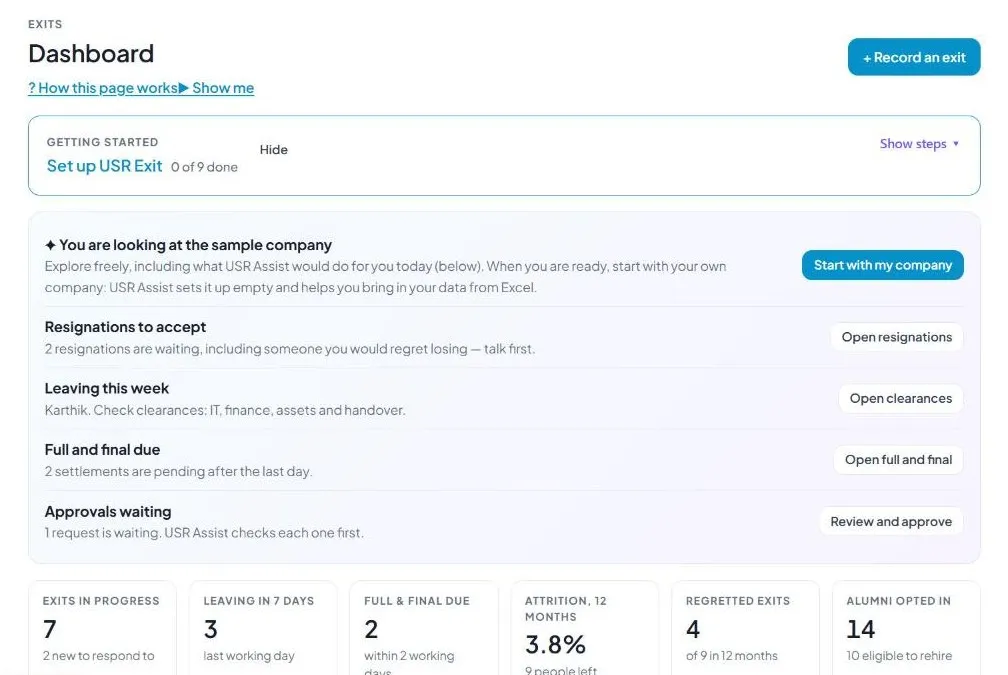
What it is: Dashboard shows what needs you this week and how healthy your exits are.
#### How to do it
- Open Dashboard.
- Read the cards.
- Click a card to go to the list.
#### Fields and buttons
| Field or button | What it is for |
|---|---|
| Exits in progress | People who are serving notice or being cleared. |
| Leaving in 7 days | People whose last day is within a week. |
| Full & final due | Settlements to finish. |
| Attrition, 12 months | The percentage of people who left in a year. |
| Regretted exits | People you did not want to lose, out of all exits. |
| Alumni opted in | Alumni who agreed to stay in touch, and how many are eligible to rehire. |
| Why people leave | Reasons, counted, such as Workload and Pay. |
| + Record an exit | Starts a new exit. |
TIP: Look at Why people leave every quarter.
5.2 Resignations
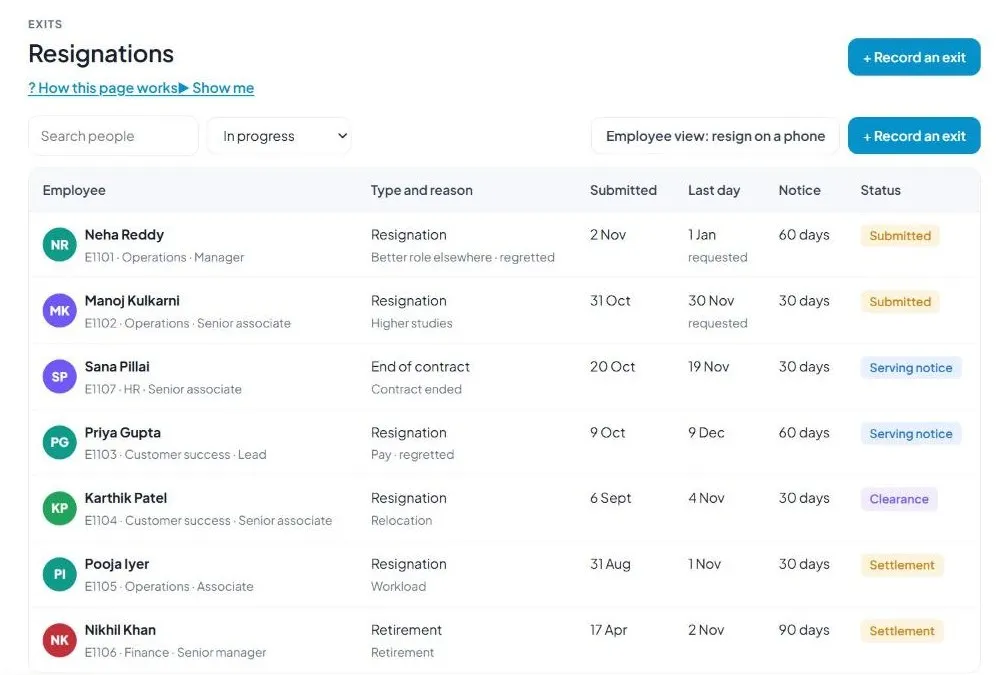
What it is: Resignations lists every exit with its type, reason, dates and status.
#### How to do it
- Open Resignations.
- Click + Record an exit or open one that is waiting.
- Accept it and confirm the last day.
#### Fields and buttons
| Field or button | What it is for |
|---|---|
| Search and status filter | In progress, All, Submitted, Accepted, Serving notice, Clearance, Settlement, Relieved, Retained or Withdrawn. |
| Employee | Name, employee number, team and grade. |
| Type and reason | Resignation, Retirement, End of contract, Termination or Absconding, with the reason. |
| Submitted | The date the exit was recorded. |
| Last day | The last working day. Requested means the person asked and it is not yet agreed. |
| Notice | Notice days for the grade. |
| Status | Where the exit stands. |
| Employee view: resign on a phone | Shows what the employee sees. |
| + Record an exit | Adds an exit yourself. |
WATCH OUT: A last day marked requested is not final. Agree it before you start clearances.
5.3 Clearances
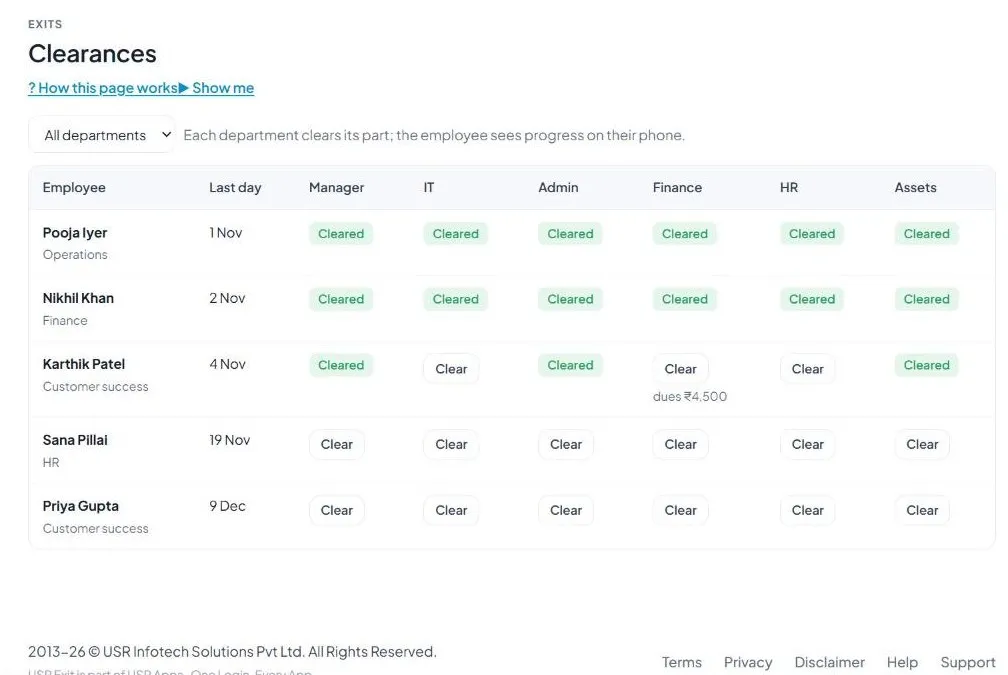
What it is: Clearances makes each department confirm its part before the person goes. The employee sees progress on their phone.
#### How to do it
- Open Clearances.
- Click Clear in your department's column when the work is done.
#### Fields and buttons
| Field or button | What it is for |
|---|---|
| Department filter | All departments or one. |
| Manager, IT, Admin, Finance, HR, Assets | One column for each department. |
| Clear | Click to confirm that department is done. |
| Cleared | Shows the part is done. |
| Dues | An amount, such as ₹4,500, shows when money is owed. It flows to the full and final. |
WATCH OUT: Dues recorded here reduce the net amount in Full & final.
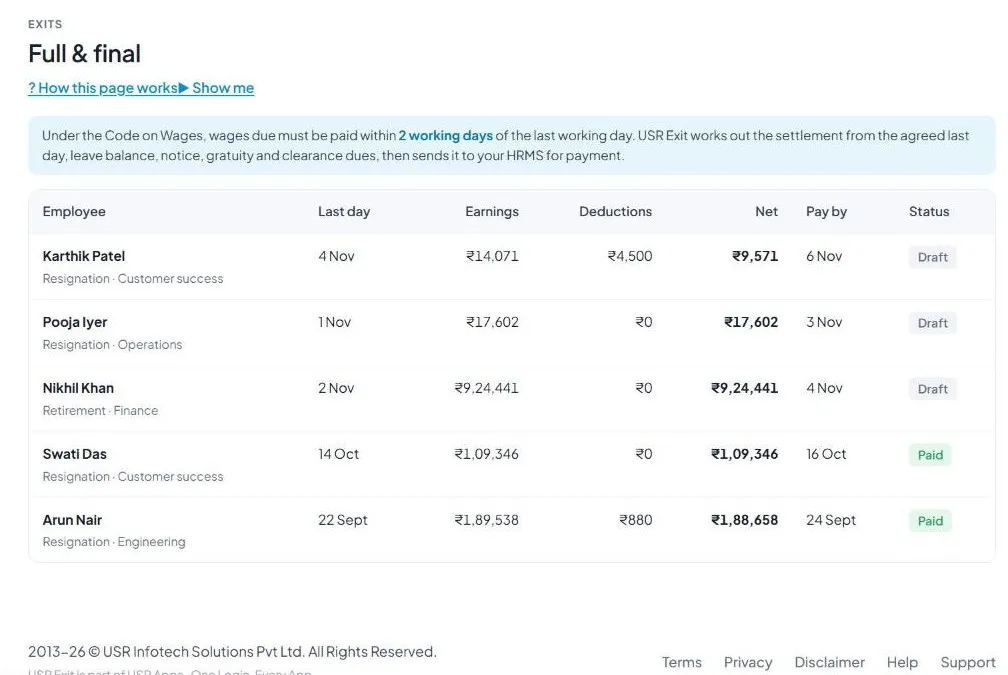
5.4 Full & final
What it is: Full & final works out the last settlement from the agreed last day, leave balance, notice, gratuity and clearance dues, and sends it to USR HRMS for payment.
#### How to do it
- Open Full & final.
- Check the earnings and deductions.
- Send for approval and pay by the date shown.
#### Fields and buttons
| Field or button | What it is for |
|---|---|
| Employee | Name, exit type and team. |
| Last day | The last working day. |
| Earnings | Salary, leave encashment and gratuity due. |
| Deductions | Notice shortfall and clearance dues. |
| Net | What the person gets. |
| Pay by | The date the law or your policy says to pay. |
| Status | Draft or Paid. |
WATCH OUT: Under the Code on Wages, pay within 2 working days of the last day unless your Exit policy says otherwise. Check with your payroll adviser.
5.5 Exit interviews
What it is: Exit interviews shows why people leave, in their own words, and turns it into themes.
#### How to do it
- Open Exit interviews.
- Read the scores and comments.
- Click Themes and actions for management.
#### Fields and buttons
| Field or button | What it is for |
|---|---|
| Interviews done | Number in the last 12 months. |
| Would come back | The percentage who would return, your boomerang potential. |
| Manager support | Average score out of 5. |
| Fair pay | Average score out of 5. Low scores show in red. |
| How leavers rate us | Manager support, Growth, Fair pay and Culture. |
| What they said | Short comments with the team. |
| Themes and actions for management | AI summary of themes and what to do. |
TIP: Comments are best taken by USR Survey, on WhatsApp or email, in any language.
5.6 Exit letters
What it is: Exit letters creates the letters from your letterhead and signatory. Every issued letter is copied to the alumni portal.
#### How to do it
- Open Exit letters.
- Click Create in the letter you need.
- Check and issue it.
#### Fields and buttons
| Field or button | What it is for |
|---|---|
| Employee and Status | Who and where the exit stands. |
| Acceptance | Accepts the resignation. |
| Relieving | Releases the person from duty. |
| Experience | States the service. |
| F&F statement | A statement of the full and final. |
| Create or Issued | Create makes the letter. Issued means it is done. |
WATCH OUT: Relieving and experience letters become available when the person reaches the settlement stage.
5.7 Approvals
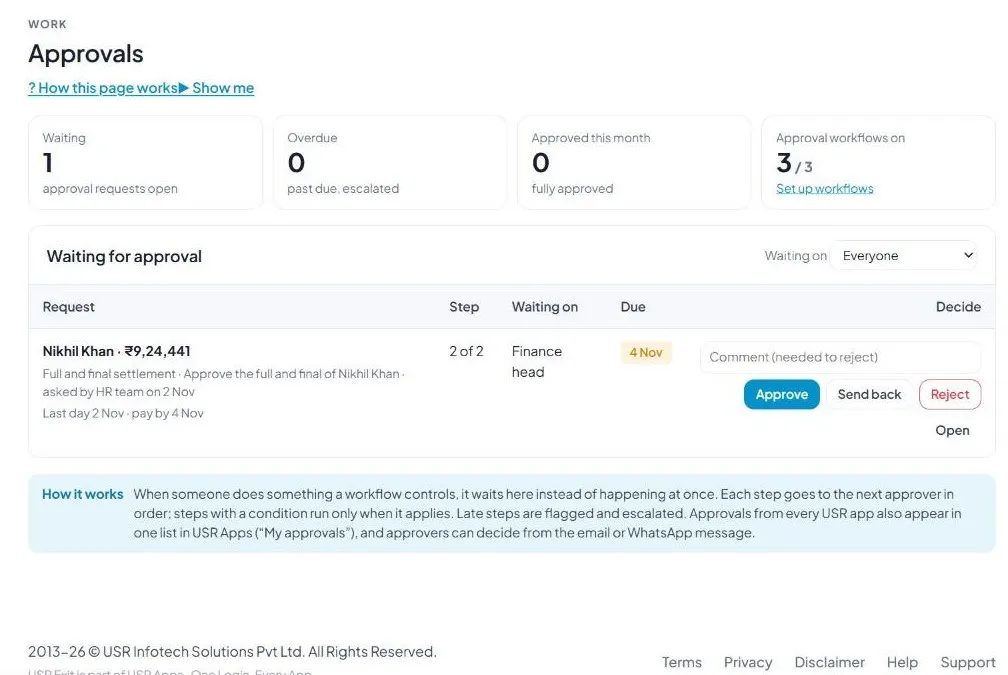
What it is: Approvals shows exit items that wait for a decision, such as a full and final settlement.
#### How to do it
- Open Approvals.
- Read the request.
- Click Approve, Send back or Reject.
#### Fields and buttons
| Field or button | What it is for |
|---|---|
| Waiting, Overdue, Approved this month | Counts at the top. |
| Approval workflows on | How many of your workflows are on. |
| Request, Step, Waiting on, Due | What, which step, who and by when. |
| Comment | Needed if you reject. |
| Approve, Send back, Reject, Open | Your decisions. |
TIP: Approvers can also decide from the email or WhatsApp message.
5.8 Alumni network
What it is: Alumni network is the list of people who left, with what they do now and whether you would rehire them.
#### How to do it
- Open Alumni network.
- Choose a filter.
- Click Send to USR Hire for someone who wants to rejoin.
#### Fields and buttons
| Field or button | What it is for |
|---|---|
| Alumni, Eligible to rehire, Want to rejoin, Referrals, Verification requests | Counts at the top. |
| Filters | All alumni, Eligible to rehire, Rehire: conditional, Not eligible, Want to rejoin, Happy to refer. |
| Name, Was, Left, Now | Who, their old role, when they left and where they are now. |
| Rehire | Yes, Conditional or No. |
| Interest | Rejoin, Refer or Stay in touch. |
| Send to USR Hire | Sends a good alumnus to hiring. |
| Invite alumni to the portal | Invites them. |
| Employment verification requests | Requests from new employers, answered only with consent. |
WATCH OUT: Contact details of alumni who did not opt in stay hidden.
5.9 Rehire
What it is: Rehire lists alumni who would come back and are eligible. Boomerang hires join faster and stay longer.
#### How to do it
- Open Rehire.
- Click Send to USR Hire.
#### Fields and buttons
| Field or button | What it is for |
|---|---|
| Person cards | Name, old role, tenure, where they are now and a Yes tag. |
| Send to USR Hire | Sends the person with the old record, skipping first screening. |
| Interviewing or Interested | Shows progress. |
| Open roles shown to alumni | Roles from USR Hire that alumni can see. |
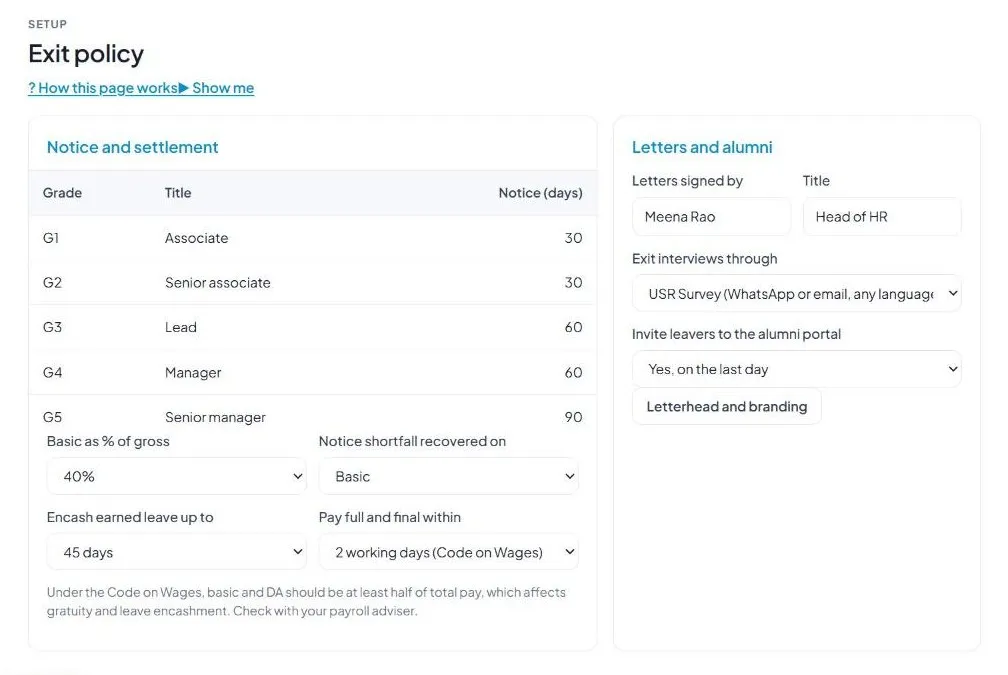
5.10 Exit policy
What it is: Exit policy holds the rules for notice, settlement and letters.
#### How to do it
- Open Exit policy.
- Set each value and save.
#### Fields and buttons
| Field or button | What it is for |
|---|---|
| Notice (days) | For each grade, such as 30, 60 or 90 days. |
| Basic as % of gross | 40%, 50% (Code on Wages) or 60%. |
| Notice shortfall recovered on | Basic or Gross. |
| Encash earned leave up to | 30, 45, 60 or 90 days. |
| Pay full and final within | 2 working days (Code on Wages), 7 working days or 30 days (company policy). |
| Letters signed by and Title | Who signs the letters. |
| Exit interviews through | USR Survey or a form in this app. |
| Invite leavers to the alumni portal | Yes, on the last day, or No. |
| Letterhead and branding | Opens the letterhead. |
WATCH OUT: Under the Code on Wages, basic and DA should be at least half of total pay. This affects gratuity and leave encashment.
5.11 Plan & billing
What it is: Plan & billing shows your plan, invoices and the plans you can choose. One bill covers every USR app through USR Billing.
#### How to do it
- Open Plan & billing.
- Choose Yearly or Monthly, then a plan.
#### Fields and buttons
| Field or button | What it is for |
|---|---|
| Free | ₹0 (US$0). Up to 5 exits a year, clearances and letters. |
| Starter | ₹1,249 (US$15) per company a month. Unlimited exits, clearances, letters and the statutory checklist. |
| Growth | ₹2,916 (US$35) per company a month. Full and final, exit interviews, alumni portal and AI. |
| Group | ₹7,499 (US$90) per company a month. Up to 5 companies and combined attrition reports. |
| Enterprise | Talk to us: private hosting, HRMS integration and an agreed SLA. |
| Yearly or Monthly | Yearly means you pay for 10 months. |
| Prices | INR excludes 18% GST. USD is for customers outside India. |
WATCH OUT: If a payment fails, you get a reminder on the due date and 3 and 7 days later. After 21 days the account becomes read-only, never deleted, until it is paid.
If something is not working
| Problem | What to do |
|---|---|
| A clearance is stuck | Open Clearances and remind the department that has not cleared. |
| The full and final amount looks wrong | Check the last day, leave balance and clearance dues, and the Exit policy settings. |
| I cannot create a relieving letter | It becomes available at the settlement stage. Finish clearances first. |
| I cannot see an alumnus's email | The person did not opt in, so contact details are hidden. |
| The last day shows requested | The date is not agreed yet. Accept the resignation and confirm the date. |
Questions people ask
#### Law and privacy
When must the settlement be paid?
Under the Code on Wages, within 2 working days of the last working day, unless your Exit policy sets a longer period. Check with your payroll adviser.
Who can see alumni contact details?
Only alumni who opted in. Employment verification is answered only with their consent.
#### Using the app
Is this linked to payroll?
Yes. The full and final goes to USR HRMS for payment.
Is there a free plan?
Yes. Free allows up to 5 exits a year, with clearances and letters.
Can I take exit interviews on WhatsApp?
Yes, through USR Survey, in any language.
Glossary: words you will see
| Word | Meaning |
|---|---|
| Alumni | People who have left. |
| Boomerang hire | A former employee who returns. |
| Clearance | Confirmation from a department. |
| DPDP Act | India's data protection law. |
| Experience letter | States the person's service. |
| Full & final | The last settlement of pay and dues. |
| LWD | Last working day. |
| Regretted exit | A person you did not want to lose. |
| Relieving letter | Confirms a person is released from duty. |
USR Exit shares one record with these apps
No retyping between apps: data entered once flows to the next app, on the same login.
USR Exit is part of USR One. People Suite from ₹39 ($1) per employee a month, or every app in USR One Complete. Free for up to 10 people.
See USR One
